Data Binding in Angular Scheduler
The Scheduler uses the DataManager, which supports both RESTful data service binding and JavaScript object array binding. The Scheduler dataSource property can be assigned either a DataManager instance or a JavaScript object array. Scheduler supports the following data binding methods:
- Local data
- Remote data
Binding local data
To bind local JSON data to the Scheduler, assign a JavaScript object array to the dataSource option within the eventSettings property. The JSON object data source can also be provided as a DataManager instance and assigned to the Scheduler dataSource property.
import { NgModule } from '@angular/core'
import { BrowserModule } from '@angular/platform-browser'
import { ScheduleModule } from '@syncfusion/ej2-angular-schedule'
import { ButtonModule } from '@syncfusion/ej2-angular-buttons'
import { Component } from '@angular/core';
import { EventSettingsModel, DayService, WeekService, WorkWeekService, MonthService, AgendaService, MonthAgendaService } from '@syncfusion/ej2-angular-schedule';
@Component({
    imports: [ScheduleModule, ButtonModule],
    standalone: true,
    selector: 'app-root',
    providers: [DayService, WeekService, WorkWeekService, MonthService, AgendaService, MonthAgendaService],
    // specifies the template string for the Schedule component
    template: `<ejs-schedule width='100%' height='550px' [selectedDate]='selectedDate' [eventSettings]='eventSettings'></ejs-schedule>`
})
export class AppComponent {
    public selectedDate: Date = new Date(2018, 1, 15);
    public eventSettings: EventSettingsModel = {
        dataSource: [
            {
                Id: 1,
                Subject: 'Explosion of Betelgeuse Star',
                StartTime: new Date(2018, 1, 15, 9, 30),
                EndTime: new Date(2018, 1, 15, 11, 0)
            }, {
                Id: 2,
                Subject: 'Thule Air Crash Report',
                StartTime: new Date(2018, 1, 12, 12, 0),
                EndTime: new Date(2018, 1, 12, 14, 0)
            }, {
                Id: 3,
                Subject: 'Blue Moon Eclipse',
                StartTime: new Date(2018, 1, 13, 9, 30),
                EndTime: new Date(2018, 1, 13, 11, 0)
            }, {
                Id: 4,
                Subject: 'Meteor Showers in 2018',
                StartTime: new Date(2018, 1, 14, 13, 0),
                EndTime: new Date(2018, 1, 14, 14, 30)
            }]
    };
}
import { bootstrapApplication } from '@angular/platform-browser';
import { AppComponent } from './app.component';
bootstrapApplication(AppComponent).catch((err) => console.error(err));By default,
DataManageruses theJsonAdaptorfor local data binding.
You can also map different field names to the default event fields and include additional custom fields in the event object collection. For details, refer to event fields.
Binding remote data
The Scheduler supports binding to various remote data services. To configure this, create a DataManager instance, supply the remote service URL to the url option, and assign it to the Scheduler dataSource property within eventSettings.
Using ODataV4Adaptor
ODataV4 is a standardized protocol for creating and consuming data. The following example demonstrates how to retrieve data from an ODataV4 service using DataManager. To connect to ODataV4 service endpoints, use the ODataV4Adaptor within DataManager.
import { NgModule } from '@angular/core'
import { BrowserModule } from '@angular/platform-browser'
import { ScheduleModule } from '@syncfusion/ej2-angular-schedule'
import { ButtonModule } from '@syncfusion/ej2-angular-buttons'
import { Component } from '@angular/core';
import { EventSettingsModel, DayService, WeekService, WorkWeekService, MonthService, AgendaService, MonthAgendaService } from '@syncfusion/ej2-angular-schedule';
import { DataManager, ODataV4Adaptor, Query } from '@syncfusion/ej2-data';

@Component({
imports: [

        ScheduleModule,
        ButtonModule
    ],
standalone: true,
  selector: 'app-root',
  providers: [DayService, WeekService, WorkWeekService, MonthService, AgendaService,MonthAgendaService ],
  // specifies the template string for the Schedule component
  template: `<ejs-schedule width='100%' height='550px' [readonly]="readonly" [selectedDate]="selectedDate" [eventSettings]="eventSettings"></ejs-schedule>`
})
export class AppComponent {
    public readonly: boolean = true;
    public selectedDate: Date = new Date(2020, 9, 20);
    private dataManager: DataManager = new DataManager({
       url: 'https://services.syncfusion.com/angular/production/api/Schedule',
       adaptor: new ODataV4Adaptor,
       crossDomain: true
    });
    public eventSettings: EventSettingsModel = { dataSource: this.dataManager };
}
import { bootstrapApplication } from '@angular/platform-browser';
import { AppComponent } from './app.component';
bootstrapApplication(AppComponent).catch((err) => console.error(err));Filter events using the in-built query
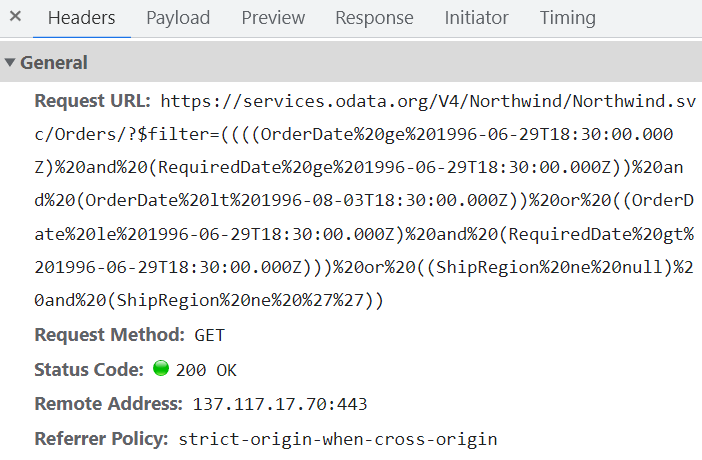
To enable server-side filtering based on specific conditions, set the includeFiltersInQuery API to true. This allows the filter query to include the start date, end date, and recurrence rule, so the request retrieves only the relevant data from the server.
This method greatly improves performance by reducing the data transferred to the client side. As a result, the component becomes more efficient and responsive, providing a better user experience. However, longer query strings may affect the maximum URL length or exceed server query-string limits.
import { NgModule } from '@angular/core'
import { BrowserModule } from '@angular/platform-browser'
import { ScheduleModule } from '@syncfusion/ej2-angular-schedule'
import { ButtonModule } from '@syncfusion/ej2-angular-buttons'


import { Component } from '@angular/core';
import { EventSettingsModel, DayService, WeekService, WorkWeekService, MonthService, AgendaService, MonthAgendaService } from '@syncfusion/ej2-angular-schedule';
import { DataManager, ODataV4Adaptor, Query } from '@syncfusion/ej2-data';

@Component({
imports: [

        ScheduleModule,
        ButtonModule
    ],
standalone: true,
  selector: 'app-root',
  providers: [DayService, WeekService, WorkWeekService, MonthService, AgendaService, MonthAgendaService],
  // specifies the template string for the Schedule component
  template: `<ejs-schedule width='100%' height='550px' [readonly]="readonly" [selectedDate]="selectedDate" [eventSettings]="eventSettings"></ejs-schedule>`
})
export class AppComponent {
  public readonly: boolean = true;
  public selectedDate: Date = new Date(1996, 6, 9);
  private dataManager: DataManager = new DataManager({
    url: 'https://services.odata.org/V4/Northwind/Northwind.svc/Orders/',
    adaptor: new ODataV4Adaptor,
    crossDomain: true
  });
  public eventSettings: EventSettingsModel = {
    includeFiltersInQuery: true, dataSource: this.dataManager, fields: {
      id: 'Id',
      subject: { name: 'ShipName' },
      location: { name: 'ShipCountry' },
      description: { name: 'ShipAddress' },
      startTime: { name: 'OrderDate' },
      endTime: { name: 'RequiredDate' },
      recurrenceRule: { name: 'ShipRegion' }
    }
  };
}
import { bootstrapApplication } from '@angular/platform-browser';
import { AppComponent } from './app.component';
bootstrapApplication(AppComponent).catch((err) => console.error(err));The following image illustrates how parameters are passed using an ODataV4 filter for remote data binding.
Using custom adaptor
You can create a custom adaptor by extending one of the built-in adaptors. The following example demonstrates how to use a custom adaptor and add a custom field, such as EventID, to appointments by overriding response processing with the processResponse method of the ODataV4Adaptor.
import { NgModule } from '@angular/core'
import { BrowserModule } from '@angular/platform-browser'
import { ScheduleModule } from '@syncfusion/ej2-angular-schedule'
import { ButtonModule } from '@syncfusion/ej2-angular-buttons'


import { Component } from '@angular/core';
import { EventSettingsModel, DayService, WeekService, WorkWeekService, MonthService, AgendaService, MonthAgendaService } from '@syncfusion/ej2-angular-schedule';
import { DataManager, ODataV4Adaptor, Query } from '@syncfusion/ej2-data';

class CustomAdaptor extends ODataV4Adaptor {
    override processResponse(): Object {
        let i: number = 0;
        // calling base class processResponse function
        let original: any = super.processResponse.apply(this, arguments as any);
        // adding employee id
        original.forEach((item: any) => item['EventID'] = ++i);
        return  original;
    }
}

@Component({
imports: [

        ScheduleModule,
        ButtonModule
    ],
standalone: true,
  selector: 'app-root',
  providers: [DayService, WeekService, WorkWeekService, MonthService, AgendaService, MonthAgendaService],
  // specifies the template string for the Schedule component
  template: `<ejs-schedule width='100%' height='550px' [readonly]="readonly" [selectedDate]="selectedDate" [eventSettings]="eventSettings"></ejs-schedule>`
})

export class AppComponent {
    public readonly: boolean = true;
    public selectedDate: Date = new Date(1996, 6, 9);
    private dataManager: DataManager = new DataManager({
       url: 'https://services.odata.org/V4/Northwind/Northwind.svc/Orders/',
       adaptor: new CustomAdaptor
    });
    public eventSettings: EventSettingsModel = {
        dataSource: this.dataManager, fields: {
            id: 'Id',
            subject: { name: 'ShipName' },
            location: { name: 'ShipCountry' },
            description: { name: 'ShipAddress' },
            startTime: { name: 'OrderDate' },
            endTime: { name: 'RequiredDate' },
            recurrenceRule: { name: 'ShipRegion' }
        }
    };
}
import { bootstrapApplication } from '@angular/platform-browser';
import { AppComponent } from './app.component';
bootstrapApplication(AppComponent).catch((err) => console.error(err));Loading data via AJAX post
You can bind event data through an external AJAX request and assign it to the Scheduler dataSource property. In the following code example, the data is retrieved from the server using an AJAX request and assigned to the Scheduler dataSource property within the Ajax onSuccess event.
[src/app/app.ts]
import { Component, OnInit, ViewChild } from "@angular/core";
import { Ajax } from "@syncfusion/ej2-base";
import { DataManager, UrlAdaptor, Query } from "@syncfusion/ej2-data";
import { EventSettingsModel, View, EventRenderedArgs, DayService, WeekService, WorkWeekService, MonthService AgendaService, ResizeService, DragAndDropService, ScheduleComponent } from "@syncfusion/ej2-angular-schedule";

@Component({
  selector: "app-root",
  templateUrl: "app/app.component.html",
  providers: [ DayService, WeekService, WorkWeekService, MonthService, AgendaService, ResizeService,
DragAndDropService ]
})
export class AppComponent implements OnInit {
  @ViewChild("scheduleObj") public scheduleObj: ScheduleComponent;
  ngOnInit(): void {}

  public currentDate: Date = new Date(2017, 5, 5);
  onCreate() {
    const scheduleObj = this.scheduleObj; // Schedule instance
    const ajax = new Ajax(
      "https://services.syncfusion.com/angular/production/api/Schedule",
      "GET"
    );
    ajax.send();
    ajax.onSuccess = (data: string) => {
      scheduleObj.eventSettings.dataSource = JSON.parse(data);
    };
  }
}
The controller method
GetDatais defined here.
Passing additional parameters to the server
To send additional custom parameters in the server-side request, use the addParams method of Query. Assign the Query object with the custom parameters to the Scheduler query property.
import { NgModule } from '@angular/core'
import { BrowserModule } from '@angular/platform-browser'
import { ScheduleModule } from '@syncfusion/ej2-angular-schedule'
import { ButtonModule } from '@syncfusion/ej2-angular-buttons'


import { Component } from '@angular/core';
import { EventSettingsModel, DayService, WeekService, WorkWeekService, MonthService, AgendaService, MonthAgendaService } from '@syncfusion/ej2-angular-schedule';
import { DataManager, ODataV4Adaptor, Query } from '@syncfusion/ej2-data';

@Component({
imports: [

        ScheduleModule,
        ButtonModule
    ],
standalone: true,
  selector: 'app-root',
  providers: [DayService, WeekService, WorkWeekService, MonthService, AgendaService, MonthAgendaService],
  // specifies the template string for the Schedule component
  template: `<ejs-schedule width='100%' height='550px' [readonly]="readonly" [selectedDate]="selectedDate" [eventSettings]="eventSettings"></ejs-schedule>`
})

export class AppComponent {
    public readonly: boolean = true;
    public selectedDate: Date = new Date(2017, 5, 11);
    private dataManager: DataManager = new DataManager({
       url: 'https://js.syncfusion.com/demos/ejservices/api/Schedule/LoadData',
       adaptor: new ODataV4Adaptor
    });
    private dataQuery: Query = new Query().from("Events").addParams('readOnly', 'true');
    public eventSettings: EventSettingsModel = { dataSource: this.dataManager, query: this.dataQuery };
}
import { bootstrapApplication } from '@angular/platform-browser';
import { AppComponent } from './app.component';
bootstrapApplication(AppComponent).catch((err) => console.error(err));Parameters added using the Scheduler
queryproperty are sent with every data request to the server.
Handling failure actions
When the Scheduler interacts with the server, server-side exceptions may occur. These error messages or exception details can be accessed on the client side using the Scheduler actionFailure event.
The argument passed to the actionFailure event contains all error details returned from the server.
import { NgModule } from '@angular/core'
import { BrowserModule } from '@angular/platform-browser'
import { ScheduleModule } from '@syncfusion/ej2-angular-schedule'
import { ButtonModule } from '@syncfusion/ej2-angular-buttons'


import { Component, ViewChild } from '@angular/core';
import { EventSettingsModel, DayService, WeekService, WorkWeekService, MonthService, AgendaService, ScheduleComponent, MonthAgendaService } from '@syncfusion/ej2-angular-schedule';
import { DataManager } from '@syncfusion/ej2-data';

@Component({
imports: [

        ScheduleModule,
        ButtonModule
    ],
standalone: true,
  selector: 'app-root',
  providers: [DayService, WeekService, WorkWeekService, MonthService, AgendaService, MonthAgendaService],
  // specifies the template string for the Schedule component
  template: `<span style="color: #FF0000"></span><ejs-schedule #scheduleObj width='100%' height='530px' [readonly]="readonly" [selectedDate]="selectedDate" [eventSettings]="eventSettings" (actionFailure)="onActionFailure($event)"></ejs-schedule>`
})

export class AppComponent {
    @ViewChild('scheduleObj')
    public scheduleObj?: ScheduleComponent;
    public selectedDate: Date = new Date(2017, 5, 11);
    public err: string = '';
    private dataManager: DataManager = new DataManager({
        url: 'http://some.com/invalidUrl'
    });
    public eventSettings: EventSettingsModel = { dataSource: this.dataManager };
readonly: any;
    onActionFailure(eventData: any): void {
       this.err = 'Server exception: 404 Not found';
    }
}
import { bootstrapApplication } from '@angular/platform-browser';
import { AppComponent } from './app.component';
bootstrapApplication(AppComponent).catch((err) => console.error(err));The
actionFailureevent is triggered not only when the server returns errors, but also when an exception occurs during Scheduler CRUD operations.
Scheduler CRUD actions
CRUD (Create, Read, Update, and Delete) actions can be performed on Scheduler appointments using the adaptors available within the DataManager. Typically, the UrlAdaptor is used for CRUD operations on Scheduler appointments.
import { Component } from '@angular/core';
import { EventSettingsModel, DayService, WeekService, WorkWeekService, MonthService, AgendaService } from '@syncfusion/ej2-angular-schedule';
import { DataManager, UrlAdaptor } from '@syncfusion/ej2-data';

@Component({
  selector: 'app-root',
  providers: [DayService, WeekService, WorkWeekService, MonthService, AgendaService],
  // specifies the template string for the Schedule component
  template: `<ejs-schedule width='100%' height='550px' [readonly]="readonly" [selectedDate]="selectedDate" [eventSettings]="eventSettings"></ejs-schedule>`
})

export class AppComponent {
    public selectedDate: Date = new Date(2017, 5, 11);
    private dataManager: DataManager = new DataManager({
       url: 'Home/GetData', // 'controller/actions'
       crudUrl: 'Home/UpdateData',
       adaptor: new UrlAdaptor
    });
    public eventSettings: EventSettingsModel = { dataSource: this.dataManager };
}
The following server-side controller code handles the CRUD operations.
using System;
using System.Collections.Generic;
using System.Linq;
using System.Web;
using System.Web.Mvc;
using ScheduleSample.Models;

namespace ScheduleSample.Controllers
{
    public class HomeController : Controller
    {
        ScheduleDataDataContext db = new ScheduleDataDataContext();
        public ActionResult Index()
        {
            return View();
        }
        public JsonResult LoadData()  // Here we get the start and end dates and filter the data before returning it to the Scheduler
        {
            var data = db.ScheduleEventDatas.ToList();
            return Json(data, JsonRequestBehavior.AllowGet);
        }
        [HttpPost]
        public JsonResult UpdateData(EditParams param)
        {
            if (param.action == "insert" || (param.action == "batch" && param.added != null)) // This block of code executes while inserting appointments
            {
                var value = (param.action == "insert") ? param.value : param.added[0];
                int intMax = db.ScheduleEventDatas.ToList().Count > 0 ? db.ScheduleEventDatas.ToList().Max(p => p.Id) : 1;
                DateTime startTime = Convert.ToDateTime(value.StartTime);
                DateTime endTime = Convert.ToDateTime(value.EndTime);
                ScheduleEventData appointment = new ScheduleEventData()
                {
                    Id = intMax + 1,
                    StartTime = startTime.ToLocalTime(),
                    EndTime = endTime.ToLocalTime(),
                    Subject = value.Subject,
                    IsAllDay = value.IsAllDay,
                    StartTimezone = value.StartTimezone,
                    EndTimezone = value.EndTimezone,
                    RecurrenceRule = value.RecurrenceRule,
                    RecurrenceID = value.RecurrenceID,
                    RecurrenceException = value.RecurrenceException
                };
                db.ScheduleEventDatas.InsertOnSubmit(appointment);
                db.SubmitChanges();
            }
            if (param.action == "update" || (param.action == "batch" && param.changed != null)) // This block of code executes while updating the appointment
            {
                var value = (param.action == "update") ? param.value : param.changed[0];
                var filterData = db.ScheduleEventDatas.Where(c => c.Id == Convert.ToInt32(value.Id));
                if (filterData.Count() > 0)
                {
                    DateTime startTime = Convert.ToDateTime(value.StartTime);
                    DateTime endTime = Convert.ToDateTime(value.EndTime);
                    ScheduleEventData appointment = db.ScheduleEventDatas.Single(A => A.Id == Convert.ToInt32(value.Id));
                    appointment.StartTime = startTime.ToLocalTime();
                    appointment.EndTime = endTime.ToLocalTime();
                    appointment.StartTimezone = value.StartTimezone;
                    appointment.EndTimezone = value.EndTimezone;
                    appointment.Subject = value.Subject;
                    appointment.IsAllDay = value.IsAllDay;
                    appointment.RecurrenceRule = value.RecurrenceRule;
                    appointment.RecurrenceID = value.RecurrenceID;
                    appointment.RecurrenceException = value.RecurrenceException;
                }
                db.SubmitChanges();
            }
            if (param.action == "remove" || (param.action == "batch" && param.deleted != null)) // This block of code executes while removing the appointment
            {
                if (param.action == "remove")
                {
                    int key = Convert.ToInt32(param.key);
                    ScheduleEventData appointment = db.ScheduleEventDatas.Where(c => c.Id == key).FirstOrDefault();
                    if (appointment != null) db.ScheduleEventDatas.DeleteOnSubmit(appointment);
                }
                else
                {
                    foreach (var apps in param.deleted)
                    {
                        ScheduleEventData appointment = db.ScheduleEventDatas.Where(c => c.Id == apps.Id).FirstOrDefault();
                        if (appointment != null) db.ScheduleEventDatas.DeleteOnSubmit(appointment);
                    }
                }
                db.SubmitChanges();
            }
            var data = db.ScheduleEventDatas.ToList();
            return Json(data, JsonRequestBehavior.AllowGet);
        }

        public class EditParams
        {
            public string key { get; set; }
            public string action { get; set; }
            public List<ScheduleEventData> added { get; set; }
            public List<ScheduleEventData> changed { get; set; }
            public List<ScheduleEventData> deleted { get; set; }
            public ScheduleEventData value { get; set; }
        }
    }
}
Configuring Scheduler with Google API service
We have assigned our custom Google Calendar URL to the DataManager and used it for the Scheduler dataSource. Since the event data retrieved from Google Calendar is in its own object format, it must be resolved manually within the Scheduler’s dataBinding event. Within this event, the event fields need to be mapped properly and then assigned to the result.
import { NgModule } from '@angular/core'
import { BrowserModule } from '@angular/platform-browser'
import { ScheduleModule } from '@syncfusion/ej2-angular-schedule'
import { ButtonModule } from '@syncfusion/ej2-angular-buttons'


import { Component } from '@angular/core';
import { EventSettingsModel, View, DayService, WeekService, WorkWeekService, MonthService, AgendaService, MonthAgendaService }
    from '@syncfusion/ej2-angular-schedule';
import { DataManager, WebApiAdaptor } from '@syncfusion/ej2-data';

@Component({
imports: [

        ScheduleModule,
        ButtonModule
    ],
standalone: true,
  selector: 'app-root',
  providers: [DayService, WeekService, WorkWeekService, MonthService, AgendaService, MonthAgendaService],
  // specifies the template string for the Schedule component
  template: `<ejs-schedule #scheduleObj width='100%' height='550px' [selectedDate]="selectedDate" [eventSettings]="eventSettings" (dataBinding)="onDataBinding($event)" [readonly]="readonly"></ejs-schedule>`
})
export class AppComponent {
    public selectedDate: Date = new Date(2018, 10, 14);
    public readonly: boolean = true;
    private calendarId: string = '[email protected]';
    private publicKey: string = 'AIzaSyD76zjMDsL_jkenM5AAnNsORypS1Icuqxg';
    private dataManger: DataManager = new DataManager({
        url: 'https://www.googleapis.com/calendar/v3/calendars/' + this.calendarId + '/events?key=' + this.publicKey,
        adaptor: new WebApiAdaptor,
        crossDomain: true
    });
    public eventSettings: EventSettingsModel = { dataSource: this.dataManger };
    onDataBinding(e: { [key: string]: Object }): void {
        let items: { [key: string]: Object }[] = (e['result'] as { [key: string]: Object; })['items'] as { [key: string]: Object }[];
        let scheduleData: Object[] = [];
        if (items.length > 0) {
            for (let i: number = 0; i < items.length; i++) {
                let event: { [key: string]: Object } = items[i];
                let when: string = (event['start'] as { [key: string]: Object; })['dateTime'] as string;
                let start: string = (event['start'] as { [key: string]: Object; })['dateTime'] as string;
                let end: string = (event['end'] as { [key: string]: Object; })['dateTime'] as string;
                if (!when) {
                    when = (event['start'] as { [key: string]: Object; })['date'] as string;
                    start = (event['start'] as { [key: string]: Object; })['date'] as string;
                    end = (event['end'] as { [key: string]: Object; })['date'] as string;
                }
                scheduleData.push({
                    Id: event['id'],
                    Subject: event['summary'],
                    StartTime: new Date(start),
                    EndTime: new Date(end),
                    IsAllDay: !(event['start'] as { [key: string]: Object; })['dateTime']
                });
            }
        }
        e['result'] = scheduleData;
    }
}
import { bootstrapApplication } from '@angular/platform-browser';
import { AppComponent } from './app.component';
bootstrapApplication(AppComponent).catch((err) => console.error(err));You can refer to our Angular Scheduler feature tour page for an overview of its features. You can also explore our Angular Scheduler example to learn how to present and manipulate data.