Context Menu in Angular Scheduler
You can display a context menu on Scheduler work cells and appointments by using the ContextMenu control manually in the application. In the following code example, the context menu is added and its target is set to the Scheduler component.
On Scheduler cells, you can display menu items such as New Event, New Recurring Event, and Today. For appointments, you can display options such as Edit Event and Delete Event. Use the openEditor method of the Scheduler to open the default event window for creating or editing appointments.
You can delete appointments by using the deleteEvent public method. Also, the selectedDate property can be used to navigate between different dates.
You can also display custom menu options on Scheduler cells and appointments. The context menu opens on tap-hold in responsive mode.
<ejs-schedule #scheduleObj height='550px' [selectedDate]="selectedDate" [allowResizing]="allowResizing"
    [allowDragAndDrop]="allowDragDrop" [eventSettings]="eventSettings">
</ejs-schedule>
<ejs-contextmenu #menuObj cssClass='schedule-context-menu' target='.e-schedule' [items]='menuItems' (beforeOpen)='onContextMenuBeforeOpen($event)'
    (select)='onMenuItemSelect($event)'></ejs-contextmenu>
import { NgModule } from '@angular/core'
import { BrowserModule } from '@angular/platform-browser'
import { ScheduleModule } from '@syncfusion/ej2-angular-schedule'
import { ButtonModule } from '@syncfusion/ej2-angular-buttons'
import { ContextMenuModule } from '@syncfusion/ej2-angular-navigations'
import { Component, ViewChild, ViewEncapsulation } from '@angular/core';
import { extend, closest, isNullOrUndefined, remove, removeClass } from '@syncfusion/ej2-base';
import { DataManager, Query } from '@syncfusion/ej2-data';
import {
EventSettingsModel, DayService, WeekService, WorkWeekService, MonthService, AgendaService, ScheduleComponent, CellClickEventArgs, MonthAgendaService
} from '@syncfusion/ej2-angular-schedule';
import { ContextMenuComponent, MenuItemModel, BeforeOpenCloseMenuEventArgs, MenuEventArgs } from '@syncfusion/ej2-angular-navigations';
import { scheduleData } from './datasource';
@Component({
imports: [
ScheduleModule,
ButtonModule,
ContextMenuModule
],
standalone: true,
selector: 'app-root',
templateUrl: './app.component.html',
providers: [DayService, WeekService, WorkWeekService, MonthService, AgendaService, MonthAgendaService],
styleUrls: ['./index.css'],
encapsulation: ViewEncapsulation.None
})
export class AppComponent {
@ViewChild('scheduleObj')
public scheduleObj?: ScheduleComponent;
@ViewChild('menuObj')
public menuObj?: ContextMenuComponent;
public allowResizing: Boolean = false;
public allowDragDrop: Boolean = false;
public selectedDate: Date = new Date(2018, 1, 15);
public eventSettings: EventSettingsModel = { dataSource: <Object[]>extend([], scheduleData, undefined, true) };
public selectedTarget?: Element;
public menuItems: MenuItemModel[] = [
{
text: 'New Event',
iconCss: 'e-icons new',
id: 'Add'
}, {
text: 'New Recurring Event',
iconCss: 'e-icons recurrence',
id: 'AddRecurrence'
}, {
text: 'Today',
iconCss: 'e-icons today',
id: 'Today'
}, {
text: 'Edit Event',
iconCss: 'e-icons edit',
id: 'Save'
}, {
text: 'Edit Event',
id: 'EditRecurrenceEvent',
iconCss: 'e-icons edit',
items: [{
text: 'Edit Occurrence',
id: 'EditOccurrence'
}, {
text: 'Edit Series',
id: 'EditSeries'
}]
}, {
text: 'Delete Event',
iconCss: 'e-icons delete',
id: 'Delete'
}, {
text: 'Delete Event',
id: 'DeleteRecurrenceEvent',
iconCss: 'e-icons delete',
items: [{
text: 'Delete Occurrence',
id: 'DeleteOccurrence'
}, {
text: 'Delete Series',
id: 'DeleteSeries'
}]
}
];
onContextMenuBeforeOpen(args: BeforeOpenCloseMenuEventArgs): void {
const newEventElement: HTMLElement = document.querySelector('.e-new-event') as HTMLElement;
if (newEventElement) {
remove(newEventElement);
removeClass([document.querySelector('.e-selected-cell') as Element], 'e-selected-cell');
}
this.scheduleObj?.closeQuickInfoPopup();
const targetElement: HTMLElement = <HTMLElement>args.event.target;
if (closest(targetElement, '.e-contextmenu')) {
return;
}
this.selectedTarget = closest(targetElement, '.e-appointment,.e-work-cells,' +
'.e-vertical-view .e-date-header-wrap .e-all-day-cells,.e-vertical-view .e-date-header-wrap .e-header-cells');
if (isNullOrUndefined(this.selectedTarget)) {
args.cancel = true;
return;
}
if (this.selectedTarget.classList.contains('e-appointment')) {
const eventObj: { [key: string]: Object } = <{ [key: string]: Object }>this.scheduleObj?.getEventDetails(this.selectedTarget);
if (eventObj['RecurrenceRule']) {
this.menuObj?.showItems(['EditRecurrenceEvent', 'DeleteRecurrenceEvent'], true);
this.menuObj?.hideItems(['Add', 'AddRecurrence', 'Today', 'Save', 'Delete'], true);
} else {
this.menuObj?.showItems(['Save', 'Delete'], true);
this.menuObj?.hideItems(['Add', 'AddRecurrence', 'Today', 'EditRecurrenceEvent', 'DeleteRecurrenceEvent'], true);
}
return;
}
this.menuObj?.hideItems(['Save', 'Delete', 'EditRecurrenceEvent', 'DeleteRecurrenceEvent'], true);
this.menuObj?.showItems(['Add', 'AddRecurrence', 'Today'], true);
}
onMenuItemSelect(args: MenuEventArgs): void {
const selectedMenuItem: string | undefined = args.item.id;
let eventObj: { [key: string]: Object } = {};
if (this.selectedTarget && this.selectedTarget.classList.contains('e-appointment')) {
eventObj = <{ [key: string]: Object }>this.scheduleObj?.getEventDetails(this.selectedTarget);
}
switch (selectedMenuItem) {
case 'Today':
this.scheduleObj!.selectedDate = new Date();
break;
case 'Add':
case 'AddRecurrence':
const selectedCells: Element[] = this.scheduleObj!.getSelectedElements();
const activeCellsData: CellClickEventArgs = this.scheduleObj!.getCellDetails(selectedCells.length > 0 ? selectedCells : this.selectedTarget as any);
if (selectedMenuItem === 'Add') {
this.scheduleObj?.openEditor(activeCellsData, 'Add');
} else {
this.scheduleObj?.openEditor(activeCellsData, 'Add', undefined, 1);
}
break;
case 'Save':
case 'EditOccurrence':
case 'EditSeries':
if (selectedMenuItem === 'EditSeries') {
eventObj = <{ [key: string]: Object }>new DataManager(this.scheduleObj?.eventsData).executeLocal(new Query().
where(this.scheduleObj?.eventFields.id as any, 'equal', eventObj[this.scheduleObj?.eventFields.recurrenceID as any] as string | number))[0];
}
this.scheduleObj?.openEditor(eventObj, selectedMenuItem);
break;
case 'Delete':
this.scheduleObj?.deleteEvent(eventObj);
break;
case 'DeleteOccurrence':
case 'DeleteSeries':
this.scheduleObj?.deleteEvent(eventObj, selectedMenuItem);
break;
}
}
}import { bootstrapApplication } from '@angular/platform-browser';
import { AppComponent } from './app.component';
bootstrapApplication(AppComponent).catch((err) => console.error(err));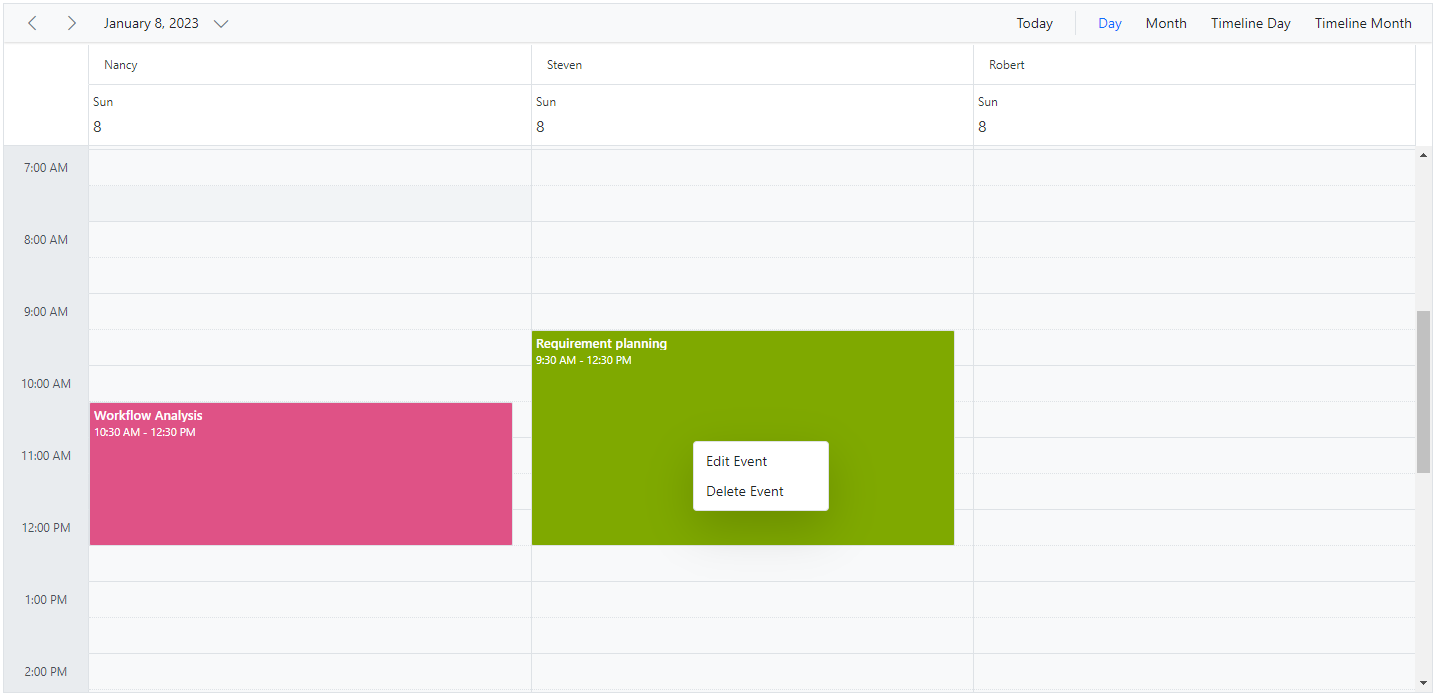
You can refer to our Angular Scheduler feature tour page for its feature overview. You can also explore our Angular Scheduler example to learn how to present and manipulate data.