Code Block in Blazor Block Editor component
18 Nov 20182 minutes to read
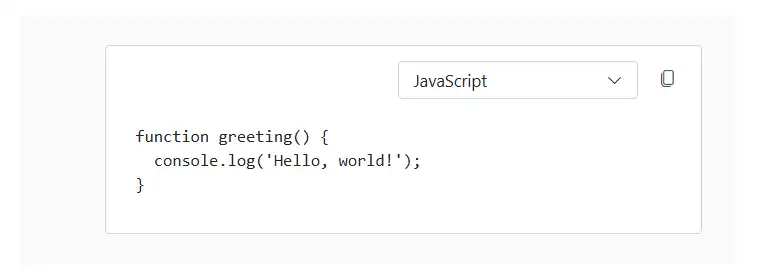
The Block Editor allows you to render code snippets with syntax highlighting by setting the BlockType property to Code. You can set a default language using the Properties property.
Global code settings
You can configure global settings for code blocks using the BlockEditorCodeBlock tag directive in the Block Editor root configuration. This ensures consistent behavior for syntax highlighting and language options across all code blocks.
The tag directive supports the following options:
| Property | Description | Default Value |
|---|---|---|
| Languages | Specifies the array of language options for syntax highlighting. | [] |
| DefaultLanguage | Defines the default language to use for syntax highlighting. | ‘plaintext’ |
Configure code properties
For Code blocks, you can specify the language for syntax highlighting using the Properties property. This property supports the following options:
- Language: The language value used for syntax highlighting.
The following example demonstrates how to configure and render a Code block within the Block Editor.
@using Syncfusion.Blazor.BlockEditor

<SfBlockEditor Blocks="BlockData">
    <BlockEditorCodeBlock DefaultLanguage="javascript" Languages="codeLanguages"></BlockEditorCodeBlock>
</SfBlockEditor>

@code {

    private List<CodeLanguageModel> codeLanguages = new()
    {
        new CodeLanguageModel { Language = "javascript", Label = "JavaScript" },
        new CodeLanguageModel { Language = "typescript", Label = "TypeScript" },
        new CodeLanguageModel { Language = "html", Label = "HTML" },
        new CodeLanguageModel { Language = "css", Label = "CSS" }
    };

    private List<BlockModel> BlockData = new()
    {
        new BlockModel
        {
            BlockType = BlockType.Code,
            Content = new() {
                new ContentModel {
                    ContentType = ContentType.Text,
                    Content = "function greeting() {\n  console.log('Hello, world!');\n}"
                }
            }
        }
    };
}