Appearance in ASP.NET MVC Block Editor control
18 Nov 201817 minutes to read
The Block Editor control provides various appearance customization options to match your application’s design requirements. These properties allow you to control the visual styling, layout, and overall look and feel of the editor.
Setting width and height
You can specify the width and height for the Block Editor control using the Width and Height properties.
<div id='blockeditor-container'>
    @Html.EJS().BlockEditor("block-editor").Width("100%").Height("80vh").Render()
</div>

// Or with specific pixel values
<div id='blockeditor-container'>
    @Html.EJS().BlockEditor("block-editor").Width("800px").Height("500px").Render()
</div>
Setting readonly mode
You can utilize the ReadOnly property to control whether the editor is in read-only mode. When set to true, users cannot edit the content but can still view it.
<div id='blockeditor-container'>
    @Html.EJS().BlockEditor("block-editor").ReadOnly(true).Render()
</div>
Customization using CSS Class
You can use the CssClass property to customize the appearance of the Block Editor control.
<div id='blockeditor-container'>
    @Html.EJS().BlockEditor("block-editor").CssClass("custom-editor-theme").Width("600px").Height("400px").Render()
</div>@using Syncfusion.EJ2.BlockEditor
<div id='blockeditor-container'>
@Html.EJS().BlockEditor("block-editor").Blocks((List<BlockModel>)ViewData["BlocksData"]).Created("onCreated").Focus("displayOutput('Editor focused. You can now type or edit content.')").Blur("displayOutput('Editor lost focus.')").Render()
<div id="controls">
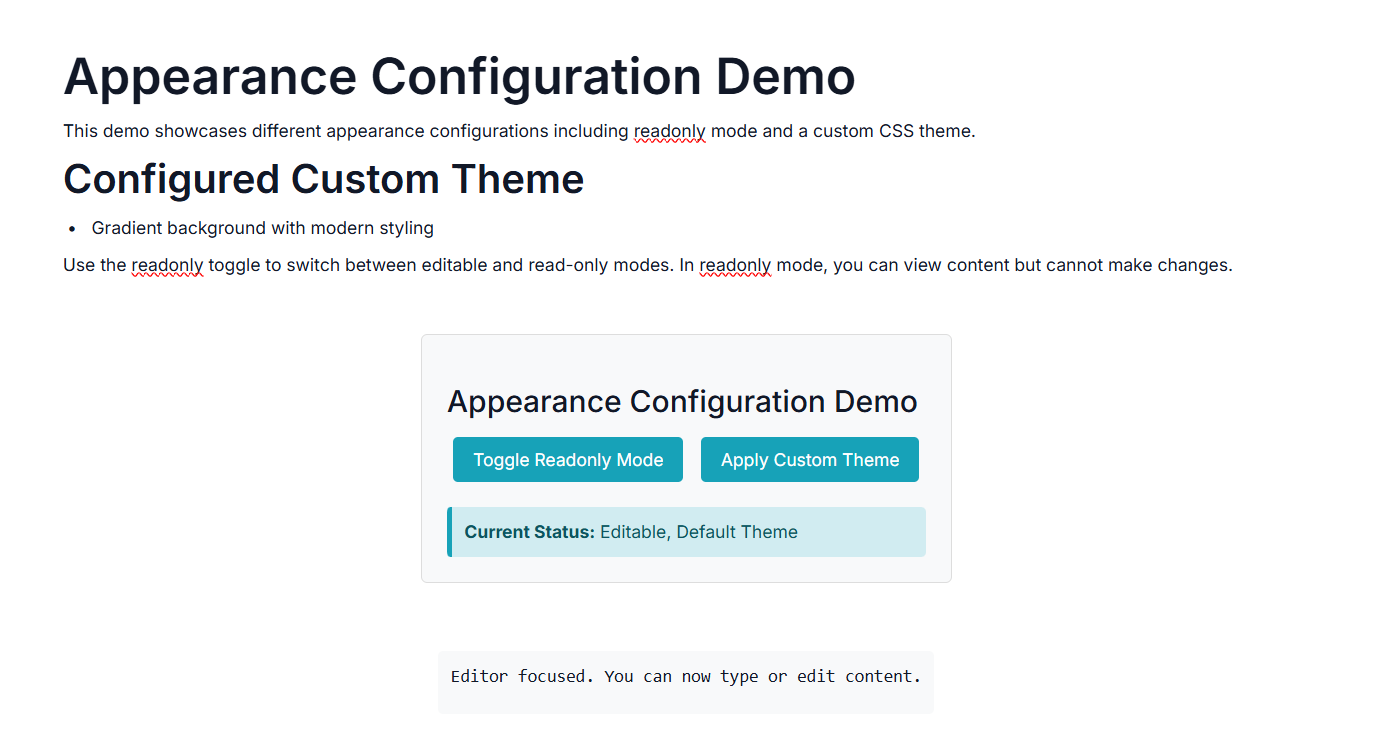
<h3>Appearance Configuration Demo</h3>
<div class="button-group">
<button id="toggleReadonlyBtn" onclick="toggleReadonlyBtn()">Toggle Readonly Mode</button>
<button id="applyCustomThemeBtn" onclick="applyCustomThemeBtn()">Apply Custom Theme</button>
</div>
<div class="status-info">
<p><strong>Current Status:</strong> <span id="statusText">Editable, Default Theme</span></p>
</div>
</div>
<div id="output"></div>
</div>
<script>
var blockEditorObj;
let isReadonly = false;
let currentTheme = 'default';
function onCreated() {
blockEditorObj = ej.base.getInstance(document.getElementById('block-editor'), ejs.blockeditor.BlockEditor);
updateStatus();
}
// Toggle Readonly Mode
function toggleReadonlyBtn () {
isReadonly = !isReadonly;
blockEditorObj.readOnly = isReadonly;
// Add visual indication for readonly mode
var editorElement = document.getElementById('blockeditor');
if (editorElement) {
if (isReadonly) {
editorElement.classList.add('readonly-mode');
} else {
editorElement.classList.remove('readonly-mode');
}
}
updateStatus();
displayOutput(`Readonly mode ${isReadonly ? 'enabled' : 'disabled'}. ${isReadonly ? 'Content is now view-only.' : 'Content is now editable.'}`);
}
// Apply Custom Theme
function applyCustomThemeBtn () {
blockEditorObj.cssClass = 'custom-theme';
currentTheme = 'custom';
updateStatus();
displayOutput('Custom theme applied. The editor now features a gradient background with modern styling and hover effects.');
}
// Output helper function
function displayOutput(message) {
var outputDiv = document.getElementById('output');
if (outputDiv) {
outputDiv.textContent = message;
}
}
// Update status display
function updateStatus() {
var statusText = document.getElementById('statusText');
if (statusText) {
var mode = isReadonly ? 'Readonly' : 'Editable';
var theme = currentTheme.charAt(0).toUpperCase() + currentTheme.slice(1);
statusText.textContent = `${mode}, ${theme} Theme`;
}
}
</script>
<style>
#blockeditor-container {
margin: 20px auto;
gap: 20px;
display: flex;
flex-direction: column;
align-items: center;
}
#controls {
margin-bottom: 20px;
padding: 20px;
border: 1px solid #ddd;
border-radius: 5px;
background-color: #f8f9fa;
}
.button-group {
margin-bottom: 15px;
}
.button-group button {
margin: 5px;
padding: 8px 16px;
background-color: #17a2b8;
color: white;
border: none;
border-radius: 4px;
cursor: pointer;
}
.button-group button:hover {
background-color: #138496;
}
.status-info {
padding: 10px;
background-color: #d1ecf1;
border-left: 4px solid #17a2b8;
border-radius: 4px;
}
.status-info p {
margin: 0;
color: #0c5460;
}
#output {
margin-top: 15px;
padding: 10px;
background-color: #f8f9fa;
border-radius: 4px;
min-height: 50px;
font-family: monospace;
white-space: pre-wrap;
}
/* Custom Theme CSS Class */
.custom-theme {
background: linear-gradient(135deg, #667eea 0%, #764ba2 100%);
border-radius: 12px;
}
.custom-theme .e-block {
border-radius: 8px;
margin-bottom: 10px;
backdrop-filter: blur(10px);
}
.custom-theme .e-block:hover {
transform: translateY(-2px);
transition: all 0.3s ease;
}
.custom-theme .e-block-content {
color: #2d3748;
font-weight: 500;
}
/* Readonly Mode Styling */
.readonly-mode {
opacity: 0.8;
cursor: not-allowed;
}
.readonly-mode .e-block-content {
color: #6c757d;
}
.custom-theme.readonly-mode .e-block-content {
color: #101111;
}
</style>public List<BlockModel> BlocksData { get; set; } = new List<BlockModel>();
public class BlockModel
{
public string id { get; set; }
public string blockType { get; set; }
public object properties { get; set; }
public List<object> content { get; set; }
}
public ActionResult Appearance()
{
BlocksData.Add(new BlockModel
{
id = "title-block",
blockType = "Heading",
properties = new { level = 1 },
content = new List<object>()
{
new
{
contentType = "Text",
content = "Appearance Configuration Demo"
}
}
});
BlocksData.Add(new BlockModel
{
id = "intro-block",
blockType = "Paragraph",
content = new List<object>()
{
new
{
id = "paragraph1-content",
contentType = "Text",
content = "This demo showcases different appearance configurations including readonly mode and a custom CSS theme."
}
}
});
BlocksData.Add(new BlockModel
{
id = "features-heading",
blockType = "Heading",
properties = new { level = 2 },
content = new List<object>()
{
new
{
contentType = "Text",
content = "Configured Custom Theme"
}
}
});
BlocksData.Add(new BlockModel
{
id = "theme-list-1",
blockType = "BulletList",
content = new List<object>()
{
new
{
contentType = "Text",
content = "Gradient background with modern styling"
}
}
});
BlocksData.Add(new BlockModel
{
id = "readonly-info",
blockType = "Paragraph",
content = new List<object>()
{
new
{
contentType = "Text",
content = "Use the readonly toggle to switch between editable and read-only modes. In readonly mode, you can view content but cannot make changes."
}
}
});
ViewBag.BlocksData = BlocksData;
return View();
}