Selection in .NET MAUI Sunburst Chart
18 Nov 20187 minutes to read
The Sunburst Chart supports segment selection and visual highlighting. Selection is triggered by tapping (touch) or clicking (mouse) a segment, enabling users to interact with hierarchical data. Selection requires the chart to be bound to data via the ItemsSource, ValueMemberPath, and Levels properties.
Prerequisite: Ensure that the required NuGet package is installed, the necessary namespaces are imported, and the Sunburst Chart control is properly configured in your application. For detailed setup and configuration instructions, refer to the Getting Started guide.
To enable selection, create an instance of the SunburstSelectionSettings class and assign it to the SelectionSettings property of the SfSunburstChart. The Type and DisplayMode properties of SunburstSelectionSettings are independent and can be combined.
Selection Type
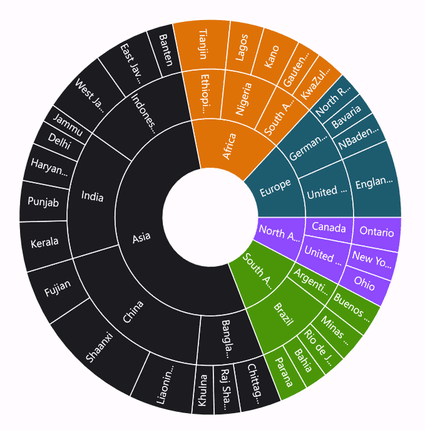
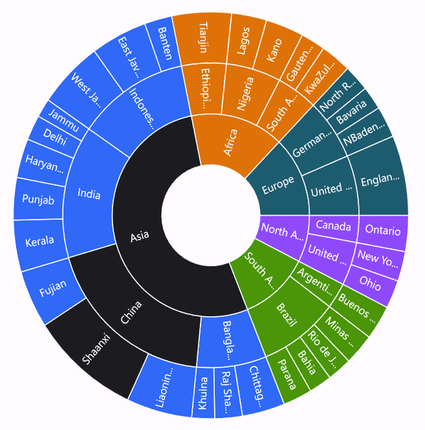
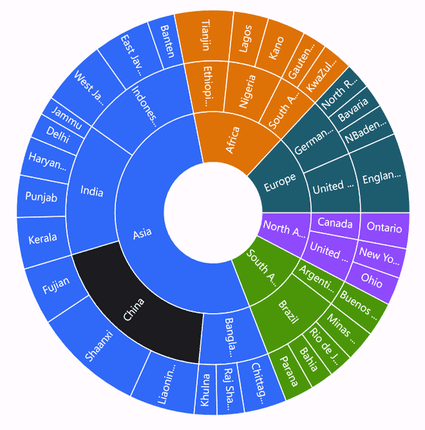
The Type property of the SunburstSelectionSettings class configures which segments are highlighted when a segment is selected, using the SunburstSelectionType enum with the following values:
- Child: Highlights the selected segment along with its children in all levels.
- Group: Highlights the entire group of the selected segment in a hierarchy.
- Parent: Highlights the parent of the selected segment in the hierarchy.
- Single: Highlights the selected segment alone.
The default value of the Type property is Single. The following example shows the Child selection type; the examples for Group, Parent, and Single differ only in the Type value.
<sunburst:SfSunburstChart>
    <sunburst:SfSunburstChart.SelectionSettings>
        <sunburst:SunburstSelectionSettings Type="Child"/>
    </sunburst:SfSunburstChart.SelectionSettings>
    <!-- code omitted for brevity -->
</sunburst:SfSunburstChart>
SfSunburstChart sunburstChart = new SfSunburstChart();
// code omitted for brevity
SunburstSelectionSettings selectionSettings = new SunburstSelectionSettings
{
Type = SunburstSelectionType.Child
};
sunburstChart.SelectionSettings = selectionSettings;
this.Content = sunburstChart;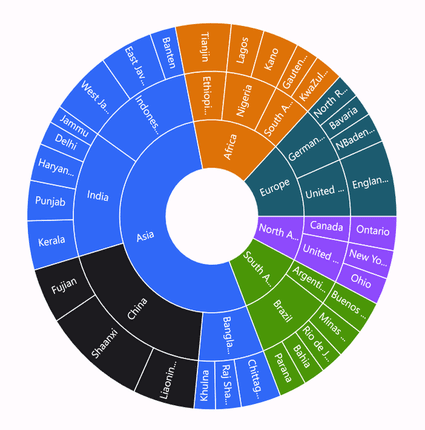
Highlight Mode
The DisplayMode property of the SunburstSelectionSettings class configures how segments are visually highlighted, using the SunburstSelectionDisplayMode enum with the following values:
- HighlightByBrush: Highlights the selected segment using a brush (default).
- HighlightByOpacity: Highlights the selected segment at full opacity and dims unselected segments.
- HighlightByStroke: Highlights the selected segment by applying a stroke to it.
The default value of the DisplayMode property is HighlightByBrush.
Brush
This mode highlights the selected segment using the brush defined in the Fill property of the SunburstSelectionSettings class.
<sunburst:SfSunburstChart>
    <sunburst:SfSunburstChart.SelectionSettings>
        <sunburst:SunburstSelectionSettings Fill="DarkRed" DisplayMode="HighlightByBrush" Type="Child"/>
    </sunburst:SfSunburstChart.SelectionSettings>
    <!-- code omitted for brevity -->
</sunburst:SfSunburstChart>
SfSunburstChart sunburstChart = new SfSunburstChart();
// code omitted for brevity
SunburstSelectionSettings selectionSettings = new SunburstSelectionSettings
{
Fill = Colors.DarkRed,
DisplayMode = SunburstSelectionDisplayMode.HighlightByBrush,
Type = SunburstSelectionType.Child
};
sunburstChart.SelectionSettings = selectionSettings;
this.Content = sunburstChart;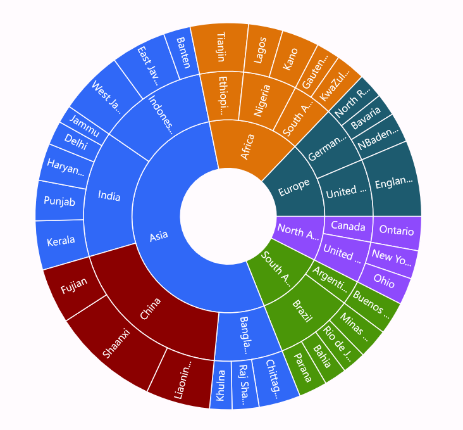
Opacity
This mode renders the selected segment at full opacity (1) and dims the unselected segments to the Opacity value. The default Opacity value is 0.6.
<sunburst:SfSunburstChart>
    <sunburst:SfSunburstChart.SelectionSettings>
        <sunburst:SunburstSelectionSettings Opacity="0.6" DisplayMode="HighlightByOpacity" Type="Child"/>
    </sunburst:SfSunburstChart.SelectionSettings>
    <!-- code omitted for brevity -->
</sunburst:SfSunburstChart>
SfSunburstChart sunburstChart = new SfSunburstChart();
// code omitted for brevity
SunburstSelectionSettings selectionSettings = new SunburstSelectionSettings
{
Opacity = 0.6,
DisplayMode = SunburstSelectionDisplayMode.HighlightByOpacity,
Type = SunburstSelectionType.Child
};
sunburstChart.SelectionSettings = selectionSettings;
this.Content = sunburstChart;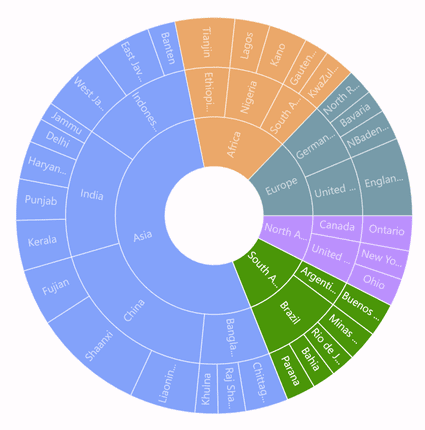
Stroke
This mode highlights the selected segment by applying a stroke to it. The color and thickness of the stroke can be customized using the Stroke and StrokeWidth properties. The default StrokeWidth value is 2.
<sunburst:SfSunburstChart>
    <sunburst:SfSunburstChart.SelectionSettings>
        <sunburst:SunburstSelectionSettings Stroke="Black" StrokeWidth="3" DisplayMode="HighlightByStroke" Type="Child"/>
    </sunburst:SfSunburstChart.SelectionSettings>
    <!-- code omitted for brevity -->
</sunburst:SfSunburstChart>
SfSunburstChart sunburstChart = new SfSunburstChart();
// code omitted for brevity
SunburstSelectionSettings selectionSettings = new SunburstSelectionSettings
{
Stroke = Colors.Black,
StrokeWidth = 3,
DisplayMode = SunburstSelectionDisplayMode.HighlightByStroke,
Type = SunburstSelectionType.Child
};
sunburstChart.SelectionSettings = selectionSettings;
this.Content = sunburstChart;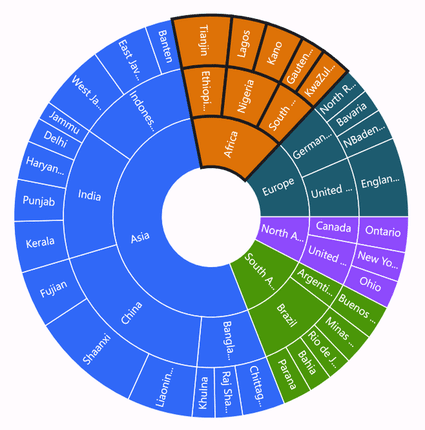
Events
The Sunburst Chart raises events before and after a segment is selected or deselected.
SelectionChanging
The SelectionChanging event is triggered when a segment is about to be selected. This is a cancelable event. The following properties are contained in the event arguments:
- NewSegment: Gets the segment that will be selected.
- OldSegment: Gets the segment that was previously selected or deselected.
- Cancel: Gets or sets a value indicating whether to cancel the selection.
<sunburst:SfSunburstChart SelectionChanging="SunburstChart_SelectionChanging">
    <!-- code omitted for brevity -->
</sunburst:SfSunburstChart>
SfSunburstChart sunburstChart = new SfSunburstChart();
sunburstChart.SelectionChanging += SunburstChart_SelectionChanging;
// code omitted for brevity
this.Content = sunburstChart;
private void SunburstChart_SelectionChanging(object sender, SunburstSelectionChangingEventArgs e)
{
e.Cancel = false;
}SelectionChanged
The SelectionChanged event occurs after a segment is selected or deselected. The following properties are contained in the event arguments:
- IsSelected: Indicates whether a segment is selected.
- NewSegment: Gets the segment that was selected.
- OldSegment: Gets the segment that was previously selected or deselected.
<sunburst:SfSunburstChart SelectionChanged="SunburstChart_SelectionChanged">
    <!-- code omitted for brevity -->
</sunburst:SfSunburstChart>
SfSunburstChart sunburstChart = new SfSunburstChart();
sunburstChart.SelectionChanged += SunburstChart_SelectionChanged;
// code omitted for brevity
this.Content = sunburstChart;
private void SunburstChart_SelectionChanged(object sender, SunburstSelectionChangedEventArgs e)
{
var isSelected = e.IsSelected;
}