Syncfusion® MAUI UI Builder Skill for AI Assistants
1 Jun 20268 minutes to read
Syncfusion® MAUI UI Builder is an AI-powered skill and companion agent that accelerates cross-platform application development by transforming natural-language UI requirements into production-ready components using Syncfusion® MAUI libraries.
Integrated with your AI-powered IDE, it leverages deep knowledge of Syncfusion® MAUI components to deliver accurate and ready-to-use code.
By combining intelligent code generation with best practices, accessibility standards, and design-system consistency, MAUI UI Builder helps you rapidly build scalable mobile and desktop applications for iOS, Android, macOS, and Windows without leaving your development workflow.
Prerequisites
Before installing MAUI UI Builder, ensure the following:
- Install APM (Agent Package Manager)
- Required Node.js version ≥ 18
- Required .NET SDK version ≥ 8.0
-
MAUI workload installed (
dotnet workload install maui) - MAUI application (existing or new); see Quick Start
- A supported AI agent or IDE that integrates with the Skills (VS Code, Visual Studio, Cursor, Code Studio, etc.)
- Active Syncfusion® license (any of the following):
Key Benefits
AI-Driven UI Generation
- Converts prompts into complete MAUI components, not just snippets.
- Automatically selects appropriate Syncfusion® MAUI components and features.
- Produces structured, maintainable C# code.
Component Usage & API Accuracy
- Uses correct Syncfusion® MAUI component APIs.
- Injects required attached behaviors and controls.
- Avoids unsupported or deprecated patterns.
Patterns & Best Practices
- Recommended MVVM architecture and data binding patterns.
- Command handling aligned with MAUI standards.
- Secure and scalable coding patterns for cross-platform development.
Accessibility & Responsiveness
- WCAG 2.1 AA–aligned output.
- Semantic UI with accessibility automation support.
- Responsive layouts that adapt across device sizes and orientations.
Design-System Integration
- Supports Material Design 3, Fluent Design, and custom themes.
- Ensures consistent Syncfusion® theming across iOS, Android, macOS, and Windows.
- Platform-specific styling and adaptive layouts.
Installation
Before installing MAUI UI Builder, ensure that APM (Agent Package Manager) is installed and available in your environment.
Verify APM Installation
Run the following command to confirm APM is installed:
apm --versionInstall the Syncfusion® MAUI UI Builder package using APM
Use the APM CLI to install the MAUI UI Builder skill for your preferred environment:
apm install syncfusion/maui-ui-builder -t copilotapm install syncfusion/maui-ui-builder -t cursorapm install syncfusion/maui-ui-builder -t codexapm install syncfusion/maui-ui-builder -t claudeAfter installation, the following artifacts are added to your project for the GitHub Copilot target:
-
.agent/skills/– contains the skill files -
.github/agents/– contains the agent configuration
For details on supported deployment targets, refer to the documentation.
For Syncfusion® Code Studio, users must explicitly configure the agent location to use it in the chat. Refer to the documentation.
How the Syncfusion® MAUI UI Builder Skill Works
- Intent Analysis - Parse the user’s prompt to identify control types, layouts, and high-level UI structure intent.
- Project Detection - Automatically detects project framework, platform targets, package manager, and existing themes.
- Component Mapping - Map intent to Syncfusion® MAUI controls and required feature modules.
-
Theming & Design System
Load required theming guidelines and confirm key design choices:- Design system (Material Design 3, or Custom theme). If no themes detected in the existing project, Material Design 3 is shown as the default option, proceed with this or change the theme as preferred.
- Syncfusion theme (Material3)
- Light and Dark Mode support
- Platform-specific adaptations (iOS, Android, macOS, Windows)
- Core design basics (colors, spacing, typography, responsiveness, accessibility)
- Code Generation - Produce C# MAUI components, ViewModel classes, and XAML markup with proper data binding.
- Dependency Management - Recommend or install required Syncfusion® MAUI NuGet packages and peer dependencies.
- Validation - Run accessibility and basic security checks, request confirmation for changes.
- Code Insertion - Create files or patch existing files following MAUI project structure and conventions.
Key enforcement points:
- Adds correct theme and resource imports for chosen Syncfusion® MAUI themes
- Injects only the required controls and behaviors
- Generates accessible UI with proper automation properties and keyboard navigation
- Supports MVVM pattern with proper INotifyPropertyChanged implementation
- Avoids unsupported or deprecated API usages for Syncfusion® MAUI controls
The assistant handles most stages automatically and may request confirmation where required.
Using the AI Assistant
To start using the skill:
- Open your supported IDE (Visual Studio, VS Code, or Code Studio).
- In the chat panel, select the
syncfusion-maui-ui-builderagent from the Agent dropdown.
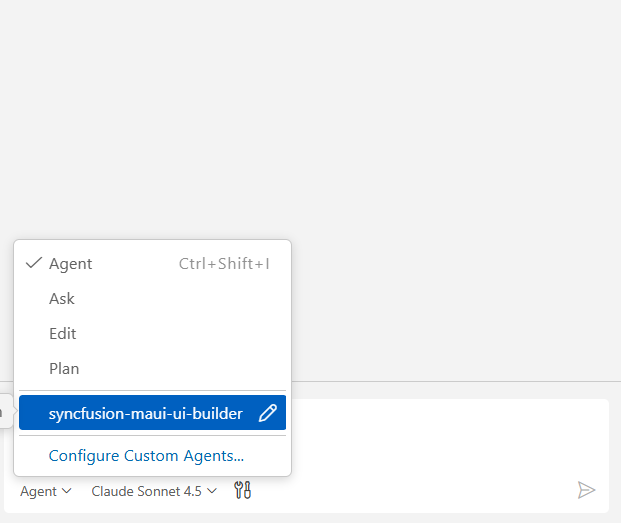
- Start prompting the agent with a clear description of your UI requirements.
Examples Prompts:
Create a login screen for a cross-platform MAUI application using Material Design 3 theme with a centered card containing email and password entry fields with input validation. Include a “Remember Me” checkbox, a forgot password link, and a primary login button. Add a secondary “Sign Up” button below. Ensure the layout is responsive and works on iOS, Android, macOS, and Windows devices.
Create a dashboard view for a MAUI application featuring a collapsible shell flyout with navigation items for Dashboard, Orders, Customers, Reports, and Settings; a top app bar showing the application title on the left and user profile button on the right; a main content area with four summary cards in a 2x2 grid displaying key metrics (Total Orders, Revenue, New Customers, Pending Tasks) with icons and percentage indicators; a filterable data grid showing recent orders with columns for Order ID, Customer, Amount, Status, and Date; and a chart displaying sales trends using sample data, all styled with Material Design 3 and supporting light/dark modes.
Generated code follows best practices with accessible UI, responsive mobile-first layouts, strong C# typing, MVVM pattern implementation, and built-in security measures such as input validation and secure data handling.
Troubleshooting
-
APM installation failure: Refer to this documentation
-
Skills not loading: Ensure the .agent/ and .github/agents/ folders exist in your project and that the skill was installed successfully using APM. Verify that the correct agent is selected from the Agent dropdown in your IDE.
-
Control not rendering: Verify that the Syncfusion® MAUI NuGet packages are correctly installed and that the XAML namespaces are properly declared. Retry generation using the specific control skill to resolve the issue.
-
Platform-specific issues: Ensure that your project has the correct platform-specific project files (.csproj) and that the MAUI workload is properly installed on your development machine.
-
Syncfusion license banner appears: Use the licensing skill to correctly register and validate your Syncfusion® license key in the application.
-
XAML IntelliSense issues: Clear the .vs folder and rebuild the solution to refresh the XAML designer and IntelliSense.
FAQ
Which agents/IDEs are supported?
Any Skills-compatible agent that reads local skill files (Visual Studio, VS Code, Code Studio, Cursor, etc.).
Are skills loaded automatically?
Yes. Supported agents automatically load relevant skills based on your query.
Can I customize the generated styles?
Yes, the skill supports choosing Material Design 3, or a custom theme; generated components include clear integration points for style adjustments.
Does it modify files automatically?
The skill proposes changes and requires confirmation for insertion; automatic NuGet package installation may be offered depending on agent permissions.
Can I generate components for specific platforms only?
Yes, you can specify platform targets (iOS, Android, macOS, Windows) in your prompt, and the skill will generate platform-appropriate code with conditional compilation where needed.
Does it support MVVM pattern?
Yes. The skill automatically generates ViewModels with proper INotifyPropertyChanged implementation, Command bindings, and data binding patterns aligned with MAUI best practices.