Appointment Resizing in .NET MAUI SfScheduler
21 Jul 202618 minutes to read
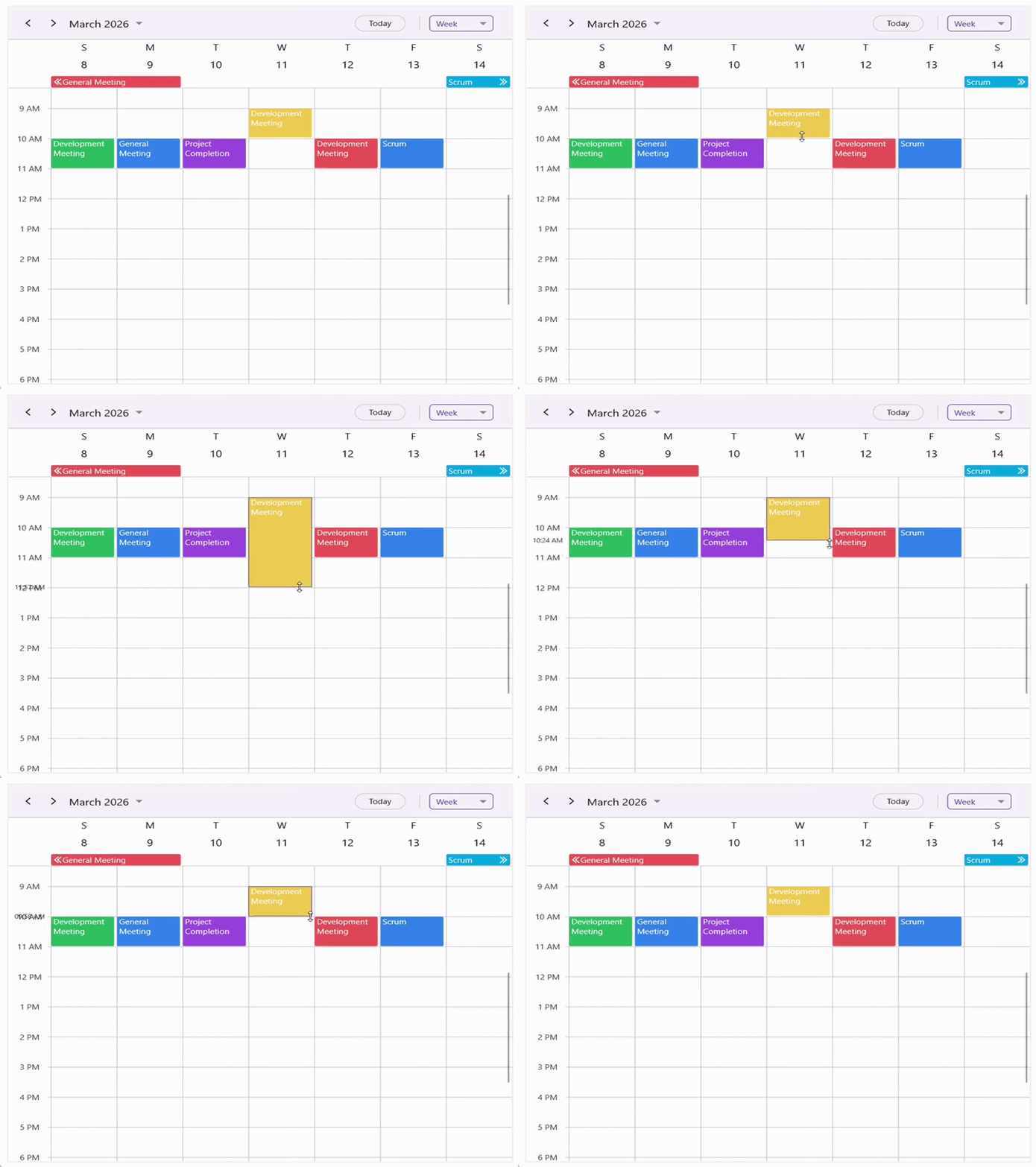
Appointments can be resized interactively to adjust their start or end times. In Day, Week, and Work Week views, you can resize an appointment by dragging its top or bottom edges. In Month, Week, All‑Day, and Timeline views, resizing is performed by dragging the left or right edges of the appointment. By default, the AllowAppointmentResize property is set to false. To enable appointment resizing, set the AllowAppointmentResize property to true.
<ContentPage
    . . .
    xmlns:scheduler="clr-namespace:Syncfusion.Maui.Scheduler;assembly=Syncfusion.Maui.Scheduler">
    <scheduler:SfScheduler x:Name="scheduler"
                           View="Day"
                           AllowAppointmentResize="True">
    </scheduler:SfScheduler>
</ContentPage>
using Syncfusion.Maui.Scheduler;
. . .
public partial class MainPage : ContentPage
{
public MainPage()
{
InitializeComponent();
this.scheduler.AllowAppointmentResize = true;
}
}
NOTE
- Appointment resizing is supported only on desktop platforms.
- Resizing works exclusively through mouse interactions, using the built‑in mouse resize cursors of the native platform.
Appointment Resize Settings
The AppointmentResizeSettings property lets you configure automatic scrolling, time indicators with customizable format and style, and the border appearance when an appointment is resized.
Allow Resize Scroll
You can enable automatic scrolling during appointment resizing using the AllowResizeScroll property. As the appointment is being resized and reaches the boundary of the visible timeslots, the scheduler scrolls to display additional timeslots. This allows the resizing process to continue smoothly. By default, AllowResizeScroll is set to true. To disable automatic scrolling during appointment resizing, set the AllowResizeScroll property to false.
<ContentPage
    . . .
    xmlns:scheduler="clr-namespace:Syncfusion.Maui.Scheduler;assembly=Syncfusion.Maui.Scheduler">
    <scheduler:SfScheduler x:Name="scheduler"
                           View="Day"
                           AllowAppointmentResize="True">
        <scheduler:SfScheduler.AppointmentResizeSettings>
            <scheduler:AppointmentResizeSettings AllowResizeScroll="False"/>
        </scheduler:SfScheduler.AppointmentResizeSettings>
    </scheduler:SfScheduler>
</ContentPage>
using Syncfusion.Maui.Scheduler;
. . .
public partial class MainPage : ContentPage
{
public MainPage()
{
InitializeComponent();
this.scheduler.AllowAppointmentResize = true;
this.scheduler.AppointmentResizeSettings.AllowResizeScroll = false;
}
}Show Time Indicator
You can display a time indicator while resizing an appointment by using the ShowTimeIndicator property. By default, ShowTimeIndicator is set to true. To hide the time indicator during resizing, set the ShowTimeIndicator property to false.
<ContentPage
    . . .
    xmlns:scheduler="clr-namespace:Syncfusion.Maui.Scheduler;assembly=Syncfusion.Maui.Scheduler">
    <scheduler:SfScheduler x:Name="scheduler"
                           View="Day"
                           AllowAppointmentResize="True">
        <scheduler:SfScheduler.AppointmentResizeSettings>
            <scheduler:AppointmentResizeSettings ShowTimeIndicator="False"/>
        </scheduler:SfScheduler.AppointmentResizeSettings>
    </scheduler:SfScheduler>
</ContentPage>
using Syncfusion.Maui.Scheduler;
. . .
public partial class MainPage : ContentPage
{
public MainPage()
{
InitializeComponent();
this.scheduler.AllowAppointmentResize = true;
this.scheduler.AppointmentResizeSettings.ShowTimeIndicator = false;
}
}NOTE
- The time indicator is not displayed in Month view, the All‑Day layout, and TimelineMonthView.
Time Indicator Text Format
The format of the time displayed in the time indicator while resizing an appointment can be customized using the TimeIndicatorTextFormat property.
<ContentPage
    . . .
    xmlns:scheduler="clr-namespace:Syncfusion.Maui.Scheduler;assembly=Syncfusion.Maui.Scheduler">
    <scheduler:SfScheduler x:Name="scheduler"
                           View="Day"
                           AllowAppointmentResize="True">
        <scheduler:SfScheduler.AppointmentResizeSettings>
            <scheduler:AppointmentResizeSettings TimeIndicatorTextFormat="HH:mm"/>
        </scheduler:SfScheduler.AppointmentResizeSettings>
    </scheduler:SfScheduler>
</ContentPage>
using Syncfusion.Maui.Scheduler;
. . .
public partial class MainPage : ContentPage
{
public MainPage()
{
InitializeComponent();
this.scheduler.AllowAppointmentResize = true;
this.scheduler.AppointmentResizeSettings.TimeIndicatorTextFormat = "HH:mm";
}
}Time Indicator Style
The appearance of the time indicator text, including color, font size, font family, and font attributes, can be customized using the TimeIndicatorStyle property.
<ContentPage
    . . .
    xmlns:scheduler="clr-namespace:Syncfusion.Maui.Scheduler;assembly=Syncfusion.Maui.Scheduler">
    <scheduler:SfScheduler x:Name="scheduler"
                           View="Day"
                           AllowAppointmentResize="True">
        <scheduler:SfScheduler.AppointmentResizeSettings>
            <scheduler:AppointmentResizeSettings>
                <scheduler:AppointmentResizeSettings.TimeIndicatorStyle>
                    <scheduler:SchedulerTextStyle TextColor="Green" FontSize="15" FontAttributes="Bold" FontFamily="OpenSansSemibold"/>
                </scheduler:AppointmentResizeSettings.TimeIndicatorStyle>
            </scheduler:AppointmentResizeSettings>
        </scheduler:SfScheduler.AppointmentResizeSettings>
    </scheduler:SfScheduler>
</ContentPage>
using Syncfusion.Maui.Scheduler;
. . .
public partial class MainPage : ContentPage
{
public MainPage()
{
InitializeComponent();
this.scheduler.AllowAppointmentResize = true;
this.scheduler.AppointmentResizeSettings.TimeIndicatorStyle = new SchedulerTextStyle()
{
TextColor = Colors.Green,
FontSize = 15,
FontAttributes = FontAttributes.Bold,
FontFamily = "OpenSansSemibold"
};
}
}Resize Border Customization
The border displayed around an appointment during resizing can be customized using the ResizeBorderThickness and ResizeBorderStroke properties. ResizeBorderThickness defines how thick the border appears, while ResizeBorderStroke specifies its color.
<ContentPage
    . . .
    xmlns:scheduler="clr-namespace:Syncfusion.Maui.Scheduler;assembly=Syncfusion.Maui.Scheduler">
    <scheduler:SfScheduler x:Name="scheduler"
                           View="Day"
                           AllowAppointmentResize="True">
        <scheduler:SfScheduler.AppointmentResizeSettings>
            <scheduler:AppointmentResizeSettings ResizeBorderThickness="5" ResizeBorderStroke="Red"/>
        </scheduler:SfScheduler.AppointmentResizeSettings>
    </scheduler:SfScheduler>
</ContentPage>
using Syncfusion.Maui.Scheduler;
. . .
public partial class MainPage : ContentPage
{
public MainPage()
{
InitializeComponent();
this.scheduler.AppointmentResizeSettings.ResizeBorderStroke = Colors.Red;
this.scheduler.AppointmentResizeSettings.ResizeBorderThickness = 5;
}
}Events
Appointment Resize Start
The AppointmentResizeStart event is triggered when resizing of an appointment begins. This event occurs when the pointer is placed on a resizable edge of an appointment and the resize operation is initiated. This event can be used to validate whether the appointment can be resized before the operation proceeds. The resize operation can be cancelled by setting e.Cancel to true.
<ContentPage
    . . .
    xmlns:scheduler="clr-namespace:Syncfusion.Maui.Scheduler;assembly=Syncfusion.Maui.Scheduler">
    <scheduler:SfScheduler x:Name="Scheduler"
                           View="Day"
                           AppointmentResizeStart="Scheduler_AppointmentResizeStart">
    </scheduler:SfScheduler>
</ContentPage>
using Syncfusion.Maui.Scheduler;
. . .
public partial class MainPage : ContentPage
{
public MainPage()
{
InitializeComponent();
}
private void Scheduler_AppointmentResizeStart(object sender, AppointmentResizeStartEventArgs e)
{
e.Cancel = true;
}
}The AppointmentResizeStartEventArgs contains the following properties:
- Appointment : Represents the appointment that is about to be resized.
- Resource : Indicates the resource associated with the appointment when resource grouping is enabled.
- ResizeEdge : Specifies the edge from which the resizing action starts. The values include Top, Bottom, Left, and Right.
<ContentPage
    . . .
    xmlns:scheduler="clr-namespace:Syncfusion.Maui.Scheduler;assembly=Syncfusion.Maui.Scheduler">
    <scheduler:SfScheduler x:Name="Scheduler"
                           View="Day"
                           AppointmentResizeStart="Scheduler_AppointmentResizeStart">
    </scheduler:SfScheduler>
</ContentPage>
using Syncfusion.Maui.Scheduler;
. . .
public partial class MainPage : ContentPage
{
public MainPage()
{
InitializeComponent();
}
private void Scheduler_AppointmentResizeStart(object sender, AppointmentResizeStartEventArgs e)
{
var appointment = e.Appointment;
var resource = e.Resource;
var resizeEdge = e.ResizeEdge;
}
}Appointment Resizing
The AppointmentResizing event is triggered continuously while the appointment is being resized. This event is raised as the resize handle is dragged and the appointment duration changes dynamically. This event can be used to monitor the resizing process or to apply custom validation logic while the appointment duration is changing. The resizing operation can be prevented during interaction by setting e.Cancel to true.
<ContentPage
    . . .
    xmlns:scheduler="clr-namespace:Syncfusion.Maui.Scheduler;assembly=Syncfusion.Maui.Scheduler">
    <scheduler:SfScheduler x:Name="Scheduler"
                           View="Day"
                           AppointmentResizing="Scheduler_AppointmentResizing">
    </scheduler:SfScheduler>
</ContentPage>
using Syncfusion.Maui.Scheduler;
. . .
public partial class MainPage : ContentPage
{
public MainPage()
{
InitializeComponent();
}
private void Scheduler_AppointmentResizing(object sender, AppointmentResizingEventArgs e)
{
e.Cancel = true;
}
}The AppointmentResizingEventArgs provides the following information:
- Appointment : Represents the appointment currently being resized.
- Resource : Indicates the resource linked to the appointment when resource grouping is applied.
- ResizeEdge : Specifies the edge used for resizing the appointment. The values include Top, Bottom, Left, and Right.
- ResizingTime : Represents the date time value that corresponds to the current resize position.
Appointment Resize End
The AppointmentResizeEnd event occurs when the resizing action is completed and the pointer is released. After this event is triggered, the scheduler updates the appointment duration according to the resized position. You can prevent this update by setting the Cancel property to true, which keeps the appointment with its original duration.
<ContentPage
    . . .
    xmlns:scheduler="clr-namespace:Syncfusion.Maui.Scheduler;assembly=Syncfusion.Maui.Scheduler">
    <scheduler:SfScheduler x:Name="Scheduler"
                           View="Day"
                           AppointmentResizeEnd="Scheduler_AppointmentResizeEnd">
    </scheduler:SfScheduler>
</ContentPage>
using Syncfusion.Maui.Scheduler;
. . .
public partial class MainPage : ContentPage
{
public MainPage()
{
InitializeComponent();
}
private void Scheduler_AppointmentResizeEnd(object sender, AppointmentResizeEndEventArgs e)
{
e.Cancel = true;
}
}The AppointmentResizeEndEventArgs includes the following properties:
- Appointment : Represents the appointment whose duration has been modified.
- Resource : Indicates the resource associated with the appointment when grouping is enabled.
- ResizeEdge : Specifies the edge from which the appointment was resized. The values include Top, Bottom, Left, and Right.
- ResizedTime : Represents the final date time value after the resizing operation. The final resized time can be modified within this event if necessary by assigning a new value to the ResizedTime property.
<ContentPage
    . . .
    xmlns:scheduler="clr-namespace:Syncfusion.Maui.Scheduler;assembly=Syncfusion.Maui.Scheduler">
    <scheduler:SfScheduler x:Name="Scheduler"
                           View="Day"
                           AppointmentResizeEnd="Scheduler_AppointmentResizeEnd">
    </scheduler:SfScheduler>
</ContentPage>
using Syncfusion.Maui.Scheduler;
. . .
public partial class MainPage : ContentPage
{
public MainPage()
{
InitializeComponent();
}
private void Scheduler_AppointmentResizeEnd(object sender, AppointmentResizeEndEventArgs e)
{
var appointment = e.Appointment;
var resource = e.Resource;
var resizeEdge = e.ResizeEdge;
var resizedTime = e.ResizedTime;
}
}