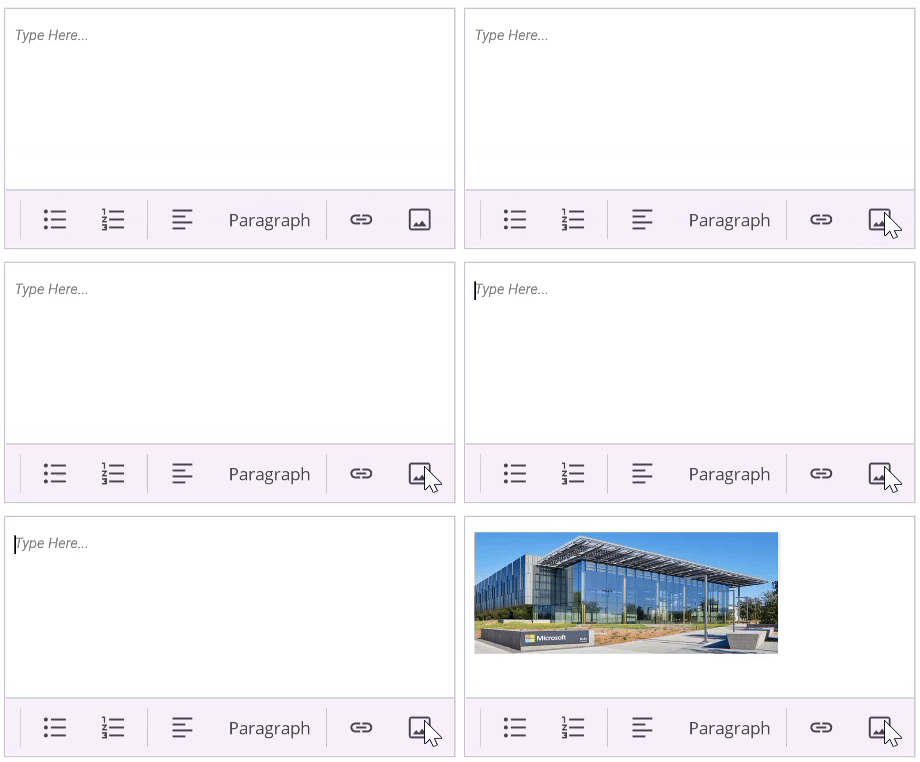
Image Insertion in .NET MAUI Rich Text Editor
The SfRichTextEditor supports inserting images (JPEG, PNG) into the content area. Images can be added by the end-user through the toolbar or programmatically from various sources like a stream or a file path.
Enable File Access Permission
On MacCatalyst devices, you need to enable file access by adding the required permission in the platform specific Entitlements.plist file located under Platforms → MacCatalyst → Entitlements.plist in your .NET MAUI project, as illustrated in the following code snippet.
<key>com.apple.security.files.user-selected.read-write</key>
<true/>
Insert an image using the default picker
When the user taps the image toolbar button, the ImageRequested event is triggered and the built-in image picker is launched automatically. No additional handling is required — the selected image is inserted into the editor content.
Insert an image from a custom source
To override the default picker (for example, to insert an image from a URI, stream, or other custom source), set e.IsHandled = true in the ImageRequested handler, then call InsertImage with a RichTextEditorImageSource.
RichTextEditorImageSource properties
-
Source Type:
ImageSource?Default:nullThe image to insert. Accepts a URI, stream, file path, or resource via ImageSource. -
ImageFormat Type:
RichTextEditorImageFormatDefault:DefaultSpecifies how the image is embedded in the editor content, as a blob URL (Default) or as a base64 string (Base64). -
Width Type:
doubleDefault:-1Width of the inserted image. A value of -1 uses the image’s actual width. -
Height Type:
doubleDefault:-1Height of the inserted image. A value of -1 uses the image’s actual height.
RichTextEditorImageFormat enum members
-
Default- Saves the image as a blob URL in the editor content. -
Base64- Saves the image as a base64-encoded string in the editor content.
The following example inserts an image from a remote URI:
xmlns:richTextEditor="clr-namespace:Syncfusion.Maui.RichTextEditor;assembly=Syncfusion.Maui.RichTextEditor"

<richTextEditor:SfRichTextEditor x:Name="richTextEditor"
                      ShowToolbar="True"
                      ImageRequested="OnImageInserting"/>
using Syncfusion.Maui.RichTextEditor;
SfRichTextEditor richTextEditor = new SfRichTextEditor();
richTextEditor.ImageRequested += OnImageInserting;
private async void OnImageInserting(object sender, RichTextEditorImageRequestedEventArgs e)
{
e.IsHandled = true;
RichTextEditorImageSource richTextEditorImageSource = new();
richTextEditorImageSource.ImageFormat = RichTextEditorImageFormat.Base64;
richTextEditorImageSource.Source = ImageSource.FromUri(new Uri("https://aka.ms/campus.jpg"));
richTextEditorImageSource.Width = 250;
richTextEditorImageSource.Height = 100;
richTextEditor.InsertImage(richTextEditorImageSource);
}