# Customization in .NET MAUI PullToRefresh (SfPullToRefresh)

The .NET MAUI PullToRefresh control supports customization of various features, including TransitionMode, PullingThreshold, ProgressBackground, ProgressColor, and more. The control can be personalized using the following properties.

## PullableContent

The [PullableContent](https://help.syncfusion.com/cr/maui/Syncfusion.Maui.PullToRefresh.SfPullToRefresh.html#Syncfusion_Maui_PullToRefresh_SfPullToRefresh_PullableContent) is the main view of the [PullToRefresh](https://help.syncfusion.com/cr/maui/Syncfusion.Maui.PullToRefresh.SfPullToRefresh.html) control on which the desired items can be placed.

{% tabs %}
{% highlight xaml tabtitle="MainPage.xaml" hl_lines="6 11" %}

    <syncfusion:SfPullToRefresh x:Name="pullToRefresh"
                                PullingThreshold="120"
                                RefreshViewHeight="30"
                                RefreshViewThreshold="30"
                                RefreshViewWidth="30">
        <syncfusion:SfPullToRefresh.PullableContent>
                <Label x:Name="Monthlabel" 
                        TextColor="White" 
                        HorizontalTextAlignment="Center"   
                        VerticalTextAlignment="Start" />
        </syncfusion:SfPullToRefresh.PullableContent>
    </syncfusion:SfPullToRefresh>

{% endhighlight %}
{% endtabs %}

## TransitionMode

The [TransitionMode](https://help.syncfusion.com/cr/maui/Syncfusion.Maui.PullToRefresh.SfPullToRefresh.html#Syncfusion_Maui_PullToRefresh_SfPullToRefresh_TransitionMode) property specifies the mode of the animations. It has the following two modes:

* [SlideOnTop](https://help.syncfusion.com/cr/maui/Syncfusion.Maui.PullToRefresh.PullToRefreshTransitionType.html#Syncfusion_Maui_PullToRefresh_PullToRefreshTransitionType_SlideOnTop)
* [Push](https://help.syncfusion.com/cr/maui/Syncfusion.Maui.PullToRefresh.PullToRefreshTransitionType.html#Syncfusion_Maui_PullToRefresh_PullToRefreshTransitionType_Push)

The default transition is `SlideOnTop` that draws the RefreshView on top of the `PullableContent`.

{% tabs %}
{% highlight xaml tabtitle="MainPage.xaml" hl_lines="2" %}

    <syncfusion:SfPullToRefresh x:Name="pullToRefresh" 
                                TransitionMode="SlideOnTop" />

{% endhighlight %}
{% highlight c# tabtitle="MainPage.xaml.cs" %}

    pullToRefresh.TransitionMode = PullToRefreshTransitionType.SlideOnTop;

{% endhighlight %}
{% endtabs %}
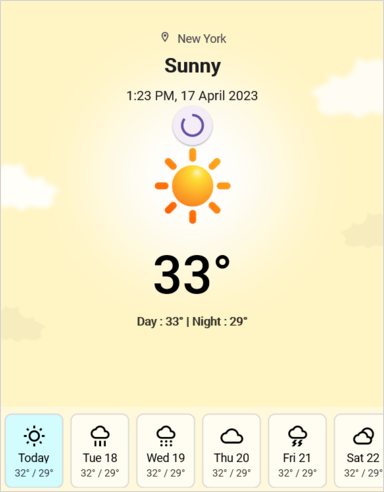

![.NET MAUI PullToRefresh with slide on top transition mode.](Images/customization/net-maui-pulltorefresh-getting-started.png)

The following code example shows how to set the `TransitionMode` as `Push` to PullToRefresh. This transition moves the refresh content and main content simultaneously.

{% tabs %}
{% highlight xaml tabtitle="MainPage.xaml" hl_lines="2" %}

    <syncfusion:SfPullToRefresh x:Name=" pullToRefresh" 
                                TransitionMode="Push" />

{% endhighlight %}
{% highlight c# tabtitle="MainPage.xaml.cs" %}

    pullToRefresh.TransitionMode = PullToRefreshTransitionType.Push;

{% endhighlight %}
{% endtabs %}
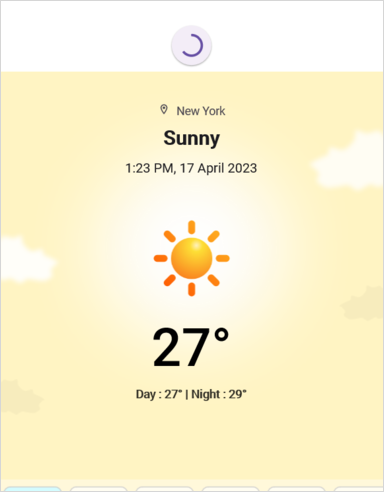

![.NET MAUI PullToRefresh with push transition mode.](Images/customization/net-maui-pulltorefresh-getting-started-push.png)

## RefreshViewThreshold

The threshold value for the refresh view, indicating the starting position of the progress indicator within the view.

{% tabs %}
{% highlight xaml tabtitle="MainPage.xaml" hl_lines="2" %}

    <syncfusion:SfPullToRefresh x:Name="pullToRefresh" 
                                RefreshViewThreshold="50"/>

{% endhighlight %}
{% highlight c# tabtitle="MainPage.xaml.cs" %}

    pullToRefresh.RefreshViewThreshold = 50d;

{% endhighlight %}
{% endtabs %}

## PullingThreshold

The threshold value for the refresh view, indicating the progress indicator's maximum pulling position in view.

{% tabs %}
{% highlight xaml tabtitle="MainPage.xaml" hl_lines="2" %}

    <syncfusion:SfPullToRefresh x:Name="pullToRefresh" 
                                PullingThreshold="200"/>

{% endhighlight %}
{% highlight c# tabtitle="MainPage.xaml.cs" %}

    pullToRefresh.PullingThreshold = 200d;

{% endhighlight %}
{% endtabs %}


## IsRefreshing

The view will get refresh while the [IsRefreshing](https://help.syncfusion.com/cr/maui/Syncfusion.Maui.PullToRefresh.SfPullToRefresh.html#Syncfusion_Maui_PullToRefresh_SfPullToRefresh_IsRefreshing) property is set to `true,` and View refreshing will be stopped when you set the `IsRefreshing` to `false.`
 
{% tabs %}
{% highlight xaml tabtitle="MainPage.xaml" hl_lines="2" %}

    <syncfusion:SfPullToRefresh x:Name="pullToRefresh" 
                                IsRefreshing="True"/>

{% endhighlight %}
{% highlight c# tabtitle="MainPage.xaml.cs" %}

    pullToRefresh.IsRefreshing = true;

{% endhighlight %}
{% endtabs %}


## ProgressBackground

The color to the progress indicator's background.

{% tabs %}
{% highlight xaml tabtitle="MainPage.xaml" hl_lines="2" %}

    <syncfusion:SfPullToRefresh x:Name="pullToRefresh" 
                                ProgressBackground = "White"/>

{% endhighlight %}
{% highlight c# tabtitle="MainPage.xaml.cs" %}

    pullToRefresh.ProgressBackground = Color.White;

{% endhighlight %}
{% endtabs %}


## ProgressColor

The color to the progress indicator's arc. 

{% tabs %}
{% highlight xaml tabtitle="MainPage.xaml" hl_lines="2" %}

    <syncfusion:SfPullToRefresh x:Name="pullToRefresh" 
                                ProgressColor = "Blue"/>

{% endhighlight %}
{% highlight c# tabtitle="MainPage.xaml.cs" %}

    pullToRefresh.ProgressColor = Color.Blue;

{% endhighlight %}

{% endtabs %}


## ProgressThickness

The width of the progress indicator's arc. 

{% tabs %}
{% highlight xaml tabtitle="MainPage.xaml" hl_lines="2" %}

    <syncfusion:SfPullToRefresh x:Name="pullToRefresh" 
                                ProgressThickness="5"/>

{% endhighlight %}
{% highlight c# tabtitle="MainPage.xaml.cs" %}

    pullToRefresh.ProgressThickness = 5d;

{% endhighlight %}
{% endtabs %}


## RefreshViewWidth

The width of the refresh view.

{% tabs %}
{% highlight xaml tabtitle="MainPage.xaml" hl_lines="2" %}

    <syncfusion:SfPullToRefresh x:Name="pullToRefresh" 
                                RefreshViewWidth="50"/>

{% endhighlight %}
{% highlight c# tabtitle="MainPage.xaml.cs" %}

    pullToRefresh.RefreshViewWidth = 50d;

{% endhighlight %}

{% endtabs %}


## RefreshViewHeight

The height to the refresh View.

{% tabs %}
{% highlight xaml tabtitle="MainPage.xaml" hl_lines="2" %}

    <syncfusion:SfPullToRefresh x:Name="pullToRefresh" 
                                RefreshViewHeight="50"/>

{% endhighlight %}
{% highlight c# tabtitle="MainPage.xaml.cs" %}

    pullToRefresh.RefreshViewHeight = 50d;

{% endhighlight %}
{% endtabs %}


## Programmatic Support 

### StartRefreshing()

The [StartRefreshing](https://help.syncfusion.com/cr/maui/Syncfusion.Maui.PullToRefresh.SfPullToRefresh.html#Syncfusion_Maui_PullToRefresh_SfPullToRefresh_StartRefreshing) method is used to refresh the content without interaction in pullable content. When you invoke this StartRefreshing() method,then the Progress indicator will be shown. 

{% tabs %}
{% highlight c# tabtitle="MainPage.xaml.cs" %}

    pullToRefresh.StartRefreshing();

{% endhighlight %}
{% endtabs %}

### EndRefreshing()

The [EndRefreshing](https://help.syncfusion.com/cr/maui/Syncfusion.Maui.PullToRefresh.SfPullToRefresh.html#Syncfusion_Maui_PullToRefresh_SfPullToRefresh_EndRefreshing) method is used to end the progress animation of the `PullToRefresh`.

{% tabs %}
{% highlight c# tabtitle="MainPage.xaml.cs" %}

    pullToRefresh.EndRefreshing();

{% endhighlight %}
{% endtabs %}


## Host .NET MAUI DataGrid as pullable content

The `PullToRefresh` control provides support for loading any custom control as pullable content. To host the .NET MAUI Datagrid inside the PullToRefresh, follow these steps.
<ol>
    <li> Add the required assembly references as discussed in the <a href="https://help.syncfusion.com/maui/datagrid/getting-started">DataGrid</a> and PullToRefresh.</li>
    <li> Import PullToRefresh and DataGrid control namespace as follows.</li>
    <br/>
{% tabs %}
{% highlight xaml tabtitle="MainPage.xaml" %}

    xmlns:sfgrid="clr-namespace:Syncfusion.Maui.DataGrid;assembly=Syncfusion.Maui.DataGrid"
    xmlns:pulltoRefresh="clr-namespace:Syncfusion.Maui.PullToRefresh;assembly=Syncfusion.Maui.PullToRefresh"

{% endhighlight %}
{% highlight c# tabtitle="MainPage.xaml.cs" %}

    using Syncfusion.Maui.DataGrid;
    using Syncfusion.Maui.PullToRefresh;

{% endhighlight %}
{% endtabs %}
    <br/>
    <li> Define the DataGrid as PullableContent of the PullToRefresh.</li> 
    <li> Handle the pull to refresh events for refreshing the data. </li>
    <li> Customize the required properties of the DataGrid and PullToRefresh based on your requirement.</li>
</ol>

This is how the final output will look like when hosting a Datagrid control as pullable content.
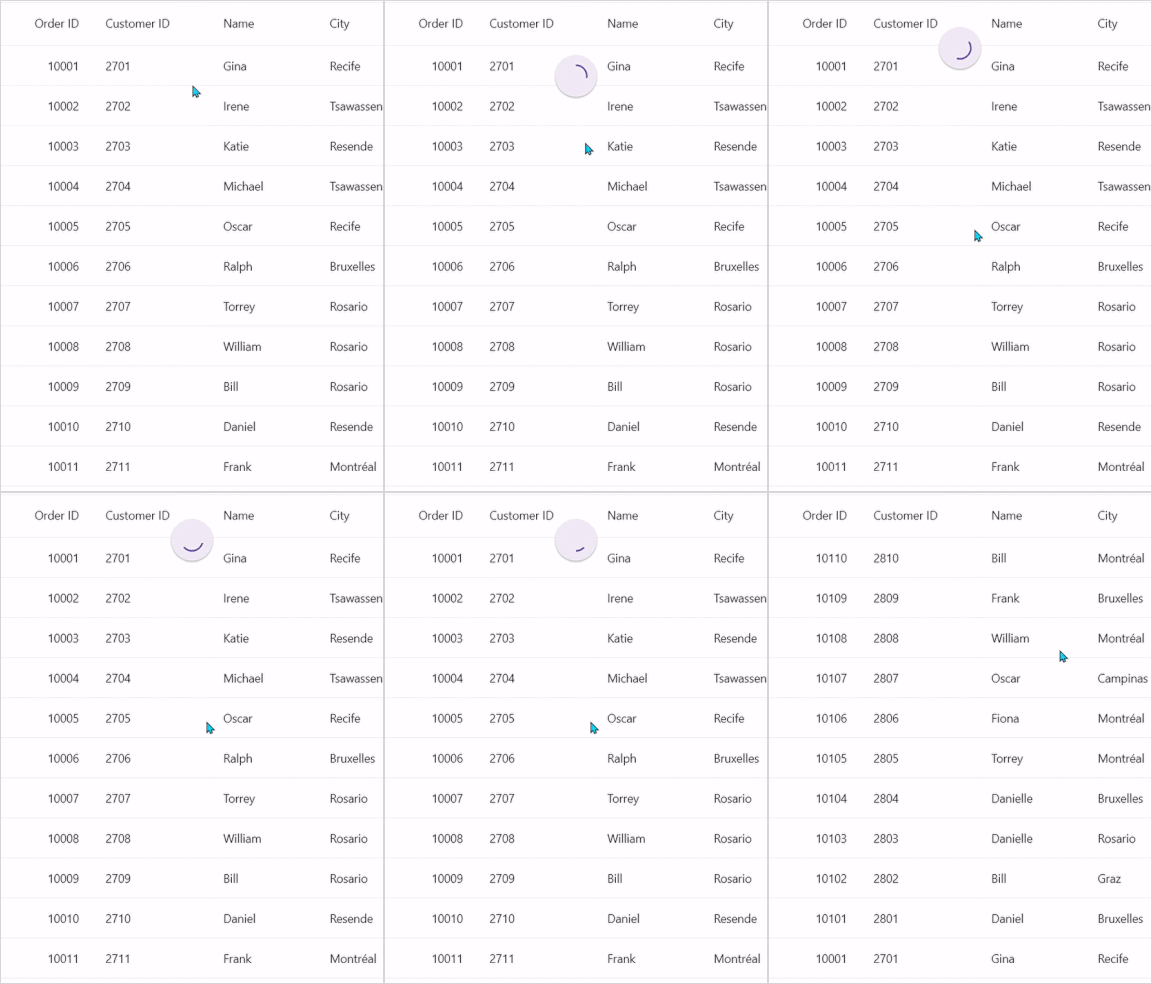

![.NET MAUI PullToRefresh with DataGrid hosted with slide on top transition mode.](Images/customization/net-maui-datagrid-slideontop.gif)

{% tabs %}
{% highlight xaml tabtitle="MainPage.xaml" hl_lines="23 24 36 37" %}

    <ContentPage xmlns="http://schemas.microsoft.com/dotnet/2021/maui"
             xmlns:x="http://schemas.microsoft.com/winfx/2009/xaml"
             x:Class="PullToRefreshTemplate.MainPage"
             xmlns:sfgrid="clr-namespace:Syncfusion.Maui.DataGrid;assembly=Syncfusion.Maui.DataGrid"
             xmlns:pulltoRefresh="clr-namespace:Syncfusion.Maui.PullToRefresh;assembly=Syncfusion.Maui.PullToRefresh"
             xmlns:local="clr-namespace:PullToRefreshTemplate">

        <ContentPage.Behaviors>
            <local:PullToRefreshTemplateBehavior />
        </ContentPage.Behaviors>

        <ContentPage.Content>
            <Grid>
                <pulltoRefresh:SfPullToRefresh x:Name="pullToRefresh"
                                            RefreshViewHeight="50"
                                            RefreshViewThreshold="30"
                                            PullingThreshold="150"
                                            RefreshViewWidth="50"
                                            ProgressThickness='{OnPlatform Android="3", Default="2"}'
                                            TransitionMode="SlideOnTop"
                                            Margin="{StaticResource margin}"
                                            IsRefreshing="False">
                    <pulltoRefresh:SfPullToRefresh.PullableContent>
                        <sfgrid:SfDataGrid x:Name="dataGrid"
                                        HeaderRowHeight="52"
                                        RowHeight="48"
                                        SortingMode="Single"
                                        ItemsSource="{Binding OrdersInfo}"
                                        AutoGenerateColumnsMode="None"
                                        ColumnWidthMode="Fill"
                                        HorizontalScrollBarVisibility="Always"
                                        VerticalScrollBarVisibility="Always">
                            . . .
                            . . . .

                        </sfgrid:SfDataGrid>
                    </pulltoRefresh:SfPullToRefresh.PullableContent>
                </pulltoRefresh:SfPullToRefresh>
            </Grid>
        </ContentPage.Content>
    </ContentPage>

{% endhighlight %}
{% highlight c# tabtitle="MainPage.xaml.cs" %}

    using Syncfusion.Maui.DataGrid;
    using Syncfusion.Maui.ProgressBar;
    using Syncfusion.Maui.PullToRefresh;

    namespace PullToRefreshTemplate
    {
        public class PullToRefreshTemplateBehavior : Behavior<ContentPage>
        {
            protected override void OnAttachedTo(ContentPage bindable)
            {
                this.viewModel = new OrderInfoViewModel();
                bindable.BindingContext = this.viewModel;
                this.pullToRefresh = bindable.FindByName<Syncfusion.Maui.PullToRefresh.SfPullToRefresh>("pullToRefresh");
                this.dataGrid = bindable.FindByName<SfDataGrid>("dataGrid");
                this.dataGrid.ItemsSource = this.viewModel.OrdersInfo;
                this.pullToRefresh.Refreshing += this.PullToRefresh_Refreshing;
                this.pullToRefresh.Pulling += this.PullToRefresh_Pulling;
                base.OnAttachedTo(bindable);
            }

            private async void PullToRefresh_Refreshing(object? sender, EventArgs e)
            {
                this.viewModel!.RefreshItemsource(10);
                await Task.Delay(10);
                this.pullToRefresh.IsRefreshing = false;
            }
        }
    }

{% endhighlight %}
{% endtabs %}

If you run the above sample with the TransitionMode as Push, the output will look as follows.
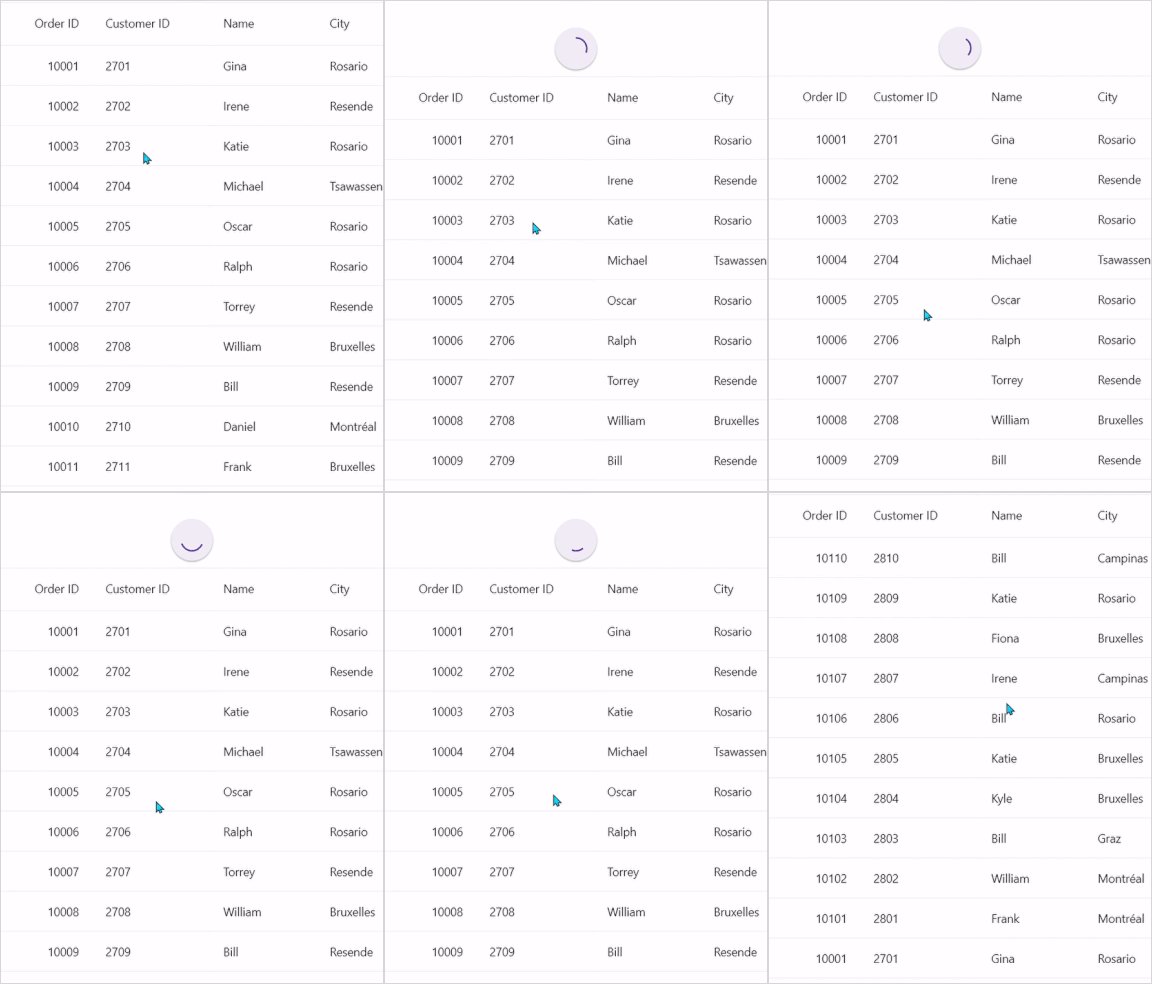

![.NET MAUI PullToRefresh with DataGrid hosted with push transition mode.](Images/customization/net-maui-datagrid-push.gif)


## Host .NET MAUI ListView as pullable content

To host the .NET MAUI `ListView` inside the `PullToRefresh`, which is used to update items in the list while performing the pull to refresh action.
<ol>
    <li>	Add the required assembly references as discussed in the <a href="https://help.syncfusion.com/maui/listview/getting-started">ListView</a> and PullToRefresh.</li>
    <li>	Import the SfPullToRefresh control and SfListView control namespace as follows.</li>
    <br/>
{% tabs %}
{% highlight xaml tabtitle="MainPage.xaml" %}

    xmlns:ListView="clr-namespace:Syncfusion.Maui.ListView;assembly=Syncfusion.Maui.ListView"
    xmlns:pulltoRefresh="clr-namespace:Syncfusion.Maui.PullToRefresh;assembly=Syncfusion.Maui.PullToRefresh"

{% endhighlight %}
{% highlight c# tabtitle="MainPage.xaml.cs" %}

    using Syncfusion.Maui.ListView;
    using Syncfusion.Maui.PullToRefresh;

{% endhighlight %}
{% endtabs %}
    <br/>
    <li>	Define the ListView as PullableContent of the SfPullToRefresh.</li>
    <li>	Handle the pull to refresh events for refreshing the data. </li>
    <li>	Customize the required properties of ListView and PullToRefresh based on your requirement.</li>
</ol>

This is how the final output will look like when hosting a SfListView control as pullable content.

![.NET MAUI PullToRefresh with ListView hosted with slide on top transition mode.](Images/customization/net-maui-listview-slideontop.gif)

{% tabs %}
{% highlight xaml tabtitle="MainPage.xaml" hl_lines="21 23 33 35" %}

    <ContentPage xmlns="http://schemas.microsoft.com/dotnet/2021/maui"
                xmlns:x="http://schemas.microsoft.com/winfx/2009/xaml"
                x:Class="RefreshableListView.MainPage"
                xmlns:ListView="clr-namespace:Syncfusion.Maui.ListView;assembly=Syncfusion.Maui.ListView"
                xmlns:pulltoRefresh="clr-namespace:Syncfusion.Maui.PullToRefresh;assembly=Syncfusion.Maui.PullToRefresh"
                xmlns:local="clr-namespace:RefreshableListView">

        <ContentPage.Behaviors>
            <local:ListViewPullToRefreshBehavior />
        </ContentPage.Behaviors>

        <ContentPage.Content>
            <Grid>
                <pulltoRefresh:SfPullToRefresh x:Name="pullToRefresh"
                                            RefreshViewHeight="50"
                                            RefreshViewThreshold="30"
                                            PullingThreshold="150"
                                            RefreshViewWidth="50"
                                            TransitionMode="SlideOnTop"
                                            IsRefreshing="False">
                    <pulltoRefresh:SfPullToRefresh.PullableContent>
                        <Grid x:Name="mainGrid">
                            <ListView:SfListView Grid.Row="1"
                                                x:Name="listView"
                                                ItemsSource="{Binding InboxInfos}"
                                                ItemSize="102"
                                                SelectionMode="Single"
                                                ScrollBarVisibility="Always"
                                                AutoFitMode="Height">
                                . . . 
                                . . . .

                            </ListView:SfListView>
                        </Grid>
                    </pulltoRefresh:SfPullToRefresh.PullableContent>
                </pulltoRefresh:SfPullToRefresh>
            </Grid>
        </ContentPage.Content>
    </ContentPage>
    
{% endhighlight %}
{% highlight c# tabtitle="MainPage.xaml.cs" %}

    using Syncfusion.Maui.DataSource;
    using Syncfusion.Maui.DataSource.Extensions;
    using Syncfusion.Maui.ListView;
    using Syncfusion.Maui.PullToRefresh;
    namespace RefreshableListView
    {
        protected override void OnAttachedTo(ContentPage bindable)
        {
            ViewModel = new ListViewInboxInfoViewModel();
            bindable.BindingContext = ViewModel;
            pullToRefresh = bindable.FindByName<SfPullToRefresh>("pullToRefresh");
            ListView = bindable.FindByName<SfListView>("listView");
            pullToRefresh.Refreshing += PullToRefresh_Refreshing;

            base.OnAttachedTo(bindable);
        }

        private async void PullToRefresh_Refreshing(object? sender, EventArgs e)
        {
            pullToRefresh!.IsRefreshing = true;
            await Task.Delay(2500);
            ViewModel!.AddItemsRefresh(3);
            pullToRefresh.IsRefreshing = false;
        }
    }

{% endhighlight %}
{% endtabs %}

N> [View sample in GitHub](https://github.com/SyncfusionExamples/load-listview-as-pullable-content-of-.net-maui-pull-to-refresh).

If you run the above sample with the [TransitionMode](https://help.syncfusion.com/cr/maui/Syncfusion.Maui.PullToRefresh.SfPullToRefresh.html#Syncfusion_Maui_PullToRefresh_SfPullToRefresh_TransitionMode) as Push, the output will look as follows.

![. NET MAUI PullToRefresh with ListView hosted with push transition mode.](Images/customization/net-maui-listview-push.gif)

## Pulling and refreshing template

The `PullToRefresh` allows you to set a template for pulling and refreshing the view. The pulling and refreshing a template can be set using the [SfPullToRefresh.PullingViewTemplate](https://help.syncfusion.com/cr/maui/Syncfusion.Maui.PullToRefresh.SfPullToRefresh.html#Syncfusion_Maui_PullToRefresh_SfPullToRefresh_PullingViewTemplate) and [SfPullToRefresh.RefreshingViewTemplate](https://help.syncfusion.com/cr/maui/Syncfusion.Maui.PullToRefresh.SfPullToRefresh.html#Syncfusion_Maui_PullToRefresh_SfPullToRefresh_RefreshingViewTemplate) properties, respectively.

Refer to the following code example in which a [SfCircularProgressBar](https://help.syncfusion.com/cr/maui/Syncfusion.Maui.ProgressBar.SfCircularProgressBar.html?tabs=tabid-1) is loaded in the pulling view template and refreshing view template.

{% tabs %}
{% highlight xaml tabtitle="MainPage.xaml" hl_lines="23 24 36 37" %}

    <ContentPage xmlns="http://schemas.microsoft.com/dotnet/2021/maui"
             xmlns:x="http://schemas.microsoft.com/winfx/2009/xaml"
             x:Class="PullToRefreshTemplate.MainPage"
             xmlns:sfgrid="clr-namespace:Syncfusion.Maui.DataGrid;assembly=Syncfusion.Maui.DataGrid"
             xmlns:pulltoRefresh="clr-namespace:Syncfusion.Maui.PullToRefresh;assembly=Syncfusion.Maui.PullToRefresh"
             xmlns:local="clr-namespace:PullToRefreshTemplate">

        <ContentPage.Behaviors>
            <local:PullToRefreshTemplateBehavior />
        </ContentPage.Behaviors>

        <ContentPage.Content>
            <Grid>
                <pulltoRefresh:SfPullToRefresh x:Name="pullToRefresh"
                                            RefreshViewHeight="50"
                                            RefreshViewThreshold="30"
                                            PullingThreshold="150"
                                            RefreshViewWidth="50"
                                            ProgressThickness='{OnPlatform Android="3", Default="2"}'
                                            TransitionMode="SlideOnTop"
                                            Margin="{StaticResource margin}"
                                            IsRefreshing="False">
                    <pulltoRefresh:SfPullToRefresh.PullableContent>
                        <sfgrid:SfDataGrid x:Name="dataGrid"
                                        HeaderRowHeight="52"
                                        RowHeight="48"
                                        SortingMode="Single"
                                        ItemsSource="{Binding OrdersInfo}"
                                        AutoGenerateColumnsMode="None"
                                        ColumnWidthMode="Fill"
                                        HorizontalScrollBarVisibility="Always"
                                        VerticalScrollBarVisibility="Always">
                            . . .
                            . . . .

                        </sfgrid:SfDataGrid>
                    </pulltoRefresh:SfPullToRefresh.PullableContent>
                </pulltoRefresh:SfPullToRefresh>
            </Grid>
        </ContentPage.Content>
    </ContentPage>

{% endhighlight %}
{% highlight c# tabtitle="MainPage.xaml.cs" %}

    public class PullToRefreshTemplateBehavior : Behavior<ContentPage>
    {        
        protected override void OnAttachedTo(ContentPage bindable)
        {
            this.viewModel = new OrderInfoViewModel();
            this.progressbar = new SfCircularProgressBar();
            this.frame = new Frame();
            this.progressContent = new Label();

            this.progressContent.TextColor = Color.FromRgb(0, 124, 238);
            this.progressContent.FontSize = 9;
            this.progressContent.WidthRequest = 20;
            this.progressContent.HorizontalTextAlignment = TextAlignment.Center;

            this.frame.BorderColor = Colors.LightGray;
            this.frame.BackgroundColor = Colors.White;
            this.frame.CornerRadius = 30;
            this.frame.Content = this.progressbar;
            this.frame.Padding = 0;
            this.frame.HasShadow = false;

            this.progressbar.SegmentCount = 10;
            this.progressbar.ProgressThickness = 6;
            this.progressbar.ProgressRadiusFactor = 0.7;
            this.progressbar.SegmentGapWidth = 1;
            this.progressbar.WidthRequest = 55;
            this.progressbar.HeightRequest = 55;
            this.progressbar.IndeterminateAnimationDuration = 750;
            this.progressbar.Content = this.progressContent;

            bindable.BindingContext = this.viewModel;
            this.pullToRefresh = bindable.FindByName<Syncfusion.Maui.PullToRefresh.SfPullToRefresh>("pullToRefresh");
            this.dataGrid = bindable.FindByName<SfDataGrid>("dataGrid");
            this.dataGrid.ItemsSource = this.viewModel.OrdersInfo;
            this.pullToRefresh.Refreshing += this.PullToRefresh_Refreshing;
            this.pullToRefresh.Pulling += this.PullToRefresh_Pulling;

            var pullingTemplate = new DataTemplate(() =>
            {
                return new ViewCell { View = this.frame };
            });

            this.pullToRefresh.PullingViewTemplate = pullingTemplate;
            this.pullToRefresh.RefreshingViewTemplate = pullingTemplate;

            base.OnAttachedTo(bindable);
        }

        private void PullToRefresh_Pulling(object? sender, PullingEventArgs e)
        {
            this.progressbar!.TrackThickness = 0.8;
            this.progressbar.TrackRadiusFactor = 0.1;
            this.progressbar.IsIndeterminate = false;
            this.progressbar.ProgressFill = Color.FromRgb(0, 124, 238);
            this.progressbar.TrackFill = Colors.White;

            var absoluteProgress = Convert.ToInt32(Math.Abs(e.Progress));
            this.progressbar.Progress = absoluteProgress;
            this.progressbar.SetProgress(absoluteProgress, 1, Easing.CubicInOut);
            this.progressContent!.Text = e.Progress.ToString();
        }

        private async void PullToRefresh_Refreshing(object? sender, EventArgs e)
        {
            this.progressContent!.IsVisible = false;
            this.pullToRefresh!.IsRefreshing = true;
            await Task.Delay(10);
            await this.AnimateRefresh();
            this.viewModel!.RefreshItemsource(10);
            await Task.Delay(10);
            this.pullToRefresh.IsRefreshing = false;
            this.progressContent.IsVisible = true;
        }

        private async Task AnimateRefresh()
        {
            this.progressbar!.Progress = 0;
            this.progressbar.IsIndeterminate = true;

            await Task.Delay(750);
            this.progressbar.ProgressFill = Colors.Red;

            await Task.Delay(750);
            this.progressbar.ProgressFill = Colors.Green;

            await Task.Delay(750);
            this.progressbar.ProgressFill = Colors.Orange;

            await Task.Delay(750);
        }

    }

{% endhighlight %}
{% endtabs %}

![.NET MAUI PullToRefresh view Template.](Images/customization/net-maui-template-slideontop.gif)

N> [View sample in GitHub](https://github.com/SyncfusionExamples/load-datagrid-as-pullable-content-of-.net-maui-pull-to-refresh).