Mode in .NET MAUI Picker control
Picker mode determines how the picker is displayed. It offers three modes: Default, Dialog, and RelativeDialog. The default picker mode is Default in the SfPicker.
Dialog Mode
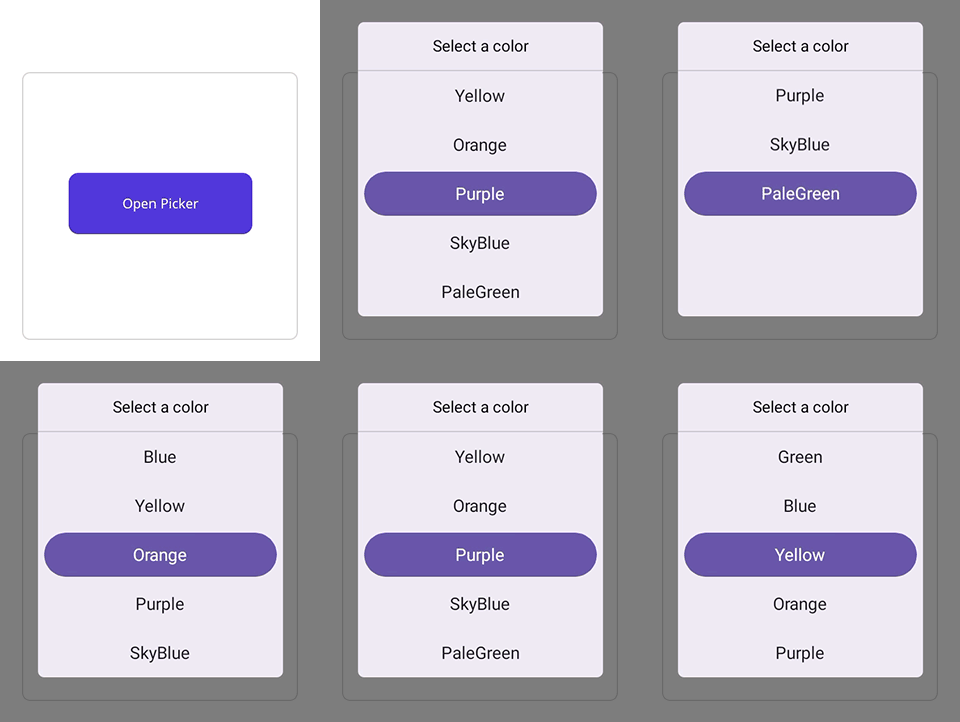
The dialog mode is used to display the picker in a pop-up by setting the Mode property to Dialog in SfPicker.
<picker:SfPicker x:Name="Picker"
                 Mode="Dialog"/>
SfPicker picker = new SfPicker()
{
    Mode = PickerMode.Dialog
};

this.Content = picker;
The Picker can be opened programmatically by setting the IsOpen property to true of SfPicker. By default, the IsOpen property is false.
Note: This property is automatically changed to false when you close the dialog by clicking outside of it.
<Grid>
    <picker:SfPicker x:Name="picker"
                         Mode="Dialog"/>
    <Button Text="Open Picker"
            x:Name="pickerButton"
            Clicked="Button_Clicked"
            HorizontalOptions="Center"
            VerticalOptions="Center"
            HeightRequest="50"
            WidthRequest="150">
    </Button>
</Grid>
private void Button_Clicked(object sender, System.EventArgs e)
{
this.picker.IsOpen = true;
}
Relative Dialog Mode
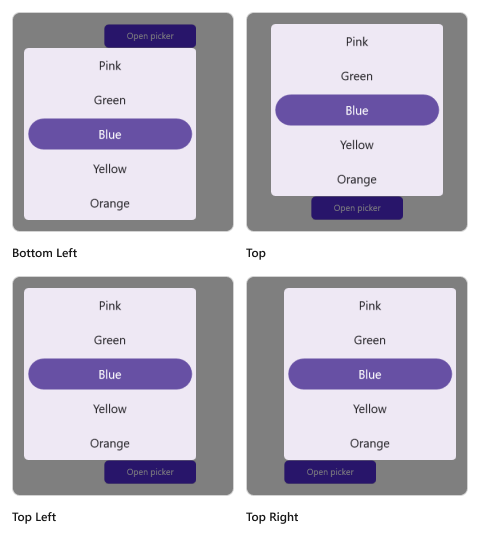
The relative dialog mode displays the picker in a pop-up by setting the Mode property to RelativeDialog. It is used to align the picker in a specific position. You can set the position by setting the RelativePosition property in the SfPicker.
Relative position
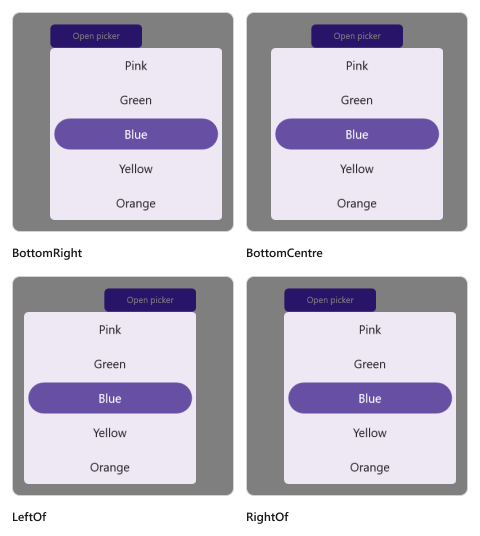
The RelativePosition is specified in the picker property enumeration, which is used to align the picker in a specific position. It provides eight positions such as AlignTop, AlignToLeftOf, AlignToRightOf, AlignBottom, AlignTopLeft, AlignTopRight, AlignBottomLeft, and AlignBottomRight. The default relative position is AlignTop in the SfPicker.
The Picker can be opened programmatically by setting the IsOpen property to true of SfPicker. By default, the IsOpen property is false.
Note: This property is automatically changed to false when you close the dialog by clicking outside of it.
<Grid>
    <picker:SfPicker x:Name="picker"
                         Mode="RelativeDialog"
                         RelativePosition="AlignTopLeft">
    </picker:SfPicker>
    <Button Text="Open Picker"
            x:Name="pickerButton"
            Clicked="Button_Clicked"
            HorizontalOptions="Center"
            VerticalOptions="Center"
            HeightRequest="50"
            WidthRequest="150">
    </Button>
</Grid>
private void Button_Clicked(object sender, System.EventArgs e)
{
this.picker.IsOpen = true;
}Relative view
The RelativeView is specified in the picker’s property enumeration and is used to display the picker dialog relative to a view by setting the Mode property to RelativeDialog. You can set the position by setting the RelativePosition property in the SfPicker.
It is only applicable in
RelativeDialogmode. Ifno relative viewis specified, the picker base will be set as thedefaultrelative view.
<Grid>
    <picker:SfPicker x:Name="picker"
                         Mode="RelativeDialog"
                         RelativePosition="AlignTopLeft"
                         RelativeView = "{x:Reference pickerButton}">
    </picker:SfPicker>
    <Button Text="Open Picker"
            x:Name="pickerButton"
            Clicked="Button_Clicked"
            HorizontalOptions="Center"
            VerticalOptions="Center"
            HeightRequest="50"
            WidthRequest="150">
    </Button>
</Grid>
private void Button_Clicked(object sender, System.EventArgs e)
{
this.picker.IsOpen = true;
this.picker.RelativeView = pickerButton;
}
Custom popup size
Use the PopupWidth and PopupHeight properties to set the popup to any size. The properties apply to both Dialog and RelativeDialog modes.
<Grid>
    <picker:SfPicker
            x:Name="picker"
            Mode="Dialog"
            IsOpen="True"
            RelativePosition="AlignToRightOf"
            PopupWidth="200"
            PopupHeight="440">
        <picker:SfPicker.HeaderView >
            <picker:PickerHeaderView Height="40" Text="Select a color" />
        </picker:SfPicker.HeaderView>
        <picker:SfPicker.Columns>
            <picker:PickerColumn HeaderText="Colors" ItemsSource="{Binding DataSource}"/>
        </picker:SfPicker.Columns>
        <picker:SfPicker.ColumnHeaderView >
            <picker:PickerColumnHeaderView Height="40"/>
        </picker:SfPicker.ColumnHeaderView>
        <picker:SfPicker.FooterView>
            <picker:PickerFooterView  Height="40"/>
        </picker:SfPicker.FooterView>
    </picker:SfPicker>
</Grid>
private void pickerButton_Clicked(object sender, System.EventArgs e)
{
this.picker.PopupWidth = 300;
this.picker.PopupHeight = 440;
this.picker.IsOpen = true;
}