Right-to-Left Flow Direction in .NET MAUI Kanban (SfKanban)
21 Jul 202617 minutes to read
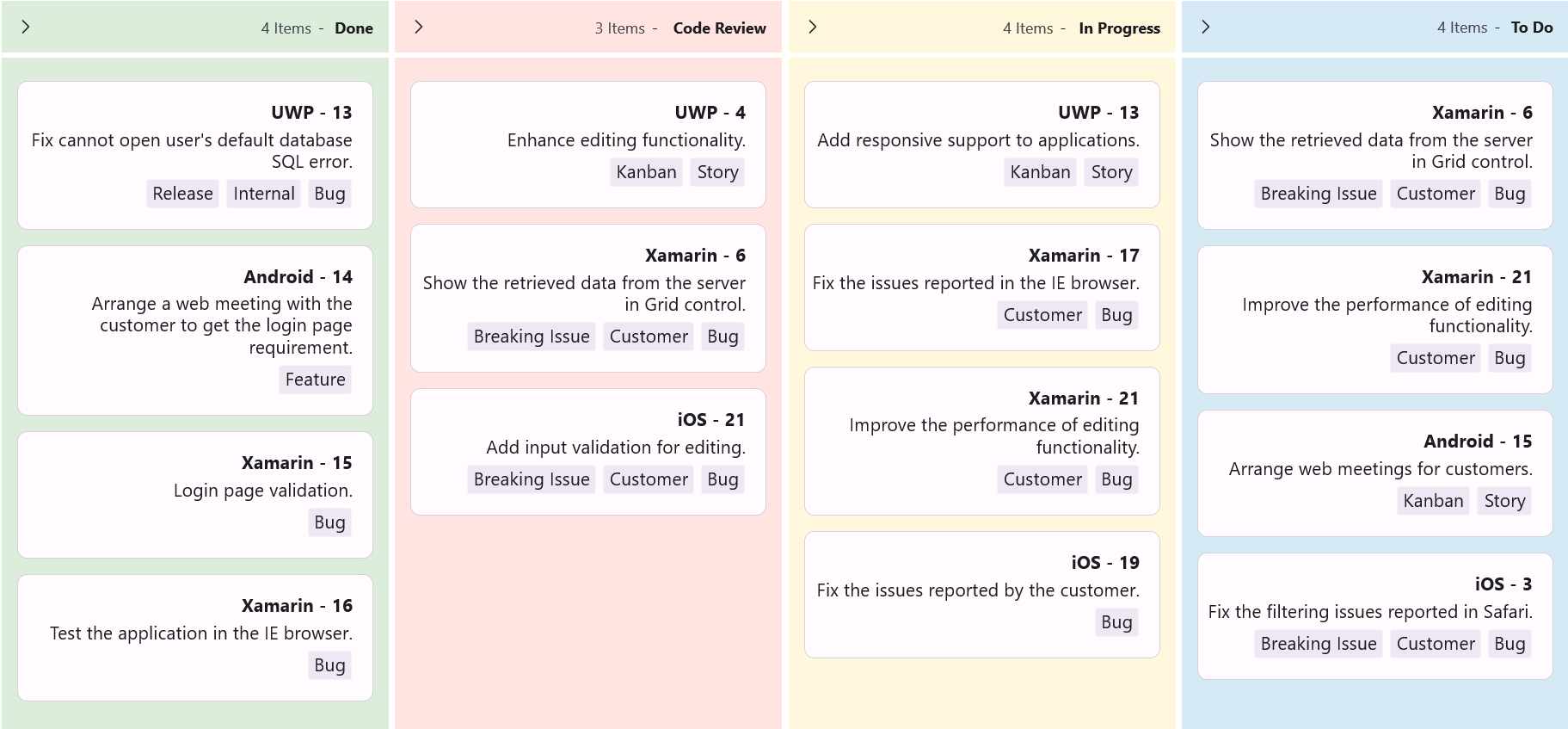
The SfKanban supports changing the flow direction of items rendering in the right-to-left order by setting the FlowDirection to RightToLeft.
The following example applies RightToLeft flow direction to the Kanban control.
<ContentPage xmlns="http://schemas.microsoft.com/dotnet/2021/maui"
             xmlns:x="http://schemas.microsoft.com/winfx/2009/xaml"
             xmlns:kanban="clr-namespace:Syncfusion.Maui.Kanban;assembly=Syncfusion.Maui.Kanban"
             xmlns:local="clr-namespace:YourAppNamespace;assembly=YourAppName"
             x:Class="YourAppNamespace.MainPage">
    <ContentPage.BindingContext>
        <local:KanbanViewModel />
    </ContentPage.BindingContext>
    <kanban:SfKanban x:Name="kanban"
                     AutoGenerateColumns="False"
                     ItemsSource="{Binding Cards}"
                     FlowDirection="RightToLeft">
        <kanban:SfKanban.Columns>
            <kanban:KanbanColumn Title="To Do"
                                 Categories="Open,Postponed"
                                 Background="#D6EAF5" />
            <kanban:KanbanColumn Title="In Progress"
                                 Categories="In Progress"
                                 Background="#FFF8DC" />
            <kanban:KanbanColumn Title="Code Review"
                                 Categories="Code Review"
                                 Background="#FFE4E1" />
            <kanban:KanbanColumn Title="Done"
                                 Categories="Closed"
                                 Background="#DCEDDC" />
        </kanban:SfKanban.Columns>
    </kanban:SfKanban>
</ContentPage>
SfKanban kanban = new SfKanban();
KanbanViewModel viewModel = new KanbanViewModel();
kanban.AutoGenerateColumns = false;
kanban.FlowDirection = FlowDirection.RightToLeft;
kanban.Columns.Add(new KanbanColumn
{
Title = "To Do",
Categories = new List<object> { "Open", "Postponed" },
Background = Color.FromArgb("#D6EAF5")
});
kanban.Columns.Add(new KanbanColumn
{
Title = "In Progress",
Categories = new List<object> { "In Progress" },
Background = Color.FromArgb("#FFF8DC")
});
kanban.Columns.Add(new KanbanColumn
{
Title = "Code Review",
Categories = new List<object> { "Code Review" },
Background = Color.FromArgb("#FFE4E1")
});
kanban.Columns.Add(new KanbanColumn
{
Title = "Done",
Categories = new List<object> { "Closed" },
Background = Color.FromArgb("#DCEDDC")
});
kanban.ItemsSource = viewModel.Cards;
this.Content = kanban;using System.Collections.ObjectModel;
using Syncfusion.Maui.Kanban;
public class KanbanViewModel
{
public KanbanViewModel()
{
this.Cards = this.GetCardDetails();
}
public ObservableCollection<KanbanModel> Cards { get; set; }
private ObservableCollection<KanbanModel> GetCardDetails()
{
var cardsDetails = new ObservableCollection<KanbanModel>();
cardsDetails.Add(new KanbanModel()
{
ID = 6,
Title = "Xamarin - 6",
Category = "Open",
Description = "Show the retrieved data from the server in Grid control.",
IndicatorFill = Colors.Red,
Tags = new List<string> { "Bug", "Customer", "Breaking Issue" }
});
cardsDetails.Add(new KanbanModel()
{
ID = 21,
Title = "Xamarin - 21",
Category = "Open",
Description = "Improve the performance of editing functionality.",
IndicatorFill = Colors.Purple,
Tags = new List<string> { "Bug", "Customer" }
});
cardsDetails.Add(new KanbanModel()
{
ID = 3,
Title = "iOS - 3",
Category = "Postponed",
Description = "Fix the filtering issues reported in Safari.",
IndicatorFill = Colors.Red,
Tags = new List<string> { "Bug", "Customer", "Breaking Issue" }
});
cardsDetails.Add(new KanbanModel()
{
ID = 11,
Title = "iOS - 21",
Category = "Code Review",
Description = "Add input validation for editing.",
IndicatorFill = Colors.Red,
Tags = new List<string> { "Bug", "Customer", "Breaking Issue" }
});
cardsDetails.Add(new KanbanModel()
{
ID = 15,
Title = "Android - 15",
Category = "Open",
Description = "Arrange web meetings for customers.",
IndicatorFill = Colors.Red,
Tags = new List<string> { "Story", "Kanban" }
});
cardsDetails.Add(new KanbanModel()
{
ID = 4,
Title = "UWP - 4",
Category = "Code Review",
Description = "Enhance editing functionality.",
IndicatorFill = Colors.Brown,
Tags = new List<string> { "Story", "Kanban" }
});
cardsDetails.Add(new KanbanModel()
{
ID = 13,
Title = "UWP - 13",
Category = "In Progress",
Description = "Add responsive support to applications.",
IndicatorFill = Colors.Brown,
Tags = new List<string> { "Story", "Kanban" }
});
cardsDetails.Add(new KanbanModel()
{
ID = 17,
Title = "Xamarin - 17",
Category = "In Progress",
Description = "Fix the issues reported in the IE browser.",
IndicatorFill = Colors.Brown,
Tags = new List<string> { "Bug", "Customer" }
});
cardsDetails.Add(new KanbanModel()
{
ID = 21,
Title = "Xamarin - 21",
Category = "Code Review",
Description = "Improve the performance of editing functionality.",
IndicatorFill = Colors.Purple,
Tags = new List<string> { "Bug", "Customer" }
});
cardsDetails.Add(new KanbanModel()
{
ID = 19,
Title = "iOS - 19",
Category = "In Progress",
Description = "Fix the issues reported by the customer.",
IndicatorFill = Colors.Purple,
Tags = new List<string> { "Bug" }
});
cardsDetails.Add(new KanbanModel()
{
ID = 6,
Title = "Xamarin - 6",
Category = "Code Review",
Description = "Show the retrieved data from the server in Grid control.",
IndicatorFill = Colors.Red,
Tags = new List<string> { "Bug", "Customer", "Breaking Issue" }
});
cardsDetails.Add(new KanbanModel()
{
ID = 13,
Title = "UWP - 13",
Category = "Closed",
Description = "Fix cannot open user's default database SQL error.",
IndicatorFill = Colors.Purple,
Tags = new List<string> { "Bug", "Internal", "Release" }
});
cardsDetails.Add(new KanbanModel()
{
ID = 14,
Title = "Android - 14",
Category = "Closed",
Description = "Arrange a web meeting with the customer to get the login page requirement.",
IndicatorFill = Colors.Red,
Tags = new List<string> { "Feature" }
});
cardsDetails.Add(new KanbanModel()
{
ID = 15,
Title = "Xamarin - 15",
Category = "Closed",
Description = "Login page validation.",
IndicatorFill = Colors.Red,
Tags = new List<string> { "Bug" }
});
cardsDetails.Add(new KanbanModel()
{
ID = 16,
Title = "Xamarin - 16",
Category = "Closed",
Description = "Test the application in the IE browser.",
IndicatorFill = Colors.Purple,
Tags = new List<string> { "Bug" }
});
return cardsDetails;
}
}