Downloading Syncfusion® .NET MAUI offline installer
23 Jul 20263 minutes to read
Applies to: Syncfusion® Essential Studio® .NET MAUI Offline Installer on Windows.
The Syncfusion® .NET MAUI installer can be downloaded from the Syncfusion website. You can either download the licensed installer or try our trial installer, depending on your license.
- Trial Installer
- Licensed Installer
Download the trial version
Our 30-day trial can be downloaded in two ways:
- Download the Free Trial Setup.
- Start a trial through NuGet.org.
Download free trial setup
- Visit the Download Free Trial page and select the .NET MAUI platform.
-
After completing the required form or signing in with your registered Syncfusion® account, download the .NET MAUI trial installer from the confirmation page (as shown in the screenshot below).
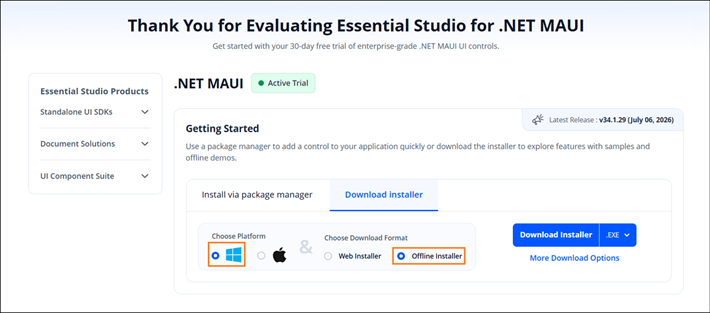
- With a trial license, only the latest version’s trial installer can be downloaded.
- Once downloaded, unlock the Syncfusion® .NET MAUI trial installer using either the trial unlock key or your registered login credentials. More information on generating an unlock key can be found in this article.
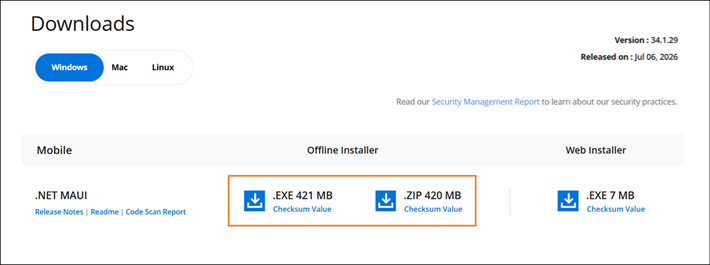
- Before the trial expires, download the trial installer at any time from your registered account’s Trials & Downloads page (as shown in the screenshot below).
-
Click More Download Options (element 2 in the screenshot) to get the Essential Studio® .NET MAUI offline trial installer, available in EXE and ZIP formats.
Start trials if using components through nuget.org
If you have already accessed our components through NuGet.org:
-
Start your 30-day free trial for .NET MAUI from the Start Trial page in your account.
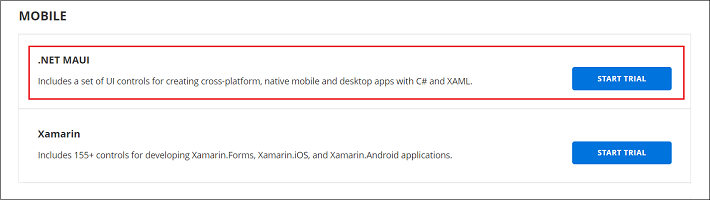
- Sign up or sign in with your Syncfusion® account to access this page.
-
Begin your trial by selecting the .NET MAUI product.
NOTE
If you have previously used a trial for a product and it has not expired, you will not be able to start a new trial for the same product.
-
After starting the trial, visit the Trials & Downloads page to get the latest version trial installer. Generate the unlock key and license key at any time before the trial period expires (as shown in the screenshot below).
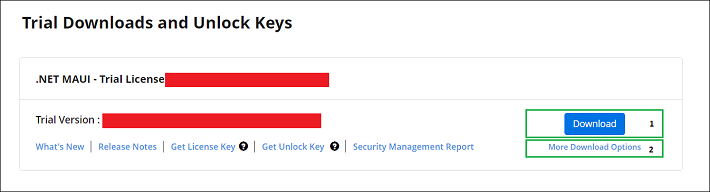
- You can find your active trial products on the Trials & Downloads page.
Download the license version
- Access Syncfusion® licensed products through the License & Downloads page under your registered Syncfusion® account.
- View all licenses (both active and expired) associated with your account.
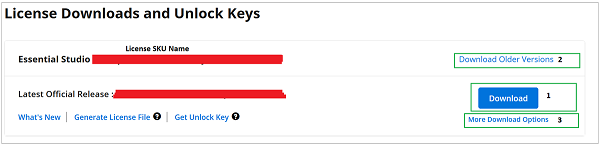
- Click Download (element 1 in the screenshot below) to download the respective product’s installer.
- The latest version of the installer will be downloaded from this page.
- To download older version installers, visit Downloads Older Versions (element 2 in the screenshot).
-
You can download other platform or add-on installers by selecting More Downloads Options (element 3 in the screenshot).
-
For Windows, EXE and ZIP formats are available for download. They are both offline installers.
For step-by-step installation guidelines, see Installing the .NET MAUI Offline Installer.