Manage packages in an existing project
18 Nov 20183 minutes to read
Package operations change NuGet references only. They do not generate control files.
In a CLI-generated project, supported package aliases also integrate their samples. For example, sfdotnet add maui datagrid adds the DataGrid package and integrates the DataGrid sample. In an ordinary project, the same command adds the package reference only, and the CLI reports that no sample was generated.
Add a package by alias
To add a package using its short package alias:
sfdotnet add maui datagridAdd a package by package ID
To add a package using the exact NuGet package identifier:
sfdotnet add maui Syncfusion.Maui.DataGridAdd generated samples
To add generated samples directly, use --control:
sfdotnet add maui --control datagrid listview --path ./MyAppUpdate a package
To update a package in an existing project:
sfdotnet update maui datagridList available packages
To list all Syncfusion® packages available for .NET MAUI:
sfdotnet list maui packages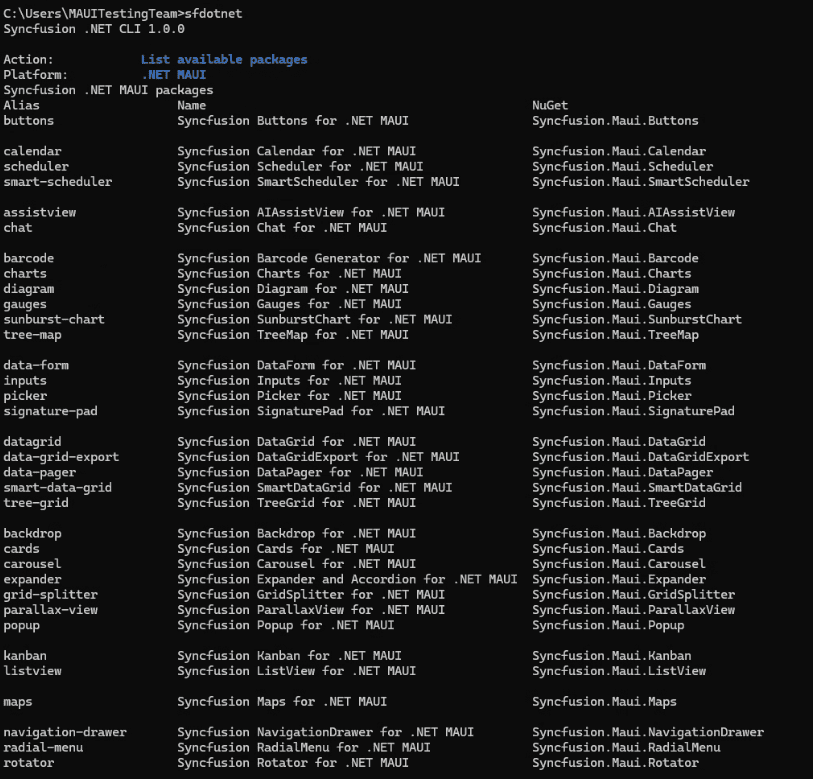
List installed packages
To list the Syncfusion® packages installed in an existing project:
sfdotnet list maui installed --path ./MyAppSearch packages
To search the package catalog:
sfdotnet search maui gridExisting-project commands accept -p/--path with a project file, a project directory, or a supported subdirectory. Discovery stops at the nearest project or repository boundary. --json emits one JSON document for script use.
Package operation options
| Option | Description |
|---|---|
-p, --path
|
The project directory, .csproj file, or a supported subdirectory |
-v, --version
|
The Syncfusion® NuGet package version |
--source |
Package source; Syncfusion® packages require https://api.nuget.org/v3/index.json
|
--configfile |
The NuGet configuration file to use |
--dry-run |
Preview the action without making changes |
--force |
Allow supported overwrites |
--no-restore |
Skip dotnet restore after the action |
--json |
Emit one JSON document |