Install AI component skills
18 Nov 20184 minutes to read
The sfdotnet skills install command installs the official Syncfusion® .NET MAUI component skills for AI agents from the syncfusion/maui-ui-components-skills GitHub repository. Skills give AI agents product-specific guidance for generating and editing Syncfusion® control code. Skills are installed for the agents you choose, either project-local or global.
No Syncfusion® account, API key, or license is required to install or read skills.
Prerequisites
-
Node.js 22.20 or later, installed with npm and Git, available on
PATH. - The setup uses the official Skills CLI (
[email protected]) through npx, which may download the CLI package and the official skills repository on first use.
Install skills through the interactive menu
-
Run
sfdotnetto open the main menu, and under AI & Skills, select Add component skills to AI Agent.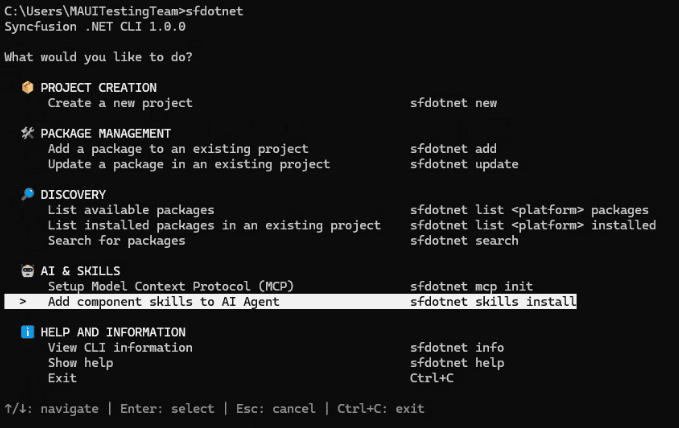
-
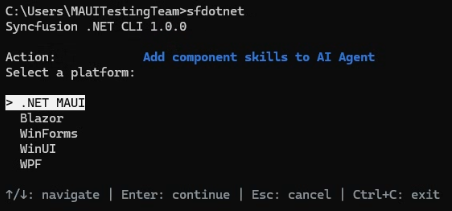
Select the platform. Choose .NET MAUI.
-
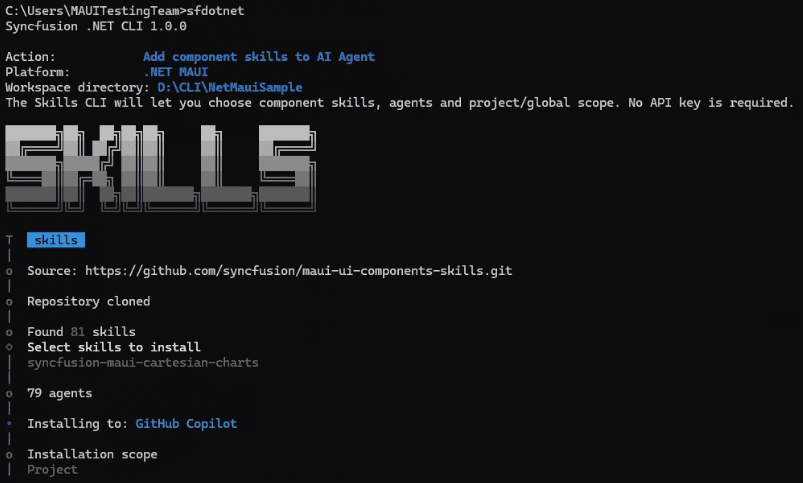
Enter the workspace directory. The Skills CLI then presents its own interactive flow, in which you choose the component skills, the agents, and the project or global scope. No API key is required.
-
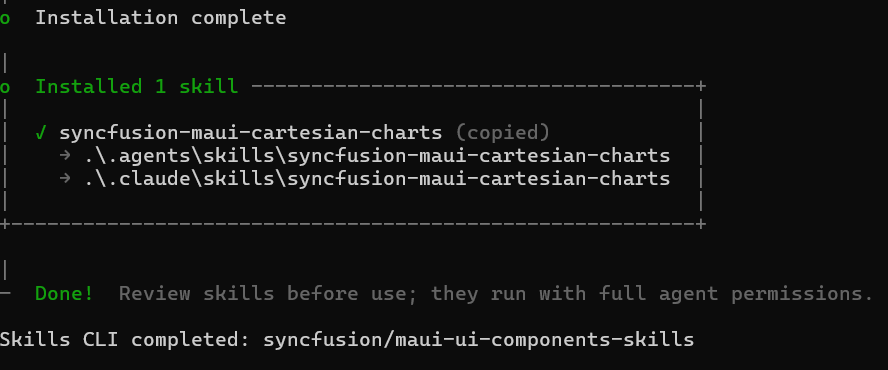
After the Skills CLI completes, the CLI reports the completed status for the skills repository.
Install skills using direct commands
sfdotnet skills install maui
sfdotnet skills install maui --list
sfdotnet skills install maui --agent github-copilot --skill <exact-skill-name> --yes
sfdotnet skills install maui --agent cursor claude-code --all --yes- Use
--listto list the exact skill names available in the repository without installing anything. - Use
--agentwith one or more agent IDs:Github Copilot,Cursor,Syncfusion Code Studio, orClaude Code. - Use
--skillwith one or more exact skill names, or--allto install all skills for the selected agents.--alldoes not mean all agents. - Installation with
--no-interactiverequires--agent,--skill(or--all), and--yes. The scope defaults to project-local; add--globalexplicitly to install skills in the user’s global agent directories. - Skills are copied into the agent’s skills location, so no elevated file-system permissions are required.
completedmeans the Skills CLI exited successfully, not that an AI agent has loaded or executed the skills. Reload the workspace in your AI agent so the newly installed skills are picked up.
Skills options
| Option | Description |
|---|---|
<platform> |
The platform: maui, blazor, wpf, winforms, or winui
|
--agent |
One or more agent IDs: github-copilot, cursor, codestudio, or claude-code
|
--skill |
One or more exact skill names. Discover names with --list
|
--all |
Install all skills for the selected agents, not all agents |
--global |
Install skills in the user’s global agent directories |
--yes |
Confirm the no-interactive installation |
--list |
List repository skill names without installing |
-p, --path
|
The workspace directory. Defaults to the current directory |
--dry-run |
Show the planned Skills CLI command without executing it |
--json |
Emit one JSON document |
FAQs
Do I need a license to install AI component skills?
No. Skills installation requires no Syncfusion® account, API key, or license. It requires Node.js 22.20 or later with npm and Git.