Mode in .NET MAUI Date Time Picker control
18 Nov 201810 minutes to read
The Mode property controls how the Date Time Picker is displayed. It offers three values: Default, Dialog, and RelativeDialog. The default picker mode in the SfDateTimePicker is Default.
Default mode
In Default mode, the Date Time Picker renders inline in the page layout and the user can interact with it directly (no popup is shown). This is the default behavior when no other Mode is set.
Dialog mode
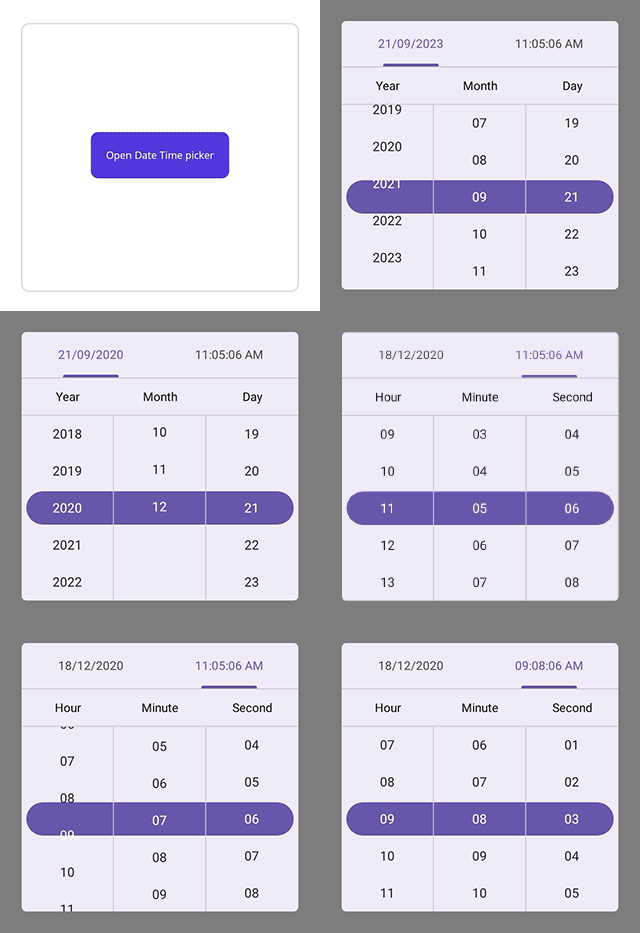
The dialog mode is used to display the date time picker in a popup by setting the Mode property to Dialog in SfDateTimePicker.
<ContentPage
    . . .
    xmlns:picker="clr-namespace:Syncfusion.Maui.Picker;assembly=Syncfusion.Maui.Picker">
    <picker:SfDateTimePicker x:Name="picker"
                             Mode="Dialog">
    </picker:SfDateTimePicker>
</ContentPage>
using Syncfusion.Maui.Picker;
. . .
public partial class MainPage : ContentPage
{
public MainPage()
{
InitializeComponent();
SfDateTimePicker dateTimePicker = new SfDateTimePicker();
dateTimePicker.Mode = PickerMode.Dialog;
this.Content = dateTimePicker;
}
}The Date Time picker can be opened programmatically by setting the IsOpen property to true of SfDateTimePicker. By default, the IsOpen property is false.
Note: This property automatically changes to false when you close the dialog by clicking outside of it.
<ContentPage
    . . .
    xmlns:picker="clr-namespace:Syncfusion.Maui.Picker;assembly=Syncfusion.Maui.Picker">
    <Grid>
        <picker:SfDateTimePicker x:Name="picker"
                                 Mode="Dialog">
        </picker:SfDateTimePicker>
        <Button Text="Open Date Time picker"
                x:Name="pickerButton"
                Clicked="Button_Clicked"
                HorizontalOptions="Center"
                VerticalOptions="Center"
                HeightRequest="50"
                WidthRequest="150">
        </Button>
    </Grid>
</ContentPage>
using Syncfusion.Maui.Picker;
. . .
public partial class MainPage : ContentPage
{
public MainPage()
{
InitializeComponent();
}
private void Button_Clicked(object sender, EventArgs e)
{
this.dateTimePicker.IsOpen = true;
}
}
Relative dialog mode
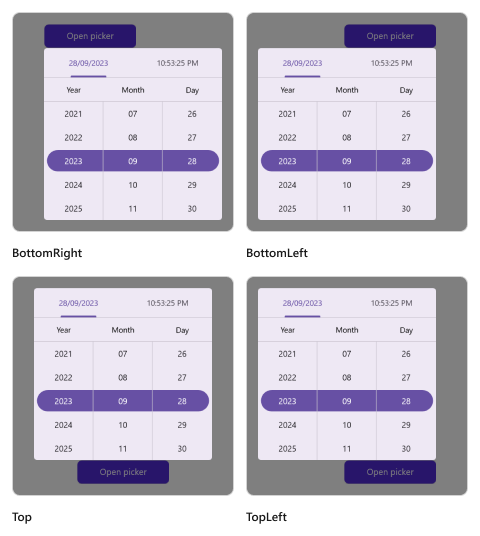
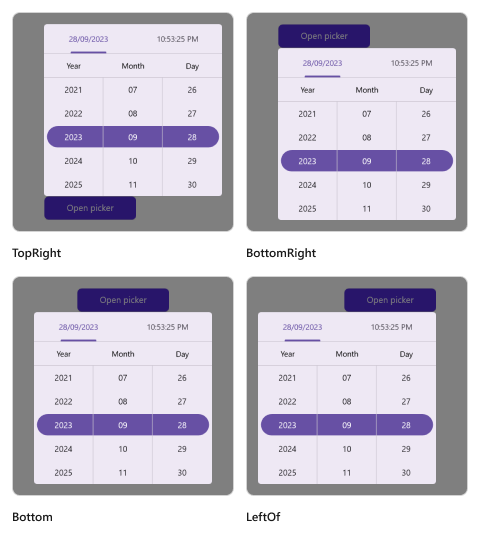
RelativeDialog mode displays the Date Time Picker as a popup anchored to another view. Use the RelativePosition property to choose the anchor side, and the RelativeView property to choose the anchor view.
Relative position
The RelativePosition property accepts the following values. The default is AlignTop.
-
AlignTop - Above the relative view, horizontally aligned to its center.
AlignToLeftOf - To the left of the relative view, vertically aligned to its center.
AlignToRightOf - To the right of the relative view, vertically aligned to its center.
AlignBottom - Below the relative view, horizontally aligned to its center.
AlignTopLeft - Above and to the left of the relative view.
AlignTopRight - Above and to the right of the relative view.
AlignBottomLeft - Below and to the left of the relative view.
AlignBottomRight - Below and to the right of the relative view.
The Date Time picker can be opened programmatically by setting the IsOpen property to true of SfDateTimePicker. By default, the IsOpen property is false.
Note: This property is automatically changed to false when you close the dialog by clicking outside of the dialog.
<ContentPage
    . . .
    xmlns:picker="clr-namespace:Syncfusion.Maui.Picker;assembly=Syncfusion.Maui.Picker">
    <Grid>
        <picker:SfDateTimePicker x:Name="picker"
                                 Mode="RelativeDialog"
                                 RelativePosition="AlignTopLeft">
        </picker:SfDateTimePicker>
        <Button Text="Open Date Time picker"
                x:Name="pickerButton"
                Clicked="Button_Clicked"
                HorizontalOptions="Center"
                VerticalOptions="Center"
                HeightRequest="50"
                WidthRequest="150">
        </Button>
    </Grid>
</ContentPage>
using Syncfusion.Maui.Picker;
. . .
public partial class MainPage : ContentPage
{
public MainPage()
{
InitializeComponent();
}
private void Button_Clicked(object sender, EventArgs e)
{
this.dateTimePicker.IsOpen = true;
}
}Relative view
The RelativeView is specified in the picker’s property enumeration and is used to display the picker dialog relative to a view by setting setting the Mode property to RelativeDialog. You can set the position by setting the RelativePosition property in the SfDateTimePicker.
It is only applicable in
RelativeDialogmode. Ifno relative viewis specified, the picker base will be set as thedefaultrelative view.
<ContentPage
    . . .
    xmlns:picker="clr-namespace:Syncfusion.Maui.Picker;assembly=Syncfusion.Maui.Picker">
    <Grid>
        <picker:SfDateTimePicker x:Name="picker"
                                 Mode="RelativeDialog"
                                 RelativePosition="AlignTopLeft"
                                 RelativeView = "{x:Reference pickerButton}">
        </picker:SfDateTimePicker>
        <Button Text="Open Date Time picker"
                x:Name="pickerButton"
                Clicked="Button_Clicked"
                HorizontalOptions="Center"
                VerticalOptions="Center"
                HeightRequest="50"
                WidthRequest="150">
        </Button>
    </Grid>
</ContentPage>
using Syncfusion.Maui.Picker;
. . .
public partial class MainPage : ContentPage
{
public MainPage()
{
InitializeComponent();
}
private void Button_Clicked(object sender, EventArgs e)
{
this.dateTimePicker.IsOpen = true;
this.dateTimePicker.RelativeView = pickerButton;
}
}
Custom popup size
When using Dialog or RelativeDialog mode, control the size of the popup with the PopupWidth and PopupHeight properties. These have no effect in Default mode.
<ContentPage
    . . .
    xmlns:picker="clr-namespace:Syncfusion.Maui.Picker;assembly=Syncfusion.Maui.Picker">
    <picker:SfDateTimePicker x:Name="picker"
                             Mode="Dialog"
                             PopupWidth="300"
                             PopupHeight="400"/>
</ContentPage>
using Syncfusion.Maui.Picker;
. . .
public partial class MainPage : ContentPage
{
public MainPage()
{
InitializeComponent();
SfDateTimePicker dateTimePicker = new SfDateTimePicker();
dateTimePicker.PopupWidth = 300;
dateTimePicker.PopupHeight = 400;
this.Content = dateTimePicker;
}
}