Columns Resizing in .NET MAUI Data Grid
18 Nov 20188 minutes to read
The SfDataGrid allows you to resize the columns by tapping and dragging the right border of the column headers. Resizing can be enabled or disabled by setting the SfDataGrid.AllowResizingColumns property. A resizing indicator is displayed while resizing a column.
Width Constraints
Resizing respects the DataGridColumn.MinimumWidth and DataGridColumn.MaximumWidth properties. The column will not resize beyond these constraints. By default, columns have no minimum or maximum width limits.
To hide a column interactively, set DataGridColumn.MinimumWidth to zero, then drag the column border to zero width.
Resizing considers
DataGridColumn.MinimumWidthandDataGridColumn.MaximumWidthof the column and will not exceed the minimum and maximum width constraints.
<ContentPage.BindingContext>
    <local:OrderInfoViewModel />
</ContentPage.BindingContext>

<syncfusion:SfDataGrid  x:Name = "dataGrid"
                        AllowResizingColumns = "True"
                        ItemsSource = "{Binding Orders}" />
SfDataGrid dataGrid = new SfDataGrid();
OrderInfoViewModel viewModel = new OrderInfoViewModel();
dataGrid.ItemsSource = viewModel.Orders;
dataGrid.AllowResizingColumns = true;
this.Content = dataGrid;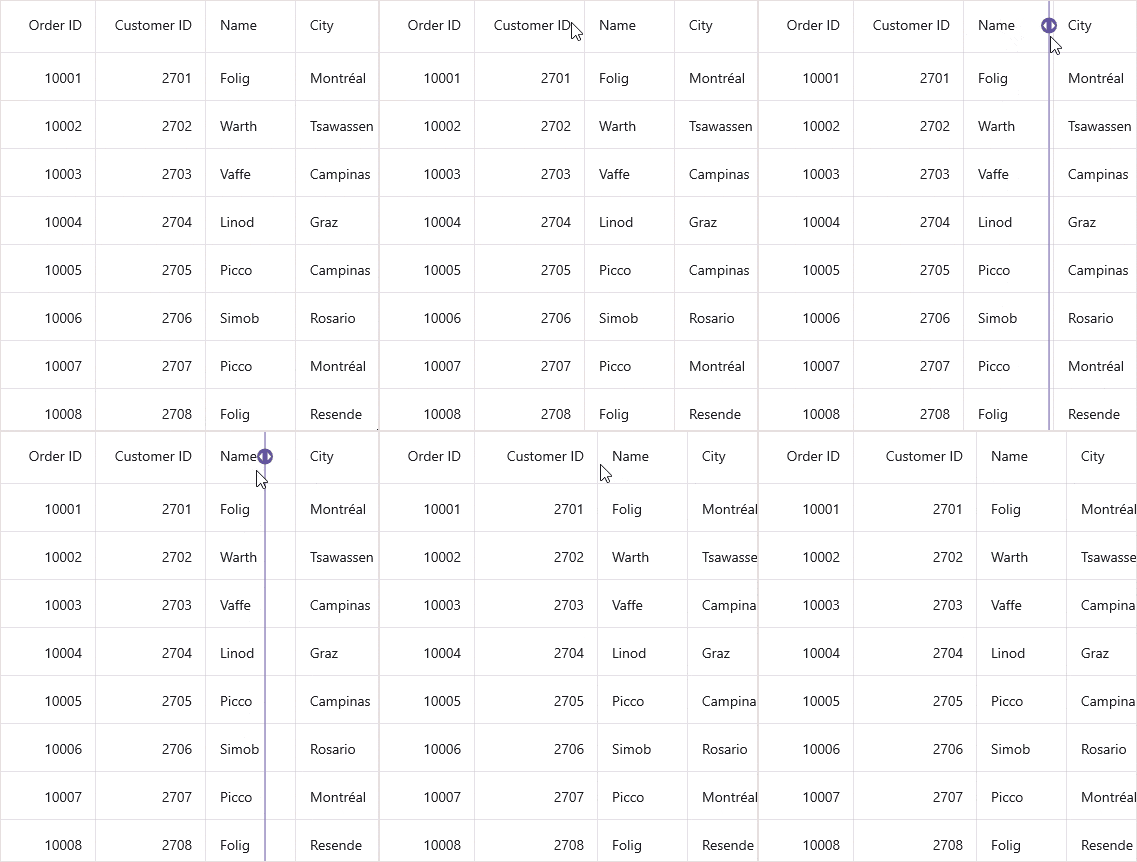
To hide a column interactively, set the DataGridColumn.MinimumWidth property to zero. Then, resize the column to a width less than zero.
Resizing Modes
The SfDataGrid allows two modes of resizing by setting the SfDataGrid.ColumnResizeMode property. The resizing modes are as follows:
- OnMoved: The resizing indicator is moved based on the touch point. The width of the column is updated as the resizing indicator moves. Use this mode for real-time visual feedback during resizing.
- OnTouchUp: The resizing indicator is moved based on the touch point. However, the width of the column is updated only on a touch up operation. Use this mode for better performance when resizing large datasets.
The default resizing mode is
OnTouchUp.
<ContentPage.BindingContext>
    <local:OrderInfoViewModel />
</ContentPage.BindingContext>

<syncfusion:SfDataGrid x:Name="dataGrid"
                       AllowResizingColumns="True"
                       ColumnResizeMode="OnMoved"
                       ItemsSource="{Binding Orders}" />
SfDataGrid dataGrid = new SfDataGrid();
OrderInfoViewModel viewModel = new OrderInfoViewModel();
dataGrid.ItemsSource = viewModel.Orders;
dataGrid.AllowResizingColumns = true;
dataGrid.ColumnResizeMode = DataGridColumnResizeMode.OnMoved;
this.Content = dataGrid;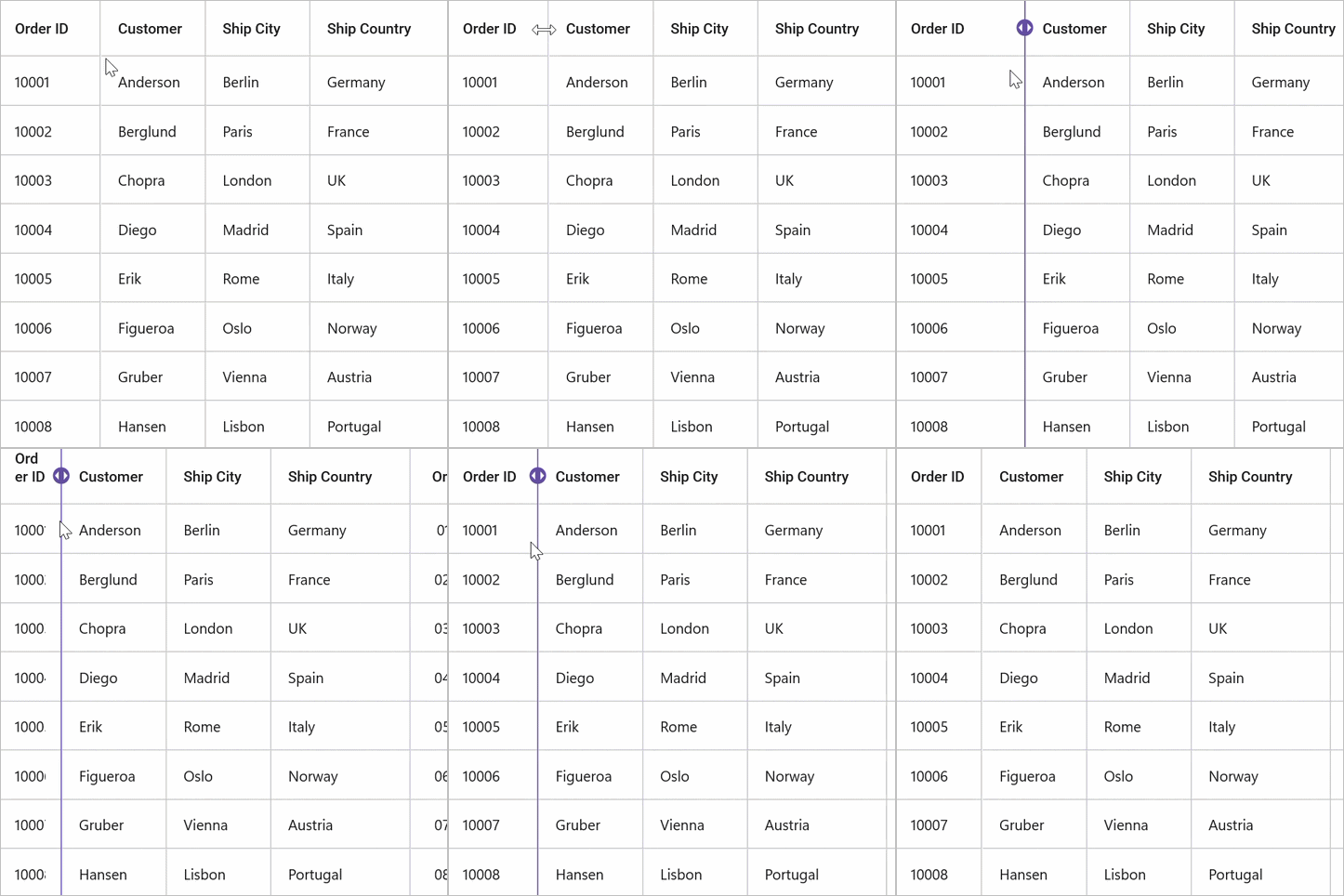
Resizing events
Based on the requirements, resizing operations can be handled using the SfDataGrid.ColumnResizing event. The SfDataGrid.ColumnResizing event is triggered while resizing a column and will continue to be triggered until the resizing operation is complete.
By handling the SfDataGrid.ColumnResizing event, it is possible to cancel the resizing of a particular column.
The SfDataGrid.ColumnResizing event provides the following properties through DataGridColumnResizingEventArgs:
-
Index- Returns the index of the column currently being resized. -
NewValue- Returns the current width of the column being resized. -
ResizingState- Returns the current state of the user interaction through a value from theDataGridProgressStateenum. Possible values are:Started,Progressing, andCompleted. -
Cancel- A Boolean property to cancel the resizing operation.
Cancel resizing for a column
To prevent resizing a specific column, use the SfDataGrid.ColumnResizing event and set the Cancel property to true based on your requirements:
<ContentPage.BindingContext>
    <local:OrderInfoViewModel />
</ContentPage.BindingContext>

<syncfusion:SfDataGrid  x:Name = "dataGrid"
                        AllowResizingColumns = "True"
                        ColumnResizing = "DataGrid_ColumnResizing"
                        ItemsSource = "{Binding Orders}" />
SfDataGrid dataGrid = new SfDataGrid();
OrderInfoViewModel viewModel = new OrderInfoViewModel();
dataGrid.ItemsSource = viewModel.Orders;
dataGrid.AllowResizingColumns = true;
dataGrid.ColumnResizing += DataGrid_ColumnResizing;
this.Content = dataGrid;private void DataGrid_ColumnResizing(object? sender, Syncfusion.Maui.DataGrid.DataGridColumnResizingEventArgs e)
{
// Cancel resizing for specific column by Index
if (e.Index == 2)
e.Cancel = true;
// Cancel resizing if column width exceeds maximum
if (e.NewValue > 100)
e.Cancel = true;
// Cancel resizing only while the user is actively dragging
if (e.ResizingState == Syncfusion.Maui.DataGrid.DataGridProgressState.Progressing)
e.Cancel = true;
}Setting column width constraints
To restrict column resizing within minimum and maximum width bounds, use the DataGridColumn.MinimumWidth and DataGridColumn.MaximumWidth properties:
<ContentPage.BindingContext>
    <local:OrderInfoViewModel />
</ContentPage.BindingContext>

<syncfusion:SfDataGrid  x:Name = "dataGrid"
                        AllowResizingColumns = "True"
                        ColumnResizing = "DataGrid_ColumnResizing"
                        ItemsSource = "{Binding Orders}" />
SfDataGrid dataGrid = new SfDataGrid();
OrderInfoViewModel viewModel = new OrderInfoViewModel();
dataGrid.ItemsSource = viewModel.Orders;
dataGrid.AllowResizingColumns = true;
dataGrid.ColumnResizing += DataGrid_ColumnResizing;
this.Content = dataGrid;private void DataGrid_ColumnResizing(object? sender, Syncfusion.Maui.DataGrid.DataGridColumnResizingEventArgs e)
{
// Code to end resizing if interaction state is Progressing
if (e.ResizingState == Syncfusion.Maui.DataGrid.DataGridProgressState.Progressing)
e.Cancel = true;
}Customize the appearance
The SfDataGrid allows you to change the resizing indicator color using SfDataGrid.DefaultStyle.ColumnResizingIndicatorColor.
<ContentPage.BindingContext>
    <local:OrderInfoViewModel />
</ContentPage.BindingContext>

<syncfusion:SfDataGrid  x:Name = "dataGrid"
                        AllowResizingColumns = "True"
                        ItemsSource = "{Binding Orders}">
    <syncfusion:SfDataGrid.DefaultStyle>
        <syncfusion:DataGridStyle ColumnResizingIndicatorColor = "Blue"/>
    </syncfusion:SfDataGrid.DefaultStyle>
</syncfusion:SfDataGrid>
SfDataGrid dataGrid = new SfDataGrid();
OrderInfoViewModel viewModel = new OrderInfoViewModel();
dataGrid.ItemsSource = viewModel.Orders;
dataGrid.AllowResizingColumns = true;
DataGridStyle dataGridStyle = new DataGridStyle();
dataGridStyle.ColumnResizingIndicatorColor = Colors.Blue;
dataGrid.DefaultStyle = dataGridStyle;
this.Content = dataGrid;