Clipboard Operations in Maui DataGrid (SfDataGrid)
7 Jul 202624 minutes to read
The SfDataGrid provides support for clipboard operations such as cut, copy, and paste data within the control and between other applications such as Notepad and Excel. Clipboard operations for copy and paste are enabled by default. You can copy selected records/cells from SfDataGrid by pressing Ctrl+C and paste the content from Clipboard to SfDataGrid by pressing Ctrl+V.
Note:
- Properties being edited must be nullable and implement
INotifyPropertyChangedto ensure the user interface updates correctly when changes occur.- Clipboard operations are not supported for summary rows, add new row, and unbound rows.
Copy to Clipboard in DataGrid
Copy operations work based on the CopyOption property.
CopyOption provides the following options:
-
None – Disables copy in SfDataGrid.
-
CopyData – Enables copy in SfDataGrid.
-
IncludeHeaders – Column header is also copied along with data.
-
IncludeFormat – Copies the display text with format instead of the actual value.
-
IncludeHiddenColumn – Hidden columns are also copied to clipboard.
You need to use IncludeHeaders, IncludeFormat, IncludeHiddenColumn options along with the CopyData option.
<syncfusion:SfDataGrid x:Name="dataGrid"
                       SelectionUnit="Row"
                       SelectionMode="Multiple"
                       AllowEditing="True"
                       CopyOption="CopyData,IncludeHeaders"
                       ItemsSource="{Binding Orders}"/>
SfDataGrid dataGrid = new SfDataGrid();
dataGrid.ItemsSource = viewModel.Orders;
dataGrid.SelectionUnit = DataGridSelectionUnit.Row;
dataGrid.SelectionMode = DataGridSelectionMode.Multiple;
dataGrid.AllowEditing = true;
dataGrid.CopyOption = DataGridCopyOption.CopyData | DataGridCopyOption.IncludeHeaders;
this.Content = dataGrid;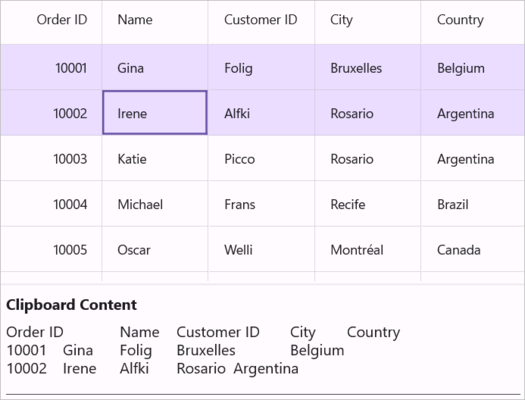
Note:
IncludeHiddenColumnis not supported whenSelectionUnitis Cell.
Paste from Clipboard in DataGrid
Paste operations work based on the PasteOption property.
PasteOption provides the following options:
-
None – Disables paste in SfDataGrid.
-
PasteData – Enables paste in SfDataGrid. When an incompatible value is pasted into a record/cell (e.g., text pasted into an integer field, invalid date format), the pasting operation is skipped for that particular record/cell.
-
ExcludeFirstLine – This can be used when pasting data copied with the
IncludeHeadercopy option. -
IncludeHiddenColumn – Paste values into hidden columns as well.
You need to use ExcludeFirstLine and IncludeHiddenColumn options along with the PasteData option.
<syncfusion:SfDataGrid x:Name="dataGrid"
                       SelectionUnit="Row"
                       SelectionMode="Multiple"
                       PasteOption="PasteData"
                       ItemsSource="{Binding Orders}"/>
SfDataGrid dataGrid = new SfDataGrid();
OrderInfoViewModel orderInfoViewModel = new OrderInfoViewModel();
dataGrid.ItemsSource = orderInfoViewModel.Orders;
dataGrid.SelectionUnit = DataGridSelectionUnit.Row;
dataGrid.SelectionMode = DataGridSelectionMode.Multiple;
dataGrid.PasteOption = DataGridPasteOption.PasteData;
this.Content = dataGrid;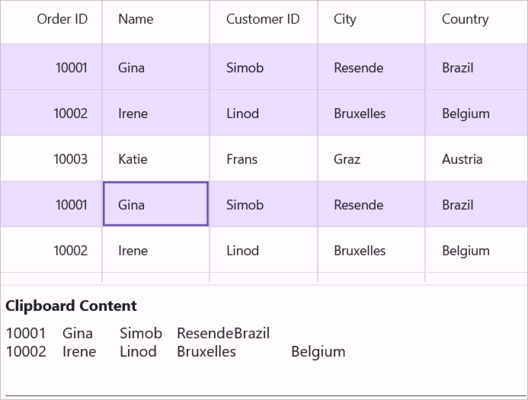
Note: To enable pasting within the DataGrid, the AllowEditing property must be set to true.
Cut to Clipboard in DataGrid
Cut operations work based on the CopyOption property. The cut operation works only when the AllowEditing property is set to true.
CopyOption provides the following options:
-
None – Disables cut in SfDataGrid.
-
CutData – Enables cut in SfDataGrid.
-
IncludeHeaders – Column header is also copied along with data.
-
IncludeFormat – Cuts the display text with format instead of the actual value.
-
IncludeHiddenColumn – Hidden columns are also cut to clipboard.
You need to use IncludeHeaders, IncludeFormat and IncludeHiddenColumn options along with the CutData option.
<syncfusion:SfDataGrid x:Name="dataGrid"
                       SelectionUnit="Row"
                       SelectionMode="Multiple"
                       AllowEditing="True"
                       CopyOption="CutData,IncludeHeaders"
                       ItemsSource="{Binding Orders}"/>
SfDataGrid dataGrid = new SfDataGrid();
OrderInfoViewModel orderInfoViewModel = new OrderInfoViewModel();
dataGrid.ItemsSource = orderInfoViewModel.Orders;
dataGrid.SelectionUnit = DataGridSelectionUnit.Row;
dataGrid.SelectionMode = DataGridSelectionMode.Multiple;
dataGrid.AllowEditing = true;
dataGrid.CopyOption = DataGridCopyOption.CutData | DataGridCopyOption.IncludeHeaders;
this.Content = dataGrid;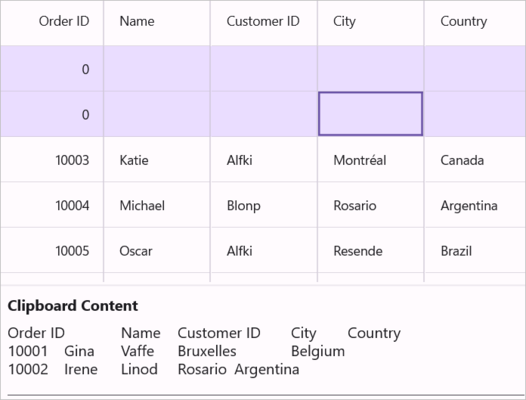
Note:
IncludeHiddenColumnis not supported whenSelectionUnitis Cell. For unbound columns, cut operations won’t work, but the data can still be copied to the clipboard.
Events
CopyContent
The CopyContent event occurs when copying or cutting cells in SfDataGrid. DataGridCopyPasteEventArgs provides information for the CopyContent event. You can cancel the copy operation by handling this event.
this.dataGrid.CopyContent += dataGrid_CopyContent;

void dataGrid_CopyContent(object? sender, DataGridCopyPasteEventArgs e)
{
    if (sender is Syncfusion.Maui.DataGrid.SfDataGrid grid && grid.SelectedRow is OrderInfo row && row.OrderID == 10004)
        e.Handled = true;
}
PasteContent
The PasteContent event occurs when pasting clipboard values into SfDataGrid. DataGridCopyPasteEventArgs provides information for the PasteContent event. You can cancel the paste operation by handling this event.
this.dataGrid.PasteContent += dataGrid_PasteContent;

void dataGrid_PasteContent(object? sender, DataGridCopyPasteEventArgs e)
{
    if (sender is Syncfusion.Maui.DataGrid.SfDataGrid grid && grid.SelectedRow is OrderInfo row && row.OrderID == 10010)
        e.Handled = true;
}
CopyCellContent
The CopyCellContent event occurs when a cell is being copied or cut. DataGridCopyPasteCellEventArgs provides information for the CopyCellContent event, which has the following members:
-
ClipBoardValue – Returns cell value.
-
Column – Returns corresponding DataGridColumn of a cell.
-
RowData – Returns corresponding RowData of a cell.
You can change the text copied to the clipboard by changing the ClipBoardValue.
this.dataGrid.CopyCellContent += dataGrid_CopyCellContent;

void dataGrid_CopyCellContent(object? sender, DataGridCopyPasteCellEventArgs e)
{
}
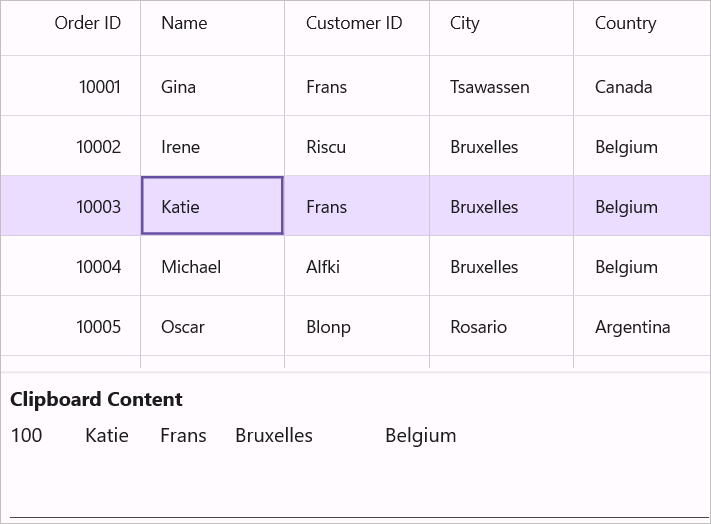
The example below changes the clipboard value to 100 instead of the cell value 10003 in SfDataGrid:
void dataGrid_CopyCellContent(object? sender, DataGridCopyPasteCellEventArgs e)
{
    if (e.Column?.MappingName == "OrderID" && e.RowData is OrderInfo row && row.OrderID == 10003)
        e.ClipboardValue = 100;
}
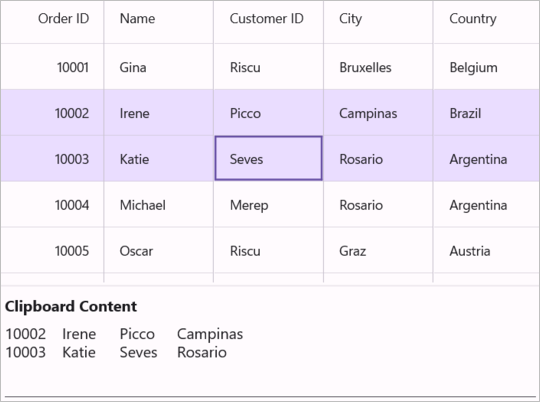
The example below handles the copy operation when the MappingName of a Column is Country:
void dataGrid_CopyCellContent(object? sender, DataGridCopyPasteCellEventArgs e)
{
    if (e.Column?.MappingName == "Country")
        e.Handled = true;
}
PasteCellContent
The PasteCellContent event occurs when pasting clipboard content to a specific cell. DataGridCopyPasteCellEventArgs provides information for the PasteCellContent event, which has the following members:
-
ClipBoardValue – Returns clipboard value of a particular cell.
-
Column – Returns corresponding DataGridColumn of a cell.
-
RowData – Returns corresponding RowData of a cell.
You can change the text pasted to SfDataGrid by changing the ClipBoardValue.
this.dataGrid.PasteCellContent += dataGrid_PasteCellContent;

void dataGrid_PasteCellContent(object? sender, DataGridCopyPasteCellEventArgs e)
{
}
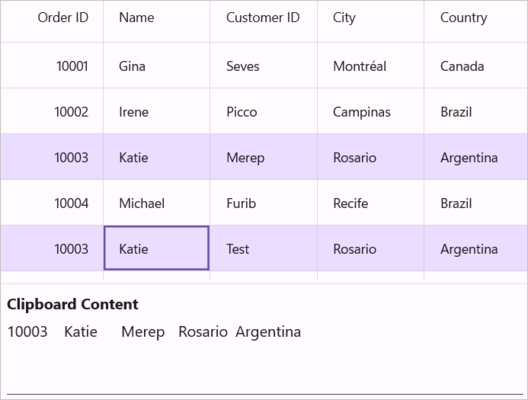
The example below changes the clipboard value to “Test” instead of the clipboard value “Lino”:
void dataGrid_PasteCellContent(object? sender, DataGridCopyPasteCellEventArgs e)
{
    if (e.Column?.MappingName == "Customer" && e.RowData is OrderInfo row && row.Customer == "Erik")
        e.ClipboardValue = "Test";
}
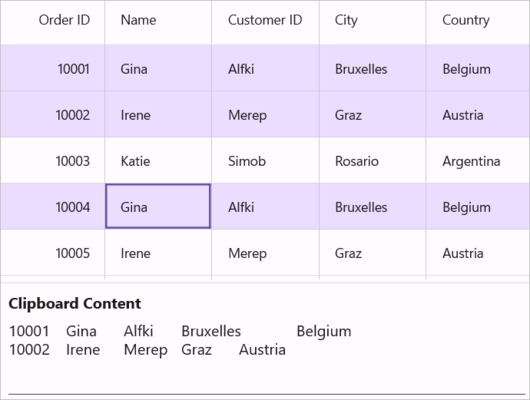
The example below handles the paste operation when the MappingName of a Column is “OrderID”:
void dataGrid_DataGridPasteCellContent(object? sender, DataGridCopyPasteCellEventArgs e)
{
    if (e.Column.MappingName == "OrderID")
        e.Handled = true;
}
Handling Programmatically
This section covers programmatic approaches for copy, cut, and paste operations without relying on keyboard shortcuts.
Copy Operations
Programmatically Copy to Clipboard in Maui DataGrid
Copy the selected records/cells in SfDataGrid by using the Copy method in CopyPasteController of SfDataGrid.
this.dataGrid.CopyPasteController.Copy();To copy a specific record, select it using the MoveCurrentCellTo method and then call the Copy method in CopyPasteController:
RowColumnIndex rowColumnIndex = new RowColumnIndex();
var lastSelectedIndex = dataGrid.CurrentCellManager.RowColumnIndex.RowIndex;
rowColumnIndex.RowIndex = 2;
rowColumnIndex.ColumnIndex = 2;
this.dataGrid.MoveCurrentCellTo(rowColumnIndex);
this.dataGrid.CopyPasteController.Copy();
To copy multiple cells, select a group of cells using the SelectCells method and then call the Copy method in CopyPasteController:
this.dataGrid.SelectCells(this.dataGrid.GetRowGenerator().Items[2].RowData, this.dataGrid.Columns[1], this.dataGrid.GetRowGenerator().Items[5].RowData, this.dataGrid.Columns[3]);
this.dataGrid.CopyPasteController.Copy();
Copy rows without selecting in Maui DataGrid
You can copy records without selection by using the CopyRowsToClipboard method in CopyPasteController of SfDataGrid:
this.dataGrid.CopyPasteController.CopyRowsToClipboard(2, 4);Cut Operations
Programmatically Cut Data to Clipboard in Maui DataGrid
To cut the selected records/cells in SfDataGrid, use the Cut method in CopyPasteController:
this.dataGrid.CopyPasteController.Cut();To cut the entire record set, select the whole SfDataGrid using the SelectAll method and then call the Cut method in CopyPasteController:
this.dataGrid.SelectAll();
this.dataGrid.CopyPasteController.Cut();
Paste Operations
Programmatically Paste in DataGrid
To paste clipboard values into SfDataGrid, use the Paste method in CopyPasteController:
this.dataGrid.CopyPasteController.Paste();To paste clipboard values into a specific record, select the record using the MoveCurrentCellTo method and then call the Paste method in CopyPasteController:
RowColumnIndex rowColumnIndex = new RowColumnIndex();
rowColumnIndex.RowIndex = 1;
rowColumnIndex.ColumnIndex = 1;
this.dataGrid.MoveCurrentCellTo(rowColumnIndex);
this.dataGrid.CopyPasteController.Paste();
Customizing Clipboard operations in Maui DataGrid
The SfDataGrid processes clipboard operations in the DataGridCopyPasteController class. You can customize the default copy-paste behaviors by overriding the DataGridCopyPasteController class and setting it to SfDataGrid.CopyPasteController.
Customization Patterns Guide
Choose the customization pattern based on your requirements:
- Paste a cell into many cells — Use when you want to copy a single cell and apply its value to all currently selected cells.
- Paste a record into many rows — Use when you want to copy a single row and apply its values to all currently selected rows.
- Select pasted records — Use when you want to automatically select newly pasted rows for further operations.
- Create new records while pasting — Use when you want pasted data to create new records instead of updating existing ones.
public class CustomCopyPaste : DataGridCopyPasteController
{
    public CustomCopyPaste(SfDataGrid sfGrid) : base(sfGrid)
    {
    }
}public MainPage()
{
InitializeComponent();
this.dataGrid.CopyPasteController = new CustomCopyPaste(this.dataGrid);
}Paste a cell into many cells in Maui DataGrid
By default, you can copy one cell and paste it into another cell when Cell Selection is enabled in SfDataGrid. The code below shows how to copy one cell and paste it into all selected cells by overriding the OnPasteToCell method in the DataGridCopyPasteController class:
using System.Text.RegularExpressions;
using Microsoft.Maui.Controls;
using Syncfusion.Maui.DataGrid;

public class CustomCopyPaste : DataGridCopyPasteController
{
    public CustomCopyPaste(SfDataGrid dataGrid) : base(dataGrid)
    {
    }

    protected override async void OnPasteToCell(object record, DataGridColumn column, object value)
    {
        var text = Clipboard.GetTextAsync();

        string[] clipBoardText = Regex.Split(text.ToString(), @"\r\n");

        clipBoardText = Regex.Split(clipBoardText[0], @"\t");

        // If the clipboard contains multiple cells, use the base implementation.
        if (clipBoardText.Length > 1)
        {
            base.OnPasteToCell(record, column, value);
            return;
        }

        // Paste the value to all selected cells
        var selectedCells = this.dataGrid.GetSelectedCells();
        int selectedCellsCount = selectedCells.Count;

        for (int i = 0; i < selectedCellsCount; i++)
        {
            record = selectedCells[i].RowData;
            column = selectedCells[i].Column;

            // Paste the value to each selected cell
            if (record != null && column != null)
                base.OnPasteToCell(record, column, value);
        }
    }
}
Paste a record into many rows in Maui DataGrid
By default, you can copy one row and paste it into another row when row selection is enabled in SfDataGrid. The code below shows how to copy one row and paste it into all selected rows by overriding the OnPasteToRow method in the DataGridCopyPasteController class:
using System.Text.RegularExpressions;
using Microsoft.Maui.Controls;
using Syncfusion.Maui.DataGrid;

public class CustomCopyPaste : DataGridCopyPasteController
{
    public CustomCopyPaste(SfDataGrid dataGrid) : base(dataGrid)
    {
    }

    protected override async void OnPasteToRow(object clipBoardContent, object selectedRecords)
    {
        var text = Clipboard.GetTextAsync();
        string[] clipBoardText = Regex.Split(text.ToString(), @"\r\n");

        // If the clipboard contains multiple rows, use the base implementation
        if (clipBoardText.Length > 1)
        {
            base.OnPasteToRow(clipBoardContent, selectedRecords);
            return;
        }

        // Paste the content to all selected rows
        var selectedRecord = this.dataGrid.SelectedRows;
        for (int i = 0; i < selectedRecord.Count; i++)
        {
            selectedRecords = selectedRecord[i];
            base.OnPasteToRow(clipBoardContent, selectedRecords);
        }
    }
}
Select pasted records in Maui DataGrid
By default, after pasting clipboard values to SfDataGrid, the selection remains on the previously selected records. The code below shows how to select the pasted records after the paste operation by overriding the OnPasteToRows and OnPasteToRow methods in the DataGridCopyPasteController class. This code is applicable when SelectionUnit is Row.
using Syncfusion.Maui.DataGrid;

public class CustomCopyPaste : DataGridCopyPasteController
{
    public CustomCopyPaste(SfDataGrid dataGrid) : base(dataGrid)
    {
    }

    //Creating the new list to add the selected records
    public List<object> selectedItem = new List<object>();

    protected override void OnPasteToRows(object clipBoardRows)
    {
        // Clear previous selections to avoid duplicate tracking
        selectedItem.Clear();

        base.OnPasteToRows(clipBoardRows);

        // Using the SelectionController apply the selection for Pasted records
        (this.dataGrid.SelectionController as DataGridRowSelectionController)?.HandleGridOperation(new GridOperationHandlerArgs(GridOperation.Paste, selectedItem));
    }

    protected override void OnPasteToRow(object clipBoardContent, object selectedRecords)
    {

        //Added the selected record to list
        selectedItem.Add(selectedRecords);
        base.OnPasteToRow(clipBoardContent, selectedRecords);
    }
}
Create new records while pasting in Maui DataGrid
By default, when pasting clipboard values to SfDataGrid, it changes the values of existing records. The code example below shows how to add the copied records as new rows in SfDataGrid by overriding the OnPasteToRows method in the DataGridCopyPasteController class:
using System.Text.RegularExpressions;
using Syncfusion.Maui.DataGrid;
using System.Diagnostics;

public class CustomCopyPaste : DataGridCopyPasteController
{
    public CustomCopyPaste(SfDataGrid dataGrid)
        : base(dataGrid)
    {
    }

    protected override void OnPasteToRows(object clipBoardRows)
    {
        var copiedRecords = clipBoardRows as string[];
        if (copiedRecords == null || copiedRecords.Length == 0)
            return;

        // Get the data context to add new records
        var viewModel = this.dataGrid.BindingContext as OrderInfoRepository;
        if (viewModel == null)
            return;

        // Create new records based on the clipboard content
        for (int i = 0; i < copiedRecords.Length; i++)
        {
            // Create a new instance for the data model
            OrderInfo newEntity = new OrderInfo();

            // Parse values from the current clipboard row
            string[] values = Regex.Split(copiedRecords[i], @"\t");

            // Apply clipboard values to each column of the new record
            for (int j = 0; j < Math.Min(this.dataGrid.Columns.Count, values.Length); j++)
            {
                this.OnPasteToCell(newEntity, this.dataGrid.Columns[j], values[j]);
            }

            // Add the new record to the collection
            viewModel.OrderInfoCollection.Add(newEntity);
        }
    }
}