Liquid Glass Effect in .NET MAUI Accordion (SfAccordion)
16 Jul 202624 minutes to read
The Liquid Glass Effect introduces a modern, translucent design with adaptive color tinting and light refraction, creating a sleek, glass-like user experience that remains clear and accessible. This section explains how to enable and customize the effect in the Syncfusion® .NET MAUI Accordion (SfAccordion) control.
Apply liquid glass effect
Follow these steps to enable and configure the Liquid Glass Effect in the Accordion control:
Step 1: Wrap the control inside glass effect view
To apply the Liquid Glass Effect to Syncfusion® .NET MAUI SfAccordion, wrap it inside the SfGlassEffectView.
For more details, refer to the Liquid Glass Getting Started documentation.
Step 2: Enable the liquid glass effect on Accordion
Set the EnableLiquidGlassEffect property to true in the SfAccordion control. When enabled, the effect is applied to all accordion items and provides responsive interaction for a smooth and engaging user experience.
Step 3: Customize the background
To achieve a glass-like background, set the Background property to Transparent. The background will then be treated as a tinted color, ensuring a consistent glass effect across the controls.
The following code snippet demonstrates how to apply the Liquid Glass Effect to the SfAccordion control:
<Grid>
<Grid.Background>
<LinearGradientBrush StartPoint="0,0" EndPoint="0,1">
<GradientStop Color="#0F4C75" Offset="0.0"/>
<GradientStop Color="#3282B8" Offset="0.5"/>
<GradientStop Color="#1B262C" Offset="1.0"/>
</LinearGradientBrush>
</Grid.Background>
<core:SfGlassEffectView EffectType="Regular"
CornerRadius="20">
<syncfusion:SfAccordion Background="Transparent"
EnableLiquidGlassEffect="True">
<syncfusion:SfAccordion.Items>
<syncfusion:AccordionItem>
<syncfusion:AccordionItem.Header>
<Grid HeightRequest="48">
<Label Text="Robin Rane" Margin="16,14,0,14" CharacterSpacing="0.25" FontFamily="Roboto-Regular" FontSize="14" />
</Grid>
</syncfusion:AccordionItem.Header>
<syncfusion:AccordionItem.Content>
<Grid ColumnSpacing="10" RowSpacing="2">
<Grid Margin="16,6,0,0">
<Grid.Resources>
<Style TargetType="Label">
<Setter Property="FontFamily" Value="Roboto-Regular"/>
</Style>
</Grid.Resources>
<Grid.RowDefinitions >
<RowDefinition Height="25"/>
<RowDefinition Height="25"/>
<RowDefinition Height="25"/>
<RowDefinition Height="25"/>
<RowDefinition Height="{OnPlatform Default=90,Android=90,WinUI=70, iOS=100,MacCatalyst=70 }"/>
<RowDefinition Height="Auto"/>
</Grid.RowDefinitions>
<Grid.ColumnDefinitions>
<ColumnDefinition Width="100"/>
<ColumnDefinition Width="100"/>
<ColumnDefinition Width="*"/>
</Grid.ColumnDefinitions>
<Border Grid.RowSpan="4"
Grid.Row="0"
Grid.Column="0"
Padding="0"
Margin="0,0,0,7">
<Image Source="emp_01.png" />
</Border>
<Label Text="Position" Grid.Column="1" Grid.Row="0" Margin="6,0,0,0"/>
<Label Text="Chairman" Grid.Row="0" Grid.Column="2"/>
<Label Text="Organization " Grid.Row="1" Grid.Column="1" Margin="6,0,0,0"/>
<Label Text="ABC Inc." Grid.Row="1" Grid.Column="2"/>
<Label Text="Date Of Birth " Grid.Row="2" Grid.Column="1" Margin="6,0,0,0"/>
<Label Text="09/17/1973" Grid.Row="2" Grid.Column="2"/>
<Label Text="Location " Grid.Row="3" Grid.Column="1" Margin="6,0,0,0"/>
<Label Text="Boston" Grid.Row="3" Grid.Column="2"/>
<Label Padding="0,10,0,10" Grid.Row="4" Grid.ColumnSpan="3" LineBreakMode="WordWrap"
FontSize="14" CharacterSpacing="0.25" VerticalTextAlignment="Center"
Text="Robin Rane, Chairman of ABC Inc., leads with dedication and vision. Under his guidance, the company thrives and continues to make a significant impact in the industry.">
</Label>
<StackLayout Grid.Row="5" Orientation="Horizontal" Margin="0,0,0,12">
<Label Text="" FontSize="16" Margin="0,2,2,2"
FontFamily='{OnPlatform Android=AccordionFontIcons.ttf#,WinUI=AccordionFontIcons.ttf#AccordionFontIcons,MacCatalyst=AccordionFontIcons,iOS=AccordionFontIcons}'
VerticalOptions="Center" VerticalTextAlignment="Center"/>
<Label Text="(617) 555-1234" Grid.Column="1" VerticalOptions="Center" CharacterSpacing="0.25" FontSize="14"/>
</StackLayout>
</Grid>
</Grid>
</syncfusion:AccordionItem.Content>
</syncfusion:AccordionItem>
<syncfusion:AccordionItem>
<syncfusion:AccordionItem.Header>
<Grid HeightRequest="48">
<Label Text="John Doe" Margin="16,14,0,14" CharacterSpacing="0.25" FontFamily="Roboto-Regular" FontSize="14" />
</Grid>
</syncfusion:AccordionItem.Header>
<syncfusion:AccordionItem.Content>
<Grid ColumnSpacing="10" RowSpacing="2">
<Grid Margin="16,6,0,0">
<Grid.Resources>
<Style TargetType="Label">
<Setter Property="FontFamily" Value="Roboto-Regular"/>
</Style>
</Grid.Resources>
<Grid.RowDefinitions >
<RowDefinition Height="25"/>
<RowDefinition Height="25"/>
<RowDefinition Height="25"/>
<RowDefinition Height="25"/>
<RowDefinition Height="{OnPlatform Default=90,Android=90,WinUI=70, iOS=100,MacCatalyst=70 }"/>
<RowDefinition Height="Auto"/>
</Grid.RowDefinitions>
<Grid.ColumnDefinitions>
<ColumnDefinition Width="100"/>
<ColumnDefinition Width="100"/>
<ColumnDefinition Width="*"/>
</Grid.ColumnDefinitions>
<Border Grid.RowSpan="4"
Grid.Row="0"
Grid.Column="0"
Padding="0"
Margin="0,0,0,7">
<Image Source="emp_02.png" />
</Border>
<Label Text="Position" Grid.Column="1" Grid.Row="0" Margin="6,0,0,0"/>
<Label Text="Developer" Grid.Row="0" Grid.Column="2"/>
<Label Text="Organization " Grid.Row="1" Grid.Column="1" Margin="6,0,0,0"/>
<Label Text="XYZ Corp." Grid.Row="1" Grid.Column="2"/>
<Label Text="Date Of Birth " Grid.Row="2" Grid.Column="1" Margin="6,0,0,0"/>
<Label Text="05/22/1985" Grid.Row="2" Grid.Column="2"/>
<Label Text="Location " Grid.Row="3" Grid.Column="1" Margin="6,0,0,0"/>
<Label Text="San Francisco" Grid.Row="3" Grid.Column="2"/>
<Label Padding="0,10,0,10" Grid.Row="4" Grid.ColumnSpan="3" LineBreakMode="WordWrap"
FontSize="14" CharacterSpacing="0.25" VerticalTextAlignment="Center"
Text="John Doe, Senior Developer at XYZ Corp., brings over 10 years of experience in mobile application development. His expertise has been instrumental in delivering high-quality products.">
</Label>
<StackLayout Grid.Row="5" Orientation="Horizontal" Margin="0,0,0,12">
<Label Text="" FontSize="16" Margin="0,2,2,2"
FontFamily='{OnPlatform Android=AccordionFontIcons.ttf#,WinUI=AccordionFontIcons.ttf#AccordionFontIcons,MacCatalyst=AccordionFontIcons,iOS=AccordionFontIcons}'
VerticalOptions="Center" VerticalTextAlignment="Center"/>
<Label Text="(415) 555-5678" Grid.Column="1" VerticalOptions="Center" CharacterSpacing="0.25" FontSize="14"/>
</StackLayout>
</Grid>
</Grid>
</syncfusion:AccordionItem.Content>
</syncfusion:AccordionItem>
</syncfusion:SfAccordion.Items>
</syncfusion:SfAccordion>
</core:SfGlassEffectView>
</Grid>using Syncfusion.Maui.Core;
using Syncfusion.Maui.Accordion;
var gradientBrush = new LinearGradientBrush
{
StartPoint = new Point(0, 0),
EndPoint = new Point(0, 1),
GradientStops = new GradientStopCollection
{
new GradientStop { Color = Color.FromArgb("#0F4C75"), Offset = 0.0f },
new GradientStop { Color = Color.FromArgb("#3282B8"), Offset = 0.5f },
new GradientStop { Color = Color.FromArgb("#1B262C"), Offset = 1.0f }
}
};
var grid = new Grid
{
Background = gradientBrush
};
var glassView = new SfGlassEffectView
{
CornerRadius = 20,
EffectType = LiquidGlassEffectType.Regular
};
var accordion = new SfAccordion
{
Background = Colors.Transparent,
EnableLiquidGlassEffect = true
};
var accordionItem = new AccordionItem();
var headerGrid = new Grid
{
HeightRequest = 48
};
var headerLabel = new Label
{
Text = "Robin Rane",
Margin = new Thickness(16, 14, 0, 14),
CharacterSpacing = 0.25,
FontFamily = "Roboto-Regular",
FontSize = 14
};
headerGrid.Children.Add(headerLabel);
accordionItem.Header = headerGrid;
var contentOuterGrid = new Grid
{
ColumnSpacing = 10,
RowSpacing = 2
};
var contentGrid = new Grid
{
Margin = new Thickness(16, 6, 0, 0)
};
var labelStyle = new Style(typeof(Label));
labelStyle.Setters.Add(new Setter { Property = Label.FontFamilyProperty, Value = "Roboto-Regular" });
contentGrid.Resources = new ResourceDictionary();
contentGrid.Resources.Add(labelStyle);
contentGrid.RowDefinitions.Add(new RowDefinition { Height = 25 });
contentGrid.RowDefinitions.Add(new RowDefinition { Height = 25 });
contentGrid.RowDefinitions.Add(new RowDefinition { Height = 25 });
contentGrid.RowDefinitions.Add(new RowDefinition { Height = 25 });
contentGrid.RowDefinitions.Add(new RowDefinition { Height = DeviceInfo.Platform == DevicePlatform.Android ? 90 : DeviceInfo.Platform == DevicePlatform.WinUI ? 70 : DeviceInfo.Platform == DevicePlatform.iOS ? 100 : DeviceInfo.Platform == DevicePlatform.MacCatalyst ? 70 : 90 });
contentGrid.RowDefinitions.Add(new RowDefinition { Height = GridLength.Auto });
contentGrid.ColumnDefinitions.Add(new ColumnDefinition { Width = 100 });
contentGrid.ColumnDefinitions.Add(new ColumnDefinition { Width = 100 });
contentGrid.ColumnDefinitions.Add(new ColumnDefinition { Width = GridLength.Star });
var border = new Border
{
Padding = 0,
Margin = new Thickness(0, 0, 0, 7)
};
Grid.SetRow(border, 0);
Grid.SetColumn(border, 0);
Grid.SetRowSpan(border, 4);
var image = new Image
{
Source = "emp_01.png"
};
border.Content = image;
contentGrid.Children.Add(border);
var positionLabel = new Label { Text = "Position", Margin = new Thickness(6, 0, 0, 0) };
Grid.SetRow(positionLabel, 0);
Grid.SetColumn(positionLabel, 1);
contentGrid.Children.Add(positionLabel);
var chairmanLabel = new Label { Text = "Chairman" };
Grid.SetRow(chairmanLabel, 0);
Grid.SetColumn(chairmanLabel, 2);
contentGrid.Children.Add(chairmanLabel);
var organizationLabel = new Label { Text = "Organization ", Margin = new Thickness(6, 0, 0, 0) };
Grid.SetRow(organizationLabel, 1);
Grid.SetColumn(organizationLabel, 1);
contentGrid.Children.Add(organizationLabel);
var abcIncLabel = new Label { Text = "ABC Inc." };
Grid.SetRow(abcIncLabel, 1);
Grid.SetColumn(abcIncLabel, 2);
contentGrid.Children.Add(abcIncLabel);
var dobLabel = new Label { Text = "Date Of Birth ", Margin = new Thickness(6, 0, 0, 0) };
Grid.SetRow(dobLabel, 2);
Grid.SetColumn(dobLabel, 1);
contentGrid.Children.Add(dobLabel);
var dateLabel = new Label { Text = "09/17/1973" };
Grid.SetRow(dateLabel, 2);
Grid.SetColumn(dateLabel, 2);
contentGrid.Children.Add(dateLabel);
var locationTitleLabel = new Label { Text = "Location ", Margin = new Thickness(6, 0, 0, 0) };
Grid.SetRow(locationTitleLabel, 3);
Grid.SetColumn(locationTitleLabel, 1);
contentGrid.Children.Add(locationTitleLabel);
var locationLabel = new Label { Text = "Boston" };
Grid.SetRow(locationLabel, 3);
Grid.SetColumn(locationLabel, 2);
contentGrid.Children.Add(locationLabel);
var descriptionLabel = new Label
{
Padding = new Thickness(0, 10, 0, 10),
LineBreakMode = LineBreakMode.WordWrap,
FontSize = 14,
CharacterSpacing = 0.25,
VerticalTextAlignment = TextAlignment.Center,
Text = "Robin Rane, Chairman of ABC Inc., leads with dedication and vision. Under his guidance, the company thrives and continues to make a significant impact in the industry."
};
Grid.SetRow(descriptionLabel, 4);
Grid.SetColumnSpan(descriptionLabel, 3);
contentGrid.Children.Add(descriptionLabel);
var phoneStack = new StackLayout
{
Orientation = StackOrientation.Horizontal,
Margin = new Thickness(0, 0, 0, 12)
};
Grid.SetRow(phoneStack, 5);
var phoneIcon = new Label
{
Text = "\ue700",
FontSize = 16,
Margin = new Thickness(0, 2, 2, 2),
FontFamily = DeviceInfo.Platform == DevicePlatform.Android ? "AccordionFontIcons.ttf#" : DeviceInfo.Platform == DevicePlatform.WinUI ? "AccordionFontIcons.ttf#AccordionFontIcons" : "AccordionFontIcons",
VerticalOptions = LayoutOptions.Center,
VerticalTextAlignment = TextAlignment.Center
};
var phoneNumber = new Label
{
Text = "(617) 555-1234",
VerticalOptions = LayoutOptions.Center,
CharacterSpacing = 0.25,
FontSize = 14
};
phoneStack.Children.Add(phoneIcon);
phoneStack.Children.Add(phoneNumber);
contentGrid.Children.Add(phoneStack);
contentOuterGrid.Children.Add(contentGrid);
accordionItem.Content = contentOuterGrid;
accordion.Items.Add(accordionItem);
glassView.Content = accordion;
grid.Children.Add(glassView);
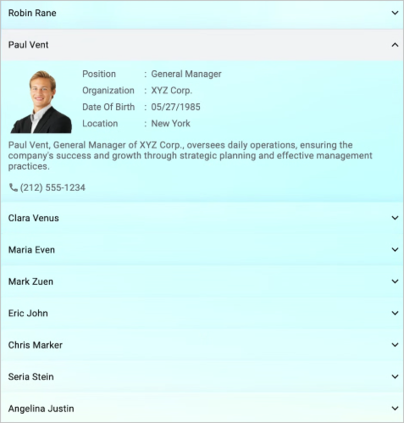
this.Content = grid;The following screenshot illustrates SfAccordion within SfGlassEffectView.
NOTE
- Supported on
macOS 10.15 or higherandiOS 13.0 or higher.- This feature is available only in
.NET 8.0and later versions.
Customization Options
The Liquid Glass Effect can be customized using the following properties:
-
EffectType: Choose from different glass effect types such asRegular,Light, orDarkto match your app’s theme -
CornerRadius: Adjust the corner radius of the glass effect view to match your design requirements -
TintOpacity: Control the opacity of the tint color to achieve the desired level of transparency -
BlurRadius: Adjust the blur radius to control the intensity of the glass effect