About Syncfusion® .NET MAUI Chips Control
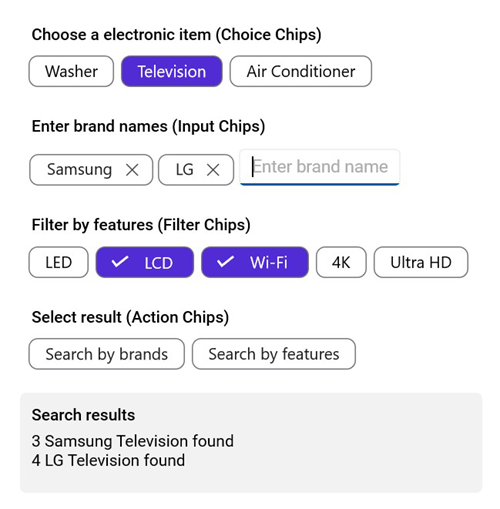
The Syncfusion® .NET MAUI Chips control is a versatile and feature-rich component that allows you to present information in an interactive and customizable layout. It enables you to arrange multiple chips in a layout and group them, making a selection and interaction seamless.
Business use cases
- Applications that require tag or category selection for filtering and classification.
- Search interfaces that use filter chips to refine results dynamically.
- E-commerce apps that allow users to select product attributes such as size, color, or category.
- Mobile and business apps that need compact selectable UI elements for quick interactions.
Key features
- Flexible layout options allow arranging chips using layouts such as stack, flex, and other configurable arrangements.
- Text-to-chip conversion allows transforming text values into compact chip representations for better readability.
- Background customization allows adding background images to enhance chip visuals.
- Comprehensive styling support allows modifying text color, background color, border color, border thickness, and selection color for a consistent UI design.
Globalization
The following table summarizes the globalization support available in this control.
 Full Support
 Not Applicable
| Control | Localization | RTL | Time zone | Screen reader | Keyboard navigation |
|---|---|---|---|---|---|
| Chips | |
|
|
|
|
Related controls
- Button for simple action triggers.
- Segmented Control for grouped option selection.
- Text Input Layout for structured form inputs with labels.
See Also
- Getting Started shows a step‑by‑step guide to begin using the Chips control.
- Chip Types explores different chip variations such as input, choice, filter, and action chips, and explains how each type can be used to represent data or user actions.
- Customization helps personalize chip appearance by modifying styles, colors, icons, and templates to match your application’s design.
- UI Kit provides interactive demos and ready‑made UI examples.
Resources
Feature Tour
Get a quick overview of key features and capabilities to kick start your journey.
Explore Features
Showcase Samples
Explore real-world sample apps to see components in action and learn by example.
View Samples
Tutorial Videos
Watch step‑by‑step video guides to quickly understand concepts and implementation.
Watch now
Knowledge Base
Find practical solutions, troubleshooting tips and how‑to guides for common scenarios.
Search KB's