Row Height Customization in WPF TreeGrid
You can change the header row height by setting SfTreeGrid.HeaderRowHeight and the other rows height can be changed by setting SfTreeGrid.RowHeight property.
<syncfusion:SfTreeGrid Name="treeGrid"
                       ChildPropertyName="ReportsTo"
                       ItemsSource="{Binding Employees}"
                       ParentPropertyName="ID"
                       SelfRelationRootValue="-1"
                       RowHeight="30"
HeaderRowHeight="50"/>this.treeGrid.HeaderRowHeight = 50;
this.treeGrid.RowHeight = 30;You can also change the particular row height using TreeGridPanel.RowHeights property.
using Syncfusion.UI.Xaml.TreeGrid.Helpers;
this.treeGrid.Loaded +=treeGrid_Loaded;

void treeGrid_Loaded(object sender, RoutedEventArgs e)
{
    var TreeGridPanel = this.treeGrid.GetTreePanel();

    //Set RowHeight to 2'nd row
    TreeGridPanel.RowHeights[2] = 50;
    TreeGridPanel.InvalidateMeasure();
}
You can also change the row height of particular row using QueryRowHeight event.
this.treeGrid.QueryRowHeight += TreeGrid_QueryRowHeight;

void TreeGrid_QueryRowHeight(object sender, TreeGridQueryRowHeightEventArgs e)
{
    if (e.RowIndex == 2) //Sets Height to the second row.
    {
        e.Height = 50;
        e.Handled = true;
    }
}
QueryRowHeight event
You can change the row height in on-demand based on the row index or row data using SfTreeGrid.QueryRowHeight event.
QueryRowHeight event triggered for each row when it becomes visible. TreeGridQueryRowHeightEventArgs provides information to QueryRowHeight event with following members,
-
RowIndex – denotes index of the row in SfTreeGrid.
-
Height – Gets or sets the height of the row.
-
Handled – Gets or sets a value indicating whether the QueryRowHeight event handled to change height of the row. Its default value is
false.
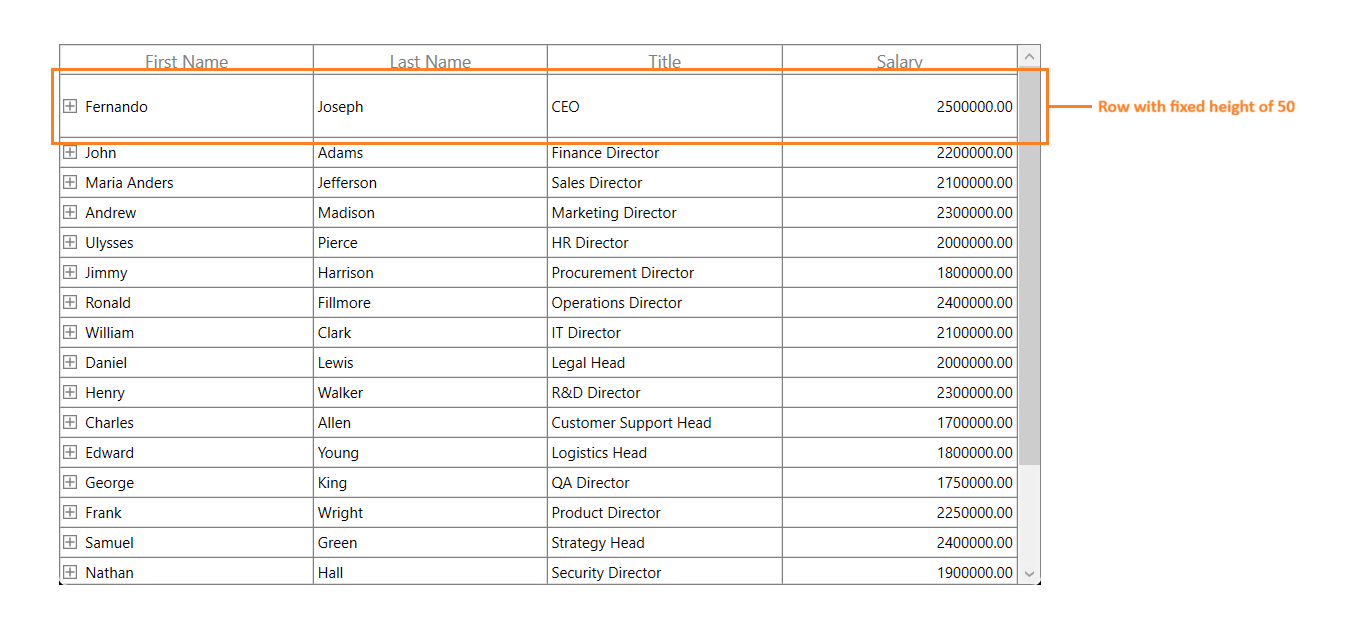
this.treeGrid.QueryRowHeight += TreeGrid_QueryRowHeight;

void TreeGrid_QueryRowHeight(object sender, TreeGridQueryRowHeightEventArgs e)
{
    if (e.RowIndex == 1) //Sets Height to the first row.
    {
        e.Height = 50;
        e.Handled = true;
    }
}
Fit the Row Height based on its content
You can fit the row height based on its content in QueryRowHeight event handler using GetAutoRowHeight method. This improves the readability of the content and it does not affect the loading performance of the SfTreeGrid as the QueryRowHeight event triggered for rows in on-demand.
GetAutoRowHeight method returns true when the row height is calculated for record and header rows and returns false for other rows. Calculated height based on content set to the out parameter and you can assign the calculated height to the Height property of TreeGridQueryRowHeightEventArgs.
Below are the parameter to GetAutoRowHeight method,
-
RowIndex – denotes the index of row in SfTreeGrid.
-
GridRowSizingOptions – A class with properties to customize the row height calculation.
<syncfusion:SfTreeGrid Name="treeGrid"
                       AutoGenerateColumns="False"
                       ChildPropertyName="ReportsTo"
                       ItemsSource="{Binding Employees}"
                       ParentPropertyName="ID"
                       SelfRelationRootValue="-1">
    <syncfusion:SfTreeGrid.Columns>
        <syncfusion:TreeGridTextColumn MappingName="FirstName"  TextWrapping="Wrap"/>
        <syncfusion:TreeGridTextColumn MappingName="Title" TextWrapping="Wrap"/>
        <syncfusion:TreeGridNumericColumn MappingName="Salary" TextWrapping="Wrap"/>
        <syncfusion:TreeGridNumericColumn MappingName="About" TextWrapping="Wrap"/>
        </syncfusion:SfTreeGrid.Columns>
</syncfusion:SfTreeGrid>
GridRowSizingOptions gridRowResizingOptions = new GridRowSizingOptions(); //To get the calculated height from GetAutoRowHeight method. double autoHeight; this.treeGrid.QueryRowHeight += TreeGrid_QueryRowHeight; void TreeGrid_QueryRowHeight(object sender, TreeGridQueryRowHeightEventArgs e) { if (this.treeGrid.TreeGridColumnSizer.GetAutoRowHeight(e.RowIndex, gridRowResizingOptions, out autoHeight)) { if (autoHeight > 24) { e.Height = autoHeight; e.Handled = true; } } }
Here, row heights are customized based on the large text content.

GridRowSizingOptions
GridRowSizingOptions have the following properties,
-
ExcludeColumns – If you want to skips specific column from row height calculation, you can add that columns to GridRowSizingOptions.ExcludeColumns. By default, GetAutoRowHeight method calculates the row height based on all columns.
-
CanIncludeHiddenColumns – If you want to consider the hidden columns while calculating row height, you can set GridRowSizingOptions.CanIncludeHiddenColumns as
true.
Calculate Height based on certain columns
You can exclude columns from row height calculation using GridRowSizingOptions.ExcludeColumns. This will helps to reduce the count of loop run for height calculation for better performance.
You can add the columns which needs to exclude from height calculation using GridRowSizingOptions.ExcludeColumns collection.
GridRowSizingOptions gridRowResizingOptions = new GridRowSizingOptions();

//To get the calculated height from GetAutoRowHeight method.
double autoHeight = double.NaN;

// The list contains the column names that will excluded from the height calculation in GetAutoRowHeight method.
List<string> excludeColumns = new List<string>() {"FirstName", "LastName", "Title", "Salary" };
this.treeGrid.QueryRowHeight += TreeGrid_QueryRowHeight;
gridRowResizingOptions.ExcludeColumns = excludeColumns;

void TreeGrid_QueryRowHeight(object sender, QueryRowHeightEventArgs e)
{

    if (this.treeGrid.TreeGridColumnSizer.GetAutoRowHeight(e.RowIndex, gridRowResizingOptions, out autoHeight))
    {

        if (autoHeight > 24)
        {
            e.Height = autoHeight;
            e.Handled = true;
        }
    }
}
Here FirstName,LastName, Title and Salary columns are excluded from height calculation and the row height is calculated based on About column only.

Reset Row Height at runtime
You can reset height of the particular or all rows in View at runtime to get the updated height from QueryRowHeight event handler using below methods. You have to call InvalidateMeasureInfo method of TreeGridPanel to refresh the View.
-
InvalidateRowHeight – Resets the height of particular row.
using Syncfusion.UI.Xaml.Grid.Helpers; treeGrid.InvalidateRowHeight(2); treeGrid.GetTreePanel().InvalidateMeasureInfo(); -
TreeGridRowHeightManager.Reset – Resets the height for all rows in View.
using Syncfusion.UI.Xaml.Grid.Helpers;

this.treeGrid.GetTreePanel().TreeGridRowHeightManager.Reset();
treeGrid.GetTreePanel().InvalidateMeasureInfo();
Update Row Height while editing
You can set the height of the row based on the content after editing by refreshing the row height in SfTreeGrid.CurrentCellEndEdit event.
You can call the InvalidateRowHeight method in CurrentCellEndEdit event to reset the particular row height. Then call the InvalidateMeasureInfo method of TreeGridPanel to refresh the view. Now the QueryRowHeight event is called again for edited row alone and row height is calculated based on edited content.
using Syncfusion.UI.Xaml.Grid.Helpers;

GridRowSizingOptions gridRowResizingOptions = new GridRowSizingOptions();

//To get the calculated height from GetAutoRowHeight method.
double autoHeight = double.NaN;

this.treeGrid.QueryRowHeight += TreeGrid_QueryRowHeight;
this.treeGrid.CurrentCellEndEdit += TreeGrid_CurrentCellEndEdit;

void TreeGrid_CurrentCellEndEdit(object sender, CurrentCellEndEditEventArgs args)
{
     treeGrid.InvalidateRowHeight(args.RowColumnIndex.RowIndex);
     treeGrid.GetTreePanel().InvalidateMeasureInfo();
}

void TreeGrid_QueryRowHeight(object sender, TreeGridQueryRowHeightEventArgs e)
{

    if (this.treeGrid.TreeGridColumnSizer.GetAutoRowHeight(e.RowIndex, gridRowResizingOptions, out autoHeight))
    {

        if (autoHeight > 24)
        {
            e.Height = autoHeight;
            e.Handled = true;
        }
    }
}
Change HeaderRow Height based on its Content
By default, auto height is supported for the headers is QueryRowHeight event. If you want to set the auto height to header row alone, you can use the GetHeaderIndex method to decide whether the row index is header or not in QueryRowHeight event.
<Window.Resources>
    <DataTemplate x:Key="headerTemplate">
        <TextBlock  FontWeight="Bold"
                    Foreground="DarkBlue"
                    Text="Employees with Over 5 Years of Experience"
                    TextWrapping="Wrap" />
    </DataTemplate>
</Window.Resources>

<syncfusion:SfTreeGrid x:Name="treeGrid" ItemsSource="{Binding Employees}">
    <syncfusion:SfTreeGrid.Columns>
        <syncfusion:TreeGridTextColumn HeaderTemplate="{StaticResource headerTemplate}" MappingName="FirstName" />
    </syncfusion:SfTreeGrid.Columns>
</syncfusion:SfTreeGrid>
GridRowSizingOptions gridRowResizingOptions = new GridRowSizingOptions();
//To get the calculated height from the GetAutoRowHeight method.
double autoHeight;
this.treeGrid.QueryRowHeight += TreeGrid_QueryRowHeight;
void TreeGrid_QueryRowHeight(object sender, TreeGridQueryRowHeightEventArgs e)
{
//checked whether the row index is header or not.
if (this.treeGrid.GetHeaderIndex() == e.RowIndex)
{
if (this.treeGrid.TreeGridColumnSizer.GetAutoRowHeight(e.RowIndex, gridRowResizingOptions, out autoHeight))
{
if (autoHeight > 24)
{
e.Height = autoHeight;
e.Handled = true;
}
}
}
}
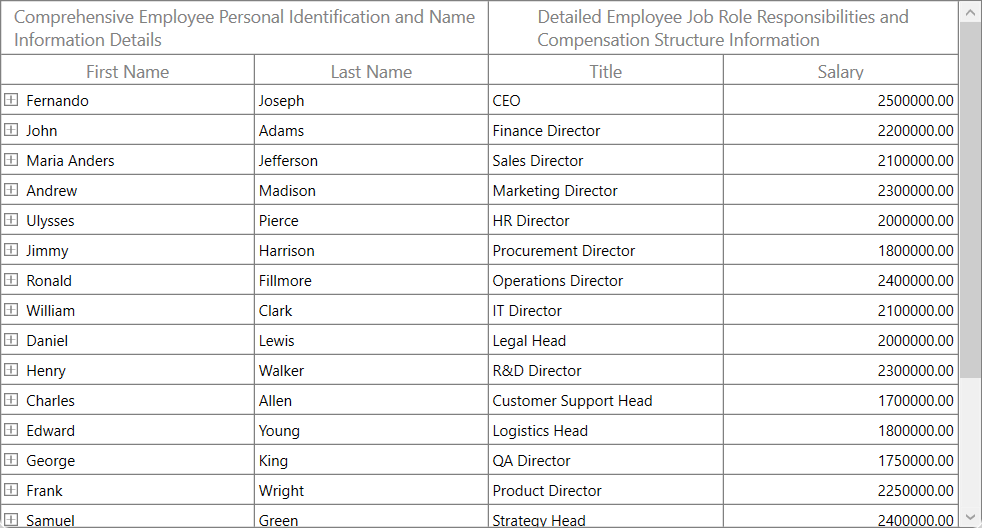
Change StackedHeaderRow Height based on its content
By default, auto height is supported for StackedHeaderRows in QueryRowHeight event. You can also set the auto height to the StackedHeaderRows alone using QueryRowHeight event by checking the row index with StackedHeaderRows count.
Also you can wrap stacked header text by writing style of TargetType GridStackedHeaderCellControl and set the TextWrapping as Wrap as below,
<Style TargetType="syncfusion:TreeGridStackedHeaderCell">
    <Setter Property="Template">
        <Setter.Value>
            <ControlTemplate TargetType="syncfusion:TreeGridStackedHeaderCell">
                <Border Background="{TemplateBinding Background}"
                        BorderBrush="{TemplateBinding BorderBrush}"
                        BorderThickness="{TemplateBinding BorderThickness}">
                        <ContentPresenter Content="{TemplateBinding Content}"
                                          HorizontalAlignment="{TemplateBinding HorizontalContentAlignment}"
                                          VerticalAlignment="{TemplateBinding VerticalContentAlignment}">
                            <ContentPresenter.ContentTemplate>
                                <DataTemplate>
                                    <TextBlock Text="{Binding}"
                                               TextWrapping="Wrap"
                                               TextAlignment="Left"/>
                                </DataTemplate>
                            </ContentPresenter.ContentTemplate>
                        </ContentPresenter>
                </Border>
            </ControlTemplate>
        </Setter.Value>
    </Setter>
</Style>
GridRowSizingOptions gridRowResizingOptions = new GridRowSizingOptions();
//To get the calculated height from the GetAutoRowHeight method.
double autoHeight;
this.treeGrid.QueryRowHeight += TreeGrid_QueryRowHeight;
void TreeGrid_QueryRowHeight(object sender, TreeGridQueryRowHeightEventArgs e)
{
if (e.RowIndex < this.treeGrid.StackedHeaderRows.Count)
{
if (this.treeGrid.TreeGridColumnSizer.GetAutoRowHeight(e.RowIndex, gridRowResizingOptions, out autoHeight))
{
if (autoHeight > 24)
{
e.Height = autoHeight;
e.Handled = true;
}
}
}
}