ODataV4Adaptor in TypeScript Grid Control
The ODataV4Adaptor in the Syncfusion® Grid Control allows seamless integration of the Grid with OData v4 services, enabling efficient data fetching and manipulation. This guide provides detailed instructions on binding data and performing CRUD (Create, Read, Update, Delete) actions using the ODataV4Adaptor in your Syncfusion® Grid Control.
This section describes a step-by-step process for retrieving data using ODataV4Adaptor, then binding it to the TypeScript Grid control to facilitate data and CRUD operations.
Handling searching operation
To enable search operations in your web application using OData, you first need to configure the OData support in your service collection. This involves adding the Filter method within the OData setup, allowing you to filter data based on specified criteria. Once enabled, clients can utilize the $filter query option in their requests to search for specific data entries.
// Create a new instance of the web application builder
var builder = WebApplication.CreateBuilder(args);

// Create an ODataConventionModelBuilder to build the OData model
var modelBuilder = new ODataConventionModelBuilder();

// Register the "Orders" entity set with the OData model builder
modelBuilder.EntitySet<OrdersDetails>("Orders");

// Add services to the container.

// Add controllers with OData support to the service collection
builder.Services.AddControllers().AddOData(
    options => options
        .Count()
        .Filter() //searching
        .AddRouteComponents("odata", modelBuilder.GetEdmModel()));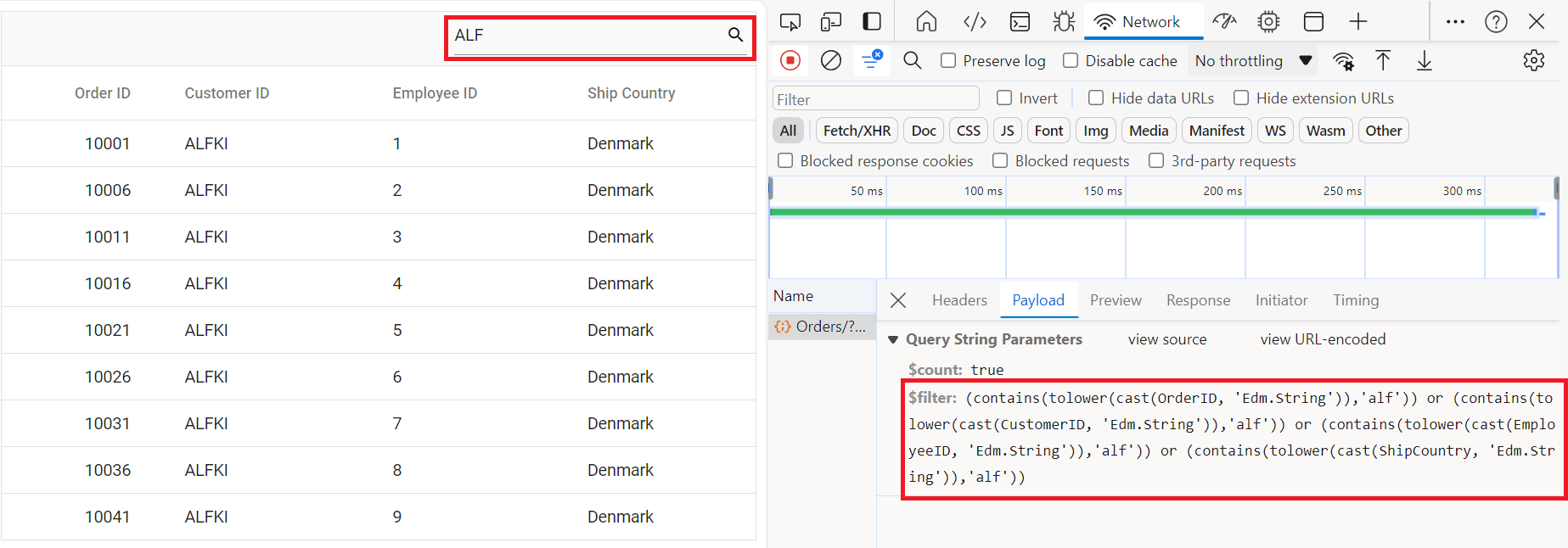
Handling filtering operation
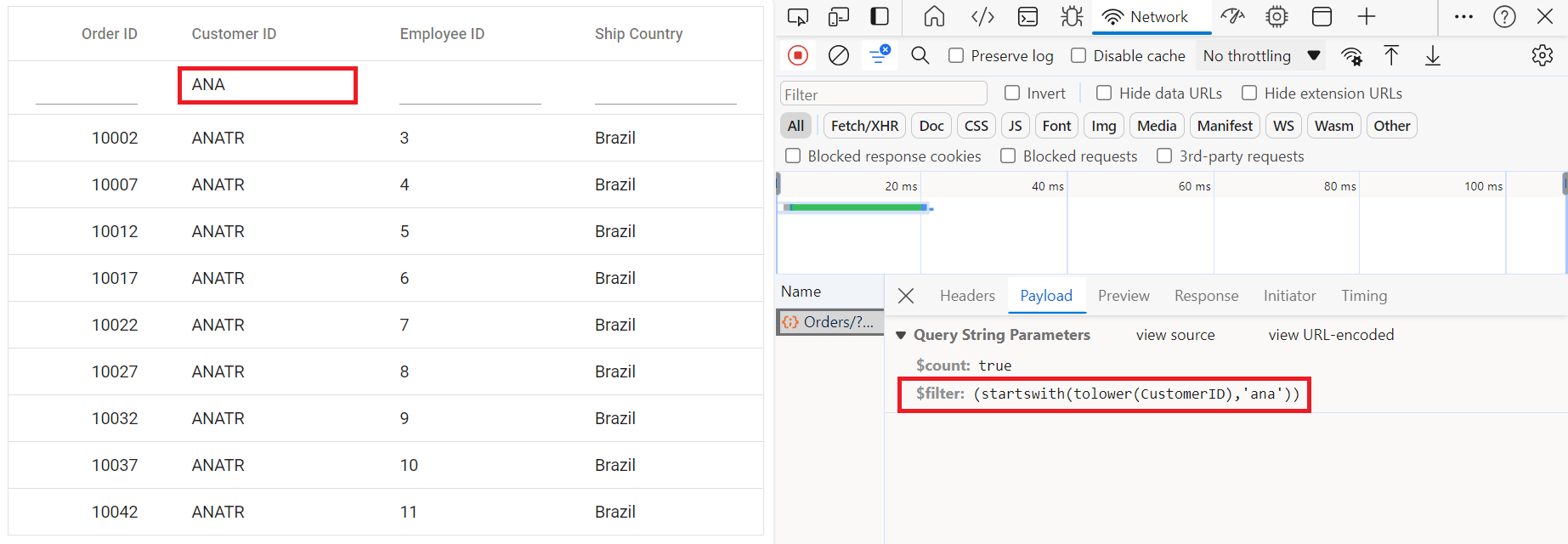
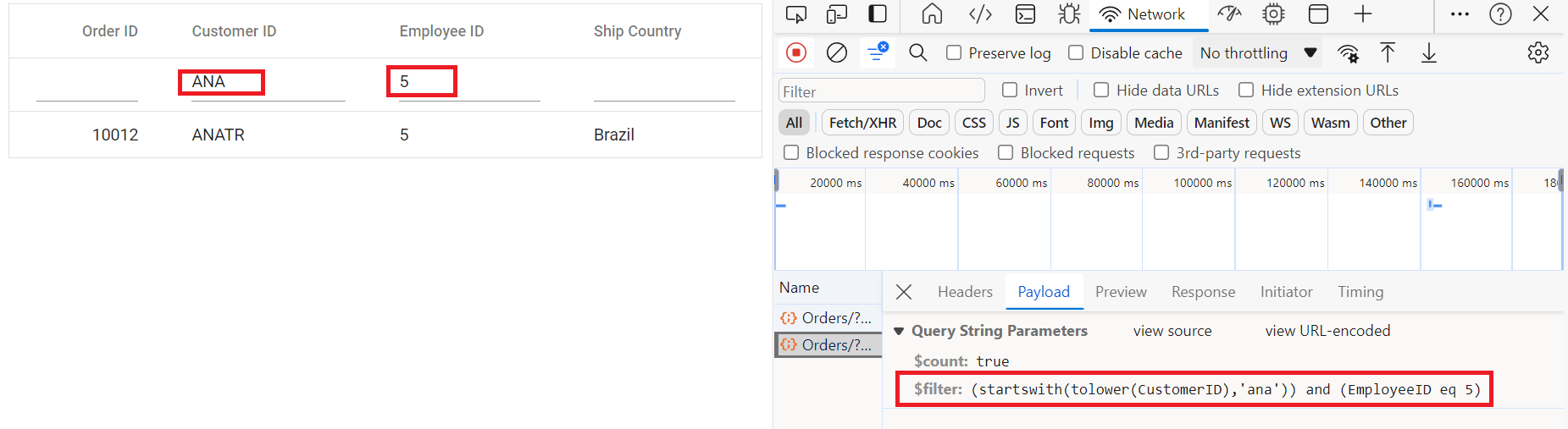
To enable filter operations in your web application using OData, you first need to configure the OData support in your service collection. This involves adding the Filter method within the OData setup, allowing you to filter data based on specified criteria. Once enabled, clients can utilize the $filter query option in your requests to filter for specific data entries.
// Create a new instance of the web application builder
var builder = WebApplication.CreateBuilder(args);

// Create an ODataConventionModelBuilder to build the OData model
var modelBuilder = new ODataConventionModelBuilder();

// Register the "Orders" entity set with the OData model builder
modelBuilder.EntitySet<OrdersDetails>("Orders");

// Add services to the container.

// Add controllers with OData support to the service collection
builder.Services.AddControllers().AddOData(
    options => options
        .Count()
        .Filter() // filtering
        .AddRouteComponents("odata", modelBuilder.GetEdmModel()));
Single column filtering
Multi column filtering
Handling sorting operation
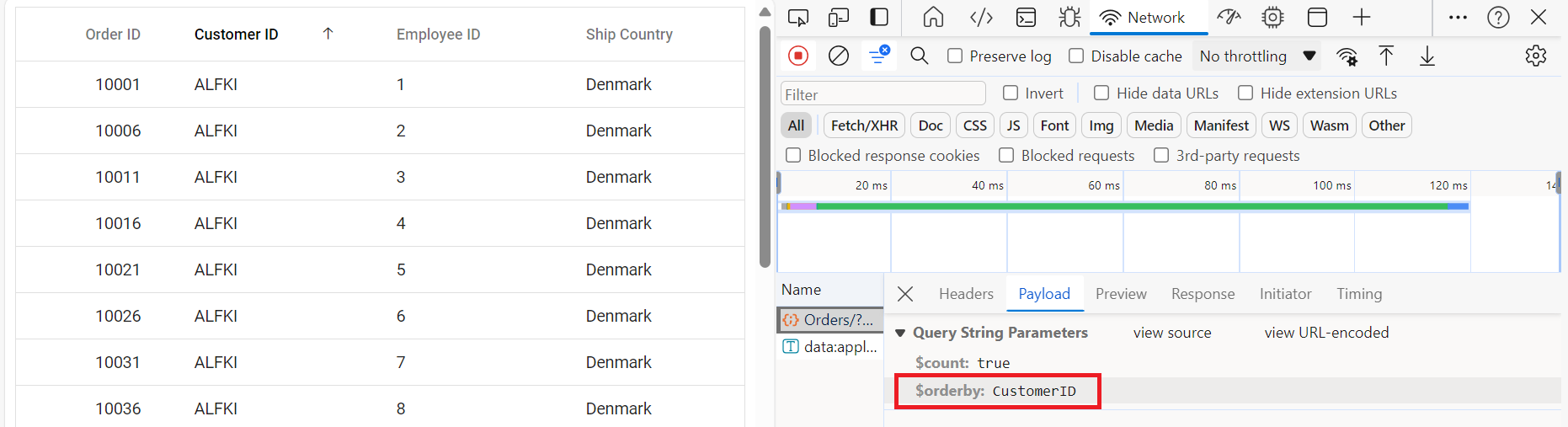
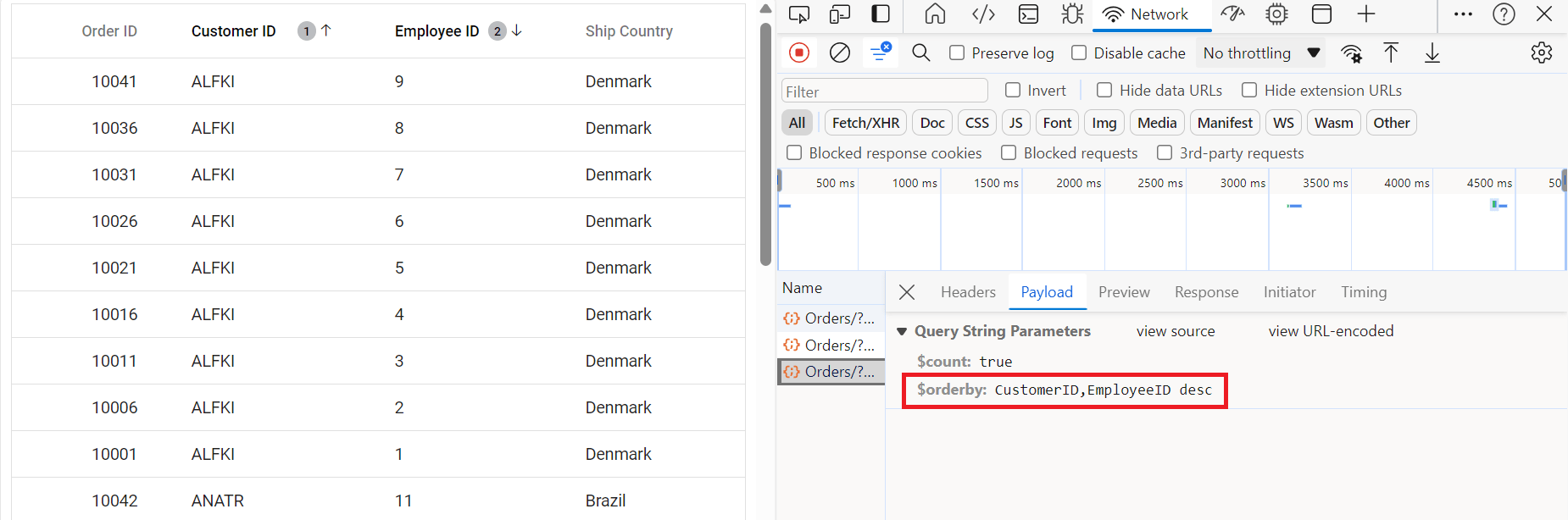
To enable sorting operations in your web application using OData, you first need to configure the OData support in your service collection. This involves adding the OrderBy method within the OData setup, allowing you to sort data based on specified criteria. Once enabled, clients can utilize the $orderby query option in their requests to sort data entries according to desired attributes.
// Create a new instance of the web application builder
var builder = WebApplication.CreateBuilder(args);

// Create an ODataConventionModelBuilder to build the OData model
var modelBuilder = new ODataConventionModelBuilder();

// Register the "Orders" entity set with the OData model builder
modelBuilder.EntitySet<OrdersDetails>("Orders");

// Add services to the container.

// Add controllers with OData support to the service collection
builder.Services.AddControllers().AddOData(
    options => options
        .Count()
        .OrderBy() // sorting
        .AddRouteComponents("odata", modelBuilder.GetEdmModel()));
Single column sorting
Multi column sorting
Handling paging operation
To implement paging operations in your web application using OData, you can utilize the SetMaxTop method within your OData setup to limit the maximum number of records that can be returned per request. While you configure the maximum limit, clients can utilize the $skip and $top query options in their requests to specify the number of records to skip and the number of records to take, respectively.
// Create a new instance of the web application builder
var builder = WebApplication.CreateBuilder(args);

// Create an ODataConventionModelBuilder to build the OData model
var modelBuilder = new ODataConventionModelBuilder();

// Register the "Orders" entity set with the OData model builder
modelBuilder.EntitySet<OrdersDetails>("Orders");

// Add services to the container.

// Add controllers with OData support to the service collection

var recordCount= OrdersDetails.GetAllRecords().Count;

builder.Services.AddControllers().AddOData(
    options => options
    .Count()
    .SetMaxTop(recordCount)
    .AddRouteComponents(
        "odata",
        modelBuilder.GetEdmModel()));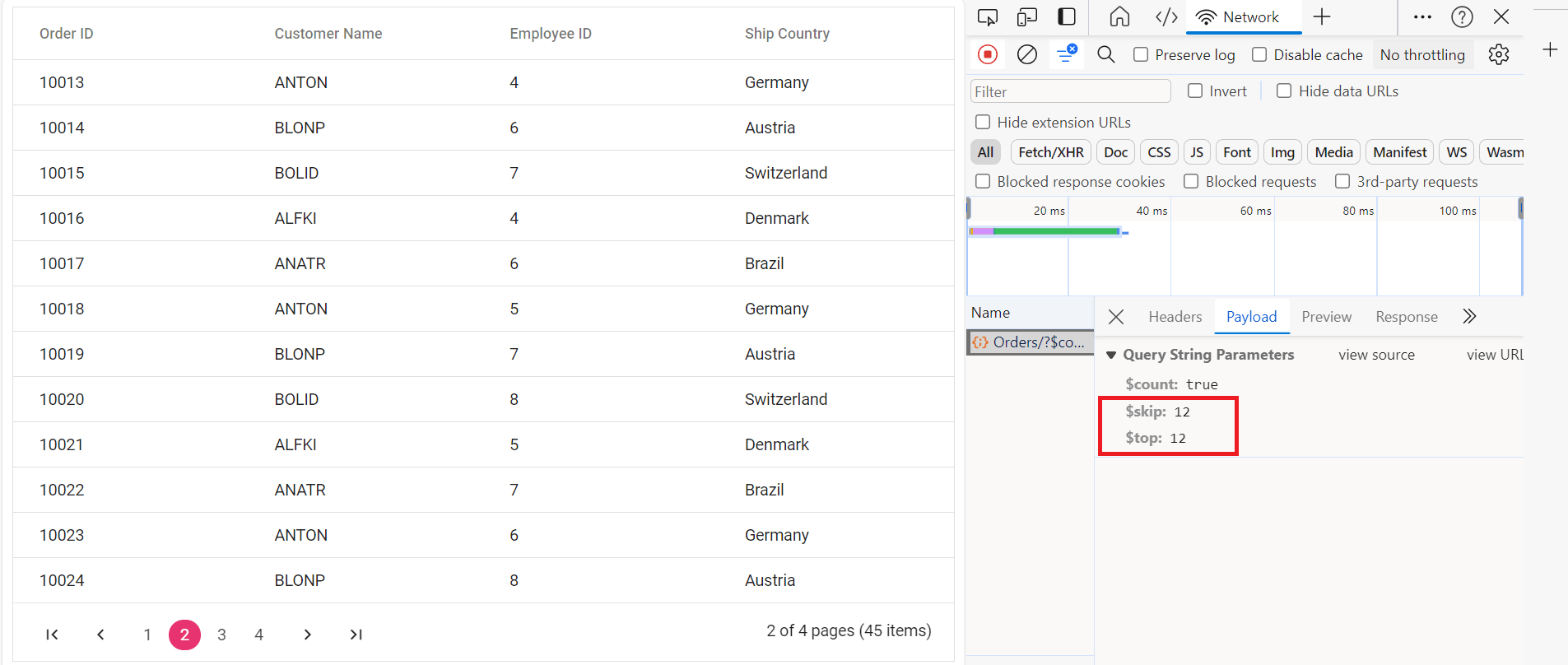
Handling CRUD operations
To manage CRUD (Create, Read, Update, Delete) operations using the ODataV4Adaptor, follow the provided guide for configuring the Syncfusion® Grid for editing and utilize the sample implementation of the OrdersController in your server application. This controller handles HTTP requests for CRUD operations such as GET, POST, PATCH, and DELETE.
To enable CRUD operations in the Syncfusion® Grid control, follow the below steps:
Normal/Inline editing is the default edit mode for the Grid control. To enable CRUD operations, ensure that the isPrimaryKey property is set to true for a specific Grid column, ensuring that its value is unique.
Insert Record
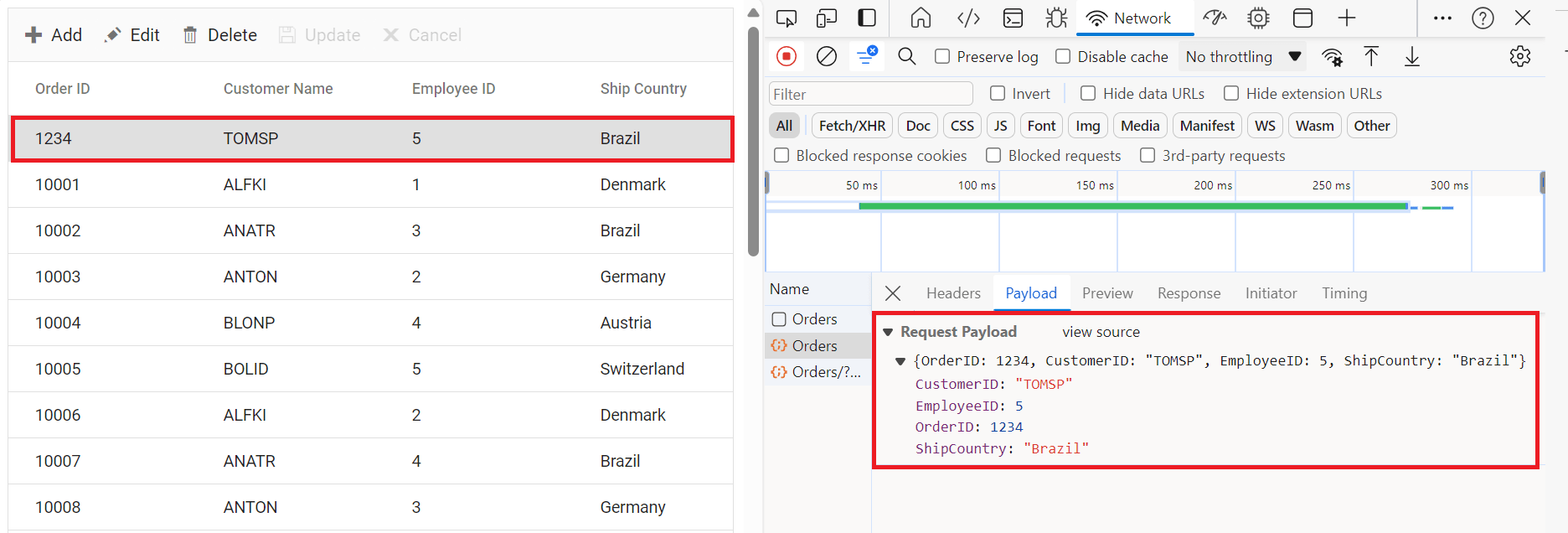
To insert a new record into your Syncfusion® Grid, you can utilize the HttpPost method in your server application. Below is a sample implementation of inserting a record using the OrdersController:
/// <summary>
/// Inserts a new order to the collection.
/// </summary>
/// <param name="addRecord">The order to be inserted.</param>
/// <returns>It returns the newly inserted record detail.</returns>
[HttpPost]
[EnableQuery]
public IActionResult Post([FromBody] OrdersDetails addRecord)
{
    if (addRecord == null)
    {
      return BadRequest("Null order");
    }
    OrdersDetails.GetAllRecords().Insert(0, addRecord);
    return Json(addRecord);
}
Update Record
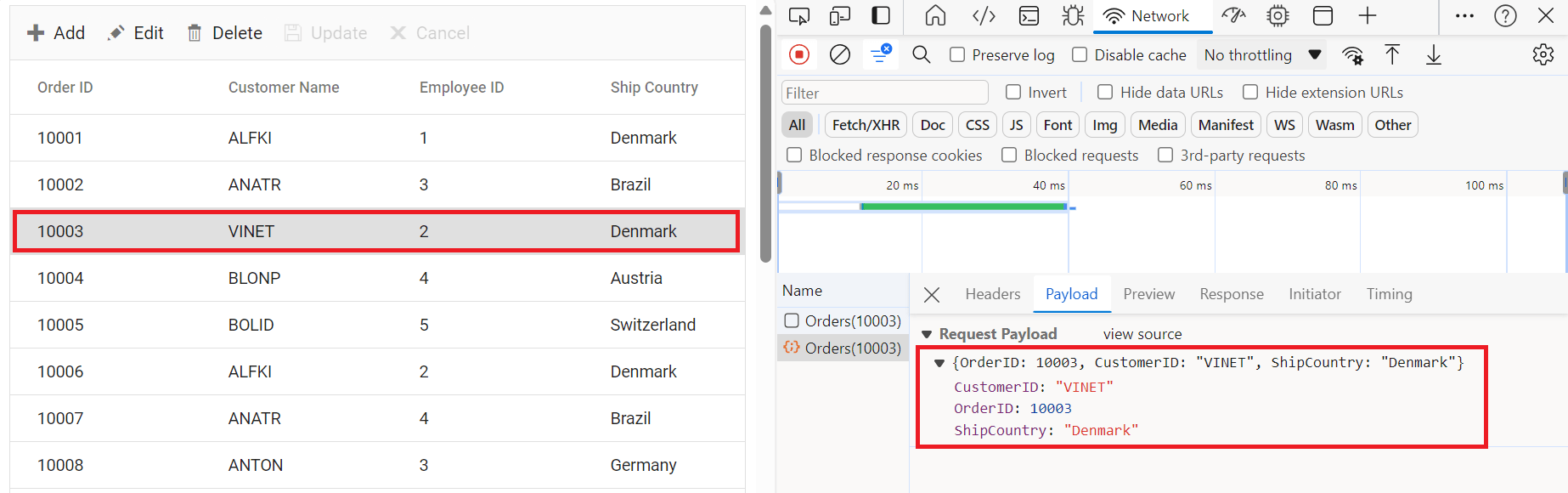
Updating a record in the Syncfusion® Grid can be achieved by utilizing the HttpPatch method in your controller. Here’s a sample implementation of updating a record:
/// <summary>
/// Updates an existing order.
/// </summary>
/// <param name="key">The ID of the order to update.</param>
/// <param name="updateRecord">The updated order details.</param>
/// <returns>It returns the updated order details.</returns>
[HttpPatch("{key}")]
public IActionResult Patch(int key, [FromBody] OrdersDetails updateRecord)
{
    if (updateRecord == null)
    {
        return BadRequest("No records");
    }
    var existingOrder = OrdersDetails.GetAllRecords().FirstOrDefault(order => order.OrderID == key);
    if (existingOrder != null)
    {
        // If the order exists, update its properties
        existingOrder.CustomerID = updateRecord.CustomerID ?? existingOrder.CustomerID;
        existingOrder.EmployeeID = updateRecord.EmployeeID ?? existingOrder.EmployeeID;
        existingOrder.ShipCountry = updateRecord.ShipCountry ?? existingOrder.ShipCountry;
    }
    return Json(updateRecord);
}
Delete Record
To delete a record from your Syncfusion® Grid, you can utilize the HttpDelete method in your controller. Below is a sample implementation:
/// <summary>
/// Deletes an order.
/// </summary>
/// <param name="key">The ID of the order to delete.</param>
/// <returns>It returns the deleted record detail</returns>
[HttpDelete("{key}")]
public IActionResult Delete(int key)
{
    var deleteRecord = OrdersDetails.GetAllRecords().FirstOrDefault(order => order.OrderID == key);
    if (deleteRecord != null)
    {
        OrdersDetails.GetAllRecords().Remove(deleteRecord);
    }
    return Json(deleteRecord);
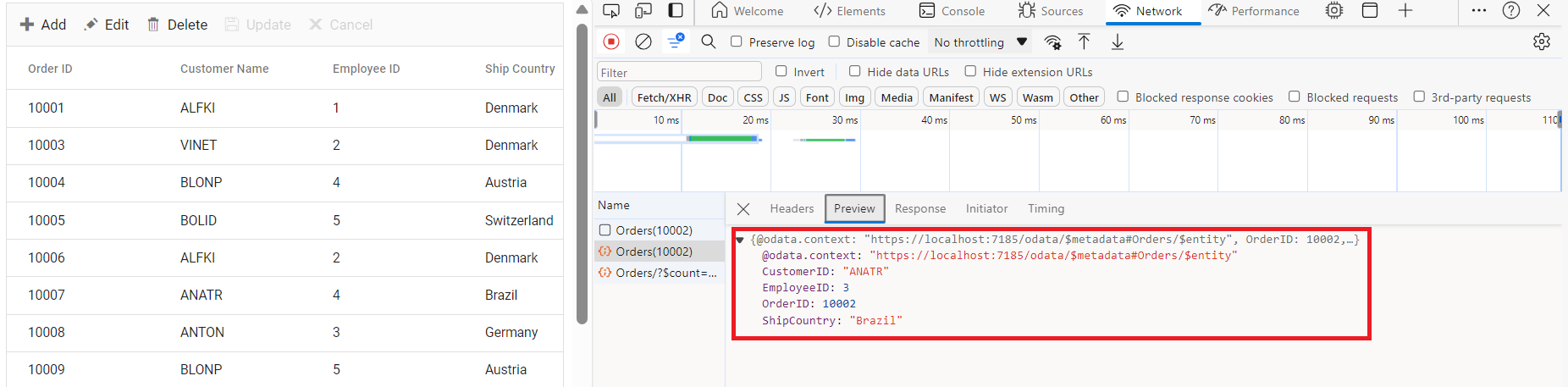
}
Odata with custom url
The Syncfusion® ODataV4 adaptor extends support for calling customized URLs to accommodate data retrieval and CRUD actions as per your application’s requirements. However, when utilizing a custom URL with the ODataV4 adaptor, it’s Essential® to modify the routing configurations in your application’s route configuration file to align with your custom URL. You can invoke the custom URL by the following methods in the Datamanager
Configuring Custom URLs
To work with custom URLs for CRUD operations in the Syncfusion® Grid, you can use the following properties:
- insertUrl: Specifies the custom URL for inserting new records.
- removeUrl: Specifies the custom URL for deleting records.
- updateUrl: Specifies the custom URL for updating records.
- batchUrl: Specifies the custom URL for batch editing operations.
Ensure that the routing configurations on the server-side are properly updated to handle these custom URLs.
The following code example describes the above behavior.
For batch editing, you can specify a custom batch URL as follows: