Custom Adaptor in Blazor Pivot Table
The SfDataManager supports custom adaptors, enabling you to perform manual operations on the data. This feature is useful for implementing custom data binding and CRUD operations in the Blazor PivotView.
To implement custom data binding in the PivotView, the DataAdaptor abstract class is used as the base class for the custom adaptor.
Prerequisites
Before implementing a custom adaptor, ensure the following are in place:
- A Blazor Server or Blazor Web App project (.NET 6.0 or later).
- The Syncfusion.Blazor.PivotView NuGet package added to the project. Register the Syncfusion Blazor service in
Program.cs(builder.Services.AddSyncfusionBlazor()). - The
@using Syncfusion.Blazor.Dataand@using Syncfusion.Blazor.PivotViewdirectives available in the component (or registered in_Imports.razor). - The DataAdaptor abstract class lives in the
Syncfusion.Blazor.Datanamespace.
The async CRUD variants (
InsertAsync,UpdateAsync,RemoveAsync,ReadAsync) follow the same signatures as their synchronous counterparts and can be overridden when non-blocking data access is required. The samples below use the synchronous forms for brevity.
The DataAdaptor abstract class includes both synchronous and asynchronous method signatures, which can be overridden in the custom adaptor. The following are the method signatures available in this class:
public abstract class DataAdaptor
{
    /// <summary>
    /// Performs data read operation synchronously.
    /// </summary>
    public virtual object Read(DataManagerRequest dataManagerRequest, string key = null)

    /// <summary>
    /// Performs data read operation asynchronously.
    /// </summary>
    public virtual Task<object> ReadAsync(DataManagerRequest dataManagerRequest, string key = null)

    /// <summary>
    /// Performs insert operation synchronously.
    /// </summary>
    public virtual object Insert(DataManager dataManager, object data, string additionalParam)
    /// <summary>
    /// Performs insert operation asynchronously.
    /// </summary>
    public virtual Task<object> InsertAsync(DataManager dataManager, object data, string additionalParam)

    /// <summary>
    /// Performs remove operation synchronously.
    /// </summary>
    public virtual object Remove(DataManager dataManager, object data, string keyField, string additionalParam)

    /// <summary>
    /// Performs remove operation asynchronously.
    /// </summary>
    public virtual Task<object> RemoveAsync(DataManager dataManager, object data, string keyField, string additionalParam)

    /// <summary>
    /// Performs update operation synchronously.
    /// </summary>
    public virtual object Update(DataManager dataManager, object data, string keyField, string additionalParam)

    /// <summary>
    /// Performs update operation asynchronously.
    /// </summary>
    public virtual Task<object> UpdateAsync(DataManager dataManager, object data, string keyField, string additionalParam)
}
Overview of Custom Adaptor in PivotView
Unlike the built-in UrlAdaptor or WebApiAdaptor, the Custom Adaptor gives you direct control over the data binding workflow. In the PivotView, the Custom Adaptor is used only for CRUD operations in the editing popup — all aggregation, grouping, sorting, filtering, and paging of the pivot result are performed client-side by the PivotView engine itself.
-
Data Retrieval: The
Readmethod returns the raw data source; aggregation/grouping happens in the PivotView, not in the adaptor. -
CRUD Operations: Handle Insert, Update, and Delete operations raised by the editing popup (
Insert,Update,Remove).
The Custom Adaptor is particularly useful for the PivotView’s editing popup, which allows users to edit, add, or delete records directly from the pivot table’s detailed view (referred to throughout this document as the “editing popup”).
Data Binding
Custom data binding in the Blazor PivotView requires a custom adaptor class. The adaptor extends the DataAdaptor abstract class by overriding the Read or ReadAsync method.
The
OrderDatamodel used in this sample is defined in the OrderData Model Class section below.
The following sample code demonstrates how to implement custom data binding using a custom adaptor in a PivotView:
@page "/"

@using Syncfusion.Blazor.PivotView
@using Syncfusion.Blazor.Data

<SfPivotView TValue="OrderData" Width="1000" Height="300" ShowFieldList="true">
    <PivotViewDataSourceSettings TValue="OrderData" ExpandAll=false EnableSorting=true>
        <SfDataManager AdaptorInstance="@typeof(CustomAdaptor)" Adaptor="Adaptors.CustomAdaptor"></SfDataManager>
        <PivotViewColumns>
            <PivotViewColumn Name="OrderID"></PivotViewColumn>
        </PivotViewColumns>
        <PivotViewRows>
            <PivotViewRow Name="CustomerID"></PivotViewRow>
        </PivotViewRows>
        <PivotViewValues>
            <PivotViewValue Name="Freight" Caption="Freight"></PivotViewValue>
        </PivotViewValues>
    </PivotViewDataSourceSettings>
    <PivotViewGridSettings ColumnWidth="120"></PivotViewGridSettings>
    <PivotViewEvents TValue="OrderData" BeginDrillThrough="BeginDrillThrough"></PivotViewEvents>
    <PivotViewCellEditSettings AllowEditing=true AllowAdding=true AllowDeleting=true Mode=Syncfusion.Blazor.PivotView.EditMode.Normal></PivotViewCellEditSettings>
</SfPivotView>

@code {
    // Configure BeginDrillThrough event to set the primary key for CRUD operations
    private void BeginDrillThrough(BeginDrillThroughEventArgs args)
    {
        // Iterate through all columns in the editing popup
        for (int index = 0; index < args.GridObj.Columns.Count; index++)
        {
            // Check if the current column is the primary key column
            if (args.GridObj.Columns[index].Field == "OrderID")
            {
                // Mark this column as the primary key
                // This tells DataManager to use this column's value to uniquely identify records
                args.GridObj.Columns[index].IsPrimaryKey = true;
            }
        }
    }

    // Custom adaptor implementation by extending the DataAdaptor class.
    public class CustomAdaptor : DataAdaptor
    {
        // Performs the data read operation.
        // The PivotView performs aggregation/grouping client-side, so Read simply
        // returns the full data source. Do not apply paging/sorting/filtering here —
        // those are handled by the PivotView engine, not by the adaptor.
        public override object Read(DataManagerRequest dm, string key = null)
        {
            // Retrieves the data source.
            IEnumerable<OrderData> dataSource = OrderData.GetAllRecords();

            // The PivotView does not paginate the raw source, so the count equals the
            // source length when RequiresCounts is true; otherwise just return the data.
            return dm.RequiresCounts
                ? new DataResult() { Result = dataSource, Count = dataSource.Count() }
                : (object)dataSource;
        }
    }
}
If the DataManagerRequest.RequiresCounts is true, the
Read/ReadAsyncreturn value must be of type DataResult with properties Result (a collection of records) and Count (the total number of records). If RequiresCounts is false, simply return the collection of records.
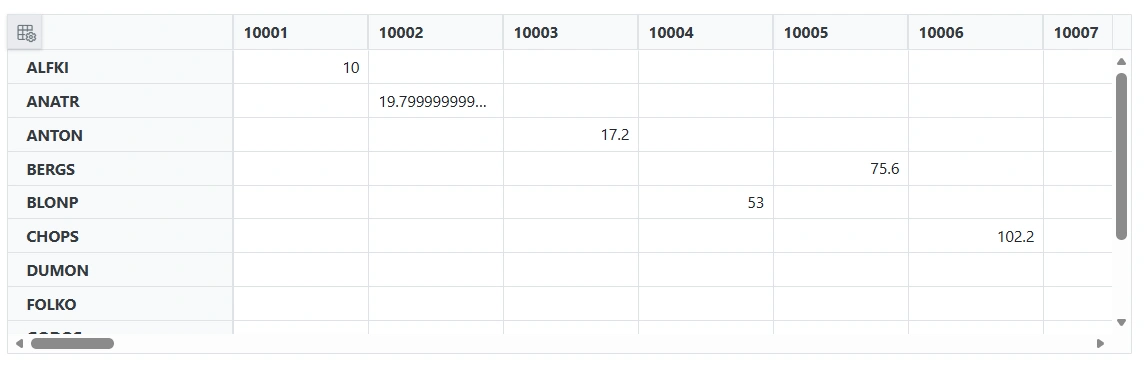
If the
Read/ReadAsyncmethod is not overridden in the custom adaptor, it will be handled by the default read handler.
How It Works
- The
SfDataManageris configured withAdaptorInstance="@typeof(CustomAdaptor)"andAdaptor="Adaptors.CustomAdaptor", which tells the Pivot Table to route every data request through theCustomAdaptorclass. - The
CustomAdaptorextendsDataAdaptorand overrides theReadmethod to return the full raw data source fromOrderData.GetAllRecords(). - The PivotView engine performs all aggregation, grouping, sorting, filtering, and paging client-side on the records returned by
Read. The adaptor does not perform these operations. - When a user double-clicks a cell, the editing popup opens; the
BeginDrillThroughevent marks theOrderIDcolumn as the primary key so that subsequent Insert, Update, and Remove operations target the correct record.
OrderData Model Class
The OrderData class serves as the data model for the PivotView and contains all order information, including order details, customer information, and order status. This model is used throughout the Custom Adaptor implementation for data binding and CRUD operations.
The
OrderDataclass below uses the namespaceCustomAdaptor.Components.Pages, matching a Blazor project where the project is namedCustomAdaptorand the component lives underComponents/Pages. Adjust the namespace to match your project name and folder layout so it resolves correctly from your.razorcomponents.
OrderData Class Structure
namespace CustomAdaptor.Components.Pages
{
    public enum OrderStatus
    {
        Processing,
        Shipped,
        Delivered,
        Cancelled
    }

    // Complex Type for Customer Details
    public class CustomerDetails
    {
        public CustomerDetails() { } // Parameterless constructor for OData compatibility

        public CustomerDetails(string name, string email)
        {
            Name = name;
            Email = email;
        }
        public string? Name { get; set; }
        public string? Email { get; set; }
    }

    public class OrderData
    {
        public static List<OrderData> Orders = new List<OrderData>();

        public OrderData()
        {
        }

        public OrderData(
            int orderID, string customerID, int employeeID, double freight, bool verified,
            DateOnly orderDate, TimeOnly orderedTime, string shipCity, string shipName, string shipCountry,
            DateTime shippedDate, string shipAddress, OrderStatus status, CustomerDetails customerDetails)
        {
            OrderID = orderID;
            CustomerID = customerID;
            EmployeeID = employeeID;
            Freight = freight;
            Verified = verified;
            OrderDate = orderDate;
            OrderedTime = orderedTime;
            ShipCity = shipCity;
            ShipName = shipName;
            ShipCountry = shipCountry;
            ShippedDate = shippedDate;
            ShipAddress = shipAddress;
            Status = status;
            CustomerDetails = customerDetails;
        }

        // Static method to retrieve all records
        public static List<OrderData> GetAllRecords()
        {
            if (Orders.Count == 0)
            {
                int code = 10000;
                int employeecode = 1;
                for (int i = 1; i <= 10; i++)
                {
                    Orders.Add(new OrderData(code + 1, "ALFKI", employeecode++, 2.3 * (i % 10 + 1), false,
                        new DateOnly(1991, 05, 15), new TimeOnly(10, i % 60, 0), "Berlin", "Simons Bistro", "Denmark",
                        new DateTime(1991, 05, 16, 10, i % 60, 0), "Kirchgasse 6", OrderStatus.Processing,
                        new CustomerDetails("John Doe", "[email protected]")));

                    Orders.Add(new OrderData(code + 2, "ANATR", employeecode++, 3.3 * (i % 10 + 2), true,
                        new DateOnly(1990, 04, 04), new TimeOnly(11, i % 60, 0), "Madrid", "Queen Cozinha", "Brazil",
                        new DateTime(1990, 04, 05, 11, i % 60, 0), "Avda. Azteca 123", OrderStatus.Shipped,
                        new CustomerDetails("Jane Smith", "[email protected]")));

                    Orders.Add(new OrderData(code + 3, "ANTON", employeecode++, 4.3 * (i % 10 + 3), true,
                        new DateOnly(1957, 11, 30), new TimeOnly(12, i % 60, 0), "Cholchester", "Frankenversand", "Germany",
                        new DateTime(1957, 12, 01, 12, i % 60, 0), "Carrera 52 con Ave. Bol\u00edvar #65-98 Llano Largo", OrderStatus.Delivered,
                        new CustomerDetails("Alice Johnson", "[email protected]")));

                    Orders.Add(new OrderData(code + 4, "BLONP", employeecode++, 5.3 * (i % 10 + 4), false,
                        new DateOnly(1930, 10, 22), new TimeOnly(13, i % 60, 0), "Marseille", "Ernst Handel", "Austria",
                        new DateTime(1930, 10, 23, 13, i % 60, 0), "Magazinweg 7", OrderStatus.Cancelled,
                        new CustomerDetails("Bob Brown", "[email protected]")));

                    Orders.Add(new OrderData(code + 5, "BERGS", employeecode++, 6.3 * (i % 10 + 5), true,
                        new DateOnly(2000, 12, 10), new TimeOnly(14, i % 60, 0), "London", "Victoria's Deli", "United Kingdom",
                        new DateTime(2000, 12, 11, 14, i % 60, 0), "221B Baker Street", OrderStatus.Processing,
                        new CustomerDetails("Charlie Green", "[email protected]")));

                    Orders.Add(new OrderData(code + 6, "CHOPS", employeecode++, 7.3 * (i % 10 + 6), false,
                        new DateOnly(2015, 06, 20), new TimeOnly(15, i % 60, 0), "Sydney", "Harbor Delight", "Australia",
                        new DateTime(2015, 06, 21, 15, i % 60, 0), "Opera House St.", OrderStatus.Shipped,
                        new CustomerDetails("Diana Prince", "[email protected]")));

                    Orders.Add(new OrderData(code + 7, "DUMON", employeecode++, 8.3 * (i % 10 + 7), true,
                        new DateOnly(2010, 03, 15), new TimeOnly(16, i % 60, 0), "Toronto", "Maple Leaf Bistro", "Canada",
                        new DateTime(2010, 03, 16, 16, i % 60, 0), "Maple Street 10", OrderStatus.Delivered,
                        new CustomerDetails("Edward Norton", "[email protected]")));

                    Orders.Add(new OrderData(code + 8, "FOLKO", employeecode++, 9.3 * (i % 10 + 8), false,
                        new DateOnly(2020, 01, 05), new TimeOnly(17, i % 60, 0), "Paris", "Eiffel Caf\u00e9", "France",
                        new DateTime(2020, 01, 06, 17, i % 60, 0), "Louvre Lane", OrderStatus.Cancelled,
                        new CustomerDetails("Fiona Scott", "[email protected]")));

                    Orders.Add(new OrderData(code + 9, "GODOS", employeecode++, 10.3 * (i % 10 + 9), true,
                        new DateOnly(2005, 07, 12), new TimeOnly(18, i % 60, 0), "Rome", "Colosseum Cuisine", "Italy",
                        new DateTime(2005, 07, 13, 18, i % 60, 0), "Via Roma 20", OrderStatus.Shipped,
                        new CustomerDetails("George Clooney", "[email protected]")));

                    Orders.Add(new OrderData(code + 10, "HUNGO", employeecode++, 11.3 * (i % 10 + 10), false,
                        new DateOnly(1985, 09, 18), new TimeOnly(19, i % 60, 0), "New York", "Statue Grill", "USA",
                        new DateTime(1985, 09, 19, 19, i % 60, 0), "Liberty Street", OrderStatus.Processing,
                        new CustomerDetails("Harvey Specter", "[email protected]")));

                    code += 10;
                }
            }
            return Orders;
        }

        // OrderData Properties
        public int? OrderID { get; set; }
        public string? CustomerID { get; set; }
        public int? EmployeeID { get; set; }
        public double? Freight { get; set; }
        public string? ShipCity { get; set; }
        public bool? Verified { get; set; }
        public DateOnly OrderDate { get; set; }
        public TimeOnly OrderedTime { get; set; }
        public string? ShipName { get; set; }
        public string? ShipCountry { get; set; }
        public DateTime ShippedDate { get; set; }
        public string? ShipAddress { get; set; }
        public OrderStatus Status { get; set; }
        public CustomerDetails? CustomerDetails { get; set; }
    }
}
OrderData Properties Description
| Property | Type | Description |
|---|---|---|
OrderID |
int? | Primary key for the order (auto-generated if not provided) |
CustomerID |
string? | Customer identifier (e.g., “ALFKI”, “ANATR”) |
EmployeeID |
int? | Employee handling the order |
Freight |
double? | Shipping cost for the order |
Verified |
bool? | Flag indicating if the order is verified |
OrderDate |
DateOnly | Date when the order was placed |
OrderedTime |
TimeOnly | Time when the order was placed |
ShipCity |
string? | City to which the order is shipped |
ShipName |
string? | Name of the shipping address |
ShipCountry |
string? | Country to which the order is shipped |
ShippedDate |
DateTime | Date and time when the order was shipped |
ShipAddress |
string? | Complete shipping address |
Status |
OrderStatus | Current status of the order (Processing, Shipped, Delivered, Cancelled) |
CustomerDetails |
CustomerDetails? | Complex nested object with customer name and email |
GetAllRecords() Static Method
The GetAllRecords() static method initializes sample data on first call and returns the complete list of orders:
public static List<OrderData> GetAllRecords()
{
    if (Orders.Count == 0)
    {
        // Initialize sample data (performed only once)
        // Creates multiple OrderData records with sample values
    }
    return Orders; // Returns the in-memory orders list
}
Key Features:
- Lazy initialization on first call
- Returns in-memory list that can be modified
- Used by the CustomAdaptor to fetch data
- Supports CRUD operations (Insert, Update, Delete)
Injecting a Service into the Custom Adaptor
If you want to inject a service into the Custom Adaptor and use it, you can achieve this as shown below.
First, register the required services in the Program.cs file. Add the OrderDataAccessLayer as a singleton, and the CustomAdaptor and ServiceClass as scoped services.
The
OrderDataAccessLayerandServiceClasstypes are application-defined data-access and helper classes you provide; they are not part of the Syncfusion library. Register them in DI so the adaptor’s constructor-injected dependencies can be resolved. WhenAdaptorInstanceis set to a type, Syncfusion resolves that type from the application’s service provider, so constructor injection works when the adaptor is registered inProgram.cs.
// Registering services in the Program.cs file.
builder.Services.AddSingleton<OrderDataAccessLayer>();
builder.Services.AddScoped<CustomAdaptor>();
builder.Services.AddScoped<ServiceClass>();
The following sample code demonstrates how to inject a service into the Custom Adaptor and use it for data operations:
@using Syncfusion.Blazor.Data
@using Syncfusion.Blazor.PivotView

<SfPivotView TValue="OrderData" ShowFieldList="true">
    <PivotViewDataSourceSettings TValue="OrderData">
        <SfDataManager AdaptorInstance="@typeof(CustomAdaptor)" Adaptor="Adaptors.CustomAdaptor"></SfDataManager>
        <PivotViewColumns>
            <PivotViewColumn Name="OrderID"></PivotViewColumn>
        </PivotViewColumns>
        <PivotViewRows>
            <PivotViewRow Name="CustomerID"></PivotViewRow>
        </PivotViewRows>
        <PivotViewValues>
            <PivotViewValue Name="Freight" Caption="Freight"></PivotViewValue>
        </PivotViewValues>
    </PivotViewDataSourceSettings>
</SfPivotView>

@code{
    // Custom adaptor class that extends the DataAdaptor class.
    public class CustomAdaptor : DataAdaptor
    {
        // Injected service for data access.
        public OrderDataAccessLayer context { get; set; }

        // Constructor to initialize the injected service.
        public CustomAdaptor(OrderDataAccessLayer _context)
        {
            context = _context;
        }

        // Performs the data read operation.
        // The PivotView aggregates/groups client-side, so Read returns the full
        // source from the injected service. Paging/sorting/filtering are not
        // applied here — they are handled by the PivotView engine, not the adaptor.
        public override object Read(DataManagerRequest dm, string key = null)
        {
            // Retrieves the data source from the injected service.
            IEnumerable<OrderData> DataSource = context.GetAllOrders();

            // Returns the result with or without counts based on the request.
            return dm.RequiresCounts
                ? new DataResult() { Result = DataSource, Count = DataSource.Count() }
                : (object)DataSource;
        }
    }
}
Handling CRUD Operations
In the PivotView, the custom adaptor’s server-side role is limited to CRUD — Insert, Update, and Remove — raised by the editing popup. Aggregation, sorting, filtering, and paging are not performed server-side; they are handled by the PivotView engine on the records returned by Read. Override the following methods of the DataAdaptor abstract class to handle CRUD:
- Insert/InsertAsync - For adding new records through the editing popup
- Remove/RemoveAsync - For deleting records through the editing popup
- Update/UpdateAsync - For updating records through the editing popup
When editing data in the editing popup of the PivotView, the record is sent as a
Dictionary<string, object>rather than a strongly-typedOrderDatainstance. The Custom Adaptor must handle both data types for robust CRUD operations. The samples below only map a subset ofOrderDataproperties (OrderID,CustomerID,EmployeeID,Freight) from the dictionary; extend the mapping to include the remaining properties (ShipCity,ShipName,ShipCountry,ShippedDate,ShipAddress,Status,OrderDate,OrderedTime,Verified,CustomerDetails) if your scenario requires them.
Configuring the Editing Popup
The BeginDrillThrough event shown earlier in the Data Binding sample is what configures the primary key required for Update and Remove operations. It is repeated here for completeness:
To open the editing popup at runtime, enable the cell edit settings on the
SfPivotView(withAllowEditing,AllowAdding, andAllowDeletingset totrue), then double-click a value cell. The editing popup lists the underlying records; from there a user can edit, add, or delete a row, which raisesInsert,Update, orRemoveon the custom adaptor.
private void BeginDrillThrough(BeginDrillThroughEventArgs args)
{
    // Configure BeginDrillThrough event to set the primary key for CRUD operations
    // Iterate through all columns in the editing popup
    for (int index = 0; index < args.GridObj.Columns.Count; index++)
    {
        // Check if the current column is the primary key column
        if (args.GridObj.Columns[index].Field == "OrderID")
        {
            // Mark this column as the primary key
            // This tells DataManager to use this column's value to uniquely identify records
            args.GridObj.Columns[index].IsPrimaryKey = true;
        }
    }
}
Insert Operation
The Insert method is called when a user adds a new record through the editing popup. The method receives the new record data as either a strongly-typed object or a Dictionary<string, object>.
public override object Insert(DataManager dataManager, object record, string additionalParam)
{
    if (record == null)
    {
        return "no record";
    }

    OrderData newRecord;

    if (record is OrderData orderData)
    {
        newRecord = orderData;
    }
    else if (record is IDictionary<string, object> dict)
    {
        newRecord = new OrderData
        {
            OrderID = dict.ContainsKey("OrderID") && dict["OrderID"] != null
                ? Convert.ToInt32(dict["OrderID"])
                : (int?)null,
            CustomerID = dict.ContainsKey("CustomerID") ? dict["CustomerID"]?.ToString() : null,
            EmployeeID = dict.ContainsKey("EmployeeID") && dict["EmployeeID"] != null
                ? Convert.ToInt32(dict["EmployeeID"])
                : (int?)null,
            Freight = dict.ContainsKey("Freight") && dict["Freight"] != null
                ? Convert.ToDouble(dict["Freight"])
                : (double?)null
        };
    }
    else
    {
        // Unknown payload shape - cannot insert
        return "no record";
    }

    // Auto-generate a unique OrderID for the new record when not provided
    if (!newRecord.OrderID.HasValue || newRecord.OrderID == 0)
    {
        var existingIds = OrderData.GetAllRecords()
            .Where(o => o.OrderID.HasValue)
            .Select(o => o.OrderID!.Value)
            .ToList();
        newRecord.OrderID = existingIds.Count > 0 ? existingIds.Max() + 1 : 1;
    }

    // Insert the new record at the beginning of the data source
    OrderData.GetAllRecords().Insert(0, newRecord);

    return newRecord;
}
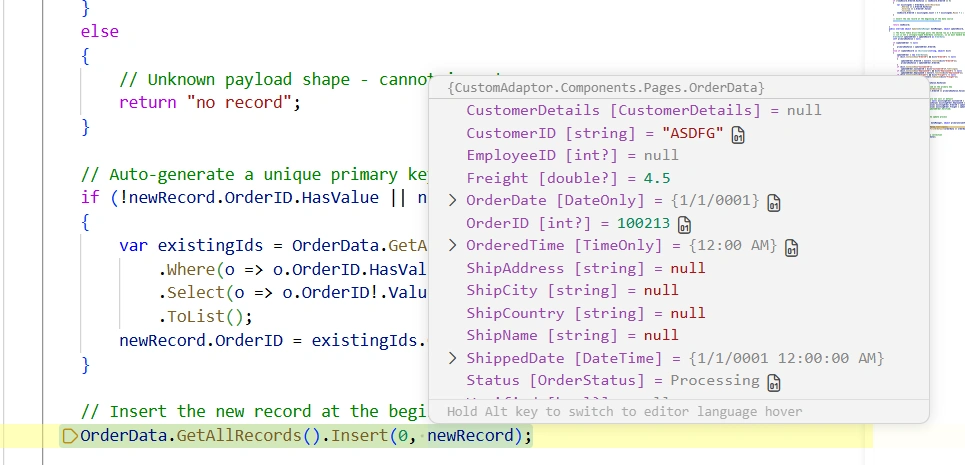
Insert Operation Workflow:
- Receive the new record data (may be Dictionary or OrderData)
- Convert Dictionary to OrderData if needed
- Auto-generate OrderID if not provided
- Insert record into data source
- Return the new record
Update Operation
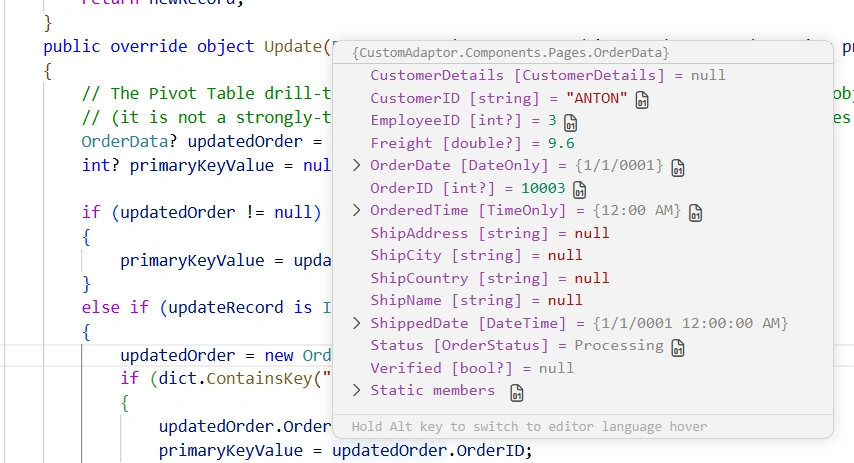
The Update method is called when a user edits an existing record through the editing popup. The method must identify the record by its primary key and update the corresponding properties.
public override object Update(DataManager dataManager, object updateRecord, string primaryColumnName, string additionalParam)
{
    OrderData? updatedOrder = updateRecord as OrderData;
    int? primaryKeyValue = null;

    if (updatedOrder != null)
    {
        primaryKeyValue = updatedOrder.OrderID;
    }
    else if (updateRecord is IDictionary<string, object> dict)
    {
        updatedOrder = new OrderData();
        if (dict.ContainsKey("OrderID") && dict["OrderID"] != null)
        {
            updatedOrder.OrderID = Convert.ToInt32(dict["OrderID"]);
            primaryKeyValue = updatedOrder.OrderID;
        }
        if (dict.ContainsKey("CustomerID"))
            updatedOrder.CustomerID = dict["CustomerID"]?.ToString();
        if (dict.ContainsKey("EmployeeID") && dict["EmployeeID"] != null)
            updatedOrder.EmployeeID = Convert.ToInt32(dict["EmployeeID"]);
        if (dict.ContainsKey("Freight") && dict["Freight"] != null)
            updatedOrder.Freight = Convert.ToDouble(dict["Freight"]);
    }

    if (updatedOrder != null && primaryKeyValue.HasValue)
    {
        // Retrieve the existing order based on the primary key
        var existingOrder = OrderData.GetAllRecords()
            .FirstOrDefault(order => order.OrderID == primaryKeyValue.Value);

        if (existingOrder != null)
        {
            // Update editable properties when the new value is not null.
            // OrderID is intentionally not reassigned because it is the primary key
            // used to locate the record; reassigning it would break record identity.
            if (updatedOrder.CustomerID != null) existingOrder.CustomerID = updatedOrder.CustomerID;
            if (updatedOrder.EmployeeID.HasValue) existingOrder.EmployeeID = updatedOrder.EmployeeID;
            if (updatedOrder.Freight.HasValue) existingOrder.Freight = updatedOrder.Freight;
        }
    }

    // Call the base method to complete the update process
    return (updateRecord);
}
Update Operation Workflow:
- Receive the updated record data (may be Dictionary or OrderData)
- Extract the primary key value from the record
- Convert Dictionary to OrderData if needed
- Locate the existing record by primary key
- Update the properties with new values
- Return the updated record
Delete Operation
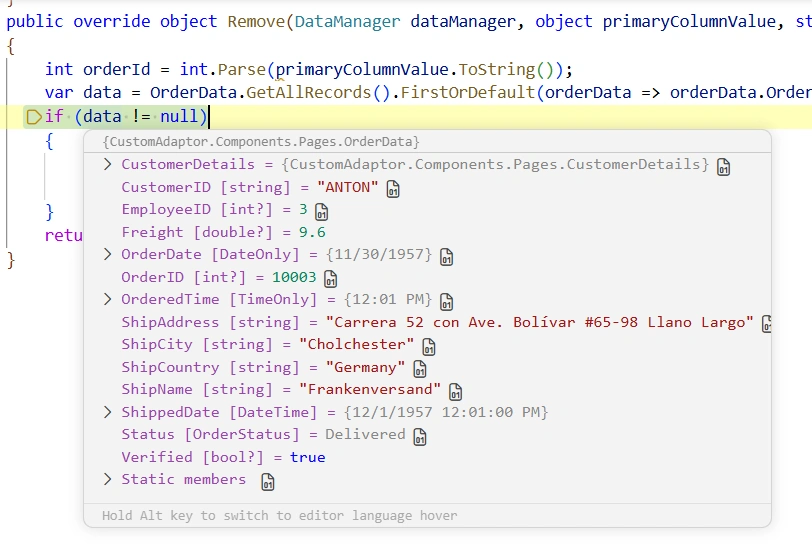
The Remove method is called when a user deletes a record through the editing popup. The method receives the primary key value and removes the corresponding record from the data source.
This implementation assumes the primary key is the
OrderIDfield (matching theIsPrimaryKeycolumn configured inBeginDrillThrough). TheprimaryColumnNameandadditionalParamparameters are unused because the only editable key in this sample isOrderID.
public override object Remove(DataManager dataManager, object primaryColumnValue, string primaryColumnName, string additionalParam)
{
    int orderId = int.Parse(primaryColumnValue.ToString());
    var data = OrderData.GetAllRecords().FirstOrDefault(orderData => orderData.OrderID == orderId);
    if (data != null)
    {
        // Remove the record from the data collection
        OrderData.GetAllRecords().Remove(data);
    }
    return (primaryColumnValue);
}
Remove Operation Workflow:
- Receive the primary key value of the record to delete
- Parse the primary key as an integer
- Find the record with the matching primary key
- Remove the record from the data source
- Return the primary key value
Complete CRUD Implementation Example
The following sample assembles the Read/Insert/Update/Remove overrides shown individually above into one complete component, ready to copy into a single .razor file. Refer to the per-method subsections above for explanations of each override; the code here is the consolidated reference, also available in the GitHub sample.
@page "/"

@using Syncfusion.Blazor.PivotView
@using Syncfusion.Blazor.Data

<SfPivotView TValue="OrderData" Width="1000" Height="300" ShowFieldList="true">
    <PivotViewDataSourceSettings TValue="OrderData" ExpandAll=false EnableSorting=true>
        <SfDataManager AdaptorInstance="@typeof(CustomAdaptor)" Adaptor="Adaptors.CustomAdaptor"></SfDataManager>
        <PivotViewColumns>
            <PivotViewColumn Name="OrderID"></PivotViewColumn>
        </PivotViewColumns>
        <PivotViewRows>
            <PivotViewRow Name="CustomerID"></PivotViewRow>
        </PivotViewRows>
        <PivotViewValues>
            <PivotViewValue Name="Freight" Caption="Freight"></PivotViewValue>
        </PivotViewValues>
    </PivotViewDataSourceSettings>
    <PivotViewGridSettings ColumnWidth="120"></PivotViewGridSettings>
    <PivotViewEvents TValue="OrderData" BeginDrillThrough="BeginDrillThrough"></PivotViewEvents>
    <PivotViewCellEditSettings AllowEditing=true AllowAdding=true AllowDeleting=true Mode=Syncfusion.Blazor.PivotView.EditMode.Normal></PivotViewCellEditSettings>
</SfPivotView>

@code {
    // Configure BeginDrillThrough event to set the primary key for CRUD operations
    private void BeginDrillThrough(BeginDrillThroughEventArgs args)
    {
        for (int index = 0; index < args.GridObj.Columns.Count; index++)
        {
            if (args.GridObj.Columns[index].Field == "OrderID")
            {
                args.GridObj.Columns[index].IsPrimaryKey = true;
            }
        }
    }

    // Custom adaptor with complete CRUD implementation
    public class CustomAdaptor : DataAdaptor
    {
        // The PivotView aggregates/groups client-side, so Read returns the full
        // data source. Paging/sorting/filtering happen in the PivotView, not here.
        public override object Read(DataManagerRequest dm, string key = null)
        {
            IEnumerable<OrderData> dataSource = OrderData.GetAllRecords();

            return dm.RequiresCounts
                ? new DataResult() { Result = dataSource, Count = dataSource.Count() }
                : (object)dataSource;
        }

        public override object Insert(DataManager dataManager, object record, string additionalParam)
        {
            if (record == null)
                return "no record";

            OrderData newRecord;

            if (record is OrderData orderData)
            {
                newRecord = orderData;
            }
            else if (record is IDictionary<string, object> dict)
            {
                newRecord = new OrderData
                {
                    OrderID = dict.ContainsKey("OrderID") && dict["OrderID"] != null
                        ? Convert.ToInt32(dict["OrderID"])
                        : (int?)null,
                    CustomerID = dict.ContainsKey("CustomerID") ? dict["CustomerID"]?.ToString() : null,
                    EmployeeID = dict.ContainsKey("EmployeeID") && dict["EmployeeID"] != null
                        ? Convert.ToInt32(dict["EmployeeID"])
                        : (int?)null,
                    Freight = dict.ContainsKey("Freight") && dict["Freight"] != null
                        ? Convert.ToDouble(dict["Freight"])
                        : (double?)null
                };
            }
            else
            {
                return "no record";
            }

            // Auto-generate unique OrderID if not provided
            if (!newRecord.OrderID.HasValue || newRecord.OrderID == 0)
            {
                var existingIds = OrderData.GetAllRecords()
                    .Where(o => o.OrderID.HasValue)
                    .Select(o => o.OrderID!.Value)
                    .ToList();
                newRecord.OrderID = existingIds.Count > 0 ? existingIds.Max() + 1 : 1;
            }

            OrderData.GetAllRecords().Insert(0, newRecord);
            return newRecord;
        }

        public override object Update(DataManager dataManager, object updateRecord, string primaryColumnName, string additionalParam)
        {
            OrderData? updatedOrder = updateRecord as OrderData;
            int? primaryKeyValue = null;

            if (updatedOrder != null)
            {
                primaryKeyValue = updatedOrder.OrderID;
            }
            else if (updateRecord is IDictionary<string, object> dict)
            {
                updatedOrder = new OrderData();
                if (dict.ContainsKey("OrderID") && dict["OrderID"] != null)
                {
                    updatedOrder.OrderID = Convert.ToInt32(dict["OrderID"]);
                    primaryKeyValue = updatedOrder.OrderID;
                }
                if (dict.ContainsKey("CustomerID"))
                    updatedOrder.CustomerID = dict["CustomerID"]?.ToString();
                if (dict.ContainsKey("EmployeeID") && dict["EmployeeID"] != null)
                    updatedOrder.EmployeeID = Convert.ToInt32(dict["EmployeeID"]);
                if (dict.ContainsKey("Freight") && dict["Freight"] != null)
                    updatedOrder.Freight = Convert.ToDouble(dict["Freight"]);
            }

            if (updatedOrder != null && primaryKeyValue.HasValue)
            {
                var existingOrder = OrderData.GetAllRecords()
                    .FirstOrDefault(order => order.OrderID == primaryKeyValue.Value);

                if (existingOrder != null)
                {
                    if (updatedOrder.CustomerID != null) existingOrder.CustomerID = updatedOrder.CustomerID;
                    if (updatedOrder.EmployeeID.HasValue) existingOrder.EmployeeID = updatedOrder.EmployeeID;
                    if (updatedOrder.Freight.HasValue) existingOrder.Freight = updatedOrder.Freight;
                }
            }

            return updateRecord;
        }

        public override object Remove(DataManager dataManager, object primaryColumnValue, string primaryColumnName, string additionalParam)
        {
            int orderId = int.Parse(primaryColumnValue.ToString());
            var data = OrderData.GetAllRecords().FirstOrDefault(orderData => orderData.OrderID == orderId);
            if (data != null)
            {
                OrderData.GetAllRecords().Remove(data);
            }
            return primaryColumnValue;
        }
    }
}
Complete Sample Repository
A complete, working sample implementation of the Custom Adaptor CRUD operations described in this document is available in the GitHub repository.
Download or clone the repository to explore the project structure, run the sample locally, and adapt the pattern to your own data source.