Getting Started with Flutter Chat (SfChat)
18 Nov 201815 minutes to read
This section explains how to add the Flutter Chat widget to a single Flutter application and how to use its basic features.
Add Flutter Chat to an application
Create a simple Flutter project by following the instructions provided in the Getting Started with your first Flutter app documentation.
Add dependency
Add the Syncfusion Flutter Chat dependency to your pubspec.yaml file.
dependencies:
  syncfusion_flutter_chat: ^x.x.x
  syncfusion_flutter_core: ^x.x.x
Here x.x.x denotes the current version of
Syncfusion Flutter Chatandsyncfusion_flutter_core. It is recommended to use the latest available version from pub.dev for the best features and updates.
Note:
syncfusion_flutter_chatdepends onsyncfusion_flutter_core. Add both dependencies in your application.
Get packages
Run the following command to get the required packages.
flutter pub getImport the Chat library
Import the library using the code provided below.
import 'package:syncfusion_flutter_chat/chat.dart';Initialize Flutter Chat widget
Add a Flutter Chat widget with the necessary properties, such as messages and outgoingUser.
import 'package:flutter/material.dart';
import 'package:syncfusion_flutter_chat/chat.dart';

void main() {
  runApp(const ChatInitializeExample());
}

class ChatInitializeExample extends StatelessWidget {
  const ChatInitializeExample({super.key});

  @override
  Widget build(BuildContext context) {
    return MaterialApp(
      home: Scaffold(
        body: SfChat(
          messages: <ChatMessage>[
            ChatMessage(
              text: 'Hi! How’s your day?',
              time: DateTime(2024, 08, 07, 9, 0),
              author: const ChatAuthor(
                id: '123-001',
                name: 'John Doe',
              ),
            ),
            ChatMessage(
              text: 'Good! Just relaxing.',
              time: DateTime(2024, 08, 07, 9, 5),
              author: const ChatAuthor(
                id: '123-002',
                name: 'Jane Smith',
              ),
            ),
            ChatMessage(
              text: 'Any plans later?',
              time: DateTime(2024, 08, 07, 9, 10),
              author: const ChatAuthor(
                id: '123-001',
                name: 'John Doe',
              ),
            ),
          ],
          outgoingUser: '123-001',
        ),
      ),
    );
  }
}
Add composer
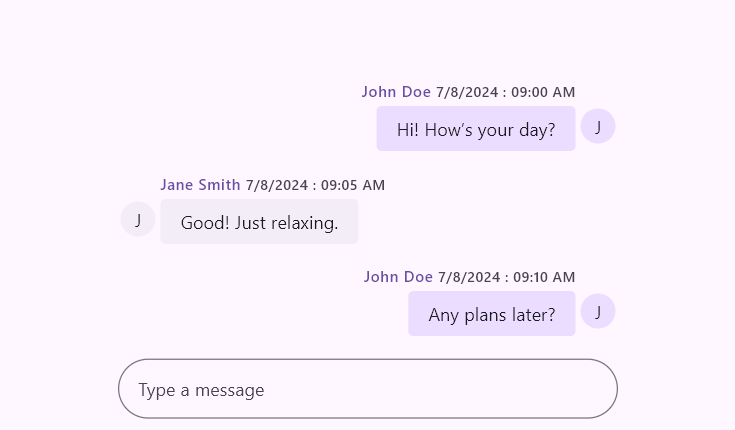
To add the ChatComposer to the SfChat widget, use the composer property. The composer can be customized using the decoration property, which is of type InputDecoration. The hint text can be added using the hintText property.
import 'package:flutter/material.dart';
import 'package:syncfusion_flutter_chat/chat.dart';

void main() {
  runApp(const ChatComposerExample());
}

class ChatComposerExample extends StatelessWidget {
  const ChatComposerExample({super.key});

  @override
  Widget build(BuildContext context) {
    return MaterialApp(
      home: Scaffold(
        body: SfChat(
          messages: <ChatMessage>[
            ChatMessage(
              text: 'Hi! How’s your day?',
              time: DateTime(2024, 08, 07, 9, 0),
              author: const ChatAuthor(
                id: '123-001',
                name: 'John Doe',
              ),
            ),
            ChatMessage(
              text: 'Good! Just relaxing.',
              time: DateTime(2024, 08, 07, 9, 5),
              author: const ChatAuthor(
                id: '123-002',
                name: 'Jane Smith',
              ),
            ),
            ChatMessage(
              text: 'Any plans later?',
              time: DateTime(2024, 08, 07, 9, 10),
              author: const ChatAuthor(
                id: '123-001',
                name: 'John Doe',
              ),
            )
          ],
          outgoingUser: '123-001',
          composer: const ChatComposer(
            decoration: InputDecoration(
              hintText: 'Type a message',
            ),
          ),
        ),
      ),
    );
  }
}
Add placeholder to conversation area
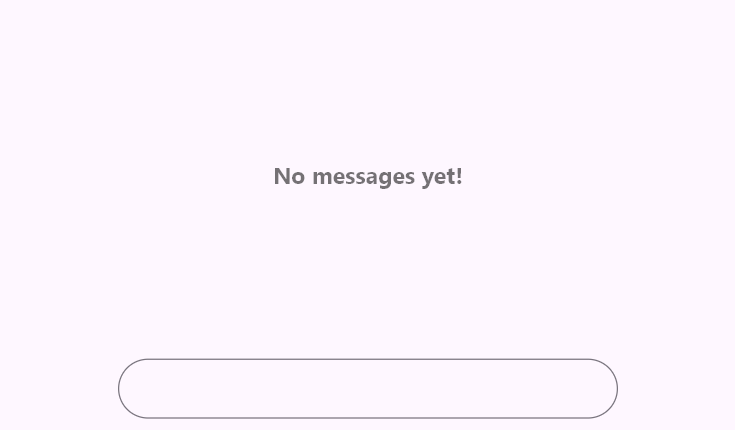
By default, conversation messages are empty. It is a good idea to show a message or design to indicate this state. You can use the placeholderBuilder property to create a custom widget in the conversation area. It will be removed once messages are added.
import 'package:flutter/material.dart';
import 'package:syncfusion_flutter_chat/chat.dart';

void main() {
  runApp(const ChatPlaceholderExample());
}

class ChatPlaceholderExample extends StatelessWidget {
  const ChatPlaceholderExample({super.key});

  final List<ChatMessage> _messages = const <ChatMessage>[];

  @override
  Widget build(BuildContext context) {
    return MaterialApp(
      home: Scaffold(
        body: SfChat(
          messages: _messages,
          outgoingUser: '123-001',
          placeholderBuilder: (BuildContext context) {
            return const Center(
              child: Text(
                'No messages yet!',
                style: TextStyle(
                  fontSize: 18,
                  color: Colors.black54,
                  fontWeight: FontWeight.bold,
                ),
              ),
            );
          },
        ),
      ),
    );
  }
}
Add action button
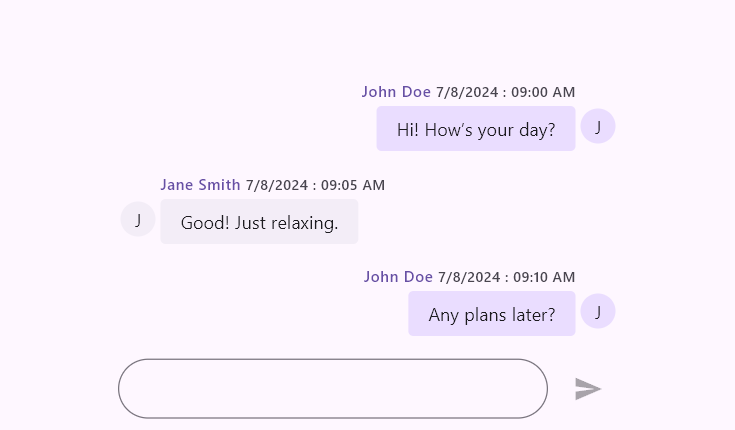
The action button represents the send button, which is not included by default. To add it, create an instance of ChatActionButton for the actionButton property.
When the send button is clicked, the ChatActionButton.onPressed callback is invoked. In that callback, add the newly composed message to the messages list and rebuild the Flutter Chat widget.
import 'package:flutter/material.dart';
import 'package:syncfusion_flutter_chat/chat.dart';

void main() {
  runApp(const ChatActionButtonExample());
}

class ChatActionButtonExample extends StatefulWidget {
  const ChatActionButtonExample({super.key});

  @override
  State<ChatActionButtonExample> createState() => _ChatActionButtonExampleState();
}

class _ChatActionButtonExampleState extends State<ChatActionButtonExample> {
  late List<ChatMessage> _messages;

  @override
  void initState() {
    super.initState();
    _messages = <ChatMessage>[
      ChatMessage(
        text: 'Hi! How’s your day?',
        time: DateTime(2024, 08, 07, 9, 0),
        author: const ChatAuthor(
          id: '123-001',
          name: 'John Doe',
        ),
      ),
      ChatMessage(
        text: 'Good! Just relaxing.',
        time: DateTime(2024, 08, 07, 9, 5),
        author: const ChatAuthor(
          id: '123-002',
          name: 'Jane Smith',
        ),
      ),
      ChatMessage(
        text: 'Any plans later?',
        time: DateTime(2024, 08, 07, 9, 10),
        author: const ChatAuthor(
          id: '123-001',
          name: 'John Doe',
        ),
      ),
    ];
  }

  @override
  Widget build(BuildContext context) {
    return MaterialApp(
      home: Scaffold(
        body: SfChat(
          messages: _messages,
          outgoingUser: '123-001',
          actionButton: ChatActionButton(
            onPressed: (String newMessage) {
              setState(() {
                _messages = <ChatMessage>[
                  ..._messages,
                  ChatMessage(
                    text: newMessage,
                    time: DateTime.now(),
                    author: const ChatAuthor(
                      id: '123-001',
                      name: 'John Doe',
                    ),
                  ),
                ];
              });
            },
          ),
        ),
      ),
    );
  }
}
You can refer to our Flutter Chat feature tour page for its groundbreaking feature representations. You can also explore our Flutter Chat example which demonstrates conversations between two or more users in a fully customizable layout and shows how to easily configure the Flutter Chat widget with built-in support for creating stunning visual effects.