Message Content in Flutter Chat (SfChat)
18 Nov 201824 minutes to read
This section explains the customization options available for incoming and outgoing messages in the Flutter Chat widget.
Messages
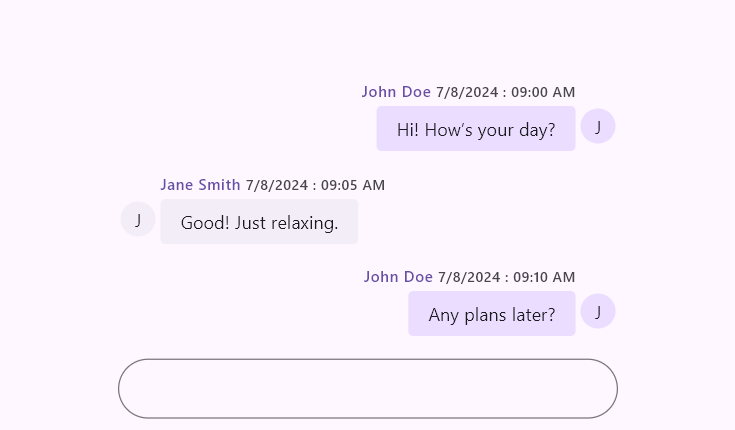
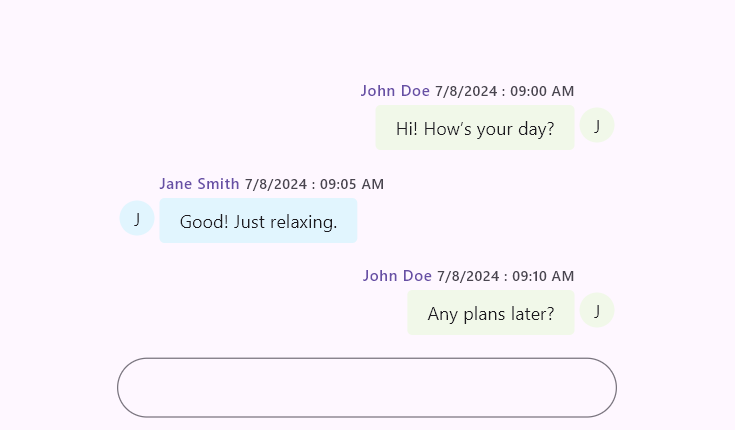
The messages property is the data source of the Flutter Chat widget. It accepts a list of ChatMessage objects that are displayed as incoming or outgoing based on the outgoingUser value.
Each ChatMessage contains:
-
text- The actual message content. -
time- The time when the message was sent. -
author- Details about the author, such as name and avatar.
import 'package:flutter/material.dart';
import 'package:syncfusion_flutter_chat/chat.dart';

void main() {
  runApp(const MessagesExample());
}

class MessagesExample extends StatelessWidget {
  const MessagesExample({super.key});

  @override
  Widget build(BuildContext context) {
    return MaterialApp(
      home: Scaffold(
        body: SfChat(
          messages: <ChatMessage>[
            ChatMessage(
              text: 'Hi! How’s your day?',
              time: DateTime(2024, 08, 07, 9, 0),
              author: const ChatAuthor(id: '123-001', name: 'John Doe'),
            ),
            ChatMessage(
              text: 'Good! Just relaxing.',
              time: DateTime(2024, 08, 07, 9, 5),
              author: const ChatAuthor(id: '123-002', name: 'Jane Smith'),
            ),
            ChatMessage(
              text: 'Any plans later?',
              time: DateTime(2024, 08, 07, 9, 10),
              author: const ChatAuthor(id: '123-001', name: 'John Doe'),
            ),
          ],
          outgoingUser: '123-001',
        ),
      ),
    );
  }
}
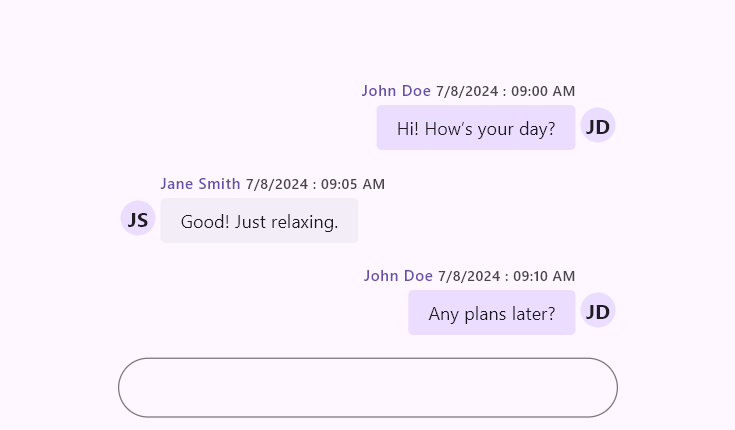
You can also extend the default message model to include additional message metadata.
import 'package:flutter/material.dart';
import 'package:syncfusion_flutter_chat/chat.dart';

void main() {
  runApp(const CustomMessageExample());
}

class CustomMessageExample extends StatefulWidget {
  const CustomMessageExample({super.key});

  @override
  State<CustomMessageExample> createState() => _CustomMessageExampleState();
}

class _CustomMessageExampleState extends State<CustomMessageExample> {
  late List<ChatMessage> _messages;

  @override
  void initState() {
    super.initState();
    _messages = <ChatMessage>[
      ChatMessageExt(
        text: 'Hi! How’s your day?',
        time: DateTime(2024, 08, 07, 9, 0),
        author: const ChatAuthor(id: '123-001', name: 'John Doe'),
        displayName: 'JD',
      ),
      ChatMessageExt(
        text: 'Good! Just relaxing.',
        time: DateTime(2024, 08, 07, 9, 5),
        author: const ChatAuthor(id: '123-002', name: 'Jane Smith'),
        displayName: 'JS',
      ),
      ChatMessageExt(
        text: 'Any plans later?',
        time: DateTime(2024, 08, 07, 9, 10),
        author: const ChatAuthor(id: '123-001', name: 'John Doe'),
        displayName: 'JD',
      ),
    ];
  }

  @override
  Widget build(BuildContext context) {
    return MaterialApp(
      home: Scaffold(
        body: SfChat(
          messages: _messages,
          outgoingUser: '123-001',
          messageAvatarBuilder: (BuildContext context, int index, ChatMessage message) {
            if (message is ChatMessageExt) {
              return CircleAvatar(
                radius: 20,
                child: Text(
                  message.displayName,
                  style: const TextStyle(
                    color: Colors.black87,
                    fontWeight: FontWeight.bold,
                  ),
                ),
              );
            }
            return const SizedBox.shrink();
          },
        ),
      ),
    );
  }
}

class ChatMessageExt extends ChatMessage {
  const ChatMessageExt({
    required super.text,
    required super.time,
    required super.author,
    required this.displayName,
  });

  final String displayName;
}
Suggestions
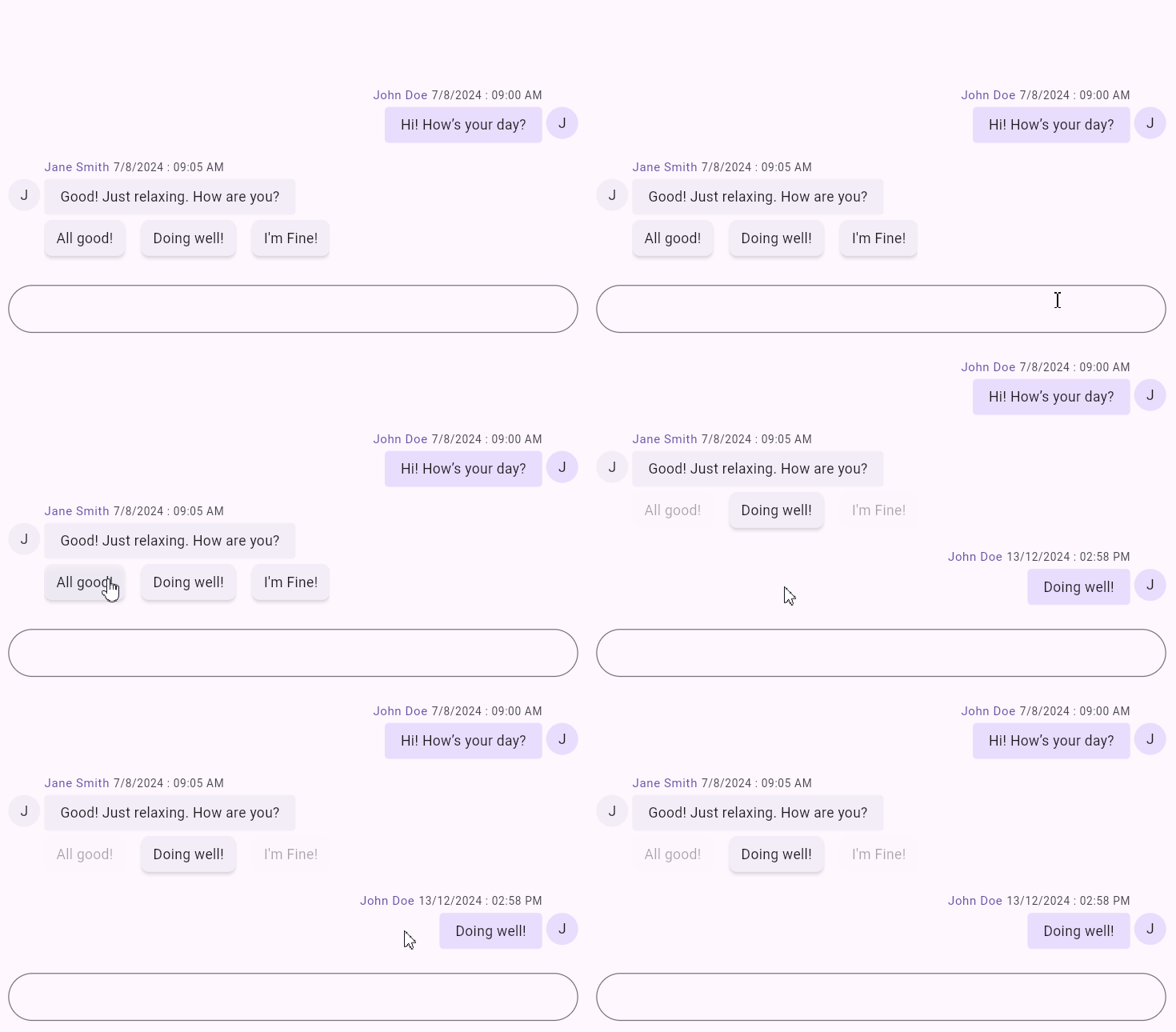
The suggestions property adds quick-reply items to a message. The selected suggestion can be displayed as incoming or outgoing based on the selected user.
import 'package:flutter/material.dart';
import 'package:syncfusion_flutter_chat/chat.dart';

void main() {
  runApp(const SuggestionsExample());
}

class SuggestionsExample extends StatelessWidget {
  const SuggestionsExample({super.key});

  @override
  Widget build(BuildContext context) {
    return MaterialApp(
      home: Scaffold(
        body: SfChat(
          messages: <ChatMessage>[
            ChatMessage(
              text: 'Hi! How’s your day?',
              time: DateTime(2024, 08, 07, 9, 0),
              author: const ChatAuthor(id: '123-001', name: 'John Doe'),
            ),
            ChatMessage(
              text: 'Good! Just relaxing. How are you?',
              time: DateTime(2024, 08, 07, 9, 5),
              author: const ChatAuthor(id: '123-002', name: 'Jane Smith'),
              suggestions: <ChatMessageSuggestion>[
                const ChatMessageSuggestion(data: 'All good!'),
                const ChatMessageSuggestion(data: 'Doing well!'),
                const ChatMessageSuggestion(data: 'I\'m fine'),
              ],
            ),
          ],
          outgoingUser: '123-001',
        ),
      ),
    );
  }
}
Outgoing user
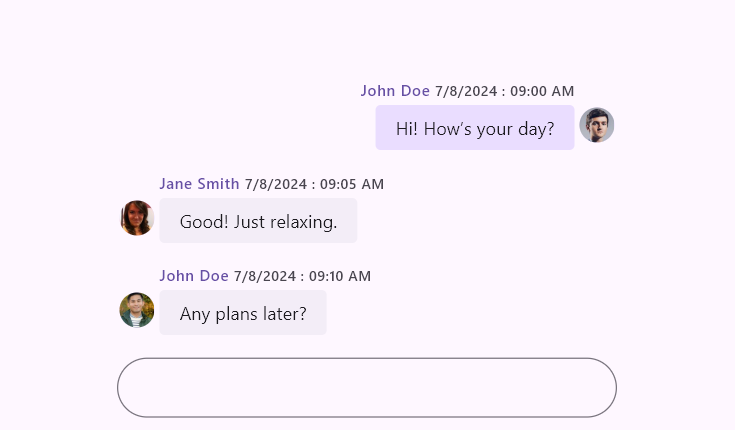
The outgoingUser property identifies the message sender. Set it to the id of the current user.
Multiple users can share the same display name, but each id must be unique.
import 'package:flutter/material.dart';
import 'package:syncfusion_flutter_chat/chat.dart';

void main() {
  runApp(const OutgoingUserExample());
}

class OutgoingUserExample extends StatelessWidget {
  const OutgoingUserExample({super.key});

  @override
  Widget build(BuildContext context) {
    return MaterialApp(
      home: Scaffold(
        body: SfChat(
          messages: <ChatMessage>[
            ChatMessage(
              text: 'Hi! How’s your day?',
              time: DateTime(2024, 08, 07, 9, 0),
              author: const ChatAuthor(
                id: '123-001',
                name: 'John Doe',
                avatar: NetworkImage('https://randomuser.me/api/portraits/men/1.jpg'),
              ),
            ),
            ChatMessage(
              text: 'Good! Just relaxing.',
              time: DateTime(2024, 08, 07, 9, 5),
              author: const ChatAuthor(
                id: '123-002',
                name: 'Jane Smith',
                avatar: NetworkImage('https://randomuser.me/api/portraits/women/1.jpg'),
              ),
            ),
            ChatMessage(
              text: 'Any plans later?',
              time: DateTime(2024, 08, 07, 9, 10),
              author: const ChatAuthor(
                id: '123-003',
                name: 'John Doe',
                avatar: NetworkImage('https://randomuser.me/api/portraits/men/4.jpg'),
              ),
            ),
          ],
          outgoingUser: '123-001',
        ),
      ),
    );
  }
}
Message builders
The conversation area supports the following builders for fully custom message layouts:
Message header builder
Use messageHeaderBuilder to customize the header region (typically author and timestamp).
import 'package:flutter/material.dart';
import 'package:syncfusion_flutter_chat/chat.dart';

void main() {
  runApp(const MessageHeaderBuilderExample());
}

class MessageHeaderBuilderExample extends StatelessWidget {
  const MessageHeaderBuilderExample({super.key});

  @override
  Widget build(BuildContext context) {
    return MaterialApp(
      home: Scaffold(
        body: SfChat(
          messages: <ChatMessage>[
            ChatMessage(
              text: 'Hello from header builder',
              time: DateTime(2024, 08, 07, 9, 0),
              author: const ChatAuthor(id: '123-001', name: 'John'),
            ),
          ],
          outgoingUser: '123-001',
          messageHeaderBuilder: (BuildContext context, int index, ChatMessage message) {
            return Padding(
              padding: const EdgeInsets.symmetric(horizontal: 12, vertical: 6),
              child: Text(
                '${message.author.name} • ${message.time.hour}:${message.time.minute.toString().padLeft(2, '0')}',
                style: Theme.of(context).textTheme.labelSmall,
              ),
            );
          },
        ),
      ),
    );
  }
}
Message footer builder
Use messageFooterBuilder to add custom metadata or actions below each message.
import 'package:flutter/material.dart';
import 'package:syncfusion_flutter_chat/chat.dart';

void main() {
  runApp(const MessageFooterBuilderExample());
}

class MessageFooterBuilderExample extends StatelessWidget {
  const MessageFooterBuilderExample({super.key});

  @override
  Widget build(BuildContext context) {
    return MaterialApp(
      home: Scaffold(
        body: SfChat(
          messages: <ChatMessage>[
            ChatMessage(
              text: 'Hello from footer builder',
              time: DateTime(2024, 08, 07, 9, 0),
              author: const ChatAuthor(id: '123-001', name: 'John'),
            ),
          ],
          outgoingUser: '123-001',
          messageFooterBuilder: (BuildContext context, int index, ChatMessage message) {
            return const Padding(
              padding: EdgeInsetsDirectional.only(start: 12, end: 12, top: 4),
              child: Text(
                'Delivered',
                style: TextStyle(fontSize: 11, color: Colors.black54),
              ),
            );
          },
        ),
      ),
    );
  }
}
Message content builder
Use messageContentBuilder to fully customize the message bubble content.
import 'package:flutter/material.dart';
import 'package:syncfusion_flutter_chat/chat.dart';

void main() {
  runApp(const MessageContentBuilderExample());
}

class MessageContentBuilderExample extends StatelessWidget {
  const MessageContentBuilderExample({super.key});

  @override
  Widget build(BuildContext context) {
    return MaterialApp(
      home: Scaffold(
        body: SfChat(
          messages: <ChatMessage>[
            ChatMessage(
              text: 'Hello from content builder',
              time: DateTime(2024, 08, 07, 9, 0),
              author: const ChatAuthor(id: '123-001', name: 'John'),
            ),
          ],
          outgoingUser: '123-001',
          messageContentBuilder: (BuildContext context, int index, ChatMessage message) {
            return Container(
              padding: const EdgeInsets.all(10),
              decoration: BoxDecoration(
                color: const Color(0xFFE8EAF6),
                borderRadius: BorderRadius.circular(10),
              ),
              child: Row(
                mainAxisSize: MainAxisSize.min,
                children: <Widget>[
                  const Icon(Icons.chat_bubble_outline, size: 16),
                  const SizedBox(width: 6),
                  Text(message.text),
                ],
              ),
            );
          },
        ),
      ),
    );
  }
}
Message settings
Based on the outgoingUser property, messages are rendered as incoming or outgoing. The following options are available to customize bubble display settings:
Import the
intlpackage to usetimestampFormat.
Author name
The showAuthorName property shows or hides the author name. Default is true.
Time stamp
The showTimestamp property shows or hides the timestamp. Default is true.
Time stamp format
The timestampFormat property controls timestamp formatting. Default is DateFormat('d/M/y : hh:mm a').
Author avatar
The showAuthorAvatar property shows or hides author avatar. Default is true.
The avatar field in ChatAuthor accepts an ImageProvider, such as NetworkImage, AssetImage, or MemoryImage.
Text styles
The textStyle property defines message text style.
Header text style
The headerTextStyle property defines header text style (name and timestamp).
Background color
The backgroundColor property defines bubble background color.
Shape
The shape property defines bubble shape.
Width factor
The widthFactor property defines relative bubble width. Valid range is from 0 to 1, and default is 0.8.
Avatar size
The avatarSize property defines avatar size. Default is Size.square(32.0).
Margin
The margin property defines external spacing around a message bubble. Default is EdgeInsets.all(2.0).
Padding
The padding property defines internal spacing inside a message bubble. Default is EdgeInsets.symmetric(horizontal: 16.0, vertical: 8.0).
Avatar padding
The avatarPadding property defines padding around the avatar.
Header padding
The headerPadding property defines padding around the header (name and timestamp). Default is EdgeInsetsDirectional.only(top: 14.0, bottom: 4.0).
Footer padding
The footerPadding property defines padding around the footer. Default is EdgeInsetsDirectional.only(top: 4.0).
import 'package:flutter/material.dart';
import 'package:intl/intl.dart';
import 'package:syncfusion_flutter_chat/chat.dart';

void main() {
  runApp(const MessageSettingsExample());
}

class MessageSettingsExample extends StatelessWidget {
  const MessageSettingsExample({super.key});

  @override
  Widget build(BuildContext context) {
    return MaterialApp(
      home: Scaffold(
        body: SfChat(
          messages: <ChatMessage>[
            ChatMessage(
              text: 'Hi! How’s your day?',
              time: DateTime(2024, 08, 07, 9, 0),
              author: const ChatAuthor(
                id: '123-001',
                name: 'John Doe',
                avatar: NetworkImage('https://randomuser.me/api/portraits/men/1.jpg'),
              ),
            ),
            ChatMessage(
              text: 'Good! Just relaxing.',
              time: DateTime(2024, 08, 07, 9, 5),
              author: const ChatAuthor(
                id: '123-002',
                name: 'Jane Smith',
                avatar: NetworkImage('https://randomuser.me/api/portraits/women/1.jpg'),
              ),
            ),
          ],
          outgoingUser: '123-001',
          incomingMessageSettings: ChatMessageSettings(
            showAuthorName: true,
            showTimestamp: true,
            showAuthorAvatar: true,
            timestampFormat: DateFormat('MMM d, h:mm a'),
            textStyle: const TextStyle(fontSize: 14, color: Colors.black87),
            headerTextStyle: const TextStyle(fontSize: 11, color: Colors.black54),
            backgroundColor: const Color(0xFFE1F5FE),
            shape: const RoundedRectangleBorder(
              borderRadius: BorderRadius.all(Radius.circular(6)),
            ),
            widthFactor: 0.9,
            avatarSize: const Size.square(35),
            margin: const EdgeInsets.all(4),
            padding: const EdgeInsets.symmetric(horizontal: 18, vertical: 10),
            avatarPadding: const EdgeInsets.all(4),
            headerPadding: const EdgeInsetsDirectional.only(top: 10, bottom: 2),
            footerPadding: const EdgeInsetsDirectional.only(top: 6),
          ),
          outgoingMessageSettings: ChatMessageSettings(
            showAuthorName: true,
            showTimestamp: true,
            showAuthorAvatar: false,
            timestampFormat: DateFormat('h:mm a'),
            textStyle: const TextStyle(fontSize: 14, color: Colors.black87),
            headerTextStyle: const TextStyle(fontSize: 11, color: Colors.black54),
            backgroundColor: const Color(0xFFF1F8E9),
            shape: const RoundedRectangleBorder(
              borderRadius: BorderRadius.all(Radius.circular(10)),
            ),
            widthFactor: 0.7,
            avatarSize: const Size.square(35),
            margin: const EdgeInsets.all(4),
            padding: const EdgeInsets.symmetric(horizontal: 18, vertical: 10),
            avatarPadding: const EdgeInsets.all(4),
            headerPadding: const EdgeInsetsDirectional.only(top: 10, bottom: 2),
            footerPadding: const EdgeInsetsDirectional.only(top: 6),
          ),
        ),
      ),
    );
  }
}
You can refer to our Flutter Chat feature tour page for its groundbreaking feature representations. You can also explore our Flutter Chat example which demonstrates conversations between two or more users in a fully customizable layout and shows how to easily configure the Flutter Chat widget with built-in support for creating stunning visual effects.
See Also
- You can customize message shapes and colors for both
incomingMessageSettingsandoutgoingMessageSettingsusingSfChatThemewithSfChat.