Multiple Selection in ASP.NET MVC File Manager
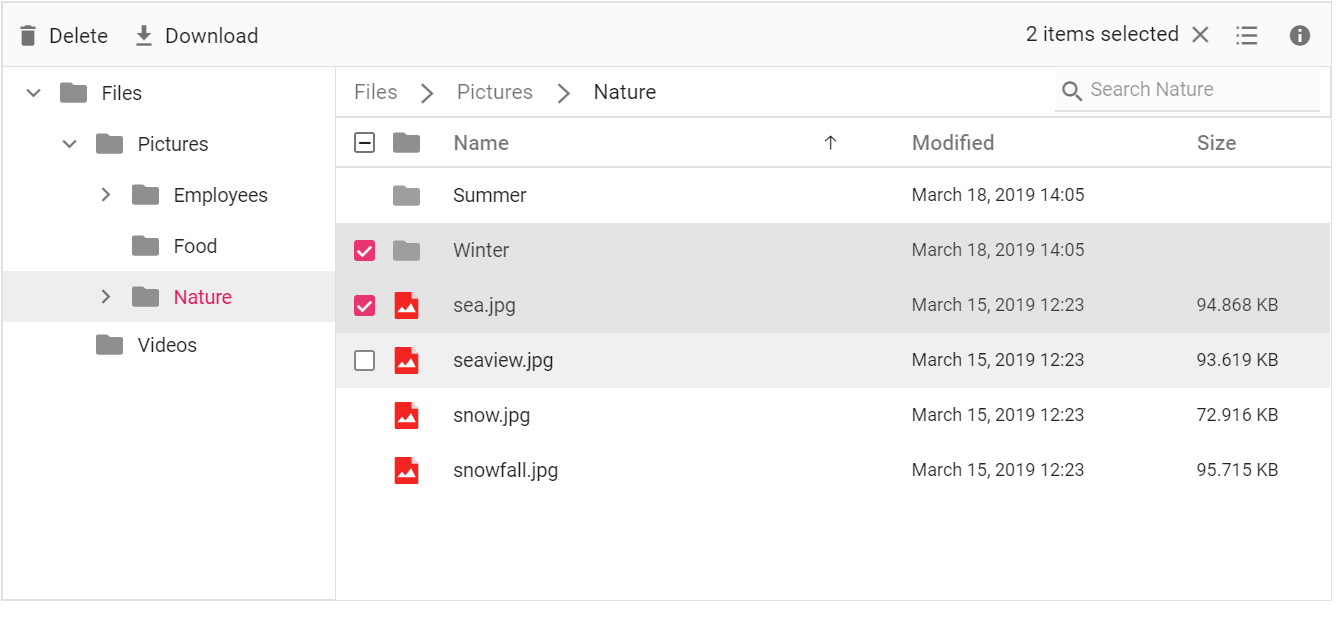
The File Manager allows multiple file selection through the allowMultiSelection) property (enabled by default). The multiple selection can be done by pressing the Ctrl key or Shift key and selecting the files. The check box can also be used to do multiple selection. Ctrl + A can be used to select all files in the current directory. The fileSelect event will be triggered when the items of File Manager control is selected or unselected.
The example below demonstrates how the File Manager allows multiple file selection using the allowMultiSelection property.
<div class="control-section">
    <div class="sample-container">
        <!--  Filemanager control declaration -->
        @Html.EJS().FileManager("file").AjaxSettings(new Syncfusion.EJ2.FileManager.FileManagerAjaxSettings
        {
            Url = "/Home/FileOperations",
            GetImageUrl = "/Home/GetImage",
            UploadUrl = "/Home/Upload",
            DownloadUrl = "/Home/Download"
        }).AllowMultiSelection(true).View(Syncfusion.EJ2.FileManager.ViewType.Details).Render()
        <!-- end of File Manager control -->
    </div>
</div>
using System;
using System.Collections.Generic;
using System.Linq;
using System.Web.Mvc;
//File Manager's base functions are available in the below package
using Syncfusion.EJ2.FileManager.Base;
//File Manager's operations are available in the below package
using Syncfusion.EJ2.FileManager.PhysicalFileProvider;
using Newtonsoft.Json;
// Use the package for hosting
using System.Web.Hosting;
namespace WebApplication.Controllers
{
public class HomeController : Controller
{
// Accessing the File Operations from File Manager package
PhysicalFileProvider operation = new PhysicalFileProvider();
public HomeController()
{
// Map the path of the files to be accessed with the host
var path = HostingEnvironment.MapPath("~/Content/Files");
// Assign the mapped path as root folder
operation.RootFolder(path);
}
public ActionResult FileOperations(FileManagerDirectoryContent args)
{
// Processing the File Manager operations
switch (args.Action)
{
case "read":
// Path - Current path; ShowHiddenItems - Boolean value to show/hide hidden items
return Json(operation.ToCamelCase(operation.GetFiles(args.Path, args.ShowHiddenItems)));
case "delete":
// Path - Current path where of the folder to be deleted; Names - Name of the files to be deleted
return Json(operation.ToCamelCase(operation.Delete(args.Path, args.Names)));
case "copy":
// Path - Path from where the file was copied; TargetPath - Path where the file/folder is to be copied; RenameFiles - Files with same name in the copied location that is confirmed for renaming; TargetData - Data of the copied file
return Json(operation.ToCamelCase(operation.Copy(args.Path, args.TargetPath, args.Names, args.RenameFiles, args.TargetData)));
case "move":
// Path - Path from where the file was cut; TargetPath - Path where the file/folder is to be moved; RenameFiles - Files with same name in the moved location that is confirmed for renaming; TargetData - Data of the moved file
return Json(operation.ToCamelCase(operation.Move(args.Path, args.TargetPath, args.Names, args.RenameFiles, args.TargetData)));
case "details":
if (args.Names == null)
{
args.Names = new string[] { };
}
// Path - Current path where details of file/folder is requested; Name - Names of the requested folders
return Json(operation.ToCamelCase(operation.Details(args.Path, args.Names)));
case "create":
// Path - Current path where the folder is to be created; Name - Name of the new folder
return Json(operation.ToCamelCase(operation.Create(args.Path, args.Name)));
case "search":
// Path - Current path where the search is performed; SearchString - String typed in the searchbox; CaseSensitive - Boolean value which specifies whether the search must be casesensitive
return Json(operation.ToCamelCase(operation.Search(args.Path, args.SearchString, args.ShowHiddenItems, args.CaseSensitive)));
case "rename":
// Path - Current path of the renamed file; Name - Old file name; NewName - New file name
return Json(operation.ToCamelCase(operation.Rename(args.Path, args.Name, args.NewName)));
}
return null;
}
// Processing the Upload operation
public ActionResult Upload(string path, IList<System.Web.HttpPostedFileBase> uploadFiles, string action)
{
FileManagerResponse uploadResponse;
//Invoking upload operation with the required paramaters
// path - Current path where the file is to uploaded; uploadFiles - Files to be uploaded; action - name of the operation(upload)
uploadResponse = operation.Upload(path, uploadFiles, action, null);
return Content("");
}
// Processing the Download operation
public ActionResult Download(string downloadInput)
{
FileManagerDirectoryContent args = JsonConvert.DeserializeObject<FileManagerDirectoryContent>(downloadInput);
//Invoking download operation with the required paramaters
// path - Current path where the file is downloaded; Names - Files to be downloaded;
return operation.Download(args.Path, args.Names);
}
// Processing the GetImage operation
public ActionResult GetImage(FileManagerDirectoryContent args)
{
//Invoking GetImage operation with the required paramaters
// path - Current path of the image file; Id - Image file id;
return operation.GetImage(args.Path, args.Id, false, null, null);
}
public ActionResult Index()
{
return View();
}
}
}The output will look like the image below.
Range Selection
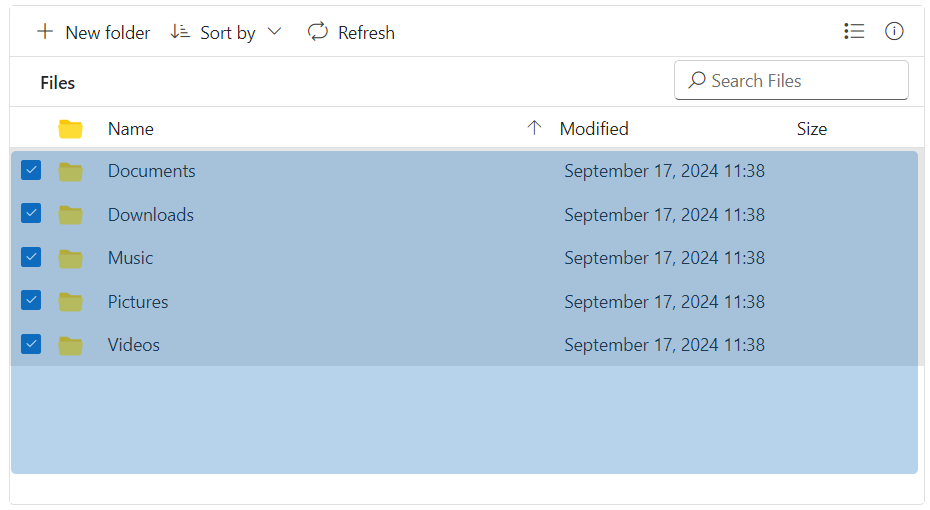
The File Manager supports selecting files and folders in specific ranges through mouse drag, similar to File Explorer. This is particularly useful in scenarios where users need to select a large group of files quickly without manually clicking each one.
Enabling Range Selection
To enable range selection, you need to set the enableRangeSelection property to true and ensure that multi-selection is allowed using the allowMultiSelection property.
<div class="control-section">
    <div class="sample-container">
        <!--  Filemanager control declaration -->
        @Html.EJS().FileManager("file").AjaxSettings(new Syncfusion.EJ2.FileManager.FileManagerAjaxSettings
        {
            Url = "/Home/FileOperations",
            GetImageUrl = "/Home/GetImage",
            UploadUrl = "/Home/Upload",
            DownloadUrl = "/Home/Download"
        }).AllowMultiSelection(true).EnableRangeSelection(true).View(Syncfusion.EJ2.FileManager.ViewType.Details).Render()
        <!-- end of File Manager control -->
    </div>
</div>
using System;
using System.Collections.Generic;
using System.Linq;
using System.Web.Mvc;
//File Manager's base functions are available in the below package
using Syncfusion.EJ2.FileManager.Base;
//File Manager's operations are available in the below package
using Syncfusion.EJ2.FileManager.PhysicalFileProvider;
using Newtonsoft.Json;
// Use the package for hosting
using System.Web.Hosting;
namespace WebApplication.Controllers
{
public class HomeController : Controller
{
// Accessing the File Operations from File Manager package
PhysicalFileProvider operation = new PhysicalFileProvider();
public HomeController()
{
// Map the path of the files to be accessed with the host
var path = HostingEnvironment.MapPath("~/Content/Files");
// Assign the mapped path as root folder
operation.RootFolder(path);
}
public ActionResult FileOperations(FileManagerDirectoryContent args)
{
// Processing the File Manager operations
switch (args.Action)
{
case "read":
// Path - Current path; ShowHiddenItems - Boolean value to show/hide hidden items
return Json(operation.ToCamelCase(operation.GetFiles(args.Path, args.ShowHiddenItems)));
case "delete":
// Path - Current path where of the folder to be deleted; Names - Name of the files to be deleted
return Json(operation.ToCamelCase(operation.Delete(args.Path, args.Names)));
case "copy":
// Path - Path from where the file was copied; TargetPath - Path where the file/folder is to be copied; RenameFiles - Files with same name in the copied location that is confirmed for renaming; TargetData - Data of the copied file
return Json(operation.ToCamelCase(operation.Copy(args.Path, args.TargetPath, args.Names, args.RenameFiles, args.TargetData)));
case "move":
// Path - Path from where the file was cut; TargetPath - Path where the file/folder is to be moved; RenameFiles - Files with same name in the moved location that is confirmed for renaming; TargetData - Data of the moved file
return Json(operation.ToCamelCase(operation.Move(args.Path, args.TargetPath, args.Names, args.RenameFiles, args.TargetData)));
case "details":
if (args.Names == null)
{
args.Names = new string[] { };
}
// Path - Current path where details of file/folder is requested; Name - Names of the requested folders
return Json(operation.ToCamelCase(operation.Details(args.Path, args.Names)));
case "create":
// Path - Current path where the folder is to be created; Name - Name of the new folder
return Json(operation.ToCamelCase(operation.Create(args.Path, args.Name)));
case "search":
// Path - Current path where the search is performed; SearchString - String typed in the searchbox; CaseSensitive - Boolean value which specifies whether the search must be casesensitive
return Json(operation.ToCamelCase(operation.Search(args.Path, args.SearchString, args.ShowHiddenItems, args.CaseSensitive)));
case "rename":
// Path - Current path of the renamed file; Name - Old file name; NewName - New file name
return Json(operation.ToCamelCase(operation.Rename(args.Path, args.Name, args.NewName)));
}
return null;
}
// Processing the Upload operation
public ActionResult Upload(string path, IList<System.Web.HttpPostedFileBase> uploadFiles, string action)
{
FileManagerResponse uploadResponse;
//Invoking upload operation with the required paramaters
// path - Current path where the file is to uploaded; uploadFiles - Files to be uploaded; action - name of the operation(upload)
uploadResponse = operation.Upload(path, uploadFiles, action, null);
return Content("");
}
// Processing the Download operation
public ActionResult Download(string downloadInput)
{
FileManagerDirectoryContent args = JsonConvert.DeserializeObject<FileManagerDirectoryContent>(downloadInput);
//Invoking download operation with the required paramaters
// path - Current path where the file is downloaded; Names - Files to be downloaded;
return operation.Download(args.Path, args.Names);
}
// Processing the GetImage operation
public ActionResult GetImage(FileManagerDirectoryContent args)
{
//Invoking GetImage operation with the required paramaters
// path - Current path of the image file; Id - Image file id;
return operation.GetImage(args.Path, args.Id, false, null, null);
}
public ActionResult Index()
{
return View();
}
}
}The output will look like the image below.
Disable Multi selection
Setting the allowMultiSelection property to false will prevent you from selecting multiple files or folders with standard selection methods. However, you can still select multiple items if checkboxes are visible. To fully disable all multi-selection capabilities, you must also set the showItemCheckBoxes property to false. This ensures that you cannot use checkboxes for multiple selections.
<div class="control-section">
    <div class="sample-container">
        <!--  File Manager control declaration -->
        @Html.EJS().FileManager("file").AjaxSettings(new Syncfusion.EJ2.FileManager.FileManagerAjaxSettings
        {
            Url ="https://physical-service.syncfusion.com/api/FileManager/FileOperations",
            DownloadUrl = "https://physical-service.syncfusion.com/api/FileManager/Download",
            UploadUrl = "https://physical-service.syncfusion.com/api/FileManager/Upload",
            GetImageUrl = "https://physical-service.syncfusion.com/api/FileManager/GetImage"
        }).AllowMultiSelection(false).ShowItemCheckBoxes(false).Render()
        <!-- end of File Manager control -->
    </div>
</div>
The output will look like the image below.