Programmatic Support for Organize Pages in Angular PDF Viewer
14 Aug 202622 minutes to read
The Syncfusion Angular PdfViewer control provides APIs to add, update, delete, and apply redaction annotations programmatically. You can also redact entire pages, configure default properties, and work with the redaction property panel.
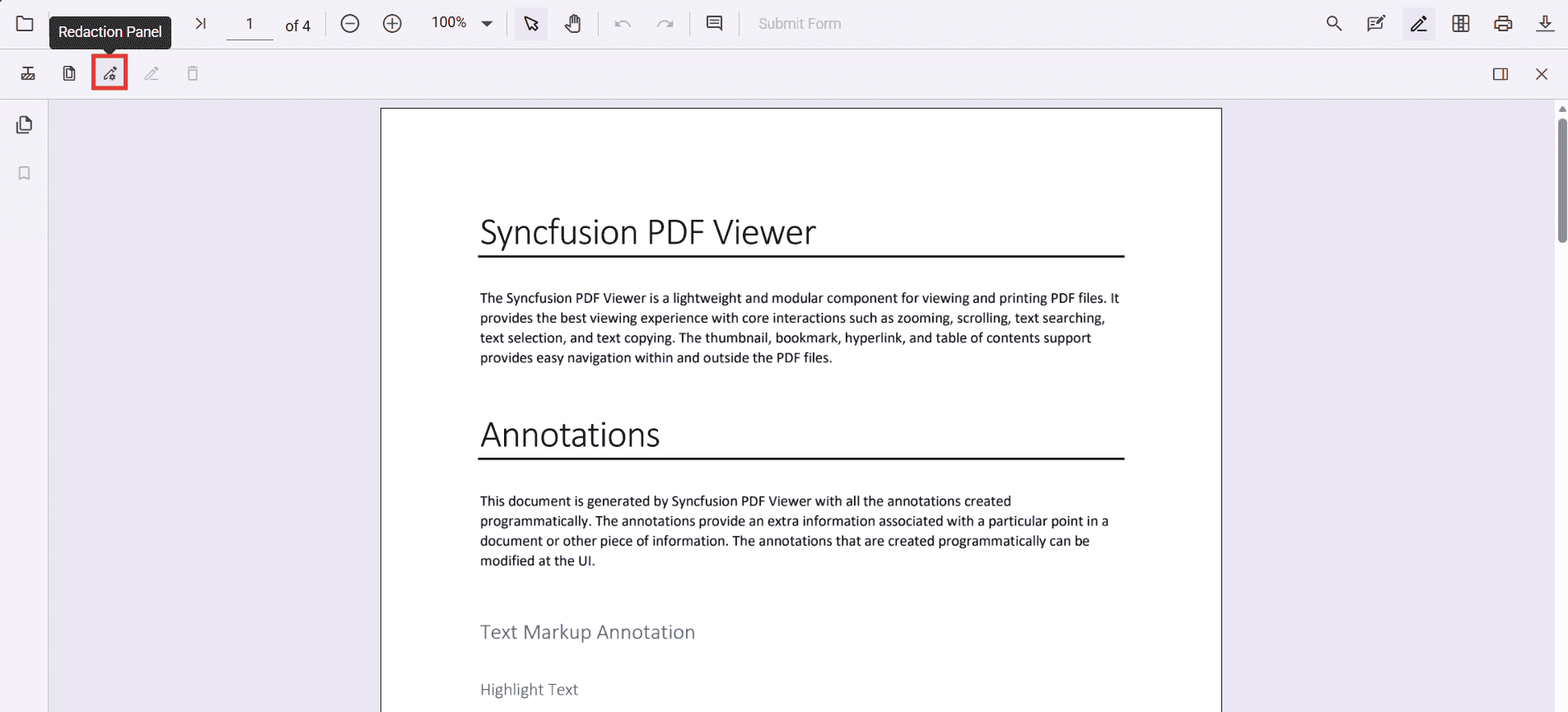
Enable the redaction toolbar
To enable the redaction toolbar, configure the toolbarSettings.toolbarItems property of the PdfViewer instance to include the RedactionEditTool.
The following example shows how to enable the redaction toolbar:
import { Component, ViewChild } from '@angular/core';
import {
  PdfViewerComponent,
  LinkAnnotationService,
  BookmarkViewService,
  MagnificationService,
  ThumbnailViewService,
  ToolbarService,
  NavigationService,
  AnnotationService,
  TextSearchService,
  TextSelectionService,
  PrintService,
  FormFieldsService,
  FormDesignerService,
  PageOrganizerService,
  ToolbarSettingsModel
} from '@syncfusion/ej2-angular-pdfviewer';

@Component({
  selector: 'app-root',
  template: `
    <div class="content-wrapper">
      <ejs-pdfviewer
        #pdfviewer
        id="pdfViewer"
        [resourceUrl]="resourceUrl"
        [documentPath]="documentPath"
        [toolbarSettings]="toolbarSettings"
        style="height:640px;display:block">
      </ejs-pdfviewer>
    </div>
  `,
  providers: [
    LinkAnnotationService,
    BookmarkViewService,
    MagnificationService,
    ThumbnailViewService,
    ToolbarService,
    NavigationService,
    AnnotationService,
    TextSearchService,
    TextSelectionService,
    PrintService,
    FormFieldsService,
    FormDesignerService,
    PageOrganizerService
  ]
})
export class AppComponent {
  @ViewChild('pdfviewer', { static: true }) pdfViewer!: PdfViewerComponent;

  // Standalone mode (CDN) – keep this version aligned with your package
  public resourceUrl = 'https://cdn.syncfusion.com/ej2/31.2.2/dist/ej2-pdfviewer-lib';
  public documentPath = 'https://cdn.syncfusion.com/content/pdf/pdf-succinctly.pdf';

  // Matches your JS toolbar configuration, with RedactionEditTool included
  public toolbarSettings: ToolbarSettingsModel = {
    toolbarItems: [
      'OpenOption',
      'UndoRedoTool',
      'PageNavigationTool',
      'MagnificationTool',
      'PanTool',
      'SelectionTool',
      'CommentTool',
      'SubmitForm',
      'AnnotationEditTool',
      'RedactionEditTool',   // Redaction entry in the primary toolbar
      'FormDesignerEditTool',
      'SearchOption',
      'PrintOption',
      'DownloadOption'
    ]
  };
}
Add redaction annotations programmatically
You can add redaction annotations to a PDF document using the addAnnotation method of the annotation module. You can listen to the annotationAdd event to track when annotations are added.
import { Component, ViewChild } from '@angular/core';
import {
  PdfViewerComponent,
  LinkAnnotationService,
  BookmarkViewService,
  MagnificationService,
  ThumbnailViewService,
  ToolbarService,
  NavigationService,
  AnnotationService,
  TextSearchService,
  TextSelectionService,
  PrintService,
  FormFieldsService,
  FormDesignerService,
  PageOrganizerService,
  ToolbarSettingsModel
} from '@syncfusion/ej2-angular-pdfviewer';

@Component({
  selector: 'app-root',
  // Inline template—kept minimal and close to your JS structure
  template: `
    <div class="content-wrapper">
      <div style="margin-bottom:8px;display:flex;gap:8px;align-items:center;">
        <button id="addRedactAnnot" type="button" (click)="addRedaction()">
          Add Redaction Annotation
        </button>
      </div>
      <ejs-pdfviewer
        #pdfviewer
        id="PdfViewer"
        [documentPath]="document"
        [resourceUrl]="resource"
        [toolbarSettings]="toolbarSettings"
        style="height:640px;display:block"
        (annotationAdd)="onAnnotationAdd($event)">
      </ejs-pdfviewer>
    </div>
  `,
  providers: [
    LinkAnnotationService,
    BookmarkViewService,
    MagnificationService,
    ThumbnailViewService,
    ToolbarService,
    NavigationService,
    AnnotationService,
    TextSearchService,
    TextSelectionService,
    PrintService,
    FormFieldsService,
    FormDesignerService,
    PageOrganizerService
  ]
})
export class AppComponent {
  @ViewChild('pdfviewer', { static: true }) pdfViewer!: PdfViewerComponent;

  // Update these as needed
  public document = 'https://cdn.syncfusion.com/content/pdf/pdf-succinctly.pdf';
  public resource = 'https://cdn.syncfusion.com/ej2/31.2.2/dist/ej2-pdfviewer-lib';

  // Keep toolbar simple; include redaction edit tool if you want UI access too
  public toolbarSettings: ToolbarSettingsModel = {
    toolbarItems: [
      'OpenOption',
      'PageNavigationTool',
      'MagnificationTool',
      'PanTool',
      'SelectionTool',
      'AnnotationEditTool',
      'RedactionEditTool',   // shows the redaction UI tool (optional)
      'SearchOption',
      'PrintOption',
      'DownloadOption'
    ]
  };

  addRedaction(): void {
    if (!this.pdfViewer) { return; }

    this.pdfViewer.annotation.addAnnotation('Redaction', {
      bound: { x: 200, y: 480, width: 150, height: 75 },
      pageNumber: 1,
      markerFillColor: '#0000FF',
      markerBorderColor: 'white',
      fillColor: 'red',
      overlayText: 'Confidential',
      fontColor: 'yellow',
      fontFamily: 'Times New Roman',
      fontSize: 8,
      beforeRedactionsApplied: false
    } as any);
  }

  // You can listen to the annotationAdd event to track when annotations are added.
  onAnnotationAdd(args: any): void {
    console.log('Annotation added:', args);
  }
}
Delete redaction annotations programmatically
Redaction annotations can be removed using the deleteAnnotationById method or by selecting and deleting them through code.
import { Component, ViewChild } from '@angular/core';
import {
  PdfViewerComponent,
  AnnotationService,
  ToolbarService,
  LinkAnnotationService,
  BookmarkViewService,
  MagnificationService,
  ThumbnailViewService,
  NavigationService,
  TextSearchService,
  TextSelectionService,
  PrintService,
  FormFieldsService,
  FormDesignerService,
  PageOrganizerService,
  ToolbarSettingsModel
} from '@syncfusion/ej2-angular-pdfviewer';

@Component({
  selector: 'app-root',
  template: `
    <div style="margin-bottom:8px;">
      <button (click)="deleteAnnotationById()">Delete Annotation By Id</button>
    </div>
    <ejs-pdfviewer
      #pdfviewer
      id="PdfViewer"
      [documentPath]="document"
      [resourceUrl]="resource"
      [toolbarSettings]="toolbarSettings"
      style="height:640px;display:block">
    </ejs-pdfviewer>
  `,
  providers: [
    AnnotationService,
    ToolbarService,
    LinkAnnotationService,
    BookmarkViewService,
    MagnificationService,
    ThumbnailViewService,
    NavigationService,
    TextSearchService,
    TextSelectionService,
    PrintService,
    FormFieldsService,
    FormDesignerService,
    PageOrganizerService
  ]
})
export class AppComponent {
  @ViewChild('pdfviewer', { static: true }) pdfViewer!: PdfViewerComponent;

  public document = 'https://cdn.syncfusion.com/content/pdf/pdf-succinctly.pdf';
  public resource = 'https://cdn.syncfusion.com/ej2/31.2.2/dist/ej2-pdfviewer-lib';
  // Keep toolbar simple; include redaction edit tool if you want UI access too
  public toolbarSettings: ToolbarSettingsModel = {
    toolbarItems: [
      'OpenOption',
      'PageNavigationTool',
      'MagnificationTool',
      'PanTool',
      'SelectionTool',
      'AnnotationEditTool',
      'RedactionEditTool',   // shows the redaction UI tool (optional)
      'SearchOption',
      'PrintOption',
      'DownloadOption'
    ]
  };

  deleteAnnotationById(): void {
    this.pdfViewer.annotationModule.deleteAnnotationById(
      (this.pdfViewer as any).annotationCollection[0].annotationId
    );
  }
}
Alternatively, you can remove annotations by selecting them in the UI and pressing the Delete key.
Update redaction annotation properties programmatically
You can update properties of an existing redaction annotation using the editAnnotation API. For example, to change overlay text or fill color:
import { Component, ViewChild } from '@angular/core';
import {
  PdfViewerComponent,
  AnnotationService,
  ToolbarService,
  LinkAnnotationService,
  BookmarkViewService,
  MagnificationService,
  ThumbnailViewService,
  NavigationService,
  TextSearchService,
  TextSelectionService,
  PrintService,
  FormFieldsService,
  FormDesignerService,
  PageOrganizerService,
  ToolbarSettingsModel
} from '@syncfusion/ej2-angular-pdfviewer';

@Component({
  selector: 'app-root',
  template: `
    <div style="margin-bottom:8px; display:flex; gap:8px;">
      <button id="editRedactAnnotation" (click)="editRedactAnnotation()">
        Edit Redact Annotation
      </button>
    </div>
    <ejs-pdfviewer
      #pdfviewer
      id="PdfViewer"
      [documentPath]="document"
      [resourceUrl]="resource"
      [toolbarSettings]="toolbarSettings"
      style="height:640px; display:block">
    </ejs-pdfviewer>
  `,
  providers: [
    AnnotationService,
    ToolbarService,
    LinkAnnotationService,
    BookmarkViewService,
    MagnificationService,
    ThumbnailViewService,
    NavigationService,
    TextSearchService,
    TextSelectionService,
    PrintService,
    FormFieldsService,
    FormDesignerService,
    PageOrganizerService
  ]
})
export class AppComponent {
  @ViewChild('pdfviewer', { static: true }) pdfViewer!: PdfViewerComponent;

  public document = 'https://cdn.syncfusion.com/content/pdf/pdf-succinctly.pdf';
  public resource = 'https://cdn.syncfusion.com/ej2/31.2.2/dist/ej2-pdfviewer-lib';

  public toolbarSettings: ToolbarSettingsModel = {
    toolbarItems: [
      'OpenOption',
      'PageNavigationTool',
      'MagnificationTool',
      'PanTool',
      'SelectionTool',
      'AnnotationEditTool',
      'RedactionEditTool',   // shows the redaction UI tool (optional)
      'SearchOption',
      'PrintOption',
      'DownloadOption'
    ]
  };

  // Edit RedactionAnnotation
  editRedactAnnotation(): void {
    const collection: any[] = (this.pdfViewer as any).annotationCollection;
    for (let i = 0; i < collection.length; i++) {
      if (collection[i].subject === 'Redaction') {
        collection[i].overlayText = 'EditedAnnotation';
        collection[i].markerFillColor = '#22FF00';
        collection[i].markerBorderColor = '#000000';
        collection[i].isRepeat = true;
        collection[i].fillColor = '#F8F8F8';
        collection[i].fontColor = '#333333';
        collection[i].fontSize = 14;
        collection[i].fontFamily = 'Symbol';
        collection[i].textAlign = 'Right';
        collection[i].beforeRedactionsApplied = false;

        (this.pdfViewer as any).annotation.editAnnotation(collection[i]);
      }
    }
  }
}
Add page redactions programmatically
Entire pages can be marked for redaction using the addPageRedactions method:
import { Component, ViewChild, AfterViewInit } from '@angular/core';
import {
  PdfViewerComponent,
  AnnotationService,
  ToolbarService,
  LinkAnnotationService,
  BookmarkViewService,
  MagnificationService,
  ThumbnailViewService,
  NavigationService,
  TextSearchService,
  TextSelectionService,
  PrintService,
  FormFieldsService,
  FormDesignerService,
  PageOrganizerService,
  ToolbarSettingsModel
} from '@syncfusion/ej2-angular-pdfviewer';

@Component({
  selector: 'app-root',
  template: `
    <div style="margin-bottom:8px; display:flex; gap:8px; align-items:center;">
      <!-- Add page redactions programmatically -->
      <button id="addPageRedactions" type="button" (click)="addPageRedactions()">
        Add Page Redaction
      </button>
    </div>
    <ejs-pdfviewer
      #pdfviewer
      id="PdfViewer"
      [documentPath]="document"
      [resourceUrl]="resource"
      [toolbarSettings]="toolbarSettings"
      style="height:640px; display:block">
    </ejs-pdfviewer>
  `,
  providers: [
    AnnotationService,
    ToolbarService,
    LinkAnnotationService,
    BookmarkViewService,
    MagnificationService,
    ThumbnailViewService,
    NavigationService,
    TextSearchService,
    TextSelectionService,
    PrintService,
    FormFieldsService,
    FormDesignerService,
    PageOrganizerService
  ]
})
export class AppComponent implements AfterViewInit {
  @ViewChild('pdfviewer', { static: true }) pdfViewer!: PdfViewerComponent;

  public document = 'https://cdn.syncfusion.com/content/pdf/pdf-succinctly.pdf';
  public resource = 'https://cdn.syncfusion.com/ej2/31.2.2/dist/ej2-pdfviewer-lib';

  public toolbarSettings: ToolbarSettingsModel = {
    toolbarItems: [
      'OpenOption',
      'PageNavigationTool',
      'MagnificationTool',
      'PanTool',
      'SelectionTool',
      'AnnotationEditTool',
      'RedactionEditTool',   // shows the redaction UI tool (optional)
      'SearchOption',
      'PrintOption',
      'DownloadOption'
    ]
  };

  // Add page redactions programmatically (pages 1, 3, 5, 7)
  addPageRedactions(): void {
    this.pdfViewer.annotation.addPageRedactions([1, 3, 5, 7]);
  }
}
Apply redaction programmatically
Once annotations are added, you can permanently apply them to the document using the redact method:
import { Component, ViewChild, AfterViewInit } from '@angular/core';
import {
  PdfViewerComponent,
  AnnotationService,
  ToolbarService,
  LinkAnnotationService,
  BookmarkViewService,
  MagnificationService,
  ThumbnailViewService,
  NavigationService,
  TextSearchService,
  TextSelectionService,
  PrintService,
  FormFieldsService,
  FormDesignerService,
  PageOrganizerService,
  ToolbarSettingsModel
} from '@syncfusion/ej2-angular-pdfviewer';

@Component({
  selector: 'app-root',
  template: `
    <div style="margin-bottom:8px; display:flex; gap:8px; align-items:center;">
      <button id="redact" type="button" (click)="applyRedaction()">
        Apply Redaction
      </button>
    </div>
    <ejs-pdfviewer
      #pdfviewer
      id="PdfViewer"
      [documentPath]="document"
      [resourceUrl]="resource"
      [toolbarSettings]="toolbarSettings"
      style="height:640px; display:block">
    </ejs-pdfviewer>
  `,
  providers: [
    AnnotationService,
    ToolbarService,
    LinkAnnotationService,
    BookmarkViewService,
    MagnificationService,
    ThumbnailViewService,
    NavigationService,
    TextSearchService,
    TextSelectionService,
    PrintService,
    FormFieldsService,
    FormDesignerService,
    PageOrganizerService
  ]
})
export class AppComponent implements AfterViewInit {
  @ViewChild('pdfviewer', { static: true }) pdfViewer!: PdfViewerComponent;

  public document = 'https://cdn.syncfusion.com/content/pdf/pdf-succinctly.pdf';
  public resource = 'https://cdn.syncfusion.com/ej2/31.2.2/dist/ej2-pdfviewer-lib';

  public toolbarSettings: ToolbarSettingsModel = {
    toolbarItems: [
      'OpenOption',
      'PageNavigationTool',
      'MagnificationTool',
      'PanTool',
      'SelectionTool',
      'AnnotationEditTool',
      'RedactionEditTool',   // shows the redaction UI tool (optional)
      'SearchOption',
      'PrintOption',
      'DownloadOption'
    ]
  };

  // Apply redaction programmatically (irreversible)
  applyRedaction(): void {
    this.pdfViewer.annotation.redact();
  }
}
Applying redaction is irreversible. Before calling
redact(), save or export a backup copy of the document; the original content cannot be recovered.
Configure default redaction annotation properties
You can configure default properties for redaction annotations (such as fill color, overlay text, and font) when adding them programmatically:
import { Component, ViewChild, AfterViewInit } from '@angular/core';
import {
  PdfViewerComponent,
  AnnotationService,
  ToolbarService,
  LinkAnnotationService,
  BookmarkViewService,
  MagnificationService,
  ThumbnailViewService,
  NavigationService,
  TextSearchService,
  TextSelectionService,
  PrintService,
  FormFieldsService,
  FormDesignerService,
  PageOrganizerService,
  ToolbarSettingsModel
} from '@syncfusion/ej2-angular-pdfviewer';

@Component({
  selector: 'app-root',
  template: `
    <div style="margin-bottom:8px; display:flex; gap:8px; align-items:center;">
    </div>
    <ejs-pdfviewer
      #pdfviewer
      id="PdfViewer"
      [documentPath]="document"
      [resourceUrl]="resource"
      [toolbarSettings]="toolbarSettings"
      style="height:640px; display:block">
    </ejs-pdfviewer>
  `,
  providers: [
    AnnotationService,
    ToolbarService,
    LinkAnnotationService,
    BookmarkViewService,
    MagnificationService,
    ThumbnailViewService,
    NavigationService,
    TextSearchService,
    TextSelectionService,
    PrintService,
    FormFieldsService,
    FormDesignerService,
    PageOrganizerService
  ]
})
export class AppComponent implements AfterViewInit {
  @ViewChild('pdfviewer', { static: true }) pdfViewer!: PdfViewerComponent;

  public document = 'https://cdn.syncfusion.com/content/pdf/pdf-succinctly.pdf';
  public resource = 'https://cdn.syncfusion.com/ej2/31.2.2/dist/ej2-pdfviewer-lib';

  public toolbarSettings: ToolbarSettingsModel = {
    toolbarItems: [
      'OpenOption',
      'PageNavigationTool',
      'MagnificationTool',
      'PanTool',
      'SelectionTool',
      'AnnotationEditTool',
      'RedactionEditTool',   // shows the redaction UI tool (optional)
      'SearchOption',
      'PrintOption',
      'DownloadOption'
    ]
  };

  // Configure default redaction annotation properties (same as your JS)
  ngAfterViewInit(): void {
    (this.pdfViewer as any).redactionSettings = {
      overlayText: 'Confidential',
      markerFillColor: '#FF0000',
      markerBorderColor: '#000000',
      isRepeat: false,
      fillColor: '#F8F8F8',
      fontColor: '#333333',
      fontSize: 14,
      fontFamily: 'Symbol',
      textAlign: 'Right'
    };
  }
}
View sample repository on GitHub
Redaction property panel
The redaction property panel allows users to update annotation properties through the UI. Programmatically, you can invoke the property panel by selecting an annotation and calling the relevant APIs. Properties such as overlay text, font style, and fill color can be updated directly in the panel.