How can I help you?
Syncfusion Document SDK AI Agent Tools Overview
12 May 202610 minutes to read
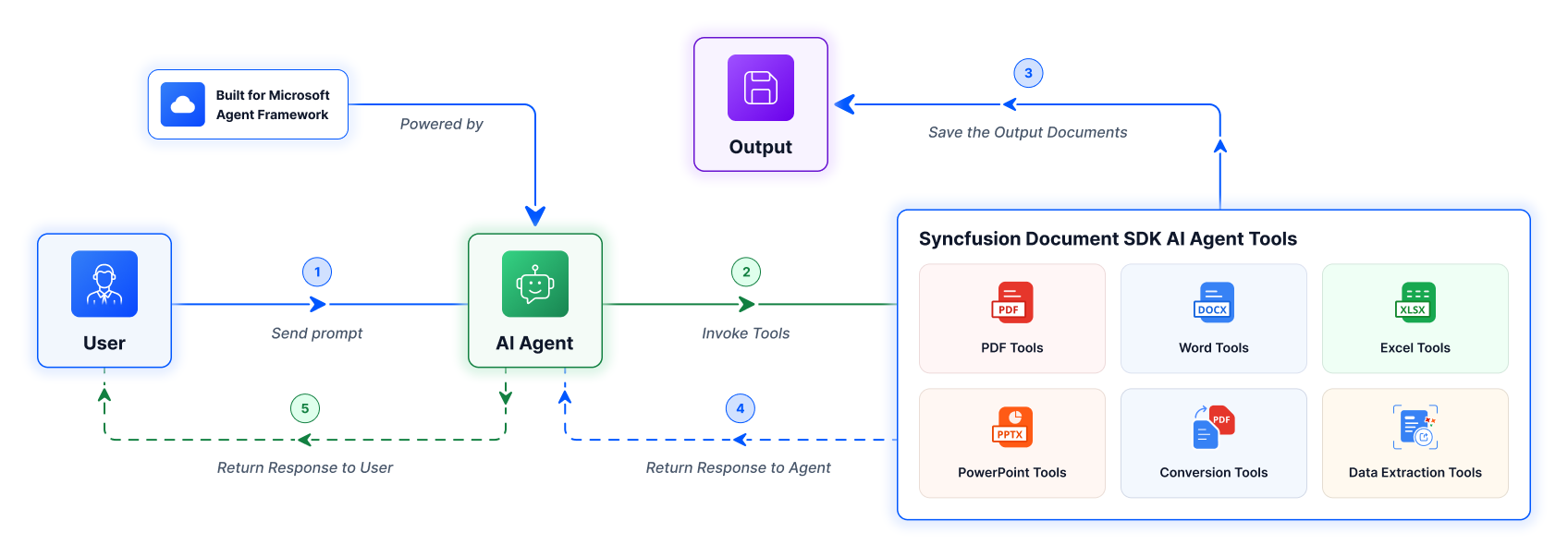
Syncfusion Document SDK AI Agent Tool is a .NET library offering comprehensive AI toolkit that enables AI models and assistants to autonomously create, manipulate, convert, and extract data from Word, Excel, PDF, PowerPoint, Markdown, HTML, and RTF documents using Syncfusion Document SDK libraries.
It exposes a rich set of pre-defined tools and functions that an AI agent can invoke to perform document operations across various file formats - without requiring the host application to implement document-processing logic directly.
You can quickly deploy it to your infrastructure via NuGet. If you want to add new functionality or customize any existing functionalities, then you can use our source code available on GitHub.
Key Capabilities
The PDF tools cover the full document lifecycle - from creating and loading PDFs to securing, extracting content, and converting formats. Whether you need to merge invoices, redact sensitive data, add digital signatures, or run OCR on scanned pages, these tools handle it autonomously.
- Digital Signing - Digitally sign PDF documents using a PFX certificate with configurable signature bounds and an optional visible appearance image.
- Redaction - Permanently redact rectangular regions from PDF pages to remove sensitive content, with configurable fill color.
- Watermarking - Apply configurable text watermarks to all pages of a PDF with control over opacity, rotation, color, and positioning.
- OCR - Perform Optical Character Recognition on scanned or image-based PDFs to make text selectable and searchable. Supports multiple languages via Tesseract.
- Encryption & Decryption - Protect PDFs with password-based encryption using AES or other algorithms, or remove encryption from protected documents.
- Permissions - Set or remove document permissions such as print, copy, and edit content on PDF files.
- Merge & Split - Merge multiple PDF files into one document, or split a PDF into individual pages or by specified page ranges.
- Compression - Compress PDFs by optimizing images, fonts, and page contents, with options to remove metadata.
- Page Reordering - Rearrange PDF pages using a zero-based page index sequence.
- Text & Image Extraction - Extract text content from specific page ranges or the entire document. Extract and save embedded images from PDF pages.
- Text Search - Search a PDF for matching text and get all occurrences grouped by page with bounding rectangle positions.
- Annotation Import/Export - Export annotations from a PDF to XFDF, FDF, or JSON format, or import annotations back from those formats.
- Form Field Import/Export - Export form field data to FDF, XFDF, or XML format, or import form field data from those formats.
- PDF/A Conversion - Convert existing PDFs to PDF/A-compliant formats including PDF/A-1B, PDF/A-2B, PDF/A-3B, and PDF/A-4.
- Image to PDF - Create PDF documents from one or more image files with control over image placement and page size.
Word
The Word tools enable end-to-end document automation - from loading and editing Word files to merging, comparing, and converting them. Your agent can populate templates via mail merge, manage bookmarks and form fields, track and resolve changes, and export to multiple formats without manual intervention.
- Mail Merge - Populate Word templates with structured data using simple, group, or nested group mail merge operations driven by JSON input.
- Bookmarks - Get, replace, and remove bookmark content from Word documents. You can also list all bookmarks or remove a specific bookmark entirely.
- Form Fields - Read and write form field values in Word documents. Retrieve all form data as a dictionary or set multiple field values at once using JSON.
- Find & Replace - Find and replace text across a Word document in a single pass. Supports plain text arrays and regex patterns, with options for case sensitivity and whole-word matching.
- Document Merging and Splitting - Merge multiple Word documents into one or split a single document by section or placeholder-based rules.
- Comparison - Compare an original document with a revised version and mark all differences as tracked changes.
- Track Changes - Accept or reject tracked revisions in a Word document, either by a specific author or all at once.
- Import/Export (HTML, Markdown) - Import HTML or Markdown content into a Word document, or export document content as HTML, Markdown, or plain text.
- Conversion to PDF, Image, RTF, and HTML - Convert Word documents to PDF, export pages as PNG or JPEG images, or save in RTF, HTML, Doc, and TXT formats and vice-versa.
- Field Management - Update all document fields (DATE, TIME, IF, SEQ, etc.) or unlink them by replacing each field with its current static result.
- Table of Contents - Rebuild the Table of Contents based on current heading styles and page layout.
- Document Security - Protect, encrypt, unprotect, and decrypt Word documents with password-based security.
- Clone - Create a deep copy of a Word document for duplicating templates before making changes.
Excel
The Excel tools let your agent create and manipulate workbooks programmatically - from setting cell values and formulas to building charts, pivot tables, and conditional formatting rules. They also support workbook security, data validation, and conversion to image, CSV, HTML, and JSON formats.
- Charts - Create charts from data ranges, add named series with values and category labels, and configure chart elements like titles, legends, data labels, and axis titles. Supports many chart types, including Column, Line, Pie, and Bar.
- Conditional Formatting - Add conditional formatting to cells or ranges using cell value rules, formulas, data bars, color scales, or icon sets with customizable styles.
- Data Validation - Add dropdown lists, number, date, time, text length, or custom formula-based validation to cells or ranges with configurable error and prompt messages.
- Pivot Tables - Create pivot tables from data ranges with row, column, and data fields. Supports aggregation functions like Sum, Count, Average, Max, and Min, along with built-in styles.
- Encryption & Protection - Encrypt and decrypt workbooks with passwords. Protect or unprotect workbook structure and individual worksheets.
- Worksheet Management - Create, delete, and manage worksheets within Excel workbooks.
- Conversion to Image, CSV, HTML, and JSON - Convert worksheets or charts to PNG and JPEG images. Export workbooks or worksheets to HTML with preserved styles, or to JSON with optional schema. Convert specific cell ranges to JSON.
- Workbook Format Conversion - Convert workbooks between XLS, XLSX, XLSM, and CSV formats.
PowerPoint
The PowerPoint tools provide essential presentation operations - loading, merging, splitting, and securing PPTX files. Your agent can extract text content, perform find-and-replace across all slides, and export slides as images for downstream processing.
- Text Extraction - Extract all text content from a presentation or get the total slide count.
- Find & Replace - Find and replace text across all slides in a presentation. Supports plain text arrays and regex patterns, with options for case sensitivity and whole-word matching.
- Merge & Split - Merge multiple presentations into one or split a presentation by sections, layout type, or specific slide numbers.
- Encryption & Decryption - Encrypt presentations with a password or remove encryption from protected presentations.
- Protection - Write-protect presentations with a password or remove write protection.
- Export as Image - Export presentation slides as PNG or JPEG images to a specified output location.
Office to PDF
The Office to PDF tool bridges Word, Excel, and PowerPoint with the PDF format. It produces a high-fidelity PDF output in a single tool call, making it ideal for report generation and document archival workflows.
- Office to PDF Conversion - Convert Word, Excel, or PowerPoint documents to PDF in a single tool call by specifying the source document and its type.
Data Extraction
The data extraction tools used to pull structured information from PDFs and images. They can identify text, tables, form fields, checkboxes, signatures, and radio buttons, returning results as clean JSON for downstream processing.
- Structured Data Extraction - Extract structured data including text, forms, tables, checkboxes, signatures, and radio buttons from PDF or image files and return the result as JSON.
- Table Extraction - Extract only table data from PDF documents as JSON, optimized for table-focused extraction with support for border less tables.
- Form Recognition - Extract only form field data from PDF documents as JSON, optimized for form-focused recognition with support for signatures, textboxes, checkboxes, and radio buttons.
- PDF to Markdown Conversion - Convert PDF documents and scanned images into structured Markdown (MD) by extracting text, tables, headers, and form fields, with configurable detection and layout preservation.
- PDF Table to Markdown Conversion - Convert tables from PDF documents and scanned images into clean and well‑structured Markdown (MD) format by analyzing visual table structures, including bordered and border‑less tables, for accurate programmatic table extraction.
Supported Document Formats
| Format | Supported File Types |
|---|---|
| Word |
.docx, .doc, .rtf, .html, .txt, .md
|
| Excel |
.xlsx, .xls, .xlsm, .csv
|
.pdf |
|
| PowerPoint | .pptx |
| Image (extraction input) |
.png, .jpg, .jpeg
|
Dependent NuGet Packages
The following NuGet packages are required dependencies for the agent tool library.
| Package | Purpose |
|---|---|
| Syncfusion.DocIO.NET | Word document processing |
| Syncfusion.Pdf.NET | PDF document processing |
| Syncfusion.XlsIO.NET | Excel workbook processing |
| Syncfusion.Presentation.NET | PowerPoint presentation processing |
| Syncfusion.DocIORenderer.NET | Word to PDF and Image conversions |
| Syncfusion.PresentationRenderer.NET | PowerPoint to PDF and Image conversions |
| Syncfusion.XlsIORenderer.NET | Excel to PDF and Image conversions |
| Syncfusion.SmartDataExtractor.NET | Structured data extraction from PDF/images |
| Syncfusion.SmartTableExtractor.NET | Table extraction from PDF |
| Syncfusion.SmartFormRecognizer.Net | Form field recognition |
| Syncfusion.PDF.OCR.NET | OCR Processor |
The following functionality required additional NuGet packages in non-Windows platforms.
- Office to PDF Conversion in Linux platform
Supported .NET Versions
- .NET 8.0
- .NET 9.0
- .NET 10.0