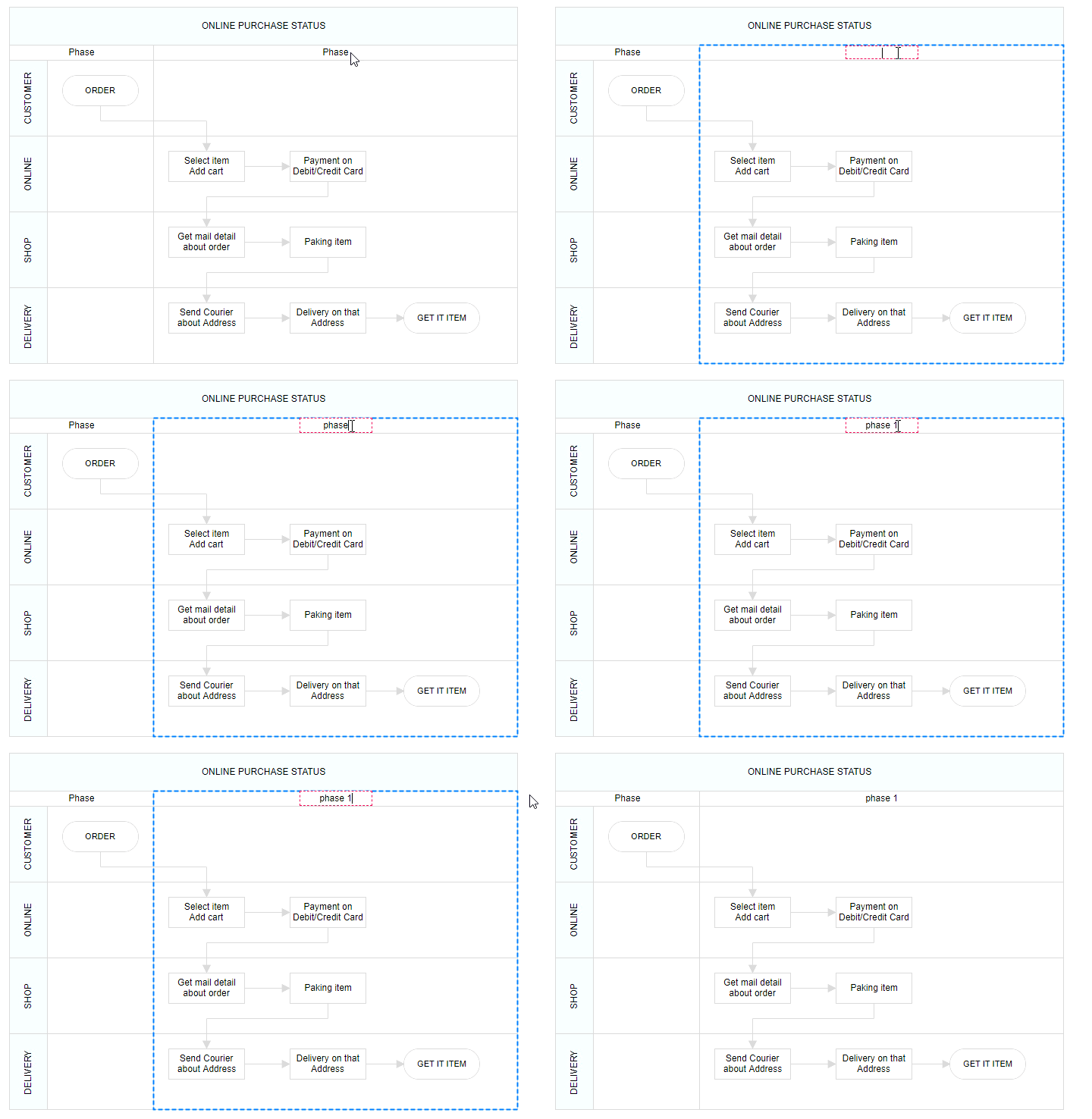
Phase
Phase are the subprocess which will split each lanes as horizontally or vertically based on the swimlane orientation. We can add multiple number of Phase to swimlane.
The following code example illustrates how to create phase.
<template>
    <div id="app">
        <ejs-diagram id="diagram" :width='width' :height='height' :nodes='nodes'></ejs-diagram>
    </div>
</template>
<script setup>
import { DiagramComponent as EjsDiagram } from '@syncfusion/ej2-vue-diagrams';

const nodes = [{
        shape: {
        type: 'SwimLane',
        orientation: 'Horizontal',
        //Intialize header to swimlane
        header: {
        annotation: {
            content: 'ONLINE PURCHASE STATUS'
        },
        height: 50,
        style: { fontSize: 11 },
        },
        lanes: [
        {
            id: 'stackCanvas1',
            height: 100,
            header: {
            annotation: { content: 'CUSTOMER' },
            width: 50,
            style: { fontSize: 11 },
            },
        },
        ],
        // Set phase to swimlane
        phases: [
        {
            id: 'phase1',
            offset: 150,
        },
        {
            id: 'phase2',
            offset: 200,
        },
        ],
        phaseSize: 20,
    },
    offsetX: 300,
    offsetY: 200,
    height: 200,
    width: 350,
}];
const width = "100%";
const height = "350px";
</script>
<style>
@import "../node_modules/@syncfusion/ej2-vue-diagrams/styles/tailwind3.css";
@import "../node_modules/@syncfusion/ej2-base/styles/tailwind3.css";
@import "../node_modules/@syncfusion/ej2-popups/styles/tailwind3.css";
@import "../node_modules/@syncfusion/ej2-splitbuttons/styles/tailwind3.css";
@import "../node_modules/@syncfusion/ej2-navigations/styles/tailwind3.css";
</style><template>
<div id="app">
<ejs-diagram id="diagram" :width='width' :height='height' :nodes='nodes'></ejs-diagram>
</div>
</template>
<script>
import { DiagramComponent } from '@syncfusion/ej2-vue-diagrams';
let nodes = [{
shape: {
type: 'SwimLane',
orientation: 'Horizontal',
//Intialize header to swimlane
header: {
annotation: {
content: 'ONLINE PURCHASE STATUS'
},
height: 50,
style: { fontSize: 11 },
},
lanes: [
{
id: 'stackCanvas1',
height: 100,
header: {
annotation: { content: 'CUSTOMER' },
width: 50,
style: { fontSize: 11 },
},
},
],
// Set phase to swimlane
phases: [
{
id: 'phase1',
offset: 150,
},
{
id: 'phase2',
offset: 200,
},
],
phaseSize: 20,
},
offsetX: 300,
offsetY: 200,
height: 200,
width: 350,
}];
export default {
name: "App",
components: {
"ejs-diagram": DiagramComponent
},
data() {
return {
width: "100%",
height: "350px",
nodes: nodes,
}
}
}
</script>
<style>
@import "../node_modules/@syncfusion/ej2-vue-diagrams/styles/tailwind3.css";
@import "../node_modules/@syncfusion/ej2-base/styles/tailwind3.css";
@import "../node_modules/@syncfusion/ej2-popups/styles/tailwind3.css";
@import "../node_modules/@syncfusion/ej2-splitbuttons/styles/tailwind3.css";
@import "../node_modules/@syncfusion/ej2-navigations/styles/tailwind3.css";
</style>Dynamically add/remove phase to Lane
You can add a phase at runtime by using addPhases method and remove a phase by using removePhase method. The following code example illustrates how to add and remove phase at run time.
<template>
    <div id="app">
        <button @click = "addPhase">addPhase</button>
        <button @click = "removePhase">removePhase</button>
        <ejs-diagram id="diagram" ref="diagram" :width='width' :height='height' :nodes='nodes'></ejs-diagram>
    </div>
</template>
<script setup>
import { onMounted, ref } from "vue";
import { DiagramComponent as EjsDiagram } from '@syncfusion/ej2-vue-diagrams';

const diagram = ref(null);
const nodes = [{
    id: 'swim1',
    shape: {
        type: 'SwimLane',
        orientation: 'Horizontal',
        //Intialize header to swimlane
        header: {
        annotation: {
            content: 'ONLINE PURCHASE STATUS'
        },
        height: 50,
        style: { fontSize: 11 },
        },
        lanes: [
        {
            id: 'stackCanvas1',
            height: 100,
            header: {
            annotation: { content: 'CUSTOMER' },
            width: 50,
            style: { fontSize: 11 },
            },
        },
        ],
        phases: [
        {
            id: 'phase1',
            offset: 120,
            header: { annotation: { content: 'Phase' } },
        },
        {
            id: 'phase2',
            offset: 200,
            header: { annotation: { content: 'Phase' } },
        },
        ],
        phaseSize: 20,
    },
    offsetX: 300,
    offsetY: 200,
    height: 200,
    width: 350,
}];

const width = "100%";
const height = "350px";

const addPhase = () => {
    const diagramInstance = diagram.value.ej2Instances;
    const swimlane = diagramInstance.getObject('swim1');
    const phase = [
    {
      id: 'phase3',
      offset: 250,
      header: { annotation: { content: 'New Phase' } },
    },
    ];
    /**
     * To add phases
     * parameter 1 - object representing the swimlane to which phases will be added.
     * parameter 2 - objects representing the phases to be added.
     */
    diagramInstance.addPhases(swimlane, phase);
};

const removePhase = () => {
    const diagramInstance = diagram.value.ej2Instances;
    const swimlane = diagramInstance.getObject('swim1')
    const phase = swimlane.shape.phases[swimlane.shape.phases.length - 1];
    /**
     * To remove phase
     * parameter 1 - representing the swimlane to remove the phase from.
     * paramter 2 - representing the phase to be removed.
     */
    diagramInstance.removePhase(swimlane, phase);
}


</script>
<style>
@import "../node_modules/@syncfusion/ej2-vue-diagrams/styles/tailwind3.css";
@import "../node_modules/@syncfusion/ej2-base/styles/tailwind3.css";
@import "../node_modules/@syncfusion/ej2-popups/styles/tailwind3.css";
@import "../node_modules/@syncfusion/ej2-splitbuttons/styles/tailwind3.css";
@import "../node_modules/@syncfusion/ej2-navigations/styles/tailwind3.css";
</style><template>
<div id="app">
<button @click = "addPhase">addPhase</button>
<button @click = "removePhase">removePhase</button>
<ejs-diagram id="diagram" ref="diagram" :width='width' :height='height' :nodes='nodes'></ejs-diagram>
</div>
</template>
<script>
import { DiagramComponent } from '@syncfusion/ej2-vue-diagrams';
let nodes = [{
id: 'swim1',
shape: {
type: 'SwimLane',
orientation: 'Horizontal',
//Intialize header to swimlane
header: {
annotation: {
content: 'ONLINE PURCHASE STATUS'
},
height: 50,
style: { fontSize: 11 },
},
lanes: [
{
id: 'stackCanvas1',
height: 100,
header: {
annotation: { content: 'CUSTOMER' },
width: 50,
style: { fontSize: 11 },
},
},
],
phases: [
{
id: 'phase1',
offset: 120,
header: { annotation: { content: 'Phase' } },
},
{
id: 'phase2',
offset: 200,
header: { annotation: { content: 'Phase' } },
},
],
phaseSize: 20,
},
offsetX: 300,
offsetY: 200,
height: 200,
width: 350,
}];
export default {
name: "App",
components: {
"ejs-diagram": DiagramComponent
},
data() {
return {
width: "100%",
height: "350px",
nodes: nodes,
}
},
methods: {
addPhase() {
const diagramInstance = this.$refs.diagram.ej2Instances;
const swimlane = diagramInstance.getObject('swim1');
const phase = [
{
id: 'phase3',
offset: 250,
header: { annotation: { content: 'New Phase' } },
},
];
/**
* To add phases
* parameter 1 - object representing the swimlane to which phases will be added.
* parameter 2 - objects representing the phases to be added.
*/
diagramInstance.addPhases(swimlane, phase);
},
removePhase() {
const diagramInstance = this.$refs.diagram.ej2Instances;
const swimlane = diagramInstance.getObject('swim1')
const phase = swimlane.shape.phases[swimlane.shape.phases.length - 1];
/**
* To remove phase
* parameter 1 - representing the swimlane to remove the phase from.
* paramter 2 - representing the phase to be removed.
*/
diagramInstance.removePhase(swimlane, phase);
},
},
}
</script>
<style>
@import "../node_modules/@syncfusion/ej2-vue-diagrams/styles/tailwind3.css";
@import "../node_modules/@syncfusion/ej2-base/styles/tailwind3.css";
@import "../node_modules/@syncfusion/ej2-popups/styles/tailwind3.css";
@import "../node_modules/@syncfusion/ej2-splitbuttons/styles/tailwind3.css";
@import "../node_modules/@syncfusion/ej2-navigations/styles/tailwind3.css";
</style>Customizing phase
- The length of region can be set by using the
offsetproperty of the phase. - Every phase region can be textually described with the
headerproperty of the phase. - You can increase the height of phase by using
phaseSizeproperty of swimlane. - We can provide additional information to the phase by using the
addInfoproperty of the phase.
The following code example illustrates how to customize the phase in swimlane.
<template>
    <div id="app">
        <ejs-diagram id="diagram" :width='width' :height='height' :nodes='nodes'></ejs-diagram>
    </div>
</template>
<script setup>
import { DiagramComponent as EjsDiagram } from '@syncfusion/ej2-vue-diagrams';

const nodes = [{
    shape: {
        type: 'SwimLane',
        orientation: 'Horizontal',
        //Intialize header to swimlane
        header: {
        annotation: {
            content: 'ONLINE PURCHASE STATUS'
        },
        height: 50,
        style: { fontSize: 11 },
        },
        lanes: [
        {
            id: 'stackCanvas1',
            height: 100,
            header: {
            annotation: { content: 'CUSTOMER' },
            width: 50,
            style: { fontSize: 11 },
            },
        },
        ],
        phases: [
        {
            id: 'phase1',
            offset: 150,
            addInfo: { name: 'phase1' },
            header: {
            annotation: {
                content: 'First phase',
                style: { fill: 'yellow', color: 'red' },
            },
            },
        },
        {
            id: 'phase2',
            offset: 200,
            header: { annotation: { content: 'Second phase' } },
            style: { fill: 'violet' },
        },
        ],
        phaseSize: 40,
    },
    offsetX: 300,
    offsetY: 200,
    height: 200,
    width: 350,
}];

const width = "100%";
const height = "350px";

</script>
<style>
@import "../node_modules/@syncfusion/ej2-vue-diagrams/styles/tailwind3.css";
@import "../node_modules/@syncfusion/ej2-base/styles/tailwind3.css";
@import "../node_modules/@syncfusion/ej2-popups/styles/tailwind3.css";
@import "../node_modules/@syncfusion/ej2-splitbuttons/styles/tailwind3.css";
@import "../node_modules/@syncfusion/ej2-navigations/styles/tailwind3.css";
</style><template>
<div id="app">
<ejs-diagram id="diagram" :width='width' :height='height' :nodes='nodes'></ejs-diagram>
</div>
</template>
<script>
import { DiagramComponent } from '@syncfusion/ej2-vue-diagrams';
let nodes = [{
shape: {
type: 'SwimLane',
orientation: 'Horizontal',
//Intialize header to swimlane
header: {
annotation: {
content: 'ONLINE PURCHASE STATUS'
},
height: 50,
style: { fontSize: 11 },
},
lanes: [
{
id: 'stackCanvas1',
height: 100,
header: {
annotation: { content: 'CUSTOMER' },
width: 50,
style: { fontSize: 11 },
},
},
],
phases: [
{
id: 'phase1',
offset: 150,
addInfo: { name: 'phase1' },
header: {
annotation: {
content: 'First phase',
style: { fill: 'yellow', color: 'red' },
},
},
},
{
id: 'phase2',
offset: 200,
header: { annotation: { content: 'Second phase' } },
style: { fill: 'violet' },
},
],
phaseSize: 40,
},
offsetX: 300,
offsetY: 200,
height: 200,
width: 350,
}]
export default {
name: "App",
components: {
"ejs-diagram": DiagramComponent
},
data() {
return {
width: "100%",
height: "350px",
nodes: nodes,
}
}
}
</script>
<style>
@import "../node_modules/@syncfusion/ej2-vue-diagrams/styles/tailwind3.css";
@import "../node_modules/@syncfusion/ej2-base/styles/tailwind3.css";
@import "../node_modules/@syncfusion/ej2-popups/styles/tailwind3.css";
@import "../node_modules/@syncfusion/ej2-splitbuttons/styles/tailwind3.css";
@import "../node_modules/@syncfusion/ej2-navigations/styles/tailwind3.css";
</style>Dynamic customization of phase
You can customize the phase style and text properties dynamically. The following code illustrates how to dynamically customize the phase.
The following code example illustrates how to customize the phase at runtime.
<template>
    <div id="app">
        <button @click="updatePhase">updatePhase</button>
        <ejs-diagram id="diagram" ref="diagram" :width='width' :height='height' :nodes='nodes'></ejs-diagram>
    </div>
</template>
<script setup>
import { DiagramComponent as EjsDiagram } from '@syncfusion/ej2-vue-diagrams';
const diagram = ref(null);
const nodes = [{
    id: 'swimlane',
    shape: {
    type: 'SwimLane',
    orientation: 'Horizontal',
    //Intialize header to swimlane
    header: {
      annotation: {
        content: 'ONLINE PURCHASE STATUS',
      },
      height: 50,
      style: { fontSize: 11 },
    },
    lanes: [
      {
        id: 'stackCanvas1',
        height: 100,
        header: {
          annotation: { content: 'CUSTOMER' },
          width: 50,
          style: { fontSize: 11 },
        },
      },
    ],
    phases: [
      {
        id: 'phase1',
        offset: 150,
        addInfo: { name: 'phase1' },
        header: {
          annotation: {
            content: 'First phase',
            style: { fill: 'yellow', color: 'red' },
          },
        },
      },
      {
        id: 'phase2',
        offset: 200,
        header: { annotation: { content: 'Second phase' } },
        style: { fill: 'violet' },
      },
    ],
    phaseSize: 40,
  },
  offsetX: 300,
  offsetY: 200,
  height: 200,
  width: 350,
}];

const width = "100%";
const height = "350px";

const updatePhase = () => {
    const diagramInstance = diagram.value.ej2Instances;
    const swimlane = diagramInstance.nameTable['swimlane'];
    const phase = swimlane.shape.phases[0];
    phase.header.style.fill = 'orange';
    phase.header.annotation.content = 'phase updated';
    diagramInstance.dataBind();
}

</script>
<style>
@import "../node_modules/@syncfusion/ej2-vue-diagrams/styles/tailwind3.css";
@import "../node_modules/@syncfusion/ej2-base/styles/tailwind3.css";
@import "../node_modules/@syncfusion/ej2-popups/styles/tailwind3.css";
@import "../node_modules/@syncfusion/ej2-splitbuttons/styles/tailwind3.css";
@import "../node_modules/@syncfusion/ej2-navigations/styles/tailwind3.css";
</style><template>
<div id="app">
<button @click="updatePhase">updatePhase</button>
<ejs-diagram id="diagram" ref="diagram" :width='width' :height='height' :nodes='nodes'></ejs-diagram>
</div>
</template>
<script>
import { DiagramComponent } from '@syncfusion/ej2-vue-diagrams';
let nodes = [{
id: 'swimlane',
shape: {
type: 'SwimLane',
orientation: 'Horizontal',
//Intialize header to swimlane
header: {
annotation: {
content: 'ONLINE PURCHASE STATUS',
},
height: 50,
style: { fontSize: 11 },
},
lanes: [
{
id: 'stackCanvas1',
height: 100,
header: {
annotation: { content: 'CUSTOMER' },
width: 50,
style: { fontSize: 11 },
},
},
],
phases: [
{
id: 'phase1',
offset: 150,
addInfo: { name: 'phase1' },
header: {
annotation: {
content: 'First phase',
style: { fill: 'yellow', color: 'red' },
},
},
},
{
id: 'phase2',
offset: 200,
header: { annotation: { content: 'Second phase' } },
style: { fill: 'violet' },
},
],
phaseSize: 40,
},
offsetX: 300,
offsetY: 200,
height: 200,
width: 350,
}]
export default {
name: "App",
components: {
"ejs-diagram": DiagramComponent
},
data() {
return {
width: "100%",
height: "350px",
nodes: nodes,
}
},
methods: {
updatePhase() {
const diagramInstance = this.$refs.diagram.ej2Instances;
const swimlane = diagramInstance.nameTable['swimlane'];
const phase = swimlane.shape.phases[0];
phase.header.style.fill = 'orange';
phase.header.annotation.content = 'phase updated';
diagramInstance.dataBind();
}
}
}
</script>
<style>
@import "../node_modules/@syncfusion/ej2-vue-diagrams/styles/tailwind3.css";
@import "../node_modules/@syncfusion/ej2-base/styles/tailwind3.css";
@import "../node_modules/@syncfusion/ej2-popups/styles/tailwind3.css";
@import "../node_modules/@syncfusion/ej2-splitbuttons/styles/tailwind3.css";
@import "../node_modules/@syncfusion/ej2-navigations/styles/tailwind3.css";
</style>Phase interaction
Resizing
- The phase can be resized by using its selector.
- You must select the phase header to enable the phase selection.
- Once the phase is resized, the lane size will be updated automatically.
Resizing helper
- The special resize selector will be used to resize the phase.
- The resize cursor will be available on the left and bottom direction for horizontal, and the top and bottom direction for vertical swimlane.
Phase header editing
Diagram provides the support to edit phase headers at runtime. We achieve the header editing by double click event. Double clicking the header label will enables the editing of that. The following image illustrates how to edit the swimlane header.The following image illustrates how to edit the phase header.