Connector annotations in Vue Diagram component
Annotations of a connector can be positioned using the following properties of Annotation class.
- Offset
- Alignment
- Displacement
- SegmentAngle
- HorizontalAlignment
- VerticalAlignment
- Margin
Annotation offset
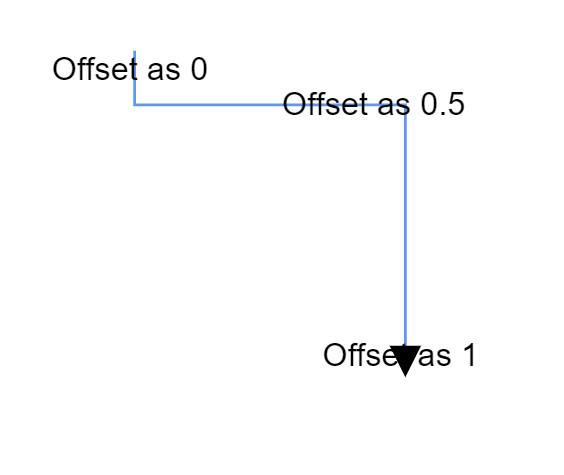
The offset for pathAnnotation is of type number and ranges from 0 to 1, from the source to the target point of the connector. By default, the offset value for a connector annotation is 0.5.
The following code illustrates, how to set offset for the connector.
<template>
    <div id="app">
        <ejs-diagram id="diagram" :width='width' :height='height' :connectors='connectors'></ejs-diagram>
    </div>
</template>
<script setup>
import { DiagramComponent as EjsDiagram } from '@syncfusion/ej2-vue-diagrams';

const connectors = [{
  sourcePoint: { x: 200, y: 100 },
  targetPoint: { x: 300, y: 200 },
  type: 'Straight',
  //Path annotation offset
  annotations: [{ content: 'annotation', offset: 0.2 }],
}];

const width = "750px";
const height = "500px";

</script>
<style>
@import "../node_modules/@syncfusion/ej2-vue-diagrams/styles/tailwind3.css";
@import "../node_modules/@syncfusion/ej2-base/styles/tailwind3.css";
@import "../node_modules/@syncfusion/ej2-popups/styles/tailwind3.css";
@import "../node_modules/@syncfusion/ej2-splitbuttons/styles/tailwind3.css";
@import "../node_modules/@syncfusion/ej2-navigations/styles/tailwind3.css";
</style><template>
<div id="app">
<ejs-diagram id="diagram" :width='width' :height='height' :connectors='connectors'></ejs-diagram>
</div>
</template>
<script>
import { DiagramComponent } from '@syncfusion/ej2-vue-diagrams';
let connectors = [{
sourcePoint: { x: 200, y: 100 },
targetPoint: { x: 300, y: 200 },
type: 'Straight',
//Path annotation offset
annotations: [{ content: 'annotation', offset: 0.2 }],
}];
export default {
name: "App",
components: {
"ejs-diagram": DiagramComponent
},
data() {
return {
width: "100%",
height: "500px",
connectors: connectors
}
}
}
</script>
<style>
@import "../node_modules/@syncfusion/ej2-vue-diagrams/styles/tailwind3.css";
@import "../node_modules/@syncfusion/ej2-base/styles/tailwind3.css";
@import "../node_modules/@syncfusion/ej2-popups/styles/tailwind3.css";
@import "../node_modules/@syncfusion/ej2-splitbuttons/styles/tailwind3.css";
@import "../node_modules/@syncfusion/ej2-navigations/styles/tailwind3.css";
</style>The following image shows the position of the annotation with respect to different offsets.
Annotation alignment
The connector’s annotation can be aligned over its segment path using the alignment property of annotation.
The following code example illustrates how to align connector annotations.
<template>
    <div id="app">
        <ejs-diagram id="diagram" :width='width' :height='height' :nodes='nodes' :connectors='connectors'></ejs-diagram>
    </div>
</template>
<script setup>
import { DiagramComponent as EjsDiagram } from '@syncfusion/ej2-vue-diagrams';

const nodes = [{
    id: 'node1',
    // Position of the node
    offsetX: 100,
    offsetY: 100,
    // Size of the node
    width: 100,
    height: 100,
    // Sets the annotation for the node
    annotations: [{
        content: 'Task1'
    }]
},
{
    id: 'node2',
    // Position of the node
    offsetX: 300,
    offsetY: 100,
    // Size of the node
    width: 100,
    height: 100,
    // Sets the annotation for the node
    annotations: [{
        content: 'Task2'
    }]
}];

const connectors = [{
    sourceID: 'node1',
    targetID: 'node2',
    type: 'Orthogonal',
    targetDecorator: { shape: 'None' },
    // Sets the annotation for the connector
    annotations: [{
        content: '0',
        // Sets the offset for the content
        offset: 0,
        alignment: 'Before'
    }, {
        content: '1',
        // Sets the offset for the content
        offset: 1,
        alignment: 'After'
    }]
}];

const width = "750px";
const height = "350px";

</script>
<style>
@import "../node_modules/@syncfusion/ej2-vue-diagrams/styles/tailwind3.css";
@import "../node_modules/@syncfusion/ej2-base/styles/tailwind3.css";
@import "../node_modules/@syncfusion/ej2-popups/styles/tailwind3.css";
@import "../node_modules/@syncfusion/ej2-splitbuttons/styles/tailwind3.css";
@import "../node_modules/@syncfusion/ej2-navigations/styles/tailwind3.css";
</style><template>
<div id="app">
<ejs-diagram id="diagram" :width='width' :height='height' :nodes='nodes' :connectors='connectors'></ejs-diagram>
</div>
</template>
<script>
import { DiagramComponent } from '@syncfusion/ej2-vue-diagrams';
let nodes = [{
id: 'node1',
// Position of the node
offsetX: 100,
offsetY: 100,
// Size of the node
width: 100,
height: 100,
// Sets the annotation for the node
annotations: [{
content: 'Task1'
}]
},
{
id: 'node2',
// Position of the node
offsetX: 300,
offsetY: 100,
// Size of the node
width: 100,
height: 100,
// Sets the annotation for the node
annotations: [{
content: 'Task2'
}]
}];
let connectors = [{
sourceID: 'node1',
targetID: 'node2',
type: 'Orthogonal',
targetDecorator: { shape: 'None' },
// Sets the annotation for the connector
annotations: [{
content: '0',
// Sets the offset for the content
offset: 0,
alignment: 'Before'
}, {
content: '1',
// Sets the offset for the content
offset: 1,
alignment: 'After'
}]
}];
export default {
name: "App",
components: {
"ejs-diagram": DiagramComponent
},
data() {
return {
width: "100%",
height: "350px",
nodes: nodes,
connectors: connectors
}
}
}
</script>
<style>
@import "../node_modules/@syncfusion/ej2-vue-diagrams/styles/tailwind3.css";
@import "../node_modules/@syncfusion/ej2-base/styles/tailwind3.css";
@import "../node_modules/@syncfusion/ej2-popups/styles/tailwind3.css";
@import "../node_modules/@syncfusion/ej2-splitbuttons/styles/tailwind3.css";
@import "../node_modules/@syncfusion/ej2-navigations/styles/tailwind3.css";
</style>Displacement of annotation
Displacement refers displacement of an annotation from its actual position. A connector annotation can be displaced to a particular distance by using a displacement property of the pathAnnotation. The following example shows how to set displacement for the connector annotation.
<template>
    <div id="app">
        <ejs-diagram id="diagram" :width='width' :height='height' :connectors='connectors'></ejs-diagram>
    </div>
</template>
<script setup>
import { DiagramComponent as EjsDiagram } from '@syncfusion/ej2-vue-diagrams';

const connectors = [{
  sourcePoint: { x: 200, y: 100 },
  targetPoint: { x: 500, y: 100 },
  type: 'Straight',
  //Path annotation offset
  annotations: [
    {
      content: 'annotation',
      alignment: 'After',
      displacement: { x: 50, y: 50 },
    }
  ],
}];

const width = "750px";
const height = "500px";

</script>
<style>
@import "../node_modules/@syncfusion/ej2-vue-diagrams/styles/tailwind3.css";
@import "../node_modules/@syncfusion/ej2-base/styles/tailwind3.css";
@import "../node_modules/@syncfusion/ej2-popups/styles/tailwind3.css";
@import "../node_modules/@syncfusion/ej2-splitbuttons/styles/tailwind3.css";
@import "../node_modules/@syncfusion/ej2-navigations/styles/tailwind3.css";
</style><template>
<div id="app">
<ejs-diagram id="diagram" :width='width' :height='height' :connectors='connectors'></ejs-diagram>
</div>
</template>
<script>
import { DiagramComponent } from '@syncfusion/ej2-vue-diagrams';
let connectors = [{
sourcePoint: { x: 200, y: 100 },
targetPoint: { x: 500, y: 100 },
type: 'Straight',
//Path annotation offset
annotations: [
{
content: 'annotation',
alignment: 'After',
displacement: { x: 50, y: 50 },
}
],
}];
export default {
name: "App",
components: {
"ejs-diagram": DiagramComponent
},
data() {
return {
width: "100%",
height: "500px",
connectors: connectors
}
}
}
</script>
<style>
@import "../node_modules/@syncfusion/ej2-vue-diagrams/styles/tailwind3.css";
@import "../node_modules/@syncfusion/ej2-base/styles/tailwind3.css";
@import "../node_modules/@syncfusion/ej2-popups/styles/tailwind3.css";
@import "../node_modules/@syncfusion/ej2-splitbuttons/styles/tailwind3.css";
@import "../node_modules/@syncfusion/ej2-navigations/styles/tailwind3.css";
</style>NOTE
Displacement is only applicable when we use alignment as
AfterorBefore.
Segment angle for annotation
The segmentAngle property is used to rotate the annotation based on the connectors segment direction. By default, annotation will be rotated in the connector path. When you set segmentAngle as true, annotation will be rotated from its position based on the connector segment direction. The following code illustrates, how to set segment angle.
<template>
    <div id="app">
        <ejs-diagram id="diagram" :width='width' :height='height' :connectors='connectors'></ejs-diagram>
    </div>
</template>
<script setup>
import { DiagramComponent as EjsDiagram } from '@syncfusion/ej2-vue-diagrams';

const connectors = [{
  sourcePoint: { x: 200, y: 100 },
  targetPoint: { x: 500, y: 300 },
  type: 'Orthogonal',
  annotations: [
    {
      content: 'annotation',
      offset: 0.2,
      //Segment angle
      segmentAngle: true,
    },
  ],
}];

const width = "750px";
const height = "500px";

</script>
<style>
@import "../node_modules/@syncfusion/ej2-vue-diagrams/styles/tailwind3.css";
@import "../node_modules/@syncfusion/ej2-base/styles/tailwind3.css";
@import "../node_modules/@syncfusion/ej2-popups/styles/tailwind3.css";
@import "../node_modules/@syncfusion/ej2-splitbuttons/styles/tailwind3.css";
@import "../node_modules/@syncfusion/ej2-navigations/styles/tailwind3.css";
</style><template>
<div id="app">
<ejs-diagram id="diagram" :width='width' :height='height' :connectors='connectors'></ejs-diagram>
</div>
</template>
<script>
import { DiagramComponent } from '@syncfusion/ej2-vue-diagrams';
let connectors = [{
sourcePoint: { x: 200, y: 100 },
targetPoint: { x: 500, y: 300 },
type: 'Orthogonal',
annotations: [
{
content: 'annotation',
offset: 0.2,
//Segment angle
segmentAngle: true,
},
],
}];
export default {
name: "App",
components: {
"ejs-diagram": DiagramComponent
},
data() {
return {
width: "100%",
height: "500px",
connectors: connectors
}
}
}
</script>
<style>
@import "../node_modules/@syncfusion/ej2-vue-diagrams/styles/tailwind3.css";
@import "../node_modules/@syncfusion/ej2-base/styles/tailwind3.css";
@import "../node_modules/@syncfusion/ej2-popups/styles/tailwind3.css";
@import "../node_modules/@syncfusion/ej2-splitbuttons/styles/tailwind3.css";
@import "../node_modules/@syncfusion/ej2-navigations/styles/tailwind3.css";
</style>| Segment angle | Output |
|---|---|
| True | 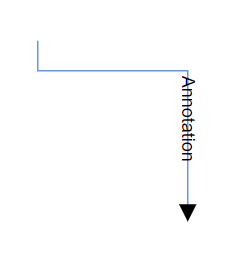 |
| False | 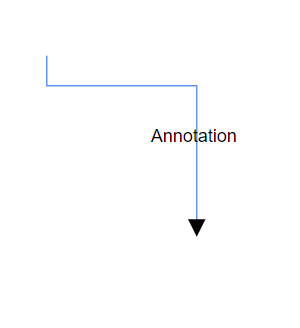 |