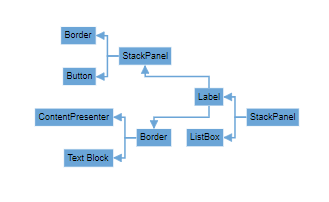
Mind Map layout in Vue Diagram control
A mind map is a diagram that displays the nodes as a spider diagram organizes information around a central concept. To create mind map, the type of layout should be set as MindMap.
Mind Map Orientation
An Orientation of a MindMapTreeLayout is used to arrange the tree layout according to a specific direction. By default, the orientation is set to Horizontal.
The following code example illustrates how to create an MindMap layout.
<template>
    <div id="app">

      <ejs-diagram id="diagram" :width='width' :height='height' :dataSourceSettings='dataSourceSettings'
        :getNodeDefaults='getNodeDefaults' :getConnectorDefaults='getConnectorDefaults' :layout='layout'></ejs-diagram>

    </div>
  </template>

  <script setup>
  import { provide } from "vue";
  import { DiagramComponent as EjsDiagram, MindMap, DataBinding } from '@syncfusion/ej2-vue-diagrams';
  import { DataManager, Query } from "@syncfusion/ej2-data";


  //Initialize data
  let data = [
    {
      id: 1,
      Label: 'StackPanel'
    },
    {
      id: 2,
      Label: 'Label',
      parentId: 1
    },
    {
      id: 3,
      Label: 'ListBox',
      parentId: 1
    },
    {
      id: 4,
      Label: 'StackPanel',
      parentId: 2
    },
    {
      id: 5,
      Label: 'Border',
      parentId: 2
    },
    {
      id: 6,
      Label: 'Border',
      parentId: 4
    },
    {
      id: 7,
      Label: 'Button',
      parentId: 4
    },
    {
      id: 8,
      Label: 'ContentPresenter',
      parentId: 5
    },
    {
      id: 9,
      Label: 'Text Block',
      parentId: 5
    },

  ];

  let items = new DataManager(data, new Query().take(7));

  const width = "1000px";
  const height = "590px";

  //Configures data source for Diagram
  const dataSourceSettings = {
    id: 'id',
    parentId: 'parentId',
    dataSource: items,
    root: String(1)
  }

  //Uses layout to auto-arrange nodes on the Diagram page
  const layout = {
    //Sets layout type
    type: 'MindMap',
    orientation: 'Horizontal',
  }

  //Sets the default properties for nodes and connectors
  const getNodeDefaults = (node) => {
    node.annotations = [{ content: node.data.Label }];
    node.width = 100; node.height = 40;
    return node;
  }
  const getConnectorDefaults = (connector) => {
    connector.type = 'Orthogonal';
    return connector;
  }

  provide('diagram', [MindMap, DataBinding]);

  </script>

  <style>
@import "../node_modules/@syncfusion/ej2-vue-diagrams/styles/tailwind3.css";
@import "../node_modules/@syncfusion/ej2-base/styles/tailwind3.css";
@import "../node_modules/@syncfusion/ej2-popups/styles/tailwind3.css";
@import "../node_modules/@syncfusion/ej2-splitbuttons/styles/tailwind3.css";
@import "../node_modules/@syncfusion/ej2-navigations/styles/tailwind3.css";
</style><template>
<div id="app">
<ejs-diagram id="diagram" :width='width' :height='height' :getNodeDefaults='getNodeDefaults'
:getConnectorDefaults='getConnectorDefaults' :layout='layout'
:dataSourceSettings='dataSourceSettings'></ejs-diagram>
</div>
</template>
<script>
import { DiagramComponent, MindMap, DataBinding } from '@syncfusion/ej2-vue-diagrams';
import { DataManager, Query } from "@syncfusion/ej2-data";
let data = [
{
id: 1,
Label: 'StackPanel'
},
{
id: 2,
Label: 'Label',
parentId: 1
},
{
id: 3,
Label: 'ListBox',
parentId: 1
},
{
id: 4,
Label: 'StackPanel',
parentId: 2
},
{
id: 5,
Label: 'Border',
parentId: 2
},
{
id: 6,
Label: 'Border',
parentId: 4
},
{
id: 7,
Label: 'Button',
parentId: 4
},
{
id: 8,
Label: 'ContentPresenter',
parentId: 5
},
{
id: 9,
Label: 'Text Block',
parentId: 5
},
];
let items = new DataManager(data, new Query().take(7));
export default {
name: "App",
components: {
"ejs-diagram": DiagramComponent
},
data() {
return {
width: "1000px",
height: "590px",
//Uses layout to auto-arrange nodes on the Diagram page
layout: {
//Sets layout type
type: 'MindMap',
orientation: 'Horizontal'
},
//Configures data source for Diagram
dataSourceSettings: {
id: 'id',
parentId: 'parentId',
dataSource: items,
root: String(1)
},
//Sets the default properties for nodes and connectors
getNodeDefaults: (node) => {
node.annotations = [{ content: node.data.Label }];
node.width = 100; node.height = 40;
return node;
},
getConnectorDefaults: (connector) => {
connector.type = 'Orthogonal';
return connector;
},
}
},
provide: {
diagram: [MindMap, DataBinding]
}
}
</script>
<style>
@import "../node_modules/@syncfusion/ej2-vue-diagrams/styles/tailwind3.css";
@import "../node_modules/@syncfusion/ej2-base/styles/tailwind3.css";
@import "../node_modules/@syncfusion/ej2-popups/styles/tailwind3.css";
@import "../node_modules/@syncfusion/ej2-splitbuttons/styles/tailwind3.css";
@import "../node_modules/@syncfusion/ej2-navigations/styles/tailwind3.css";
</style>The following table outlines the various orientation types available:
| Orientation Type | Description |
|---|---|
| Horizontal | Aligns the tree layout from left to right |
| Vertical | Aligns the tree layout from top to bottom |
NOTE
If you want to use mind map layout in diagram, you need to inject MindMap in the diagram.
Mind Map branch
You can also decide the branch for mind map using getBranch method. The following code demonstrates how to set all branches on the right side for mind map layout using getBranch method.
<template>
    <div id="app">

      <ejs-diagram id="diagram" :width='width' :height='height' :dataSourceSettings='dataSourceSettings'
        :getNodeDefaults='getNodeDefaults' :getConnectorDefaults='getConnectorDefaults' :layout='layout'></ejs-diagram>

    </div>
  </template>

  <script setup>
  import { provide } from "vue";
  import { DiagramComponent as EjsDiagram, MindMap, DataBinding } from '@syncfusion/ej2-vue-diagrams';
  import { DataManager, Query } from "@syncfusion/ej2-data";


  //Initialize data
  let data = [
    {
      id: 1,
      Label: 'StackPanel'
    },
    {
      id: 2,
      Label: 'Label',
      parentId: 1
    },
    {
      id: 3,
      Label: 'ListBox',
      parentId: 1
    },
    {
      id: 4,
      Label: 'StackPanel',
      parentId: 2
    },
    {
      id: 5,
      Label: 'Border',
      parentId: 2
    },
    {
      id: 6,
      Label: 'Border',
      parentId: 4
    },
    {
      id: 7,
      Label: 'Button',
      parentId: 4
    },
    {
      id: 8,
      Label: 'ContentPresenter',
      parentId: 5
    },
    {
      id: 9,
      Label: 'Text Block',
      parentId: 5
    },

  ];

  let items = new DataManager(data, new Query().take(7));

  const width = "1000px";
  const height = "590px";

  //Configures data source for Diagram
  const dataSourceSettings = {
    id: 'id',
    parentId: 'parentId',
    dataSource: items,
    root: String(1)
  }

  //Uses layout to auto-arrange nodes on the Diagram page
  const layout = {
    //Sets layout type
    type: 'MindMap',
    orientation: 'Horizontal',
    getBranch: (node) => {
      if (node.data.id === 1) {
        return 'Root';
      }
      return 'Right';
    },
  }

  //Sets the default properties for nodes and connectors
  const getNodeDefaults = (node) => {
    node.annotations = [{ content: node.data.Label }];
    node.width = 100; node.height = 40;
    return node;
  }
  const getConnectorDefaults = (connector) => {
    connector.type = 'Orthogonal';
    return connector;
  }

  provide('diagram', [MindMap, DataBinding]);

  </script>

  <style>
@import "../node_modules/@syncfusion/ej2-vue-diagrams/styles/tailwind3.css";
@import "../node_modules/@syncfusion/ej2-base/styles/tailwind3.css";
@import "../node_modules/@syncfusion/ej2-popups/styles/tailwind3.css";
@import "../node_modules/@syncfusion/ej2-splitbuttons/styles/tailwind3.css";
@import "../node_modules/@syncfusion/ej2-navigations/styles/tailwind3.css";
</style><template>
<div id="app">
<ejs-diagram id="diagram" :width='width' :height='height' :getNodeDefaults='getNodeDefaults'
:getConnectorDefaults='getConnectorDefaults' :layout='layout'
:dataSourceSettings='dataSourceSettings'></ejs-diagram>
</div>
</template>
<script>
import { DiagramComponent, MindMap, DataBinding } from '@syncfusion/ej2-vue-diagrams';
import { DataManager, Query } from "@syncfusion/ej2-data";
let data = [
{
id: 1,
Label: 'StackPanel'
},
{
id: 2,
Label: 'Label',
parentId: 1
},
{
id: 3,
Label: 'ListBox',
parentId: 1
},
{
id: 4,
Label: 'StackPanel',
parentId: 2
},
{
id: 5,
Label: 'Border',
parentId: 2
},
{
id: 6,
Label: 'Border',
parentId: 4
},
{
id: 7,
Label: 'Button',
parentId: 4
},
{
id: 8,
Label: 'ContentPresenter',
parentId: 5
},
{
id: 9,
Label: 'Text Block',
parentId: 5
},
];
let items = new DataManager(data, new Query().take(7));
export default {
name: "App",
components: {
"ejs-diagram": DiagramComponent
},
data() {
return {
width: "1000px",
height: "590px",
//Uses layout to auto-arrange nodes on the Diagram page
layout: {
//Sets layout type
type: 'MindMap',
orientation: 'Horizontal',
getBranch: (node) => {
if (node.data.id === 1) {
return 'Root';
}
return 'Right';
},
},
//Configures data source for Diagram
dataSourceSettings: {
id: 'id',
parentId: 'parentId',
dataSource: items,
root: String(1)
},
//Sets the default properties for nodes and connectors
getNodeDefaults: (node) => {
node.annotations = [{ content: node.data.Label }];
node.width = 100; node.height = 40;
return node;
},
getConnectorDefaults: (connector) => {
connector.type = 'Orthogonal';
return connector;
},
}
},
provide: {
diagram: [MindMap, DataBinding]
}
}
</script>
<style>
@import "../node_modules/@syncfusion/ej2-vue-diagrams/styles/tailwind3.css";
@import "../node_modules/@syncfusion/ej2-base/styles/tailwind3.css";
@import "../node_modules/@syncfusion/ej2-popups/styles/tailwind3.css";
@import "../node_modules/@syncfusion/ej2-splitbuttons/styles/tailwind3.css";
@import "../node_modules/@syncfusion/ej2-navigations/styles/tailwind3.css";
</style>