Customizing layout in Vue Diagram control
Orientation, spacings, and alignment of the layout can be customized with a set of properties.
To explore layout properties, refer to Layout Properties.
Layout bounds
Diagram provides support to align the layout within any custom rectangular area.
The following example shows how to align the layout within the given layout bounds.
<template>
    <div id="app">

      <ejs-diagram id="diagram" :width='width' :height='height' :dataSourceSettings='dataSourceSettings'
        :getNodeDefaults='getNodeDefaults' :getConnectorDefaults='getConnectorDefaults' :layout='layout'></ejs-diagram>

    </div>
  </template>

  <script setup>
  import { provide } from "vue";
  import { DiagramComponent as EjsDiagram, HierarchicalTree, DataBinding, Rect } from '@syncfusion/ej2-vue-diagrams';
  import { DataManager, Query } from "@syncfusion/ej2-data";

  //Initialize data
  let data = [
  { Name: "Steve-Ceo" },
    { Name: "Kevin-Manager", ReportingPerson: "Steve-Ceo" },
    { Name: "Peter-Manager", ReportingPerson: "Kevin-Manager" },
    { Name: "John-Manager", ReportingPerson: "Peter-Manager" },
    { Name: "Mary-CSE ", ReportingPerson: "Peter-Manager" },
  ];

  let items = new DataManager(data, new Query().take(7));

  const width = "1000px";
  const height = "590px";

  //Configures data source for Diagram
  const dataSourceSettings = {
    id: 'Name',
    parentId: 'ReportingPerson',
    dataManager: items
  }

  //Uses layout to auto-arrange nodes on the Diagram page
  const layout = {
    //Sets layout type
    type: 'HierarchicalTree',
    bounds: new Rect(0, 0, 500, 700)
  }

  //Sets the default properties for nodes and connectors
  const getNodeDefaults = (node) => {
    node.annotations = [{ content: node.data.Name }];
    node.width = 100; node.height = 40;

    if (node.data.Name === 'Robert') {
      //Excludes node from layout
      node.excludeFromLayout = true;
      node.offsetX = 150;
      node.offsetY = 75;
    }
    return node;
  }
  const getConnectorDefaults = (connector) => {
    connector.type = 'Orthogonal';
    return connector;
  }

  provide('diagram', [HierarchicalTree, DataBinding]);

  </script>

  <style>
@import "../node_modules/@syncfusion/ej2-vue-diagrams/styles/tailwind3.css";
@import "../node_modules/@syncfusion/ej2-base/styles/tailwind3.css";
@import "../node_modules/@syncfusion/ej2-popups/styles/tailwind3.css";
@import "../node_modules/@syncfusion/ej2-splitbuttons/styles/tailwind3.css";
@import "../node_modules/@syncfusion/ej2-navigations/styles/tailwind3.css";
</style><template>
<div id="app">
<ejs-diagram id="diagram" :width="width" :height="height" :getNodeDefaults="getNodeDefaults"
:getConnectorDefaults="getConnectorDefaults" :layout="layout"
:dataSourceSettings="dataSourceSettings"></ejs-diagram>
</div>
</template>
<script>
import { DiagramComponent, HierarchicalTree, DataBinding, Rect } from '@syncfusion/ej2-vue-diagrams';
import { DataManager, Query } from "@syncfusion/ej2-data";
let data = [
{ Name: "Steve-Ceo" },
{ Name: "Kevin-Manager", ReportingPerson: "Steve-Ceo" },
{ Name: "Peter-Manager", ReportingPerson: "Kevin-Manager" },
{ Name: "John-Manager", ReportingPerson: "Peter-Manager" },
{ Name: "Mary-CSE ", ReportingPerson: "Peter-Manager" },
];
let items = new DataManager(data, new Query().take(7));
export default {
name: "App",
components: {
"ejs-diagram": DiagramComponent
},
data() {
return {
width: "1000px",
height: "590px",
//Uses layout to auto-arrange nodes on the Diagram page
layout: {
//Sets layout type
type: 'HierarchicalTree',
bounds: new Rect(0, 0, 500, 700)
},
//Configures data source for Diagram
dataSourceSettings: {
id: 'Name',
parentId: 'ReportingPerson',
dataManager: items
},
//Sets the default properties for nodes and connectors
getNodeDefaults: (node) => {
node.annotations = [{ content: node.data.Name }];
node.width = 100; node.height = 40;
return node;
},
getConnectorDefaults: (connector) => {
connector.type = 'Orthogonal';
return connector;
}
}
},
provide: {
diagram: [HierarchicalTree, DataBinding]
}
}
</script>
<style>
@import "../node_modules/@syncfusion/ej2-vue-diagrams/styles/tailwind3.css";
@import "../node_modules/@syncfusion/ej2-base/styles/tailwind3.css";
@import "../node_modules/@syncfusion/ej2-popups/styles/tailwind3.css";
@import "../node_modules/@syncfusion/ej2-splitbuttons/styles/tailwind3.css";
@import "../node_modules/@syncfusion/ej2-navigations/styles/tailwind3.css";
</style>For more information about bounds, refer to bounds.
Layout alignment
The layout can be aligned anywhere over the layout bounds/viewport using the horizontalAlignment and verticalAlignment properties of the layout.
The following code illustrates how to align the layout and how to change layout horizontal and vertical alignment at runtime.
<template>
    <div id="app">

      <label for="horizontalAlignment">Horizontal Alignment : </label>
      <select id="horizontalAlignment" ref="horizontalAlign" v-on:change="onHorizontalChange()">
        <option value="Left">Left</option>
        <option value="Center">Center</option>
        <option value="Right">Right</option>
      </select>

      <label for="verticalAlignment">Vertical Alignment : </label>
      <select id="verticalAlignment" ref="verticalAlign" v-on:change="onVerticalChange()">
        <option value="Top">Top</option>
        <option value="Center">Center</option>
        <option value="Bottom">Bottom</option>
      </select>

      <ejs-diagram id="diagram" ref="diagramObj" :width='width' :height='height' :dataSourceSettings='dataSourceSettings'
        :getNodeDefaults='getNodeDefaults' :getConnectorDefaults='getConnectorDefaults' :layout='layout'></ejs-diagram>

    </div>
  </template>

  <script setup>
  import { provide, ref, onMounted } from "vue";
  import { DiagramComponent as EjsDiagram, HierarchicalTree, DataBinding } from '@syncfusion/ej2-vue-diagrams';
  import { DataManager, Query } from "@syncfusion/ej2-data";

  let diagramInstance;
  let diagramObj = ref(null);
  let horizontalAlign = ref(null);
  let verticalAlign = ref(null);

  //Initialize data
  let data = [
    { Name: "Steve-Ceo" },
    { Name: "Kevin-Manager", ReportingPerson: "Steve-Ceo" },
    { Name: "Peter-Manager", ReportingPerson: "Kevin-Manager" },
    { Name: "John-Manager", ReportingPerson: "Peter-Manager" },
    { Name: "Mary-CSE ", ReportingPerson: "Peter-Manager" },
  ];

  let items = new DataManager(data, new Query().take(7));

  const width = "1000px";
  const height = "590px";

  //Configures data source for Diagram
  const dataSourceSettings = {
    id: 'Name',
    parentId: 'ReportingPerson',
    dataManager: items
  }
  //Uses layout to auto-arrange nodes on the Diagram page
  const layout = {
    //Sets layout type
    type: 'HierarchicalTree',
    //Sets layout alignment
    horizontalAlignment: 'Left',
    verticalAlignment: 'Top',
  }

  //Sets the default properties for nodes and connectors
  const getNodeDefaults = (node) => {
    node.annotations = [{ content: node.data.Name }];
    node.width = 100; node.height = 40;
    return node;
  }
  const getConnectorDefaults = (connector) => {
    connector.type = 'Orthogonal';
    return connector;
  }
  const onHorizontalChange = () => {
    const horizontalAlignment = horizontalAlign.value.value;
    diagramInstance.layout.horizontalAlignment = horizontalAlignment;
    diagramInstance.dataBind();
  };

  const onVerticalChange = () => {
    const verticalAlignment = verticalAlign.value.value;
    diagramInstance.layout.verticalAlignment = verticalAlignment;
    diagramInstance.dataBind();
  };

  onMounted(function () {
    diagramInstance = diagramObj.value.ej2Instances;
  })

  provide('diagram', [HierarchicalTree, DataBinding]);

  </script>

  <style>
@import "../node_modules/@syncfusion/ej2-vue-diagrams/styles/tailwind3.css";
@import "../node_modules/@syncfusion/ej2-base/styles/tailwind3.css";
@import "../node_modules/@syncfusion/ej2-popups/styles/tailwind3.css";
@import "../node_modules/@syncfusion/ej2-splitbuttons/styles/tailwind3.css";
@import "../node_modules/@syncfusion/ej2-navigations/styles/tailwind3.css";
</style><template>
<div id="app">
<label for="horizontalAlignment">Horizontal Alignment : </label>
<select id="horizontalAlignment" ref="horizontal" v-on:change="onHorizontalChange()">
<option value="Left">Left</option>
<option value="Center">Center</option>
<option value="Right">Right</option>
</select>
<label for="verticalAlignment">Vertical Alignment : </label>
<select id="verticalAlignment" ref="vertical" v-on:change="onVerticalChange()">
<option value="Top">Top</option>
<option value="Center">Center</option>
<option value="Bottom">Bottom</option>
</select>
<ejs-diagram id="diagram" ref="diagramObj" :width="width" :height="height" :getNodeDefaults="getNodeDefaults"
:getConnectorDefaults="getConnectorDefaults" :layout="layout"
:dataSourceSettings="dataSourceSettings"></ejs-diagram>
</div>
</template>
<script>
import { DiagramComponent, HierarchicalTree, DataBinding } from '@syncfusion/ej2-vue-diagrams';
import { DataManager, Query } from "@syncfusion/ej2-data";
let diagramInstance;
let data = [
{ Name: "Steve-Ceo" },
{ Name: "Kevin-Manager", ReportingPerson: "Steve-Ceo" },
{ Name: "Peter-Manager", ReportingPerson: "Kevin-Manager" },
{ Name: "John-Manager", ReportingPerson: "Peter-Manager" },
{ Name: "Mary-CSE ", ReportingPerson: "Peter-Manager" },
];
let items = new DataManager(data, new Query().take(7));
export default {
name: "App",
components: {
"ejs-diagram": DiagramComponent
},
data() {
return {
width: "100%",
height: "590px",
//Uses layout to auto-arrange nodes on the Diagram page
layout: {
//Sets layout type
type: 'HierarchicalTree',
//set layout alignments
horizontalAlignment: 'Left',
verticalAlignment: 'Top'
},
//Configures data source for Diagram
dataSourceSettings: {
id: 'Name',
parentId: 'ReportingPerson',
dataManager: items
},
//Sets the default properties for nodes and connectors
getNodeDefaults: (node) => {
node.annotations = [{ content: node.data.Name }];
node.width = 100; node.height = 40;
return node;
},
getConnectorDefaults: (connector) => {
connector.type = 'Orthogonal';
return connector;
}
}
},
provide: {
diagram: [HierarchicalTree, DataBinding]
},
mounted: function () {
diagramInstance = this.$refs.diagramObj.ej2Instances;
},
methods: {
onHorizontalChange() {
const horizontalAlignment = this.$refs.horizontal.value;
diagramInstance.layout.horizontalAlignment = horizontalAlignment;
diagramInstance.dataBind();
},
onVerticalChange() {
const verticalAlignment = this.$refs.vertical.value;
diagramInstance.layout.verticalAlignment = verticalAlignment;
diagramInstance.dataBind();
}
}
}
</script>
<style>
@import "../node_modules/@syncfusion/ej2-vue-diagrams/styles/tailwind3.css";
@import "../node_modules/@syncfusion/ej2-base/styles/tailwind3.css";
@import "../node_modules/@syncfusion/ej2-popups/styles/tailwind3.css";
@import "../node_modules/@syncfusion/ej2-splitbuttons/styles/tailwind3.css";
@import "../node_modules/@syncfusion/ej2-navigations/styles/tailwind3.css";
</style>Layout spacing
Layout provides support to add space horizontally and vertically between the nodes. The horizontalSpacing and verticalSpacing properties of the layout allows you to set the space between the nodes in horizontally and vertically.
The following code illustrates how to set the initial horizontal and vertical spacing for the layout, as well as how to change these spacing values at runtime
<template>
    <div id="app">

      <label for="horizontalSpacing">Horizontal Spacing : </label>
      <input type="number" ref="horizontal" id="horizontalSpacing" value="30" v-on:change="onHorizontalChange()">

      <label for="verticalSpacing">Vertical Spacing : </label>
      <input type="number" ref="vertical" id="verticalSpacing" value="30" v-on:change="onVerticalChange()">

      <ejs-diagram id="diagram" ref="diagramObj" :width='width' :height='height' :dataSourceSettings='dataSourceSettings'
        :getNodeDefaults='getNodeDefaults' :getConnectorDefaults='getConnectorDefaults' :layout='layout'></ejs-diagram>

    </div>
  </template>

  <script setup>
  import { provide, ref, onMounted } from "vue";
  import { DiagramComponent as EjsDiagram, HierarchicalTree, DataBinding } from '@syncfusion/ej2-vue-diagrams';
  import { DataManager, Query } from "@syncfusion/ej2-data";

  let diagramInstance;
  let diagramObj = ref(null);
  let horizontal = ref(null);
  let vertical = ref(null);

  //Initialize data
  let data = [
    { Name: "Steve-Ceo" },
    { Name: "Kevin-Manager", ReportingPerson: "Steve-Ceo" },
    { Name: "Peter-Manager", ReportingPerson: "Kevin-Manager" },
    { Name: "John-Manager", ReportingPerson: "Peter-Manager" },
    { Name: "Mary-CSE ", ReportingPerson: "Peter-Manager" },
  ];

  let items = new DataManager(data, new Query().take(7));

  const width = "1000px";
  const height = "590px";

  //Configures data source for Diagram
  const dataSourceSettings = {
    id: 'Name',
    parentId: 'ReportingPerson',
    dataManager: items
  }
  //Uses layout to auto-arrange nodes on the Diagram page
  const layout = {
    //Sets layout type
    type: 'HierarchicalTree',
    //set layout spacing
    horizontalSpacing: 30,
    verticalSpacing: 30,
  }

  //Sets the default properties for nodes and connectors
  const getNodeDefaults = (node) => {
    node.annotations = [{ content: node.data.Name }];
    node.width = 100; node.height = 40;
    return node;
  }
  const getConnectorDefaults = (connector) => {
    connector.type = 'Orthogonal';
    return connector;
  }
  onMounted(function () {
    diagramInstance = diagramObj.value.ej2Instances;
  })

  const onHorizontalChange = () => {
    let horizontalSpacing = Number(horizontal.value.value);
    if (horizontalSpacing < 20) {
      horizontalSpacing = 20;
    }
    if (horizontalSpacing > 100) {
      horizontalSpacing = 100;
    }
    diagramInstance.layout.horizontalSpacing = horizontalSpacing;
    diagramInstance.dataBind();
  };

  const onVerticalChange = () => {
    let verticalSpacing = Number(vertical.value.value);
    if (verticalSpacing < 20) {
      verticalSpacing = 20;
    }
    if (verticalSpacing > 100) {
      verticalSpacing = 100;
    }
    diagramInstance.layout.verticalSpacing = verticalSpacing;
    diagramInstance.dataBind();
  };
  provide('diagram', [HierarchicalTree, DataBinding]);

  </script>

  <style>
@import "../node_modules/@syncfusion/ej2-vue-diagrams/styles/tailwind3.css";
@import "../node_modules/@syncfusion/ej2-base/styles/tailwind3.css";
@import "../node_modules/@syncfusion/ej2-popups/styles/tailwind3.css";
@import "../node_modules/@syncfusion/ej2-splitbuttons/styles/tailwind3.css";
@import "../node_modules/@syncfusion/ej2-navigations/styles/tailwind3.css";
</style><template>
<div id="app">
<label for="horizontalSpacing">Horizontal Spacing : </label>
<input type="number" ref="horizontal" id="horizontalSpacing" value="30" v-on:change="onHorizontalChange()">
<label for="verticalSpacing">Vertical Spacing : </label>
<input type="number" ref="vertical" id="verticalSpacing" value="30" v-on:change="onVerticalChange()">
<ejs-diagram id="diagram" ref="diagramObj" :width="width" :height="height" :getNodeDefaults="getNodeDefaults"
:getConnectorDefaults="getConnectorDefaults" :layout="layout" :snapSettings="snapSettings"
:dataSourceSettings="dataSourceSettings"></ejs-diagram>
</div>
</template>
<script>
import { DiagramComponent, HierarchicalTree, DataBinding } from '@syncfusion/ej2-vue-diagrams';
import { DataManager, Query } from "@syncfusion/ej2-data";
let diagramInstance;
let data = [
{ Name: "Steve-Ceo" },
{ Name: "Kevin-Manager", ReportingPerson: "Steve-Ceo" },
{ Name: "Peter-Manager", ReportingPerson: "Kevin-Manager" },
{ Name: "John-Manager", ReportingPerson: "Peter-Manager" },
{ Name: "Mary-CSE ", ReportingPerson: "Peter-Manager" },
];
let items = new DataManager(data, new Query().take(7));
export default {
name: "App",
components: {
"ejs-diagram": DiagramComponent
},
data() {
return {
width: "1000px",
height: "590px",
snapSettings: { constraints: 0 },
//Uses layout to auto-arrange nodes on the Diagram page
layout: {
//Sets layout type
type: 'HierarchicalTree',
//set layout spacing
horizontalSpacing: 30,
verticalSpacing: 30,
},
//Configures data source for Diagram
dataSourceSettings: {
id: 'Name',
parentId: 'ReportingPerson',
dataManager: items
},
//Sets the default properties for nodes and connectors
getNodeDefaults: (node) => {
node.annotations = [{ content: node.data.Name }];
node.width = 100; node.height = 40;
return node;
},
getConnectorDefaults: (connector) => {
connector.type = 'Orthogonal';
return connector;
}
}
},
provide: {
diagram: [HierarchicalTree, DataBinding]
},
mounted: function () {
diagramInstance = this.$refs.diagramObj.ej2Instances;
},
methods: {
onHorizontalChange() {
let horizontalSpacing = Number(this.$refs.horizontal.value);
if (horizontalSpacing < 20) {
horizontalSpacing = 20;
}
if (horizontalSpacing > 100) {
horizontalSpacing = 100;
}
diagramInstance.layout.horizontalSpacing = horizontalSpacing;
diagramInstance.dataBind();
},
onVerticalChange() {
let verticalSpacing = Number(this.$refs.vertical.value);
if (verticalSpacing < 20) {
verticalSpacing = 20;
}
if (verticalSpacing > 100) {
verticalSpacing = 100;
}
diagramInstance.layout.verticalSpacing = verticalSpacing;
diagramInstance.dataBind();
}
}
}
</script>
<style>
@import "../node_modules/@syncfusion/ej2-vue-diagrams/styles/tailwind3.css";
@import "../node_modules/@syncfusion/ej2-base/styles/tailwind3.css";
@import "../node_modules/@syncfusion/ej2-popups/styles/tailwind3.css";
@import "../node_modules/@syncfusion/ej2-splitbuttons/styles/tailwind3.css";
@import "../node_modules/@syncfusion/ej2-navigations/styles/tailwind3.css";
</style>Layout margin
Layout provides support to add some blank space between the layout bounds/viewport and the layout. The margin property of the layout allows you to set the blank space.
The following code demonstrates how to set the initial layout margin and how to modify the layout margin dynamically at runtime.
<template>
    <div id="app">

      <label for="marginLeft">Margin Left : </label>
      <input type="number" ref="marginLeft" id="marginLeft" value="100" v-on:change="onLeftChange()">

      <label for="marginTop">Margin Top : </label>
      <input type="number" ref="marginTop" id="marginTop" value="100" v-on:change="onTopChange()">

      <ejs-diagram id="diagram" ref="diagramObj" :width='width' :height='height' :dataSourceSettings='dataSourceSettings'
        :getNodeDefaults='getNodeDefaults' :snapSettings="snapSettings" :getConnectorDefaults='getConnectorDefaults'
        :layout='layout'></ejs-diagram>

    </div>
  </template>

  <script setup>
  import { provide, ref, onMounted } from "vue";
  import { DiagramComponent as EjsDiagram, HierarchicalTree, DataBinding } from '@syncfusion/ej2-vue-diagrams';
  import { DataManager, Query } from "@syncfusion/ej2-data";

  let diagramInstance;
  let diagramObj = ref(null);
  let marginLeft = ref(null);
  let marginTop = ref(null);

  //Initialize data
  let data = [
    { Name: "Steve-Ceo" },
    { Name: "Kevin-Manager", ReportingPerson: "Steve-Ceo" },
    { Name: "Peter-Manager", ReportingPerson: "Kevin-Manager" },
    { Name: "John-Manager", ReportingPerson: "Peter-Manager" },
    { Name: "Mary-CSE ", ReportingPerson: "Peter-Manager" },
  ];

  let items = new DataManager(data, new Query().take(7));

  const width = "1000px";
  const height = "590px";
  const snapSettings = { constraints: 0 };

  //Configures data source for Diagram
  const dataSourceSettings = {
    id: 'Name',
    parentId: 'ReportingPerson',
    dataManager: items
  }
  //Uses layout to auto-arrange nodes on the Diagram page
  const layout = {
    //Sets layout type
    type: 'HierarchicalTree',
    //Sets layout alignment
    horizontalAlignment: 'Left',
    verticalAlignment: 'Top',
    margin: { left: 100, top: 100 },
  }

  //Sets the default properties for nodes and connectors
  const getNodeDefaults = (node) => {
    node.annotations = [{ content: node.data.Name }];
    node.width = 100; node.height = 40;
    return node;
  }
  const getConnectorDefaults = (connector) => {
    connector.type = 'Orthogonal';
    return connector;
  }
  const onLeftChange = () => {
    let leftValue = Number(marginLeft.value.value);
    if (leftValue < 20) {
      leftValue = 20;
    }
    if (leftValue > 500) {
      leftValue = 500;
    }
    diagramInstance.layout.margin.left = leftValue;
    diagramInstance.dataBind();
  };

  const onTopChange = () => {
    let topValue = Number(marginTop.value.value);
    if (topValue < 20) {
      topValue = 20;
    }
    if (topValue > 500) {
      topValue = 500;
    }
    diagramInstance.layout.margin.top = topValue;
    diagramInstance.dataBind();
  };

  onMounted(function () {
    diagramInstance = diagramObj.value.ej2Instances;
  })

  provide('diagram', [HierarchicalTree, DataBinding]);

  </script>

  <style>
@import "../node_modules/@syncfusion/ej2-vue-diagrams/styles/tailwind3.css";
@import "../node_modules/@syncfusion/ej2-base/styles/tailwind3.css";
@import "../node_modules/@syncfusion/ej2-popups/styles/tailwind3.css";
@import "../node_modules/@syncfusion/ej2-splitbuttons/styles/tailwind3.css";
@import "../node_modules/@syncfusion/ej2-navigations/styles/tailwind3.css";
</style><template>
<div id="app">
<label for="marginLeft">Margin Left : </label>
<input type="number" ref="marginLeft" id="marginLeft" value="100" v-on:change="onLeftChange()">
<label for="marginTop">Margin Top : </label>
<input type="number" ref="marginTop" id="marginTop" value="100" v-on:change="onTopChange()">
<ejs-diagram id="diagram" ref="diagramObj" :width="width" :height="height" :getNodeDefaults="getNodeDefaults"
:getConnectorDefaults="getConnectorDefaults" :layout="layout" :snapSettings="snapSettings"
:dataSourceSettings="dataSourceSettings"></ejs-diagram>
</div>
</template>
<script>
import { DiagramComponent, HierarchicalTree, DataBinding } from '@syncfusion/ej2-vue-diagrams';
import { DataManager, Query } from "@syncfusion/ej2-data";
let diagramInstance;
let data = [
{ Name: "Steve-Ceo" },
{ Name: "Kevin-Manager", ReportingPerson: "Steve-Ceo" },
{ Name: "Peter-Manager", ReportingPerson: "Kevin-Manager" },
{ Name: "John-Manager", ReportingPerson: "Peter-Manager" },
{ Name: "Mary-CSE ", ReportingPerson: "Peter-Manager" },
];
let items = new DataManager(data, new Query().take(7));
export default {
name: "App",
components: {
"ejs-diagram": DiagramComponent
},
data() {
return {
width: "1000px",
height: "590px",
snapSettings: { constraints: 0 },
//Uses layout to auto-arrange nodes on the Diagram page
layout: {
//Sets layout type
type: 'HierarchicalTree',
//Sets layout alignment
horizontalAlignment: 'Left',
verticalAlignment: 'Top',
margin: { left: 100, top: 100 },
},
//Configures data source for Diagram
dataSourceSettings: {
id: 'Name',
parentId: 'ReportingPerson',
dataManager: items
},
//Sets the default properties for nodes and connectors
getNodeDefaults: (node) => {
node.annotations = [{ content: node.data.Name }];
node.width = 100; node.height = 40;
return node;
},
getConnectorDefaults: (connector) => {
connector.type = 'Orthogonal';
return connector;
}
}
},
provide: {
diagram: [HierarchicalTree, DataBinding]
},
mounted: function () {
diagramInstance = this.$refs.diagramObj.ej2Instances;
},
methods: {
onLeftChange() {
let leftValue = Number(this.$refs.marginLeft.value);
if (leftValue < 20) {
leftValue = 20;
}
if (leftValue > 500) {
leftValue = 500;
}
diagramInstance.layout.margin.left = leftValue;
diagramInstance.dataBind();
},
onTopChange() {
let topValue = Number(this.$refs.marginTop.value);
if (topValue < 20) {
topValue = 20;
}
if (topValue > 500) {
topValue = 500;
}
diagramInstance.layout.margin.top = topValue;
diagramInstance.dataBind();
}
}
}
</script>
<style>
@import "../node_modules/@syncfusion/ej2-vue-diagrams/styles/tailwind3.css";
@import "../node_modules/@syncfusion/ej2-base/styles/tailwind3.css";
@import "../node_modules/@syncfusion/ej2-popups/styles/tailwind3.css";
@import "../node_modules/@syncfusion/ej2-splitbuttons/styles/tailwind3.css";
@import "../node_modules/@syncfusion/ej2-navigations/styles/tailwind3.css";
</style>Layout orientation
The layout orientation can used to arrange the layout based on the direction. there are different orientation types that are defined in the following table.
| Orientation | Description |
|---|---|
| TopToBottom | Aligns the layout from top to bottom. All the roots are placed at top of diagram. |
| LeftToRight | Aligns the layout from left to right. All the roots are placed at left of diagram. |
| BottomToTop | Aligns the layout from bottom to top. All the roots are placed at bottom of the diagram. |
| RightToLeft | Aligns the layout from right to left. All the roots are placed at right of the diagram. |
Diagram provides support to customize the orientation of layout. You can set the desired orientation using layout.orientation.
NOTE
In the diagram the default orientation is
TopToBottom.
The following code demonstrates how to set the initial orientation for the layout and how to change it dynamically at runtime.
<template>
    <div id="app">

        <label for="orientation">Orientation : </label>
        <select id="orientation" ref="orientationVal" v-on:change="onOrientationChange()">
            <option value="TopToBottom">TopToBottom</option>
            <option value="BottomToTop">BottomToTop</option>
            <option value="LeftToRight">LeftToRight</option>
            <option value="RightToLeft">RightToLeft</option>
        </select>
        <ejs-diagram id="diagram" ref="diagramObj" :width='width' :height='height'
            :dataSourceSettings='dataSourceSettings' :getNodeDefaults='getNodeDefaults'
            :getConnectorDefaults='getConnectorDefaults' :layout='layout'></ejs-diagram>

    </div>
</template>

<script setup>
import { provide, ref, onMounted } from "vue";
import { DiagramComponent as EjsDiagram, HierarchicalTree, DataBinding } from '@syncfusion/ej2-vue-diagrams';
import { DataManager, Query } from "@syncfusion/ej2-data";

let diagramInstance;
let diagramObj = ref(null);
let orientationVal = ref(null);

//Initialize data
let data = [
    { Name: "Steve-Ceo" },
    { Name: "Kevin-Manager", ReportingPerson: "Steve-Ceo" },
    { Name: "Peter-Manager", ReportingPerson: "Steve-Ceo" },
    { Name: "John-Manager", ReportingPerson: "Peter-Manager" },
    { Name: "Mary-CSE", ReportingPerson: "Peter-Manager" },
    { Name: "Jim-CSE", ReportingPerson: "Kevin-Manager" },
    { Name: "Martin-CSE ", ReportingPerson: "Kevin-Manager" },
];

let items = new DataManager(data, new Query().take(7));

const width = "1000px";
const height = "590px";

//Configures data source for Diagram
const dataSourceSettings = {
    id: 'Name',
    parentId: 'ReportingPerson',
    dataManager: items
}
//Uses layout to auto-arrange nodes on the Diagram page
const layout = {
    //Sets layout type
    type: 'HierarchicalTree',
    //Sets layout alignment
    horizontalAlignment: 'Left',
    verticalAlignment: 'Top',
    orientation: 'TopToBottom',
}

//Sets the default properties for nodes and connectors
const getNodeDefaults = (node) => {
    node.annotations = [{ content: node.data.Name }];
    node.width = 100; node.height = 40;
    return node;
}
const getConnectorDefaults = (connector) => {
    connector.type = 'Orthogonal';
    return connector;
}

const onOrientationChange = () => {
    let orientation = orientationVal.value.value;
    diagramInstance.layout.orientation = orientation;
    diagramInstance.dataBind();
}

onMounted(function () {
    diagramInstance = diagramObj.value.ej2Instances;
})

provide('diagram', [HierarchicalTree, DataBinding]);

</script>

<style>
@import "../node_modules/@syncfusion/ej2-vue-diagrams/styles/tailwind3.css";
@import "../node_modules/@syncfusion/ej2-base/styles/tailwind3.css";
@import "../node_modules/@syncfusion/ej2-popups/styles/tailwind3.css";
@import "../node_modules/@syncfusion/ej2-splitbuttons/styles/tailwind3.css";
@import "../node_modules/@syncfusion/ej2-navigations/styles/tailwind3.css";
</style><template>
<div id="app">
<label for="orientation">Orientation : </label>
<select id="orientation" ref="orientationVal" v-on:change="onOrientationChange()">
<option value="TopToBottom">TopToBottom</option>
<option value="BottomToTop">BottomToTop</option>
<option value="LeftToRight">LeftToRight</option>
<option value="RightToLeft">RightToLeft</option>
</select>
<ejs-diagram id="diagram" ref="diagramObj" :width='width' :height='height' :getNodeDefaults='getNodeDefaults'
:getConnectorDefaults='getConnectorDefaults' :layout='layout'
:dataSourceSettings='dataSourceSettings'></ejs-diagram>
</div>
</template>
<script>
import { DiagramComponent, HierarchicalTree, DataBinding } from '@syncfusion/ej2-vue-diagrams';
import { DataManager, Query } from "@syncfusion/ej2-data";
let diagramInstance;
let data = [
{ Name: "Steve-Ceo" },
{ Name: "Kevin-Manager", ReportingPerson: "Steve-Ceo" },
{ Name: "Peter-Manager", ReportingPerson: "Steve-Ceo" },
{ Name: "John-Manager", ReportingPerson: "Peter-Manager" },
{ Name: "Mary-CSE", ReportingPerson: "Peter-Manager" },
{ Name: "Jim-CSE", ReportingPerson: "Kevin-Manager" },
{ Name: "Martin-CSE ", ReportingPerson: "Kevin-Manager" },
];
let items = new DataManager(data, new Query().take(7));
export default {
name: "App",
components: {
"ejs-diagram": DiagramComponent
},
data() {
return {
width: "1000px",
height: "350px",
//Uses layout to auto-arrange nodes on the Diagram page
layout: {
//Sets layout type
type: 'HierarchicalTree',
//Sets layout alignment
horizontalAlignment: 'Left',
verticalAlignment: 'Top',
orientation: 'TopToBottom',
},
//Configures data source for Diagram
dataSourceSettings: {
id: 'Name',
parentId: 'ReportingPerson',
dataManager: items
},
//Sets the default properties for nodes and connectors
getNodeDefaults: (node) => {
node.annotations = [{ content: node.data.Name }];
node.width = 100; node.height = 40;
return node;
},
getConnectorDefaults: (connector, diagram) => {
connector.type = 'Orthogonal';
return connector;
}
}
},
provide: {
diagram: [DataBinding, HierarchicalTree]
},
mounted: function () {
diagramInstance = this.$refs.diagramObj.ej2Instances;
},
methods: {
onOrientationChange() {
let orientation = this.$refs.orientationVal.value;
diagramInstance.layout.orientation = orientation;
diagramInstance.dataBind();
}
}
}
</script>
<style>
@import "../node_modules/@syncfusion/ej2-vue-diagrams/styles/tailwind3.css";
@import "../node_modules/@syncfusion/ej2-base/styles/tailwind3.css";
@import "../node_modules/@syncfusion/ej2-popups/styles/tailwind3.css";
@import "../node_modules/@syncfusion/ej2-splitbuttons/styles/tailwind3.css";
@import "../node_modules/@syncfusion/ej2-navigations/styles/tailwind3.css";
</style>Exclude from layout
In some cases, you may need one or two nodes not to be arranged based on the layout algorithm but instead positioned manually. You can exclude these nodes from the layout algorithm by setting the excludeFromLayout property to true.
The following code example demonstrates how to exclude a node from the layout and position it manually:
<template>
    <div id="app">

      <ejs-diagram id="diagram" :width='width' :height='height' :dataSourceSettings='dataSourceSettings'
        :getNodeDefaults='getNodeDefaults' :getConnectorDefaults='getConnectorDefaults' :layout='layout'></ejs-diagram>

    </div>
  </template>

  <script setup>
  import { provide } from "vue";
  import { DiagramComponent as EjsDiagram, HierarchicalTree, DataBinding } from '@syncfusion/ej2-vue-diagrams';
  import { DataManager, Query } from "@syncfusion/ej2-data";

  //Initialize data
  let data = [
    {
      Name: 'Steve-Ceo',
    },
    {
      Name: 'Kevin-Manager',
      ReportingPerson: 'Steve-Ceo',
    },
    {
      Name: 'Robert',
      ReportingPerson: 'Steve-Ceo',
    },
    {
      Name: 'Peter-Manager',
      ReportingPerson: 'Steve-Ceo',
    },
    {
      Name: 'John- Manager',
      ReportingPerson: 'Peter-Manager',
    },
    {
      Name: 'Mary-CSE ',
      ReportingPerson: 'Peter-Manager',
    },
    {
      Name: 'Jim-CSE ',
      ReportingPerson: 'Kevin-Manager',
    },
    {
      Name: 'Martin-CSE',
      ReportingPerson: 'Kevin-Manager',
    },
  ];

  let items = new DataManager(data, new Query().take(7));

  const width = "1000px";
  const height = "590px";

  //Configures data source for Diagram
  const dataSourceSettings = {
    id: 'Name',
    parentId: 'ReportingPerson',
    dataManager: items
  }

  //Uses layout to auto-arrange nodes on the Diagram page
  const layout = {
    //Sets layout type
    type: 'HierarchicalTree',
  }

  //Sets the default properties for nodes and connectors
  const getNodeDefaults = (node) => {
    node.annotations = [{ content: node.data.Name }];
    node.width = 100; node.height = 50;

    if (node.data.Name === 'Robert') {
      //Excludes node from layout
      node.excludeFromLayout = true;
      node.offsetX = 150;
      node.offsetY = 75;
    }
    return node;
  }
  const getConnectorDefaults = (connector) => {
    connector.type = 'Orthogonal';
    return connector;
  }

  provide('diagram', [HierarchicalTree, DataBinding]);

  </script>

  <style>
@import "../node_modules/@syncfusion/ej2-vue-diagrams/styles/tailwind3.css";
@import "../node_modules/@syncfusion/ej2-base/styles/tailwind3.css";
@import "../node_modules/@syncfusion/ej2-popups/styles/tailwind3.css";
@import "../node_modules/@syncfusion/ej2-splitbuttons/styles/tailwind3.css";
@import "../node_modules/@syncfusion/ej2-navigations/styles/tailwind3.css";
</style><template>
<div id="app">
<ejs-diagram id="diagram" :width="width" :height="height" :getNodeDefaults="getNodeDefaults"
:getConnectorDefaults="getConnectorDefaults" :layout="layout"
:dataSourceSettings="dataSourceSettings"></ejs-diagram>
</div>
</template>
<script>
import { DiagramComponent, HierarchicalTree, DataBinding } from '@syncfusion/ej2-vue-diagrams';
import { DataManager, Query } from "@syncfusion/ej2-data";
let data = [
{
Name: 'Steve-Ceo',
},
{
Name: 'Kevin-Manager',
ReportingPerson: 'Steve-Ceo',
},
{
Name: 'Robert',
ReportingPerson: 'Steve-Ceo',
},
{
Name: 'Peter-Manager',
ReportingPerson: 'Steve-Ceo',
},
{
Name: 'John- Manager',
ReportingPerson: 'Peter-Manager',
},
{
Name: 'Mary-CSE ',
ReportingPerson: 'Peter-Manager',
},
{
Name: 'Jim-CSE ',
ReportingPerson: 'Kevin-Manager',
},
{
Name: 'Martin-CSE',
ReportingPerson: 'Kevin-Manager',
},
];
let items = new DataManager(data, new Query().take(7));
export default {
name: "App",
components: {
"ejs-diagram": DiagramComponent
},
data() {
return {
width: "1000px",
height: "590px",
//Uses layout to auto-arrange nodes on the Diagram page
layout: {
//Sets layout type
type: 'HierarchicalTree',
},
//Configures data source for Diagram
dataSourceSettings: {
id: 'Name',
parentId: 'ReportingPerson',
dataManager: items
},
//Sets the default properties for nodes and connectors
getNodeDefaults: (node) => {
node.annotations = [{ content: node.data.Name }];
node.width = 100; node.height = 50;
if (node.data.Name === 'Robert') {
//Excludes node from layout
node.excludeFromLayout = true;
node.offsetX = 150;
node.offsetY = 75;
}
return node;
},
getConnectorDefaults: (connector) => {
connector.type = 'Orthogonal';
return connector;
}
}
},
provide: {
diagram: [HierarchicalTree, DataBinding]
}
}
</script>
<style>
@import "../node_modules/@syncfusion/ej2-vue-diagrams/styles/tailwind3.css";
@import "../node_modules/@syncfusion/ej2-base/styles/tailwind3.css";
@import "../node_modules/@syncfusion/ej2-popups/styles/tailwind3.css";
@import "../node_modules/@syncfusion/ej2-splitbuttons/styles/tailwind3.css";
@import "../node_modules/@syncfusion/ej2-navigations/styles/tailwind3.css";
</style>Fixed node
Layout provides support to arrange the nodes with reference to the position of a fixed node and set it to the fixedNode of the layout property. This is helpful when you try to expand/collapse a node. It might be expected that the position of the double-clicked node should not be changed.
<template>
    <div id="app">

      <ejs-diagram id="diagram" :width='width' :height='height' :dataSourceSettings='dataSourceSettings'
        :getNodeDefaults='getNodeDefaults' :snapSettings="snapSettings" :getConnectorDefaults='getConnectorDefaults'
        :layout='layout'></ejs-diagram>

    </div>
  </template>

  <script setup>
  import { provide } from "vue";
  import { DiagramComponent as EjsDiagram, FlowchartLayout, DataBinding } from '@syncfusion/ej2-vue-diagrams';
  import { DataManager, Query } from "@syncfusion/ej2-data";

  //Initialize data
  let data = [
    {
      Name: "Steve-Ceo",
    },
    {
      Name: "Kevin-Manager",
      ReportingPerson: "Steve-Ceo"
    },
    {
      Name: "Peter-Manager",
      ReportingPerson: "Steve-Ceo"
    },
    {
      Name: "John- Manager",
      ReportingPerson: "Peter-Manager"
    },
    {
      Name: "Mary-CSE ",
      ReportingPerson: "Peter-Manager"
    },
    {
      Name: "Jim-CSE ",
      ReportingPerson: "Kevin-Manager"
    },
    {
      Name: "Martin-CSE",
      ReportingPerson: "Kevin-Manager"
    }
  ];

  let items = new DataManager(data, new Query().take(7));

  const width = "1000px";
  const height = "590px";
  const snapSettings = { constraints: 0 };

  //Configures data source for Diagram
  const dataSourceSettings = {
    id: 'Name',
    parentId: 'ReportingPerson',
    dataManager: items
  }

  //Uses layout to auto-arrange nodes on the Diagram page
  const layout = {
    //Sets layout type
    type: 'Flowchart',
    fixedNode: 'Steve-Ceo'
  }

  //Sets the default properties for nodes and connectors
  const getNodeDefaults = (node) => {
    node.annotations = [{ content: node.data.Name }];
    node.width = 100; node.height = 40;
    return node;
  }
  const getConnectorDefaults = (connector) => {
    connector.type = 'Orthogonal';
    return connector;
  }

  provide('diagram', [FlowchartLayout, DataBinding]);

  </script>

  <style>
@import "../node_modules/@syncfusion/ej2-vue-diagrams/styles/tailwind3.css";
@import "../node_modules/@syncfusion/ej2-base/styles/tailwind3.css";
@import "../node_modules/@syncfusion/ej2-popups/styles/tailwind3.css";
@import "../node_modules/@syncfusion/ej2-splitbuttons/styles/tailwind3.css";
@import "../node_modules/@syncfusion/ej2-navigations/styles/tailwind3.css";
</style><template>
<div id="app">
<ejs-diagram id="diagram" :width="width" :height="height" :getNodeDefaults="getNodeDefaults"
:getConnectorDefaults="getConnectorDefaults" :layout="layout" :snapSettings="snapSettings"
:dataSourceSettings="dataSourceSettings"></ejs-diagram>
</div>
</template>
<script>
import { DiagramComponent, FlowchartLayout, DataBinding } from '@syncfusion/ej2-vue-diagrams';
import { DataManager, Query } from "@syncfusion/ej2-data";
let data = [
{
Name: "Steve-Ceo",
},
{
Name: "Kevin-Manager",
ReportingPerson: "Steve-Ceo"
},
{
Name: "Peter-Manager",
ReportingPerson: "Steve-Ceo"
},
{
Name: "John- Manager",
ReportingPerson: "Peter-Manager"
},
{
Name: "Mary-CSE ",
ReportingPerson: "Peter-Manager"
},
{
Name: "Jim-CSE ",
ReportingPerson: "Kevin-Manager"
},
{
Name: "Martin-CSE",
ReportingPerson: "Kevin-Manager"
}
];
let items = new DataManager(data, new Query().take(7));
export default {
name: "App",
components: {
"ejs-diagram": DiagramComponent
},
data() {
return {
width: "1000px",
height: "590px",
snapSettings: { constraints: 0 },
//Uses layout to auto-arrange nodes on the Diagram page
layout: {
//Sets layout type
type: 'Flowchart',
fixedNode: 'Steve-Ceo'
},
//Configures data source for Diagram
dataSourceSettings: {
id: 'Name',
parentId: 'ReportingPerson',
dataManager: items
},
//Sets the default properties for nodes and connectors
getNodeDefaults: (node) => {
node.annotations = [{ content: node.data.Name }];
node.width = 100; node.height = 40;
return node;
},
getConnectorDefaults: (connector) => {
connector.type = 'Orthogonal';
return connector;
}
}
},
provide: {
diagram: [FlowchartLayout, DataBinding]
}
}
</script>
<style>
@import "../node_modules/@syncfusion/ej2-vue-diagrams/styles/tailwind3.css";
@import "../node_modules/@syncfusion/ej2-base/styles/tailwind3.css";
@import "../node_modules/@syncfusion/ej2-popups/styles/tailwind3.css";
@import "../node_modules/@syncfusion/ej2-splitbuttons/styles/tailwind3.css";
@import "../node_modules/@syncfusion/ej2-navigations/styles/tailwind3.css";
</style>Expand and collapse
Diagram allows to expand/collapse the subtrees of a layout. The node’s isExpanded property allows you to expand/collapse its children. The following code example shows how to expand/collapse the children of a node.
<template>
    <div id="app">

      <ejs-diagram id="diagram" :width='width' :height='height' :dataSourceSettings='dataSourceSettings'
        :getNodeDefaults='getNodeDefaults' :selectedItems="selectedItems" :snapSettings="snapSettings"
        :getConnectorDefaults='getConnectorDefaults' :layout='layout'></ejs-diagram>

    </div>
  </template>

  <script setup>
  import { provide } from "vue";
  import { DiagramComponent as EjsDiagram, HierarchicalTree, SelectorConstraints, DataBinding } from '@syncfusion/ej2-vue-diagrams';
  import { DataManager, Query } from "@syncfusion/ej2-data";

  //Initialize data
  let data = [
    {
      'Id': 'parent1',
      'Name': 'Maria ',
      'Designation': 'Managing Director',
      'RatingColor': '#C34444'
    },
    {
      'Id': 'parent',
      'Name': ' sam',
      'Designation': 'Managing Director',
      'ReportingPerson': 'parent1',
      'RatingColor': '#C34444'
    },
    {
      'Id': 'parent3',
      'Name': ' sam geo',
      'Designation': 'Managing Director',
      'ReportingPerson': 'parent1',
      'RatingColor': '#C34444'
    },
    {
      'Id': '80',
      'Name': ' david',
      'Designation': 'Managing Director',
      'ReportingPerson': 'parent3',
      'RatingColor': '#C34444'
    },
    {
      'Id': '82',
      'Name': ' pirlo',
      'Designation': 'Managing Director',
      'ReportingPerson': 'parent',
      'RatingColor': '#C34444'
    }
  ];

  let items = new DataManager(data, new Query().take(7));

  const width = "1000px";
  const height = "590px";
  const snapSettings = { constraints: 0 };
  const selectedItems = { constraints: ~SelectorConstraints.ResizeAll };

  //Configures data source for Diagram
  const dataSourceSettings = {
    id: 'Id',
    parentId: 'ReportingPerson',
    dataManager: items
  }
  //Uses layout to auto-arrange nodes on the Diagram page
  const layout = {
    //Sets layout type
    type: 'HierarchicalTree',
    getLayoutInfo: (tree) => {
      if (!tree.hasSubTree) {
        tree.orientation = 'vertical';
        tree.type = 'alternate';
      }
    }

  }

  //Sets the default properties for nodes and connectors
  const getNodeDefaults = (node) => {
    node.expandIcon = {
      height: 15,
      width: 15,
      shape: "Plus",
      fill: 'lightgray',
      offset: { x: .5, y: .85 }
    }
    node.collapseIcon = {
      height: 15,
      width: 15,
      shape: "Minus",
      offset: { x: .5, y: .85 },
    }
    node.height = 50; node.width = 50;
    return node;
  }
  const getConnectorDefaults = (connector) => {
    connector.type = 'Orthogonal';
    connector.targetDecorator.shape = "None";
    return connector;
  }

  provide('diagram', [HierarchicalTree, DataBinding]);

  </script>

  <style>
@import "../node_modules/@syncfusion/ej2-vue-diagrams/styles/tailwind3.css";
@import "../node_modules/@syncfusion/ej2-base/styles/tailwind3.css";
@import "../node_modules/@syncfusion/ej2-popups/styles/tailwind3.css";
@import "../node_modules/@syncfusion/ej2-splitbuttons/styles/tailwind3.css";
@import "../node_modules/@syncfusion/ej2-navigations/styles/tailwind3.css";
</style><template>
<div id="app">
<ejs-diagram id="diagram" :width="width" :height="height" :getNodeDefaults="getNodeDefaults"
:getConnectorDefaults="getConnectorDefaults" :layout="layout" :selectedItems="selectedItems"
:snapSettings="snapSettings" :dataSourceSettings="dataSourceSettings"></ejs-diagram>
</div>
</template>
<script>
import { DiagramComponent, HierarchicalTree, DataBinding, SelectorConstraints } from '@syncfusion/ej2-vue-diagrams';
import { DataManager, Query } from "@syncfusion/ej2-data";
let data = [
{
'Id': 'parent1',
'Name': 'Maria ',
'Designation': 'Managing Director',
'RatingColor': '#C34444'
},
{
'Id': 'parent',
'Name': ' sam',
'Designation': 'Managing Director',
'ReportingPerson': 'parent1',
'RatingColor': '#C34444'
},
{
'Id': 'parent3',
'Name': ' sam geo',
'Designation': 'Managing Director',
'ReportingPerson': 'parent1',
'RatingColor': '#C34444'
},
{
'Id': '80',
'Name': ' david',
'Designation': 'Managing Director',
'ReportingPerson': 'parent3',
'RatingColor': '#C34444'
},
{
'Id': '82',
'Name': ' pirlo',
'Designation': 'Managing Director',
'ReportingPerson': 'parent',
'RatingColor': '#C34444'
}
];
let items = new DataManager(data, new Query().take(7));
export default {
name: "App",
components: {
"ejs-diagram": DiagramComponent
},
data() {
return {
width: "100%",
height: "590px",
selectedItems: { constraints: ~SelectorConstraints.ResizeAll },
snapSettings: { constraints: 0 },
//Uses layout to auto-arrange nodes on the Diagram page
layout: {
//Sets layout type
type: 'HierarchicalTree',
getLayoutInfo: (tree) => {
if (!tree.hasSubTree) {
tree.orientation = 'vertical';
tree.type = 'alternate';
}
}
},
//Configures data source for Diagram
dataSourceSettings: {
id: 'Id',
parentId: 'ReportingPerson',
dataManager: items
},
//Sets the default properties for nodes and connectors
getNodeDefaults: (node) => {
node.expandIcon = {
height: 15,
width: 15,
shape: "Plus",
fill: 'lightgray',
offset: { x: .5, y: .85 }
}
node.collapseIcon = {
height: 15,
width: 15,
shape: "Minus",
offset: { x: .5, y: .85 },
}
node.height = 50; node.width = 50;
return node;
},
getConnectorDefaults: (connector) => {
connector.type = 'Orthogonal';
connector.targetDecorator.shape = "None";
return connector;
}
}
},
provide: {
diagram: [HierarchicalTree, DataBinding]
}
}
</script>
<style>
@import "../node_modules/@syncfusion/ej2-vue-diagrams/styles/tailwind3.css";
@import "../node_modules/@syncfusion/ej2-base/styles/tailwind3.css";
@import "../node_modules/@syncfusion/ej2-popups/styles/tailwind3.css";
@import "../node_modules/@syncfusion/ej2-splitbuttons/styles/tailwind3.css";
@import "../node_modules/@syncfusion/ej2-navigations/styles/tailwind3.css";
</style>For more details about customizing the expand and collapse icon refer expand Collapse
Layout animation
While performing expand and collapse operations, the layout can be animated by applying a small delay. This can be achieved by setting the enableAnimation property of the layout. By default, enableAnimation is set to true.
In the following example, the enableAnimation property ensures that the layout changes are animated, enhancing the visual experience during expand and collapse operations.
<template>
    <div id="app">

      <ejs-diagram id="diagram" :width='width' :height='height' :dataSourceSettings='dataSourceSettings'
        :getNodeDefaults='getNodeDefaults' :getConnectorDefaults='getConnectorDefaults' :layout='layout'></ejs-diagram>

    </div>
  </template>

  <script setup>
  import { provide } from "vue";
  import { DiagramComponent as EjsDiagram, HierarchicalTree, DataBinding, LayoutAnimation } from '@syncfusion/ej2-vue-diagrams';
  import { DataManager, Query } from "@syncfusion/ej2-data";

  //Initialize data
  let data = [
    { Name: "Steve-Ceo" },
    { Name: "Kevin-Manager", ReportingPerson: "Steve-Ceo" },
    { Name: "Robert-Manager", ReportingPerson: "Steve-Ceo" },
    { Name: "Peter-Manager", ReportingPerson: "Kevin-Manager" },
    { Name: "Hary-Manager", ReportingPerson: "Robert-Manager" },
    { Name: "John-Manager", ReportingPerson: "Hary-Manager" },
    { Name: "Mary-CSE", ReportingPerson: "Hary-Manager" },
    { Name: "John-Manager", ReportingPerson: "Peter-Manager" },
    { Name: "Mary-CSE ", ReportingPerson: "Peter-Manager" },
  ];

  let items = new DataManager(data, new Query().take(7));

  const width = "1000px";
  const height = "590px";

  //Configures data source for Diagram
  const dataSourceSettings = {
    id: 'Name',
    parentId: 'ReportingPerson',
    dataManager: items
  }

  //Uses layout to auto-arrange nodes on the Diagram page
  const layout = {
    //Sets layout type
    type: 'HierarchicalTree',
    enableAnimation: true,
  }

  //Sets the default properties for nodes and connectors
  const getNodeDefaults = (node) => {
    node.annotations = [{ content: node.data.Name }];
    node.expandIcon = { shape: "Minus" };
    node.collapseIcon = { shape: "Plus" };
    node.width = 100; node.height = 40;
    return node;
  }
  const getConnectorDefaults = (connector) => {
    connector.type = 'Orthogonal';
    return connector;
  }

  provide('diagram', [HierarchicalTree, DataBinding, LayoutAnimation]);

  </script>

  <style>
@import "../node_modules/@syncfusion/ej2-vue-diagrams/styles/tailwind3.css";
@import "../node_modules/@syncfusion/ej2-base/styles/tailwind3.css";
@import "../node_modules/@syncfusion/ej2-popups/styles/tailwind3.css";
@import "../node_modules/@syncfusion/ej2-splitbuttons/styles/tailwind3.css";
@import "../node_modules/@syncfusion/ej2-navigations/styles/tailwind3.css";
</style><template>
<div id="app">
<ejs-diagram id="diagram" :width="width" :height="height" :getNodeDefaults="getNodeDefaults"
:getConnectorDefaults="getConnectorDefaults" :layout="layout"
:dataSourceSettings="dataSourceSettings"></ejs-diagram>
</div>
</template>
<script>
import { DiagramComponent, HierarchicalTree, DataBinding, LayoutAnimation } from '@syncfusion/ej2-vue-diagrams';
import { DataManager, Query } from "@syncfusion/ej2-data";
let data = [
{ Name: "Steve-Ceo" },
{ Name: "Kevin-Manager", ReportingPerson: "Steve-Ceo" },
{ Name: "Robert-Manager", ReportingPerson: "Steve-Ceo" },
{ Name: "Peter-Manager", ReportingPerson: "Kevin-Manager" },
{ Name: "Hary-Manager", ReportingPerson: "Robert-Manager" },
{ Name: "John-Manager", ReportingPerson: "Hary-Manager" },
{ Name: "Mary-CSE", ReportingPerson: "Hary-Manager" },
{ Name: "John-Manager", ReportingPerson: "Peter-Manager" },
{ Name: "Mary-CSE ", ReportingPerson: "Peter-Manager" },
];
let items = new DataManager(data, new Query().take(7));
export default {
name: "App",
components: {
"ejs-diagram": DiagramComponent
},
data() {
return {
width: "1000px",
height: "590px",
//Uses layout to auto-arrange nodes on the Diagram page
layout: {
//Sets layout type
type: 'HierarchicalTree',
enableAnimation: true,
},
//Configures data source for Diagram
dataSourceSettings: {
id: 'Name',
parentId: 'ReportingPerson',
dataManager: items
},
//Sets the default properties for nodes and connectors
getNodeDefaults: (node) => {
node.annotations = [{ content: node.data.Name }];
node.expandIcon = { shape: "Minus" };
node.collapseIcon = { shape: "Plus" };
node.width = 100; node.height = 40;
return node;
},
getConnectorDefaults: (connector) => {
connector.type = 'Orthogonal';
return connector;
}
}
},
provide: {
diagram: [HierarchicalTree, DataBinding, LayoutAnimation]
}
}
</script>
<style>
@import "../node_modules/@syncfusion/ej2-vue-diagrams/styles/tailwind3.css";
@import "../node_modules/@syncfusion/ej2-base/styles/tailwind3.css";
@import "../node_modules/@syncfusion/ej2-popups/styles/tailwind3.css";
@import "../node_modules/@syncfusion/ej2-splitbuttons/styles/tailwind3.css";
@import "../node_modules/@syncfusion/ej2-navigations/styles/tailwind3.css";
</style>NOTE
To enable layout animation, you need to inject LayoutAnimation module in diagram.
Parent - child relation with dropped nodes from symbol palette
You can create a layout with dropped nodes from symbol palette using the drop event. In drop event, you have to create a connection between the source and target item.
Find the code example to create parent - child relation between source and target nodes in drop event.
<template>
    <div id="app">

        <div style="height: 600px; width: 150px; float: left">
            <ejs-symbolpalette id="symbolpalette" width="100%" height="600px" :palettes="palettes" :symbolHeight="50"
                :symbolWidth="100">
            </ejs-symbolpalette>
        </div>

        <ejs-diagram id="diagram" ref="diagramObj" :width='width' :height='height'
            :dataSourceSettings='dataSourceSettings' :getNodeDefaults='getNodeDefaults'
            :getConnectorDefaults='getConnectorDefaults' :layout='layout' :onDrop="onDrop"></ejs-diagram>

    </div>
</template>

<script setup>
import { provide, ref, onMounted } from "vue";
import {
    DiagramComponent as EjsDiagram, SymbolPaletteComponent as EjsSymbolpalette, HierarchicalTree,
    DataBinding, NodeConstraints, randomId
} from '@syncfusion/ej2-vue-diagrams';
import { DataManager, Query } from "@syncfusion/ej2-data";

let diagramInstance;
let diagramObj = ref(null);

//Initialize data
let data = [
    { Name: 'Steve-Ceo' },
    { Name: 'Kevin-Manager', ReportingPerson: 'Steve-Ceo' },
    { Name: 'Peter-Manager', ReportingPerson: 'Steve-Ceo' },
    { Name: 'John-Manager', ReportingPerson: 'Peter-Manager' },
    { Name: 'Mary-CSE', ReportingPerson: 'Peter-Manager' },
    { Name: 'Jim-CSE', ReportingPerson: 'Kevin-Manager' },
    { Name: 'Martin-CSE ', ReportingPerson: 'Kevin-Manager' },
];
//Initialize shapes for symbol palette
let palettes = [
    {
        title: 'Basic shapes',
        id: 'basicShapes',
        symbols: [
            {
                id: 'Node',
                width: 100,
                height: 50,
                data: { Name: 'New Node' },
            },
        ],
    },
];

let items = new DataManager(data, new Query().take(7));

const width = "1000px";
const height = "590px";

//Configures data source for Diagram
const dataSourceSettings = {
    id: 'Name',
    parentId: 'ReportingPerson',
    dataManager: items
}
//Uses layout to auto-arrange nodes on the Diagram page
const layout = {
    //Sets layout type
    type: 'HierarchicalTree',
}

//Sets the default properties for nodes and connectors
const getNodeDefaults = (node) => {
    node.width = 100; node.height = 40;
    node.constraints = NodeConstraints.Default | NodeConstraints.AllowDrop;
    return node;
}
const getConnectorDefaults = (connector) => {
    connector.type = 'Orthogonal';
    return connector;
}

onMounted(function () {
    diagramInstance = diagramObj.value.ej2Instances;
})

const onDrop = (args) => {
    setTimeout(() => {
        let node = args.element; // The node being dragged
        let targetNode = args.target; // The target node where it's being dropped

        // Check if there are connectors associated with the dropped node
        let edges = diagramInstance.getEdges(node);
        if (edges && edges.length > 0) {
            let connector = diagramInstance.getObject(edges[0]);
            connector.sourceID = targetNode.id;
            diagramInstance.dataBind(); // Refresh diagram data
        } else {
            let newCon = {
                id: 'newcon' + randomId(),
                sourceID: targetNode.id,
                targetID: node.id,
            };
            if (newCon.sourceID === undefined) {
                newCon.sourceID = diagramInstance.nodes[0].id;
            }
            diagramInstance.dataBind(); // Refresh the data
            diagramInstance.add(newCon); // Add the new connector
        }

        diagramInstance.doLayout(); // Apply the layout after the drop
    }, 100);
}

provide('diagram', [HierarchicalTree, DataBinding]);

</script>

<style>
@import "../node_modules/@syncfusion/ej2-vue-diagrams/styles/tailwind3.css";
@import "../node_modules/@syncfusion/ej2-base/styles/tailwind3.css";
@import "../node_modules/@syncfusion/ej2-popups/styles/tailwind3.css";
@import "../node_modules/@syncfusion/ej2-splitbuttons/styles/tailwind3.css";
@import "../node_modules/@syncfusion/ej2-navigations/styles/tailwind3.css";
</style><template>
<div id="app">
<div style="height: 600px; width: 150px; float: left">
<ejs-symbolpalette id="symbolpalette" width="100%" height="600px" :palettes="palettes" :symbolHeight="50"
:symbolWidth="100">
</ejs-symbolpalette>
</div>
<ejs-diagram id="diagram" ref="diagramObj" :width="width" :height="height" :getNodeDefaults="getNodeDefaults"
:getConnectorDefaults="getConnectorDefaults" :layout="layout" :dataSourceSettings="dataSourceSettings"
:drop="onDrop"></ejs-diagram>
</div>
</template>
<script>
import { DiagramComponent, HierarchicalTree, DataBinding, NodeConstraints, SymbolPaletteComponent, randomId } from '@syncfusion/ej2-vue-diagrams';
import { DataManager, Query } from '@syncfusion/ej2-data';
let diagramInstance;
//Initialize data source
let data = [
{ Name: 'Steve-Ceo' },
{ Name: 'Kevin-Manager', ReportingPerson: 'Steve-Ceo' },
{ Name: 'Peter-Manager', ReportingPerson: 'Steve-Ceo' },
{ Name: 'John-Manager', ReportingPerson: 'Peter-Manager' },
{ Name: 'Mary-CSE', ReportingPerson: 'Peter-Manager' },
{ Name: 'Jim-CSE', ReportingPerson: 'Kevin-Manager' },
{ Name: 'Martin-CSE ', ReportingPerson: 'Kevin-Manager' },
];
//Initialize shapes for symbol palette
let palettes = [
{
title: 'Basic shapes',
id: 'basicShapes',
symbols: [
{
id: 'Node',
width: 100,
height: 50,
data: { Name: 'New Node' },
},
],
},
];
let items = new DataManager(data, new Query().take(7));
export default {
name: 'App',
components: {
'ejs-diagram': DiagramComponent,
'ejs-symbolpalette': SymbolPaletteComponent,
},
data() {
return {
width: '80%',
height: '600px',
palettes: palettes,
//Uses layout to auto-arrange nodes on the Diagram page
layout: {
//Sets layout type
type: 'HierarchicalTree',
},
//Configures data source for Diagram
dataSourceSettings: {
id: 'Name',
parentId: 'ReportingPerson',
dataManager: items,
},
//Sets the default properties for nodes and connectors
getNodeDefaults: (node) => {
node.width = 100; node.height = 40;
node.constraints = NodeConstraints.Default | NodeConstraints.AllowDrop;
return node;
},
getConnectorDefaults: (connector) => {
connector.type = 'Orthogonal';
return connector;
},
};
},
mounted: function () {
diagramInstance = this.$refs.diagramObj.ej2Instances;
},
methods: {
// Drop event handler for the diagram
onDrop(args) {
setTimeout(() => {
let node = args.element; // The node being dragged
let targetNode = args.target; // The target node where it's being dropped
// Check if there are connectors associated with the dropped node
let edges = diagramInstance.getEdges(node);
if (edges && edges.length > 0) {
let connector = diagramInstance.getObject(edges[0]);
connector.sourceID = targetNode.id;
diagramInstance.dataBind(); // Refresh diagram data
} else {
let newCon = {
id: 'newcon' + randomId(),
sourceID: targetNode.id,
targetID: node.id,
};
if (newCon.sourceID === undefined) {
newCon.sourceID = diagramInstance.nodes[0].id;
}
diagramInstance.dataBind(); // Refresh the data
diagramInstance.add(newCon); // Add the new connector
}
diagramInstance.doLayout(); // Apply the layout after the drop
}, 100);
},
},
provide: {
diagram: [DataBinding, HierarchicalTree],
},
};
</script>
<style>
@import "../node_modules/@syncfusion/ej2-vue-diagrams/styles/tailwind3.css";
@import "../node_modules/@syncfusion/ej2-base/styles/tailwind3.css";
@import "../node_modules/@syncfusion/ej2-popups/styles/tailwind3.css";
@import "../node_modules/@syncfusion/ej2-splitbuttons/styles/tailwind3.css";
@import "../node_modules/@syncfusion/ej2-navigations/styles/tailwind3.css";
</style>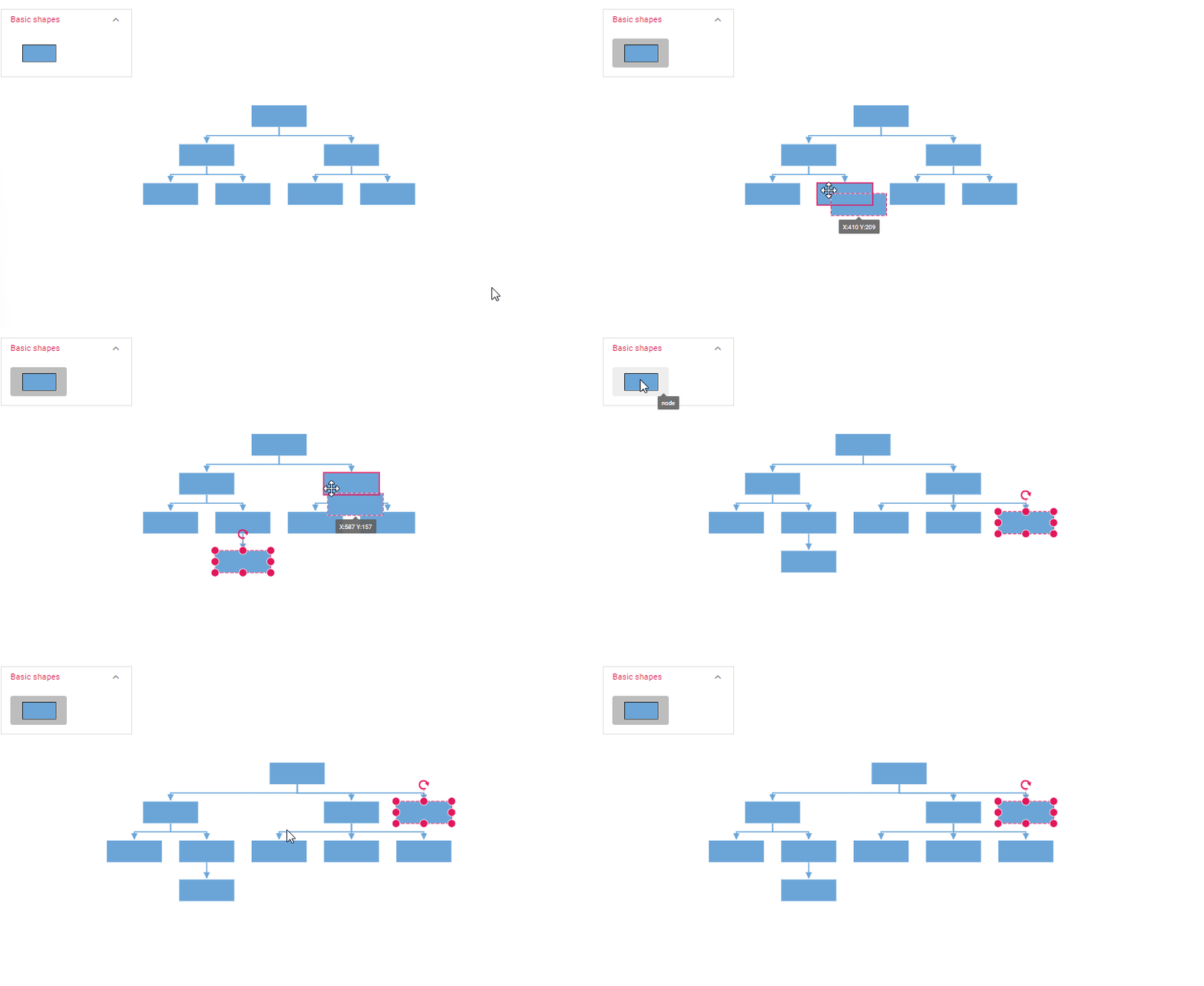
setNodeTemplate
The setNodeTemplate function allows you to customize the visual representation and behavior of nodes within your diagram. It is invoked during the initialization of each node, enabling you to define the node’s style, properties, and bind custom JSON data to it.
Typically, the setNodeTemplate function accepts a container element (e.g., StackPanel, Grid) to organize the visual components within the node. In the following example, a StackPanel is used to organize the node’s content, with an ImageElement displaying an image and a TextBlock showing text bound to the “Name” property of the node’s data. The StackPanel can contain a variety of elements, including PathElement,NativeElement,DiagramElement and HtmlElement.
You can also set the cornerRadius to create a rounded appearance for the node, while horizontalAlignment and verticalAlignment control the positioning of the StackPanel within the node.
The orientation property determines whether child elements are arranged horizontally or vertically.By effectively utilizing the setNodeTemplate function, you can create visually appealing and informative nodes that enhance the overall user experience of your diagram.
<template>
    <div id="app">

        <ejs-diagram id="diagram" :width='width' :height='height' :dataSourceSettings='dataSourceSettings'
            :getNodeDefaults='getNodeDefaults' :getConnectorDefaults='getConnectorDefaults' :layout='layout'
            :setNodeTemplate="setNodeTemplate"></ejs-diagram>

    </div>
</template>

<script setup>
import { provide } from "vue";
import { DiagramComponent as EjsDiagram, HierarchicalTree, DataBinding, ImageElement, StackPanel, TextElement } from '@syncfusion/ej2-vue-diagrams';
import { DataManager, Query } from "@syncfusion/ej2-data";


//Initialize data
let data = [
    {
        Name: 'Steve-Ceo',
    },
    {
        Name: 'Kevin-Manager',
        ReportingPerson: 'Steve-Ceo',
        color: 'darkcyan',
    },
    {
        Name: 'Peter-Manager',
        ReportingPerson: 'Steve-Ceo',
        color: 'white',
    },
    {
        Name: 'John- Manager',
        ReportingPerson: 'Peter-Manager',
        color: 'darkcyan',
    },
    {
        Name: 'Mary-CSE ',
        ReportingPerson: 'Peter-Manager',
        color: 'white',
    },
    {
        Name: 'Jim-CSE ',
        ReportingPerson: 'Kevin-Manager',
        color: 'darkcyan',
    },
    {
        Name: 'Martin-CSE',
        ReportingPerson: 'Kevin-Manager',
        color: 'white',
    },
];

let items = new DataManager(data, new Query().take(7));

const width = "1000px";
const height = "590px";

//Configures data source for Diagram
const dataSourceSettings = {
    id: 'Name',
    parentId: 'ReportingPerson',
    dataManager: items
}
//Uses layout to auto-arrange nodes on the Diagram page
const layout = {
    //Sets layout type
    type: 'HierarchicalTree',
}

//Sets the default properties for nodes and connectors
const getNodeDefaults = (node) => {
    node.width = 200; node.height = 60;
    return node;
}
const getConnectorDefaults = (connector) => {
    connector.targetDecorator.shape = 'None';
    connector.type = 'Orthogonal';
    return connector;
}


const setNodeTemplate = (node) => {

    // Create an outer StackPanel as container to contain image and text elements
    let container = new StackPanel();
    container.width = 200;
    container.height = 60;
    container.cornerRadius = 10;
    container.style.fill = 'skyblue';
    container.horizontalAlignment = 'Left';
    container.orientation = 'Horizontal';
    container.id = node.data.Name + '_StackContainter';

    // Create an inner image element to displaying image
    let innerContent = new ImageElement();
    innerContent.id = node.data.Name + '_innerContent';
    innerContent.width = 40;
    innerContent.height = 40;
    innerContent.margin.left = 20;
    innerContent.style.fill = 'lightgrey';

    // Create a inner text element for displaying employee details
    let text = new TextElement();
    text.content = 'Name: ' + node.data.Name;
    text.margin = { left: 10, top: 5 };
    text.id = node.data.Name + '_textContent';
    text.style.fill = 'green';
    text.style.color = 'white';
    if (node.data.Name === 'Steve-Ceo') {
        text.style.fill = 'black';
        text.style.color = 'white';
    }

    // Add inner image and text element to the outer StackPanel
    container.children = [innerContent, text];
    return container;
};
provide('diagram', [HierarchicalTree, DataBinding]);

</script>

<style>
@import "../node_modules/@syncfusion/ej2-vue-diagrams/styles/tailwind3.css";
@import "../node_modules/@syncfusion/ej2-base/styles/tailwind3.css";
@import "../node_modules/@syncfusion/ej2-popups/styles/tailwind3.css";
@import "../node_modules/@syncfusion/ej2-splitbuttons/styles/tailwind3.css";
@import "../node_modules/@syncfusion/ej2-navigations/styles/tailwind3.css";
</style><template>
<div id="app">
<ejs-diagram id="diagram" :width="width" :height="height" :getNodeDefaults="getNodeDefaults"
:getConnectorDefaults="getConnectorDefaults" :layout="layout" :dataSourceSettings="dataSourceSettings"
:setNodeTemplate="setNodeTemplate"></ejs-diagram>
</div>
</template>
<script>
import { DiagramComponent, HierarchicalTree, DataBinding, ImageElement, StackPanel, TextElement } from '@syncfusion/ej2-vue-diagrams';
import { DataManager, Query } from '@syncfusion/ej2-data';
let data = [
{
Name: 'Steve-Ceo',
},
{
Name: 'Kevin-Manager',
ReportingPerson: 'Steve-Ceo',
color: 'darkcyan',
},
{
Name: 'Peter-Manager',
ReportingPerson: 'Steve-Ceo',
color: 'white',
},
{
Name: 'John- Manager',
ReportingPerson: 'Peter-Manager',
color: 'darkcyan',
},
{
Name: 'Mary-CSE ',
ReportingPerson: 'Peter-Manager',
color: 'white',
},
{
Name: 'Jim-CSE ',
ReportingPerson: 'Kevin-Manager',
color: 'darkcyan',
},
{
Name: 'Martin-CSE',
ReportingPerson: 'Kevin-Manager',
color: 'white',
},
];
let items = new DataManager(data, new Query().take(7));
export default {
name: 'App',
components: {
'ejs-diagram': DiagramComponent,
},
data() {
return {
width: "1000px",
height: "350px",
//Uses layout to auto-arrange nodes on the Diagram page
layout: {
//Sets layout type
type: 'HierarchicalTree',
},
//Configures data source for Diagram
dataSourceSettings: {
id: 'Name',
parentId: 'ReportingPerson',
dataManager: items,
},
//Sets the default properties for nodes and connectors
getNodeDefaults: (node) => {
node.width = 200;
node.height = 60;
return node;
},
getConnectorDefaults: (connector) => {
connector.targetDecorator.shape = 'None';
connector.type = 'Orthogonal';
return connector;
},
setNodeTemplate: function (node) {
// Create an outer StackPanel as container to contain image and text elements
let container = new StackPanel();
container.width = 200;
container.height = 60;
container.cornerRadius = 10;
container.style.fill = 'skyblue';
container.horizontalAlignment = 'Left';
container.orientation = 'Horizontal';
container.id = node.data.Name + '_StackContainter';
// Create an inner image element to displaying image
let innerContent = new ImageElement();
innerContent.id = node.data.Name + '_innerContent';
innerContent.width = 40;
innerContent.height = 40;
innerContent.margin.left = 20;
innerContent.style.fill = 'lightgrey';
// Create a inner text element for displaying employee details
let text = new TextElement();
text.content = 'Name: ' + node.data.Name;
text.margin = { left: 10, top: 5 };
text.id = node.data.Name + '_textContent';
text.style.fill = 'green';
text.style.color = 'white';
if (node.data.Name === 'Steve-Ceo') {
text.style.fill = 'black';
text.style.color = 'white';
}
// Add inner image and text element to the outer StackPanel
container.children = [innerContent, text];
return container;
},
};
},
provide: {
diagram: [DataBinding, HierarchicalTree],
},
};
</script>
<style>
@import "../node_modules/@syncfusion/ej2-vue-diagrams/styles/tailwind3.css";
@import "../node_modules/@syncfusion/ej2-base/styles/tailwind3.css";
@import "../node_modules/@syncfusion/ej2-popups/styles/tailwind3.css";
@import "../node_modules/@syncfusion/ej2-splitbuttons/styles/tailwind3.css";
@import "../node_modules/@syncfusion/ej2-navigations/styles/tailwind3.css";
</style>Refresh layout
Diagram allows refreshing the layout at runtime. To refresh the layout, you need to call the doLayout method.
//To refresh layout
diagramInstance.doLayout();