Appearance in TypeScript Diagram control
You can change the font style of the annotations with the font specific properties fontSize, fontFamily, color.
The label’s bold, italic, and textDecoration properties are used to style the label’s text.
The label’s fill, strokeColor, and strokeWidth properties are used to define the background color and border color of the annotation and the opacity property is used to define the transparency of the annotations.
The visible property of the annotation enables or disables the visibility of annotation.
The following code illustrates how to customize the appearance of the annotation.
import { Diagram, NodeModel } from '@syncfusion/ej2-diagrams';
// A node is created and stored in nodes array.
let nodes: NodeModel[] = [
  {
    // Position of the node
    offsetX: 250,
    offsetY: 250,
    // Size of the node
    width: 100,
    height: 100,
    style: { fill: '#6BA5D7', strokeColor: 'white' },
    annotations: [
      {
        content: 'Annotation    T e x t',
        style: {
          color: 'blue',
          bold: true,
          italic: true,
          fontSize: 15,
          fontFamily: 'TimesNewRoman',
          fill: 'orange',
          whiteSpace: 'PreserveAll',
          opacity: 0.6,
        },
        visibility: true,
      },
      {
        content: 'Annotation    T e x t',
        offset: { x: 0.5, y: 1 },
        style: {
          color: 'blue',
          bold: true,
          italic: true,
          fontSize: 15,
          fontFamily: 'TimesNewRoman',
          fill: 'orange',
          whiteSpace: 'PreserveAll',
          opacity: 0.6,
        },
        visibility: false,
      },
    ],
  },
];
// initialize diagram component
let diagram: Diagram = new Diagram({
  width: '100%',
  height: '600px',
  // Add node
  nodes: nodes,
});
// render initialized diagram
diagram.appendTo('#element');
<!DOCTYPE html>
<html lang="en">
<head>
<title>EJ2 Diagram</title>
<meta charset="utf-8" />
<meta name="viewport" content="width=device-width, initial-scale=1.0" />
<meta name="description" content="Typescript UI Controls" />
<meta name="author" content="Syncfusion" />
<link href="index.css" rel="stylesheet" />
<script src="https://cdnjs.cloudflare.com/ajax/libs/systemjs/0.19.38/system.js"></script>
<link href="https://cdn.syncfusion.com/ej2/33.2.3/ej2-base/styles/tailwind3.css" rel="stylesheet" />
<link href="https://cdn.syncfusion.com/ej2/33.2.3/ej2-buttons/styles/tailwind3.css" rel="stylesheet" />
<link href="https://cdn.syncfusion.com/ej2/33.2.3/ej2-popups/styles/tailwind3.css" rel="stylesheet" />
<link href="https://cdn.syncfusion.com/ej2/33.2.3/ej2-splitbuttons/styles/tailwind3.css" rel="stylesheet" />
<link href="https://cdn.syncfusion.com/ej2/33.2.3/ej2-diagrams/styles/tailwind3.css" rel="stylesheet" />
<link href="https://cdn.syncfusion.com/ej2/33.2.3/ej2-navigations/styles/fabric.css" rel="stylesheet" />
<script src="systemjs.config.js"></script>
</head>
<body>
<div id='loader'>Loading....</div>
<div id='container'>
<div id='element'></div>
</div>
</body>
</html>Horizontal and vertical alignment
The following tables illustrates all the possible alignments visually with offset (0, 0).
| Horizontal Alignment | Vertical Alignment | Output with Offset(0,0) |
|---|---|---|
| Left | Top | 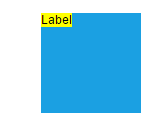 |
| Center | Top | 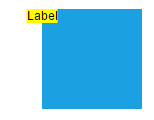 |
| Right | Top | 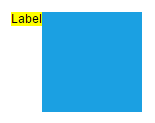 |
| Left | Center | 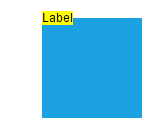 |
| Center | Center | 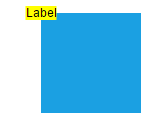 |
| Right | Center | 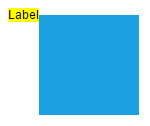 |
| Left | Bottom | 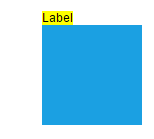 |
| Center | Bottom | 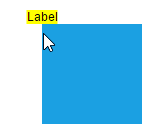 |
| Right | Bottom | 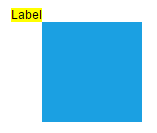 |
The following codes illustrates how to align annotations.
import { Diagram, NodeModel, ShapeAnnotationModel } from '@syncfusion/ej2-diagrams';
// A node is created and stored in nodes array.
let node: NodeModel = {
    // Position of the node
    offsetX: 250,
    offsetY: 250,
    // Size of the node
    width: 100,
    height: 100,
    style: {
        fill: '#6BA5D7',
        strokeColor: 'white'
    },
    // Sets the annotation for the node
    annotations: [{
        content: 'Annotation',
        // Sets the horizontal alignment as left
        horizontalAlignment: 'Left',
        // Sets the vertical alignment as Top
        verticalAlignment: 'Top'
    }]
};
// initialize diagram component
let diagram: Diagram = new Diagram({
    width: '100%',
    height: '600px',
    // Add node
    nodes: [node]
});
// render initialized diagram
diagram.appendTo('#element');
<!DOCTYPE html>
<html lang="en">
<head>
<title>EJ2 Diagram</title>
<meta charset="utf-8" />
<meta name="viewport" content="width=device-width, initial-scale=1.0" />
<meta name="description" content="Typescript UI Controls" />
<meta name="author" content="Syncfusion" />
<link href="index.css" rel="stylesheet" />
<script src="https://cdnjs.cloudflare.com/ajax/libs/systemjs/0.19.38/system.js"></script>
<link href="https://cdn.syncfusion.com/ej2/33.2.3/ej2-base/styles/tailwind3.css" rel="stylesheet" />
<link href="https://cdn.syncfusion.com/ej2/33.2.3/ej2-buttons/styles/tailwind3.css" rel="stylesheet" />
<link href="https://cdn.syncfusion.com/ej2/33.2.3/ej2-popups/styles/tailwind3.css" rel="stylesheet" />
<link href="https://cdn.syncfusion.com/ej2/33.2.3/ej2-splitbuttons/styles/tailwind3.css" rel="stylesheet" />
<link href="https://cdn.syncfusion.com/ej2/33.2.3/ej2-diagrams/styles/tailwind3.css" rel="stylesheet" />
<link href="https://cdn.syncfusion.com/ej2/33.2.3/ej2-navigations/styles/fabric.css" rel="stylesheet" />
<script src="systemjs.config.js"></script>
</head>
<body>
<div id='loader'>Loading....</div>
<div id='container'>
<div id='element'></div>
</div>
</body>
</html>Annotation Margin
Margin is an absolute value used to add some blank space in any one of its four sides. The annotations can be displaced with the margin property. The following code example illustrates how to align a annotation based on its offset, horizontalAlignment, verticalAlignment, and margin values.
import { ConnectorModel, Diagram, NodeModel } from '@syncfusion/ej2-diagrams';
// A node is created and stored in nodes array.
let node: NodeModel = {
  id: 'node1',
  // Position of the node
  offsetX: 100,
  offsetY: 100,
  // Size of the node
  width: 100,
  height: 100,
  style: {
    fill: '#6BA5D7',
    strokeColor: 'white',
  },
  // Sets the annotation for the connector
  annotations: [
    {
      content: 'Task1',
      // Sets the margin for the content
      margin: {
        top: 20,
      },
      horizontalAlignment: 'Center',
      verticalAlignment: 'Top',
      offset: {
        x: 0.5,
        y: 1,
      },
    },
  ],
};
let connectors: ConnectorModel[] = [
  {
    sourcePoint: { x: 200, y: 100 },
    targetPoint: { x: 500, y: 300 },
    type: 'Orthogonal',
    //Path annotation offset
    annotations: [
      {
        content: 'annotation',
        offset: 0.2,
        margin: { left: 40 },
      },
    ],
  },
];
// initialize diagram component
let diagram: Diagram = new Diagram({
  width: '100%',
  height: '600px',
  // Add node
  nodes: [node],
  connectors: connectors,
});
// render initialized diagram
diagram.appendTo('#element');
<!DOCTYPE html>
<html lang="en">
<head>
<title>EJ2 Diagram</title>
<meta charset="utf-8" />
<meta name="viewport" content="width=device-width, initial-scale=1.0" />
<meta name="description" content="Typescript UI Controls" />
<meta name="author" content="Syncfusion" />
<link href="index.css" rel="stylesheet" />
<script src="https://cdnjs.cloudflare.com/ajax/libs/systemjs/0.19.38/system.js"></script>
<link href="https://cdn.syncfusion.com/ej2/33.2.3/ej2-base/styles/tailwind3.css" rel="stylesheet" />
<link href="https://cdn.syncfusion.com/ej2/33.2.3/ej2-buttons/styles/tailwind3.css" rel="stylesheet" />
<link href="https://cdn.syncfusion.com/ej2/33.2.3/ej2-popups/styles/tailwind3.css" rel="stylesheet" />
<link href="https://cdn.syncfusion.com/ej2/33.2.3/ej2-splitbuttons/styles/tailwind3.css" rel="stylesheet" />
<link href="https://cdn.syncfusion.com/ej2/33.2.3/ej2-diagrams/styles/tailwind3.css" rel="stylesheet" />
<link href="https://cdn.syncfusion.com/ej2/33.2.3/ej2-navigations/styles/fabric.css" rel="stylesheet" />
<script src="systemjs.config.js"></script>
</head>
<body>
<div id='loader'>Loading....</div>
<div id='container'>
<div id='element'></div>
</div>
</body>
</html>Hyperlink
Diagram provides a support to add a hyperlink for the nodes/connectors annotation. It can also be customized with the below properties.
A User can open the hyperlink in the new window, the same tab and the new tab by using the hyperlinkOpenState property.
The content property of hyperlink is used to display the content of the hyper link display text. The color property of the hyperlink is used to display the color of the hyper link.
The textDecoration property is used to decorate the hyper link text with Underline, LineThrough, Overline. The following example illustrates how to define and customize hyper link in both node and connector.
import { ConnectorModel, Diagram, NodeModel } from '@syncfusion/ej2-diagrams';
// A node is created and stored in nodes array.
let node: NodeModel = {
  id: 'node1',
  // Position of the node
  offsetX: 100,
  offsetY: 100,
  // Size of the node
  width: 100,
  height: 100,
  style: {
    fill: '#6BA5D7',
    strokeColor: 'white',
  },
  // Sets the annotation for the Node
  annotations: [
    {
      hyperlink: {
        link: 'https://google.com',
        //Set the link to open in the current tab
        hyperlinkOpenState: 'NewWindow',
      },
    },
  ],
};
let connectors: ConnectorModel[] = [
  {
    sourcePoint: { x: 300, y: 200 },
    targetPoint: { x: 500, y: 300 },
    type: 'Orthogonal',
    //Path annotation offset
    annotations: [
      {
        hyperlink: {
          link: 'https://google.com',
          hyperlinkOpenState: 'NewWindow',
          content: 'Google',
          color: 'orange',
          textDecoration: 'Underline',
        },
      },
    ],
  },
];
// initialize diagram component
let diagram: Diagram = new Diagram({
  width: '100%',
  height: '600px',
  // Add node
  nodes: [node],
  connectors: connectors,
});
// render initialized diagram
diagram.appendTo('#element');
<!DOCTYPE html>
<html lang="en">
<head>
<title>EJ2 Diagram</title>
<meta charset="utf-8" />
<meta name="viewport" content="width=device-width, initial-scale=1.0" />
<meta name="description" content="Typescript UI Controls" />
<meta name="author" content="Syncfusion" />
<link href="index.css" rel="stylesheet" />
<script src="https://cdnjs.cloudflare.com/ajax/libs/systemjs/0.19.38/system.js"></script>
<link href="https://cdn.syncfusion.com/ej2/33.2.3/ej2-base/styles/tailwind3.css" rel="stylesheet" />
<link href="https://cdn.syncfusion.com/ej2/33.2.3/ej2-buttons/styles/tailwind3.css" rel="stylesheet" />
<link href="https://cdn.syncfusion.com/ej2/33.2.3/ej2-popups/styles/tailwind3.css" rel="stylesheet" />
<link href="https://cdn.syncfusion.com/ej2/33.2.3/ej2-splitbuttons/styles/tailwind3.css" rel="stylesheet" />
<link href="https://cdn.syncfusion.com/ej2/33.2.3/ej2-diagrams/styles/tailwind3.css" rel="stylesheet" />
<link href="https://cdn.syncfusion.com/ej2/33.2.3/ej2-navigations/styles/fabric.css" rel="stylesheet" />
<script src="systemjs.config.js"></script>
</head>
<body>
<div id='loader'>Loading....</div>
<div id='container'>
<div id='element'></div>
</div>
</body>
</html>Rotate Annotation
Annotation can be rotated by setting the rotateAngle property of the annotation. The following example shows how to rotate annotation text.
import { Diagram, NodeModel } from '@syncfusion/ej2-diagrams';
// A node is created and stored in nodes array.
let node: NodeModel = {
  id: 'node1',
  // Position of the node
  offsetX: 100,
  offsetY: 100,
  // Size of the node
  width: 100,
  height: 100,
  style: {
    fill: '#6BA5D7',
    strokeColor: 'white',
  },
  // Sets the annotation for the node
  annotations: [
    {
      content: 'Annotation Text',
      rotateAngle: 45,
    },
  ],
};
// initialize diagram component
let diagram: Diagram = new Diagram({
  width: '100%',
  height: '600px',
  // Add node
  nodes: [node],
});
// render initialized diagram
diagram.appendTo('#element');
<!DOCTYPE html>
<html lang="en">
<head>
<title>EJ2 Diagram</title>
<meta charset="utf-8" />
<meta name="viewport" content="width=device-width, initial-scale=1.0" />
<meta name="description" content="Typescript UI Controls" />
<meta name="author" content="Syncfusion" />
<link href="index.css" rel="stylesheet" />
<script src="https://cdnjs.cloudflare.com/ajax/libs/systemjs/0.19.38/system.js"></script>
<link href="https://cdn.syncfusion.com/ej2/33.2.3/ej2-base/styles/tailwind3.css" rel="stylesheet" />
<link href="https://cdn.syncfusion.com/ej2/33.2.3/ej2-buttons/styles/tailwind3.css" rel="stylesheet" />
<link href="https://cdn.syncfusion.com/ej2/33.2.3/ej2-popups/styles/tailwind3.css" rel="stylesheet" />
<link href="https://cdn.syncfusion.com/ej2/33.2.3/ej2-splitbuttons/styles/tailwind3.css" rel="stylesheet" />
<link href="https://cdn.syncfusion.com/ej2/33.2.3/ej2-diagrams/styles/tailwind3.css" rel="stylesheet" />
<link href="https://cdn.syncfusion.com/ej2/33.2.3/ej2-navigations/styles/fabric.css" rel="stylesheet" />
<script src="systemjs.config.js"></script>
</head>
<body>
<div id='loader'>Loading....</div>
<div id='container'>
<div id='element'></div>
</div>
</body>
</html>Template support for annotation
Diagram provides template support for annotation. You can either define a string template and assign it to template property of annotation or define a annotation template in html file and assign it to the annotationTemplate property of the diagram.
String template
For string template you should define a SVG/HTML content as string in the annotation’s template property.
The following code illustrates how to define a template in annotation.
import { ConnectorModel, Diagram, NodeModel } from '@syncfusion/ej2-diagrams';
// A node is created and stored in nodes array.
let node: NodeModel = {
  id: 'node1',
  // Position of the node
  offsetX: 100,
  offsetY: 100,
  // Size of the node
  width: 100,
  height: 100,
  style: {
    fill: '#6BA5D7',
    strokeColor: 'white',
  },
  //Sets the annotation for the node
  annotations: [
    {
      // Sets the template for a node
      template: '<div><input type="button" value="Submit"></div>',
    },
  ],
};
// A connector is created and stored in connectors array.
let connector: ConnectorModel = {
  id: 'connector1',
  sourcePoint: {
    x: 300,
    y: 100,
  },
  targetPoint: {
    x: 400,
    y: 300,
  },
  type: 'Orthogonal',
  //Sets the annotation for the node
  annotations: [
    {
      width: 100,
      height: 50,
      id: 'annotation1',
      // Sets the template for a node
      template: '<div><input type="button" value="Submit"></div>',
    },
  ],
};
// initialize diagram component
let diagram: Diagram = new Diagram({
  width: '100%',
  height: '600px',
  // Add node
  nodes: [node],
  // Add connector
  connectors: [connector],
});
// render initialized diagram
diagram.appendTo('#element');
<!DOCTYPE html>
<html lang="en">
<head>
<title>EJ2 Diagram</title>
<meta charset="utf-8" />
<meta name="viewport" content="width=device-width, initial-scale=1.0" />
<meta name="description" content="Typescript UI Controls" />
<meta name="author" content="Syncfusion" />
<link href="index.css" rel="stylesheet" />
<script src="https://cdnjs.cloudflare.com/ajax/libs/systemjs/0.19.38/system.js"></script>
<link href="https://cdn.syncfusion.com/ej2/33.2.3/ej2-base/styles/tailwind3.css" rel="stylesheet" />
<link href="https://cdn.syncfusion.com/ej2/33.2.3/ej2-buttons/styles/tailwind3.css" rel="stylesheet" />
<link href="https://cdn.syncfusion.com/ej2/33.2.3/ej2-popups/styles/tailwind3.css" rel="stylesheet" />
<link href="https://cdn.syncfusion.com/ej2/33.2.3/ej2-splitbuttons/styles/tailwind3.css" rel="stylesheet" />
<link href="https://cdn.syncfusion.com/ej2/33.2.3/ej2-diagrams/styles/tailwind3.css" rel="stylesheet" />
<link href="https://cdn.syncfusion.com/ej2/33.2.3/ej2-navigations/styles/fabric.css" rel="stylesheet" />
<script src="systemjs.config.js"></script>
</head>
<body>
<div id='loader'>Loading....</div>
<div id='container'>
<div id='element'></div>
</div>
</body>
</html>NOTE
For the proper alignment of template, we need to mention width and height for the annotation while using template.
Annotation template
For annotation template you should define a template in html file which you want to render in annotation and assign it to the annotationTemplate property of diagram. This template can be applied to both nodes and connectors within the diagram.
The following code illustrates how to define a annotationTemplate in annotation for nodes and connectors.
import { ConnectorModel, Diagram, NodeModel } from '@syncfusion/ej2-diagrams';
// A node is created and stored in nodes array.
let node: NodeModel = {
  id: 'node1',
  // Position of the node
  offsetX: 100,
  offsetY: 100,
  // Size of the node
  width: 100,
  height: 100,
  style: {
    fill: '#6BA5D7',
    strokeColor: 'white',
  },
  //Sets the annotation for the node
  annotations: [
    {
      id: 'Node',
      width: 100,
      height: 30,
    },
  ],
};
// A connector is created and stored in connectors array.
let connector: ConnectorModel = {
  id: 'connector1',
  sourcePoint: {
    x: 300,
    y: 100,
  },
  targetPoint: {
    x: 400,
    y: 300,
  },
  type: 'Straight',
  //Sets the annotation for the node
  annotations: [
    {
      id: 'Connector',
      offset: 0.5,
      width: 100,
      height: 50,
    },
  ],
};
// initialize diagram component
let diagram: Diagram = new Diagram({
  width: '100%',
  height: '600px',
  // Add node
  nodes: [node],
  // Add connector
  connectors: [connector],
  annotationTemplate: '#annotationTemplate',
});
// render initialized diagram
diagram.appendTo('#element');
<!DOCTYPE html>
<html lang="en">
<head>
<title>EJ2 Diagram</title>
<meta charset="utf-8" />
<meta name="viewport" content="width=device-width, initial-scale=1.0" />
<meta name="description" content="Typescript UI Controls" />
<meta name="author" content="Syncfusion" />
<link href="index.css" rel="stylesheet" />
<script src="https://cdnjs.cloudflare.com/ajax/libs/systemjs/0.19.38/system.js"></script>
<link href="https://cdn.syncfusion.com/ej2/33.2.3/ej2-base/styles/tailwind3.css" rel="stylesheet" />
<link href="https://cdn.syncfusion.com/ej2/33.2.3/ej2-buttons/styles/tailwind3.css" rel="stylesheet" />
<link href="https://cdn.syncfusion.com/ej2/33.2.3/ej2-popups/styles/tailwind3.css" rel="stylesheet" />
<link href="https://cdn.syncfusion.com/ej2/33.2.3/ej2-splitbuttons/styles/tailwind3.css" rel="stylesheet" />
<link href="https://cdn.syncfusion.com/ej2/33.2.3/ej2-diagrams/styles/tailwind3.css" rel="stylesheet" />
<link href="https://cdn.syncfusion.com/ej2/33.2.3/ej2-navigations/styles/fabric.css" rel="stylesheet" />
<script src="systemjs.config.js"></script>
</head>
<body>
<div id='loader'>Loading....</div>
<div id='container'>
<script id="annotationTemplate" type="text/x-template">
<div style="width:100%;height:100%;overflow:hidden"><input type="button" value="${id}"
style="width:100px;" /></div>
</script>
<div id='element'></div>
</div>
</body>
</html>Functional template
We can define a function which would return a string template and assign that method to the annotationTemplate property of diagram. Inside that function we can do customizations based on the id of the annotation.
The following code illustrates how to define a functional template.
import { ConnectorModel, Diagram, NodeModel } from '@syncfusion/ej2-diagrams';
// A node is created and stored in nodes array.
let node: NodeModel = {
  id: 'node1',
  // Position of the node
  offsetX: 100,
  offsetY: 100,
  // Size of the node
  width: 100,
  height: 100,
  //Sets the annotation for the node
  annotations: [
    {
      id: 'Node',
      width: 100,
      height: 30,
    },
  ],
  style: {
    fill: '#6BA5D7',
    strokeColor: 'white',
  },
};
// A connector is created and stored in connectors array.
let connector: ConnectorModel = {
  id: 'connector1',
  sourcePoint: {
    x: 300,
    y: 100,
  },
  targetPoint: {
    x: 400,
    y: 300,
  },
  type: 'Straight',
  //Sets the annotation for the node
  annotations: [
    {
      id: 'Connector',
      offset: 0.5,
      width: 100,
      height: 50,
    },
  ],
};

function getTemplate(obj: any) {
  let background = 'yellow';
  let height = '50%';
  if (obj.id === 'Node') {
    background = 'red';
    height = '100%';
  }
  let template = `<div style="width:100%;height:${height};overflow:hidden; background:${background}"><input type="button" value="${obj.id}"
 style="width:100px;" /></div>`;
  return template;
}
// initialize diagram component
let diagram: Diagram = new Diagram({
  width: '100%',
  height: '600px',
  // Add node
  nodes: [node],
  // Add connector
  connectors: [connector],
  annotationTemplate: getTemplate.bind(this),
});
// render initialized diagram
diagram.appendTo('#element');
<!DOCTYPE html>
<html lang="en">
<head>
<title>EJ2 Diagram</title>
<meta charset="utf-8" />
<meta name="viewport" content="width=device-width, initial-scale=1.0" />
<meta name="description" content="Typescript UI Controls" />
<meta name="author" content="Syncfusion" />
<link href="index.css" rel="stylesheet" />
<script src="https://cdnjs.cloudflare.com/ajax/libs/systemjs/0.19.38/system.js"></script>
<link href="https://cdn.syncfusion.com/ej2/33.2.3/ej2-base/styles/tailwind3.css" rel="stylesheet" />
<link href="https://cdn.syncfusion.com/ej2/33.2.3/ej2-buttons/styles/tailwind3.css" rel="stylesheet" />
<link href="https://cdn.syncfusion.com/ej2/33.2.3/ej2-popups/styles/tailwind3.css" rel="stylesheet" />
<link href="https://cdn.syncfusion.com/ej2/33.2.3/ej2-splitbuttons/styles/tailwind3.css" rel="stylesheet" />
<link href="https://cdn.syncfusion.com/ej2/33.2.3/ej2-diagrams/styles/tailwind3.css" rel="stylesheet" />
<link href="https://cdn.syncfusion.com/ej2/33.2.3/ej2-navigations/styles/fabric.css" rel="stylesheet" />
<script src="systemjs.config.js"></script>
</head>
<body>
<div id='loader'>Loading....</div>
<div id='container'>
<script id="annotationTemplate" type="text/x-template">
<div style="width:100%;height:100%;overflow:hidden"><input type="button" value="${id}"
style="width:100px;" /></div>
</script>
<div id='element'></div>
</div>
</body>
</html>Text align
The textAlign property of annotation allows you to set how the text should be aligned (left, right, center, or justify) inside the text block. The following codes illustrate how to set textAlign for an annotation.
import { ConnectorModel, Diagram, NodeModel } from '@syncfusion/ej2-diagrams';
// A node is created and stored in nodes array.
let nodes: NodeModel[] = [
  {
    id: 'node1',
    // Position of the node
    offsetX: 100,
    offsetY: 100,
    // Size of the node
    width: 100,
    height: 100,
    style: {
      fill: '#6BA5D7',
      strokeColor: 'white',
    },
    // Sets the annotation for the NOde
    annotations: [
      {
        content: 'Text align is set as Right',
        // Sets the textAlign as left for the content
        style: {
          textAlign: 'Right',
        },
      },
    ],
  },
  {
    id: 'node2',
    // Position of the node
    offsetX: 300,
    offsetY: 100,
    // Size of the node
    width: 100,
    height: 100,
    style: {
      fill: '#6BA5D7',
      strokeColor: 'white',
    },
    // Sets the annotation for the NOde
    annotations: [
      {
        content: 'Text align is set as Center',
        // Sets the textAlign as left for the content
        style: {
          textAlign: 'Center',
        },
      },
    ],
  },
  {
    id: 'node3',
    // Position of the node
    offsetX: 500,
    offsetY: 100,
    // Size of the node
    width: 100,
    height: 100,
    style: {
      fill: '#6BA5D7',
      strokeColor: 'white',
    },
    // Sets the annotation for the NOde
    annotations: [
      {
        content: 'Text align is set as Left',
        // Sets the textAlign as left for the content
        style: {
          textAlign: 'Left',
        },
      },
    ],
  },
  {
    id: 'node4',
    // Position of the node
    offsetX: 700,
    offsetY: 100,
    // Size of the node
    width: 100,
    height: 100,
    style: {
      fill: '#6BA5D7',
      strokeColor: 'white',
    },
    // Sets the annotation for the NOde
    annotations: [
      {
        content: 'Text align is set as Justify',
        // Sets the textAlign as left for the content
        style: {
          textAlign: 'Justify',
        },
      },
    ],
  },
];
let connectors: ConnectorModel[] = [
  {
    sourcePoint: { x: 100, y: 200 },
    targetPoint: { x: 300, y: 300 },
    type: 'Orthogonal',
    //Path annotation offset
    annotations: [
      {
        content: 'long annotation content for connector anntoation',
        width: 100,
        offset: 0.2,
        style: { textAlign: 'Right' },
      },
    ],
  },
  {
    sourcePoint: { x: 300, y: 200 },
    targetPoint: { x: 500, y: 300 },
    type: 'Orthogonal',
    //Path annotation offset
    annotations: [
      {
        content: 'long annotation content for connector anntoation',
        width: 100,
        offset: 0.2,
        style: { textAlign: 'Center' },
      },
    ],
  },
  {
    sourcePoint: { x: 500, y: 200 },
    targetPoint: { x: 700, y: 300 },
    type: 'Orthogonal',
    //Path annotation offset
    annotations: [
      {
        content: 'long annotation content for connector anntoation',
        width: 100,
        offset: 0.2,
        style: { textAlign: 'Left' },
      },
    ],
  },
  {
    sourcePoint: { x: 700, y: 200 },
    targetPoint: { x: 900, y: 300 },
    type: 'Orthogonal',
    //Path annotation offset
    annotations: [
      {
        content: 'long annotation content for connector anntoation',
        width: 100,
        offset: 0.2,
        style: { textAlign: 'Justify' },
      },
    ],
  },
];
// initialize diagram component
let diagram: Diagram = new Diagram({
  width: '100%',
  height: '600px',
  // Add node
  nodes: nodes,
  connectors: connectors,
});
// render initialized diagram
diagram.appendTo('#element');
<!DOCTYPE html>
<html lang="en">
<head>
<title>EJ2 Diagram</title>
<meta charset="utf-8" />
<meta name="viewport" content="width=device-width, initial-scale=1.0" />
<meta name="description" content="Typescript UI Controls" />
<meta name="author" content="Syncfusion" />
<link href="index.css" rel="stylesheet" />
<script src="https://cdnjs.cloudflare.com/ajax/libs/systemjs/0.19.38/system.js"></script>
<link href="https://cdn.syncfusion.com/ej2/33.2.3/ej2-base/styles/tailwind3.css" rel="stylesheet" />
<link href="https://cdn.syncfusion.com/ej2/33.2.3/ej2-buttons/styles/tailwind3.css" rel="stylesheet" />
<link href="https://cdn.syncfusion.com/ej2/33.2.3/ej2-popups/styles/tailwind3.css" rel="stylesheet" />
<link href="https://cdn.syncfusion.com/ej2/33.2.3/ej2-splitbuttons/styles/tailwind3.css" rel="stylesheet" />
<link href="https://cdn.syncfusion.com/ej2/33.2.3/ej2-diagrams/styles/tailwind3.css" rel="stylesheet" />
<link href="https://cdn.syncfusion.com/ej2/33.2.3/ej2-navigations/styles/fabric.css" rel="stylesheet" />
<script src="systemjs.config.js"></script>
</head>
<body>
<div id='loader'>Loading....</div>
<div id='container'>
<div id='element'></div>
</div>
</body>
</html>The following table shows the different text alignment.
| Text Align | Output image |
|---|---|
| Right | 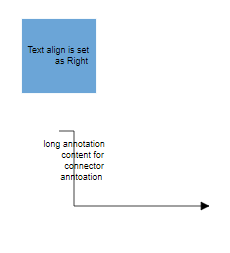 |
| Left | 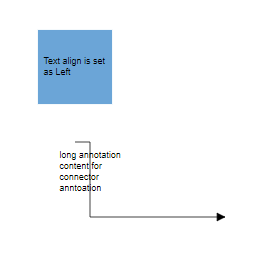 |
| Center | 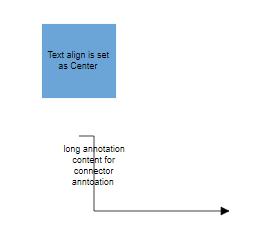 |
| Justify | 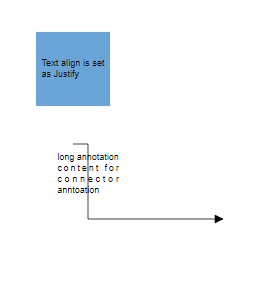 |
Text Wrapping
When text overflows node boundaries, you can control it by using text wrapping. So, it is wrapped into multiple lines. The wrapping property of annotation defines how the text should be wrapped. The following code illustrates how to wrap a text in a node.
import { Diagram, NodeModel } from '@syncfusion/ej2-diagrams';
// A node is created and stored in nodes array.
let nodes: NodeModel[] = [
  {
    id: 'node1',
    // Position of the node
    offsetX: 100,
    offsetY: 100,
    // Size of the node
    width: 100,
    height: 100,
    style: {
      fill: '#6BA5D7',
      strokeColor: 'white',
    },
    //Sets the annotation for the node
    annotations: [
      {
        content: 'Annotation Text WrapWithOverflow',
        // Sets the style for the text wrapping
        style: {
          textWrapping: 'WrapWithOverflow',
        },
      },
    ],
  },
  {
    id: 'node2',
    // Position of the node
    offsetX: 300,
    offsetY: 100,
    // Size of the node
    width: 100,
    height: 100,
    style: {
      fill: '#6BA5D7',
      strokeColor: 'white',
    },
    //Sets the annotation for the node
    annotations: [
      {
        content: 'Annotation Text Wrap',
        // Sets the style for the text wrapping
        style: {
          textWrapping: 'Wrap',
        },
      },
    ],
  },
  {
    id: 'node3',
    // Position of the node
    offsetX: 500,
    offsetY: 100,
    // Size of the node
    width: 100,
    height: 100,
    style: {
      fill: '#6BA5D7',
      strokeColor: 'white',
    },
    //Sets the annotation for the node
    annotations: [
      {
        content: 'Annotation Text NoWrap',
        // Sets the style for the text wrapping
        style: {
          textWrapping: 'NoWrap',
        },
      },
    ],
  },
];
// initialize diagram component
let diagram: Diagram = new Diagram({
  width: '100%',
  height: '600px',
  // Add node
  nodes: nodes,
});
// render initialized diagram
diagram.appendTo('#element');
<!DOCTYPE html>
<html lang="en">
<head>
<title>EJ2 Diagram</title>
<meta charset="utf-8" />
<meta name="viewport" content="width=device-width, initial-scale=1.0" />
<meta name="description" content="Typescript UI Controls" />
<meta name="author" content="Syncfusion" />
<link href="index.css" rel="stylesheet" />
<script src="https://cdnjs.cloudflare.com/ajax/libs/systemjs/0.19.38/system.js"></script>
<link href="https://cdn.syncfusion.com/ej2/33.2.3/ej2-base/styles/tailwind3.css" rel="stylesheet" />
<link href="https://cdn.syncfusion.com/ej2/33.2.3/ej2-buttons/styles/tailwind3.css" rel="stylesheet" />
<link href="https://cdn.syncfusion.com/ej2/33.2.3/ej2-popups/styles/tailwind3.css" rel="stylesheet" />
<link href="https://cdn.syncfusion.com/ej2/33.2.3/ej2-splitbuttons/styles/tailwind3.css" rel="stylesheet" />
<link href="https://cdn.syncfusion.com/ej2/33.2.3/ej2-diagrams/styles/tailwind3.css" rel="stylesheet" />
<link href="https://cdn.syncfusion.com/ej2/33.2.3/ej2-navigations/styles/fabric.css" rel="stylesheet" />
<script src="systemjs.config.js"></script>
</head>
<body>
<div id='loader'>Loading....</div>
<div id='container'>
<div id='element'></div>
</div>
</body>
</html>| Value | Description | Image |
|---|---|---|
| No Wrap | Text will not be wrapped. | 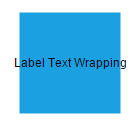 |
| Wrap | Text-wrapping occurs, when the text overflows beyond the available node width. | 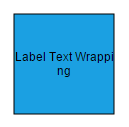 |
| WrapWithOverflow (Default) | Text-wrapping occurs, when the text overflows beyond the available node width. However, the text may overflow beyond the node width in the case of a very long word. | 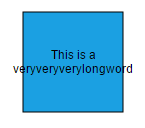 |
Text overflow
The label’s TextOverflow property is used control whether to display the overflowed content in node or not.
-
Clip- The text which overflowing node’s bounds will be removed. -
Ellipsis- The text which overflowing nodes’s bounds will be replaced by three dots. -
Wrap- Entire text will be rendered overflowing in y-axis and wrapped in x-axis.
Types of text overflow are shown in below table.
| TextOverflow | output image |
|---|---|
| Clip | 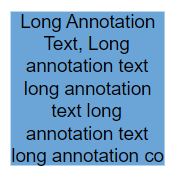 |
| Ellipsis | 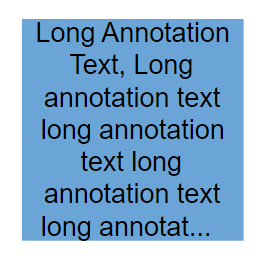 |
| Wrap(Default) | 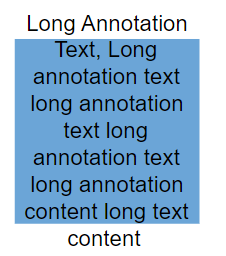 |
import {
    ConnectorModel,
    Diagram,
    NodeModel,
    ShapeAnnotationModel,
  } from '@syncfusion/ej2-diagrams';
  // A node is created and stored in nodes array.
  let nodes: NodeModel[] = [
    {
      // Position of the node
      offsetX: 100,
      offsetY: 100,
      // Size of the node
      width: 100,
      height: 100,
      style: { fill: '#6BA5D7', strokeColor: 'white' },
      annotations: [
        {
          content: 'Clip Wrap',
          offset: { x: 0.5, y: 1.4 },
        },
        {
          content:
            'Long Annotation Text, Long annotation text long annotation text long annotation text long annotation text long annotation text long annotation text',
          style: { textOverflow: 'Clip', textWrapping: 'Wrap' },
        },
      ],
    },
    {
      // Position of the node
      offsetX: 300,
      offsetY: 100,
      // Size of the node
      width: 100,
      height: 100,
      style: { fill: '#6BA5D7', strokeColor: 'white' },
      annotations: [
        {
          content: 'Clip NoWrap',
          offset: { x: 0.5, y: 1.4 },
        },
        {
          content:
            'Long Annotation Text, Long annotation text long annotation text long annotation text long annotation text',
          style: { textOverflow: 'Clip', textWrapping: 'NoWrap' },
        },
      ],
    },
    {
      // Position of the node
      offsetX: 500,
      offsetY: 100,
      // Size of the node
      width: 100,
      height: 100,
      style: { fill: '#6BA5D7', strokeColor: 'white' },
      annotations: [
        {
          content: 'Clip WrapWithOverflow',
          offset: { x: 0.5, y: 1.4 },
        },
        {
          content:
            'Long Annotation Text, Long annotation text long annotation text long annotation text long annotation text',
          style: { textOverflow: 'Clip', textWrapping: 'WrapWithOverflow' },
        },
      ],
    },

    {
      // Position of the node
      offsetX: 100,
      offsetY: 300,
      // Size of the node
      width: 100,
      height: 100,
      style: { fill: '#6BA5D7', strokeColor: 'white' },
      annotations: [
        {
          content: 'Ellipsis Wrap',
          offset: { x: 0.5, y: 1.4 },
        },
        {
          content:
            'Long Annotation Text, Long annotation text long annotation text long annotation text long annotation text long annotation text long annotation text',
          style: { textOverflow: 'Ellipsis', textWrapping: 'Wrap' },
        },
      ],
    },
    {
      // Position of the node
      offsetX: 300,
      offsetY: 300,
      // Size of the node
      width: 100,
      height: 100,
      style: { fill: '#6BA5D7', strokeColor: 'white' },
      annotations: [
        {
          content: 'Ellipsis NoWrap',
          offset: { x: 0.5, y: 1.4 },
        },
        {
          content:
            'Long Annotation Text, Long annotation text long annotation text long annotation text long annotation text',
          style: { textOverflow: 'Ellipsis', textWrapping: 'NoWrap' },
        },
      ],
    },
    {
      // Position of the node
      offsetX: 500,
      offsetY: 300,
      // Size of the node
      width: 100,
      height: 100,
      style: { fill: '#6BA5D7', strokeColor: 'white' },
      annotations: [
        {
          content: 'Ellipsis WrapWithOverflow',
          offset: { x: 0.5, y: 1.4 },
        },
        {
          content:
            'Long Annotation Text, Long annotation text long annotation text long annotation text long annotation text',
          style: { textOverflow: 'Ellipsis', textWrapping: 'WrapWithOverflow' },
        },
      ],
    },

    {
      // Position of the node
      offsetX: 100,
      offsetY: 700,
      // Size of the node
      width: 100,
      height: 100,
      style: { fill: '#6BA5D7', strokeColor: 'white' },
      annotations: [
        {
          content: 'Wrap Wrap',
          offset: { x: 0.5, y: 1.4 },
        },
        {
          content:
            'Long Annotation Text, Long annotation text long annotation text long annotation text long annotation text long annotation text long annotation text',
          style: { textOverflow: 'Wrap', textWrapping: 'Wrap' },
        },
      ],
    },
    {
      // Position of the node
      offsetX: 300,
      offsetY: 500,
      // Size of the node
      width: 100,
      height: 100,
      style: { fill: '#6BA5D7', strokeColor: 'white' },
      annotations: [
        {
          content: 'Wrap NoWrap',
          offset: { x: 0.5, y: 1.4 },
        },
        {
          content:
            'Long Annotation Text, Long annotation text long annotation text long annotation text long annotation text',
          style: { textOverflow: 'Wrap', textWrapping: 'NoWrap' },
        },
      ],
    },
    {
      // Position of the node
      offsetX: 500,
      offsetY: 700,
      // Size of the node
      width: 100,
      height: 100,
      style: { fill: '#6BA5D7', strokeColor: 'white' },
      annotations: [
        {
          content: 'Wrap WrapWithOverflow',
          offset: { x: 0.5, y: 1.4 },
        },
        {
          content:
            'Long Annotation Text, Long annotation text long annotation text long annotation text long annotation text',
          style: { textOverflow: 'Wrap', textWrapping: 'WrapWithOverflow' },
        },
      ],
    },
  ];
  // initialize diagram component
  let diagram: Diagram = new Diagram({
    width: '100%',
    height: '600px',
    // Add node
    nodes: nodes,
  });
  // render initialized diagram
  diagram.appendTo('#element');
<!DOCTYPE html>
<html lang="en">
<head>
<title>EJ2 Diagram</title>
<meta charset="utf-8" />
<meta name="viewport" content="width=device-width, initial-scale=1.0" />
<meta name="description" content="Typescript UI Controls" />
<meta name="author" content="Syncfusion" />
<link href="index.css" rel="stylesheet" />
<script src="https://cdnjs.cloudflare.com/ajax/libs/systemjs/0.19.38/system.js"></script>
<link href="https://cdn.syncfusion.com/ej2/33.2.3/ej2-base/styles/tailwind3.css" rel="stylesheet" />
<link href="https://cdn.syncfusion.com/ej2/33.2.3/ej2-buttons/styles/tailwind3.css" rel="stylesheet" />
<link href="https://cdn.syncfusion.com/ej2/33.2.3/ej2-popups/styles/tailwind3.css" rel="stylesheet" />
<link href="https://cdn.syncfusion.com/ej2/33.2.3/ej2-splitbuttons/styles/tailwind3.css" rel="stylesheet" />
<link href="https://cdn.syncfusion.com/ej2/33.2.3/ej2-diagrams/styles/tailwind3.css" rel="stylesheet" />
<link href="https://cdn.syncfusion.com/ej2/33.2.3/ej2-navigations/styles/fabric.css" rel="stylesheet" />
<script src="systemjs.config.js"></script>
</head>
<body>
<div id='loader'>Loading....</div>
<div id='container'>
<div id='element'></div>
</div>
</body>
</html>