Phase in React Diagram Component
Overview
Phases are subprocesses that split each lane horizontally or vertically based on the swimlane orientation. Phases help organize workflow stages within lanes, making it easier to visualize process steps and milestones. Multiple Phase objects can be added to a swimlane to represent different stages of a process.
The following code example illustrates how to create phase.
import * as React from "react";
import * as ReactDOM from "react-dom";
import { DiagramComponent } from "@syncfusion/ej2-react-diagrams";
// A node is created and stored in nodes array.
let node = [{
        shape: {
            type: 'SwimLane',
            orientation: 'Horizontal',
            //Intialize header to swimlane
            header: {
                annotation: { content: 'ONLINE PURCHASE STATUS' },
                height: 50, style: { fontSize: 11 },
            },
            lanes: [
                {
                    id: 'stackCanvas1',
                    height: 100,
                    header: {
                        annotation: { content: 'CUSTOMER' }, width: 50,
                        style: { fontSize: 11 }
                    },
                },
            ],
            // Set phase to swimlane
            phases: [
                {
                    id: 'phase1', offset: 120,
                },
                {
                    id: 'phase2', offset: 200,
                },
            ],
            phaseSize: 20,
        },
        offsetX: 300, offsetY: 200,
        height: 200,
        width: 350
    }];
// initialize Diagram component
function App() {
    return (<DiagramComponent id="container" width={'100%'} height={'600px'} nodes={node}/>);
}
const root = ReactDOM.createRoot(document.getElementById('diagram'));
root.render(<App />);
import * as React from "react";
import * as ReactDOM from "react-dom";
import { DiagramComponent, NodeModel } from "@syncfusion/ej2-react-diagrams";
// A node is created and stored in nodes array.
let node: NodeModel[] = [{
shape: {
type: 'SwimLane',
orientation: 'Horizontal',
//Intialize header to swimlane
header: {
annotation: { content: 'ONLINE PURCHASE STATUS' },
height: 50, style: { fontSize: 11 },
},
lanes: [
{
id: 'stackCanvas1',
height: 100,
header: {
annotation: { content: 'CUSTOMER' }, width: 50,
style: { fontSize: 11 }
},
},
],
// Set phase to swimlane
phases: [
{
id: 'phase1', offset: 120,
},
{
id: 'phase2', offset: 200,
},
],
phaseSize: 20,
},
offsetX: 300, offsetY: 200,
height: 200,
width: 350
}];
// initialize Diagram component
function App() {
return (
<DiagramComponent
id="container"
width={'100%'}
height={'600px'}
nodes={node}
/>
);
}
const root = ReactDOM.createRoot(document.getElementById('diagram'));
root.render(<App />);Dynamically Add and Remove Phases from Lanes
Phases can be added at runtime using the addPhases method and removed using the removePhase method. This dynamic functionality allows for flexible workflow management as process requirements change.
The following code example illustrates how to add and remove phases at runtime.
import * as React from "react";
import * as ReactDOM from "react-dom";
import { DiagramComponent } from "@syncfusion/ej2-react-diagrams";
// A node is created and stored in nodes array.
let node = [
    {
        id: 'swim1',
        shape: {
            type: 'SwimLane',
            orientation: 'Horizontal',
            //Intialize header to swimlane
            header: {
            annotation: {
                content: 'ONLINE PURCHASE STATUS',
            },
            height: 50,
            style: { fontSize: 11 },
            },
            lanes: [
            {
                id: 'stackCanvas1',
                height: 100,
                header: {
                annotation: { content: 'CUSTOMER' },
                width: 50,
                style: { fontSize: 11 },
                },
            },
            ],
            phases: [
            {
                id: 'phase1',
                offset: 120,
                header: { annotation: { content: 'Phase' } },
            },
            {
                id: 'phase2',
                offset: 200,
                header: { annotation: { content: 'Phase' } },
            },
            ],
            phaseSize: 20,
        },
        offsetX: 300,
        offsetY: 200,
        height: 200,
        width: 350,
    },
];
let diagramInstance;
// initialize Diagram component
function App() {
    const addPhase = () => {
        let swimlane = diagramInstance.getObject('swim1');
        var phase = [
            {
            id: 'phase3',
            offset: 250,
            header: { annotation: { content: 'New Phase' } },
            },
        ];
        /**
         * To add phases
         * parameter 1 - object representing the swimlane to which phases will be added.
         * parameter 2 - objects representing the phases to be added.
         */
         diagramInstance.addPhases(swimlane, phase);
    };

    const removePhase = () => {
        let swimlane = diagramInstance.getObject('swim1');
        let phase = (swimlane.shape ).phases[
          (swimlane.shape ).phases.length - 1
        ];
        /**
         * To remove phase
         * parameter 1 - representing the swimlane to remove the phase from.
         * paramter 2 - representing the phase to be removed.
         */
         diagramInstance.removePhase(swimlane, phase);
    };

    return (
    <div>
        <button id="addPhase" onClick={addPhase}> addPhase</button>
        <button id="removePhase" onClick={removePhase}>removePhase</button>
        <DiagramComponent id="container" ref={(diagram) => (diagramInstance = diagram)} width={'100%'} height={'600px'} nodes={node} />
    </div>);
}
const root = ReactDOM.createRoot(document.getElementById('diagram'));
root.render(<App />);
import * as React from "react";
import * as ReactDOM from "react-dom";
import { DiagramComponent, NodeModel, SwimlaneModel} from "@syncfusion/ej2-react-diagrams";
// A node is created and stored in nodes array.
let node: NodeModel[] = [
{
id: 'swim1',
shape: {
type: 'SwimLane',
orientation: 'Horizontal',
//Intialize header to swimlane
header: {
annotation: {
content: 'ONLINE PURCHASE STATUS',
},
height: 50,
style: { fontSize: 11 },
},
lanes: [
{
id: 'stackCanvas1',
height: 100,
header: {
annotation: { content: 'CUSTOMER' },
width: 50,
style: { fontSize: 11 },
},
},
],
phases: [
{
id: 'phase1',
offset: 120,
header: { annotation: { content: 'Phase' } },
},
{
id: 'phase2',
offset: 200,
header: { annotation: { content: 'Phase' } },
},
],
phaseSize: 20,
},
offsetX: 300,
offsetY: 200,
height: 200,
width: 350,
},
];
let diagramInstance: DiagramComponent;
// initialize Diagram component
function App() {
const addPhase = () => {
let swimlane = diagramInstance.getObject('swim1');
var phase = [
{
id: 'phase3',
offset: 250,
header: { annotation: { content: 'New Phase' } },
},
];
/**
* To add phases
* parameter 1 - object representing the swimlane to which phases will be added.
* parameter 2 - objects representing the phases to be added.
*/
diagramInstance.addPhases(swimlane, phase);
};
const removePhase = () => {
let swimlane = diagramInstance.getObject('swim1');
let phase = (swimlane.shape as SwimlaneModel).phases[
(swimlane.shape as SwimlaneModel).phases.length - 1
];
/**
* To remove phase
* parameter 1 - representing the swimlane to remove the phase from.
* paramter 2 - representing the phase to be removed.
*/
diagramInstance.removePhase(swimlane, phase);
};
return (
<div>
<button id="addPhase" onClick={addPhase}> addPhase</button>
<button id="removePhase" onClick={removePhase}>removePhase</button>
<DiagramComponent
id="container"
ref={(diagram) => (diagramInstance = diagram)}
width={'100%'}
height={'600px'}
nodes={node}
/>
</div>
);
}
const root = ReactDOM.createRoot(document.getElementById('diagram'));
root.render(<App />);Customizing Phase Appearance and Properties
Phase appearance and behavior can be customized through several properties:
- The length of each region can be controlled using the
offsetproperty of the phase. - Each phase region can include descriptive text through the
headerproperty of the phase. - The height of phases can be increased using the
phaseSizeproperty of swimlane. - Additional information can be stored with phases using the
addInfoproperty of the phase.
The following code example illustrates how to customize the phase in swimlane.
import * as React from "react";
import * as ReactDOM from "react-dom";
import { DiagramComponent } from "@syncfusion/ej2-react-diagrams";
// A node is created and stored in nodes array.
let node = [{
    shape: {
        type: 'SwimLane',
        orientation: 'Horizontal',
        //Intialize header to swimlane
        header: {
          annotation: {
            content: 'ONLINE PURCHASE STATUS',
          },
          height: 50,
          style: { fontSize: 11 },
        },
        lanes: [
          {
            id: 'stackCanvas1',
            height: 100,
            header: {
              annotation: { content: 'CUSTOMER' },
              width: 50,
              style: { fontSize: 11 },
            },
          },
        ],
        phases: [
          {
            id: 'phase1',
            offset: 150,
            addInfo: { name: 'phase1' },
            header: {
              annotation: {
                content: 'First phase',
                style: { fill: 'yellow', color: 'red' },
              },
            },
          },
          {
            id: 'phase2',
            offset: 200,
            header: { annotation: { content: 'Second phase' } },
            style: { fill: 'violet' },
          },
        ],
        phaseSize: 40,
      },
      offsetX: 300,
      offsetY: 200,
      height: 200,
      width: 350,
    }];
// initialize Diagram component
function App() {
    return (<DiagramComponent id="container" width={'100%'} height={'600px'} nodes={node}/>);
}
const root = ReactDOM.createRoot(document.getElementById('diagram'));
root.render(<App />);
import * as React from "react";
import * as ReactDOM from "react-dom";
import { DiagramComponent, NodeModel } from "@syncfusion/ej2-react-diagrams";
// A node is created and stored in nodes array.
let node: NodeModel[] = [{
shape: {
type: 'SwimLane',
orientation: 'Horizontal',
//Intialize header to swimlane
header: {
annotation: {
content: 'ONLINE PURCHASE STATUS',
},
height: 50,
style: { fontSize: 11 },
},
lanes: [
{
id: 'stackCanvas1',
height: 100,
header: {
annotation: { content: 'CUSTOMER' },
width: 50,
style: { fontSize: 11 },
},
},
],
phases: [
{
id: 'phase1',
offset: 150,
addInfo: { name: 'phase1' },
header: {
annotation: {
content: 'First phase',
style: { fill: 'yellow', color: 'red' },
},
},
},
{
id: 'phase2',
offset: 200,
header: { annotation: { content: 'Second phase' } },
style: { fill: 'violet' },
},
],
phaseSize: 40,
},
offsetX: 300,
offsetY: 200,
height: 200,
width: 350,
}];
// initialize Diagram component
function App() {
return (
<DiagramComponent
id="container"
width={'100%'}
height={'600px'}
nodes={node}
/>
);
}
const root = ReactDOM.createRoot(document.getElementById('diagram'));
root.render(<App />);Dynamic Customization of Phases
Phase style and text properties can be customized dynamically during runtime. This capability enables responsive design adjustments based on user interactions or changing data requirements.
The following code example illustrates how to customize the phase at runtime.
import * as React from "react";
import * as ReactDOM from "react-dom";
import { DiagramComponent } from "@syncfusion/ej2-react-diagrams";
// A node is created and stored in nodes array.
let node = [{
    id:'swimlane',
    shape: {
        type: 'SwimLane',
        orientation: 'Horizontal',
        //Intialize header to swimlane
        header: {
          annotation: {
            content: 'ONLINE PURCHASE STATUS',
          },
          height: 50,
          style: { fontSize: 11 },
        },
        lanes: [
          {
            id: 'stackCanvas1',
            height: 100,
            header: {
              annotation: { content: 'CUSTOMER' },
              width: 50,
              style: { fontSize: 11 },
            },
          },
        ],
        phases: [
          {
            id: 'phase1',
            offset: 150,
            addInfo: { name: 'phase1' },
            header: {
              annotation: {
                content: 'First phase',
                style: { fill: 'yellow', color: 'red' },
              },
            },
          },
          {
            id: 'phase2',
            offset: 200,
            header: { annotation: { content: 'Second phase' } },
            style: { fill: 'violet' },
          },
        ],
        phaseSize: 40,
      },
      offsetX: 300,
      offsetY: 200,
      height: 200,
      width: 350,
    }];
let diagramInstance;
// initialize Diagram component
function App() {
    const updatePhase = () => {
        let swimlane = diagramInstance.nameTable['swimlane'];
        let phase = swimlane.shape.phases[0];
        phase.header.style.fill = 'orange';
        phase.header.annotation.content = 'phase updated';
        diagramInstance.dataBind();
    }
    return (
      <div>
        <button id="updatePhase" onClick={updatePhase}>updatePhase</button>
        <DiagramComponent id="container" ref={(diagram) => (diagramInstance = diagram)} width={'100%'} height={'600px'} nodes={node}/>
      </div>
    );
}
const root = ReactDOM.createRoot(document.getElementById('diagram'));
root.render(<App />);
import * as React from "react";
import * as ReactDOM from "react-dom";
import { DiagramComponent, NodeModel } from "@syncfusion/ej2-react-diagrams";
// A node is created and stored in nodes array.
let node: NodeModel[] = [{
id:'swimlane',
shape: {
type: 'SwimLane',
orientation: 'Horizontal',
//Intialize header to swimlane
header: {
annotation: {
content: 'ONLINE PURCHASE STATUS',
},
height: 50,
style: { fontSize: 11 },
},
lanes: [
{
id: 'stackCanvas1',
height: 100,
header: {
annotation: { content: 'CUSTOMER' },
width: 50,
style: { fontSize: 11 },
},
},
],
phases: [
{
id: 'phase1',
offset: 150,
addInfo: { name: 'phase1' },
header: {
annotation: {
content: 'First phase',
style: { fill: 'yellow', color: 'red' },
},
},
},
{
id: 'phase2',
offset: 200,
header: { annotation: { content: 'Second phase' } },
style: { fill: 'violet' },
},
],
phaseSize: 40,
},
offsetX: 300,
offsetY: 200,
height: 200,
width: 350,
}];
let diagramInstance: DiagramComponent;
// initialize Diagram component
function App() {
const updatePhase = () => {
let swimlane = diagramInstance.nameTable['swimlane'];
let phase = swimlane.shape.phases[0];
phase.header.style.fill = 'orange';
phase.header.annotation.content = 'phase updated';
diagramInstance.dataBind();
}
return (
<div>
<button id="updatePhase" onClick={updatePhase}>updatePhase</button>
<DiagramComponent
id="container"
ref={(diagram) => (diagramInstance = diagram)}
width={'100%'}
height={'600px'}
nodes={node}
/>
</div>
);
}
const root = ReactDOM.createRoot(document.getElementById('diagram'));
root.render(<App />);Phase Interaction Capabilities
Resizing Phases
- Phases can be resized using their selection handles.
- The phase header must be selected first to enable phase selection.
- When a phase is resized, the associated lane size updates automatically to maintain layout consistency.
Resizing Helper Functionality
- A specialized resize selector is used for phase resizing operations.
- The resize cursor appears in different directions based on swimlane orientation: left and bottom directions for horizontal swimlanes, and top and bottom directions for vertical swimlanes.
Phase Header Editing
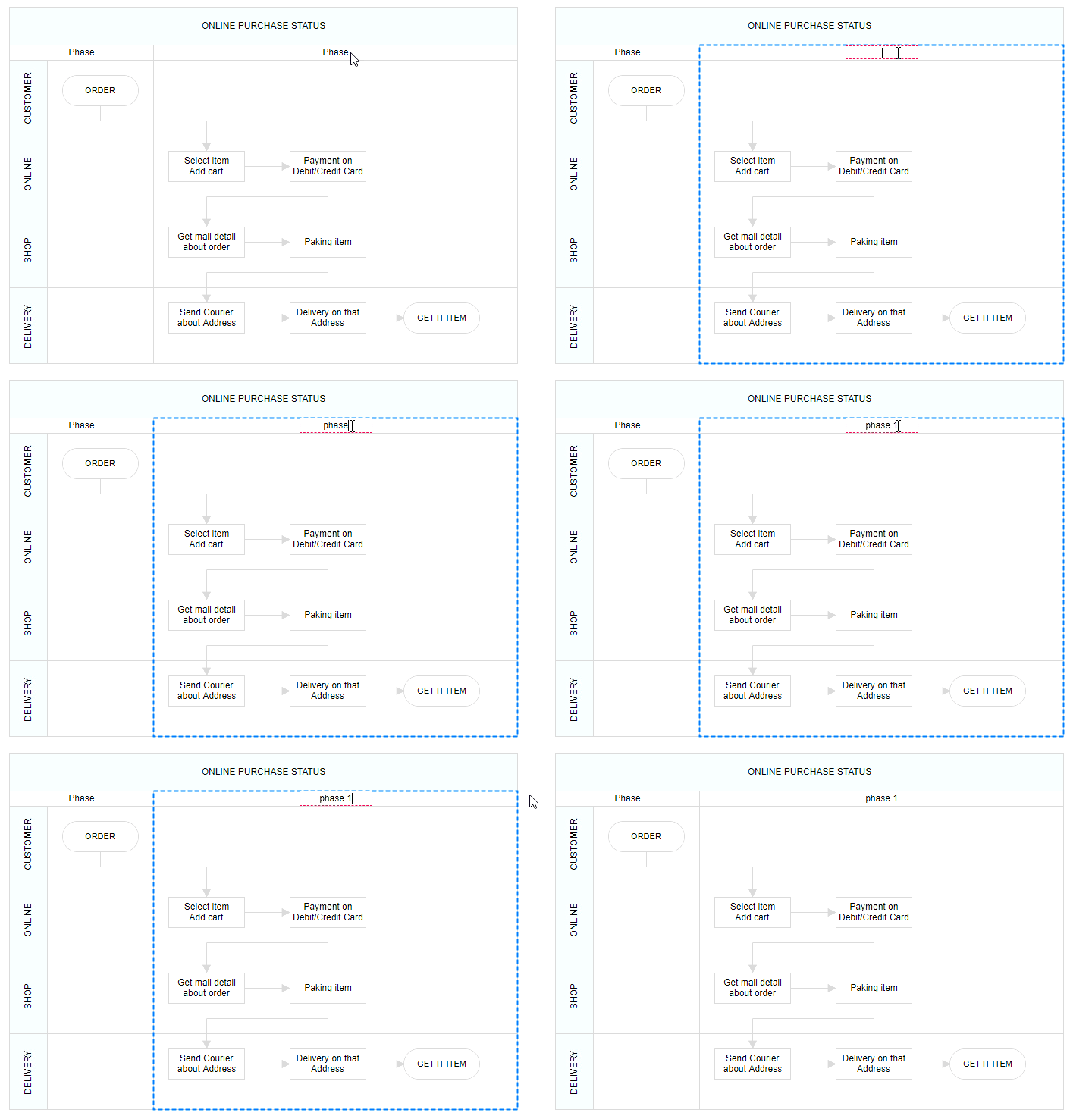
The diagram component provides support for editing phase headers at runtime through double-click interaction. Double-clicking the header label enables inline editing functionality, allowing users to modify phase titles directly within the diagram.
The following image illustrates the phase header editing process: