Lane Management in React Diagram Component
Overview
A lane is a functional unit or responsible department of a business process that helps to map a process within the functional unit or between other functional units. In swimlane diagrams, lanes represent different actors, departments, or systems that participate in the process workflow.
The number of lanes can be added to a swimlane. The lanes are automatically stacked inside the swimlane based on the order they are added.
Create an Empty Lane
- The lane
idis used to define the name of the lane and its further used to find the lane at runtime and do any customization.
The following code example illustrates how to define a swimlane with lane.
import * as React from "react";
import * as ReactDOM from "react-dom";
import { DiagramComponent } from "@syncfusion/ej2-react-diagrams";
// A node is created and stored in nodes array.
let node = [{
        shape: {
            type: 'SwimLane',
            orientation: 'Horizontal',
            header: {
                annotation: { content: 'ONLINE PURCHASE STATUS' },
                height: 50, style: { fontSize: 11 },
            },
            // initialize the lane of swimlane
            lanes: [
                {
                    id: 'stackCanvas1',
                    // set the lane height
                    height: 100,
                },
            ],
            phases: [
                {
                    id: 'phase1', offset: 170,
                    header: { annotation: { content: 'Phase' } }
                },
            ],
            phaseSize: 20,
        },
        offsetX: 300, offsetY: 200,
        height: 200,
        width: 350
    }];
// initialize Diagram component
function App() {
    return (<DiagramComponent id="container" width={'100%'} height={'600px'} nodes={node}/>);
}
const root = ReactDOM.createRoot(document.getElementById('diagram'));
root.render(<App />);
import * as React from "react";
import * as ReactDOM from "react-dom";
import { DiagramComponent, NodeModel } from "@syncfusion/ej2-react-diagrams";
// A node is created and stored in nodes array.
let node: NodeModel[] = [{
shape: {
type: 'SwimLane',
orientation: 'Horizontal',
header: {
annotation: { content: 'ONLINE PURCHASE STATUS' },
height: 50, style: { fontSize: 11 },
},
// initialize the lane of swimlane
lanes: [
{
id: 'stackCanvas1',
// set the lane height
height: 100,
},
],
phases: [
{
id: 'phase1', offset: 170,
header: { annotation: { content: 'Phase' } }
},
],
phaseSize: 20,
},
offsetX: 300, offsetY: 200,
height: 200,
width: 350
}];
// initialize Diagram component
function App() {
return (
<DiagramComponent
id="container"
width={'100%'}
height={'600px'}
nodes={node}
/>
);
}
const root = ReactDOM.createRoot(document.getElementById('diagram'));
root.render(<App />);Create Lane Header
- The
headerproperty of lane allows you to textually describe the lane and to customize the appearance of the description.
The following code example illustrates how to define a lane header.
import * as React from "react";
import * as ReactDOM from "react-dom";
import { DiagramComponent } from "@syncfusion/ej2-react-diagrams";
// A node is created and stored in nodes array.
let node = [{
        shape: {
            type: 'SwimLane',
            orientation: 'Horizontal',
            // Intialize header to swimlane
            header: {
                annotation: { content: 'ONLINE PURCHASE STATUS' },
                height: 50, style: { fontSize: 11 },
            },
            // Intialize lane to swimlane
            lanes: [
                {
                    id: 'stackCanvas1',
                    height: 100,
                    // Intialize header to lane
                    header: {
                        annotation: { content: 'CUSTOMER' }, width: 50,
                        style: { fontSize: 11 }
                    },
                },
            ],
            phases: [
                {
                    id: 'phase1', offset: 170,
                    header: { annotation: { content: 'Phase' } }
                },
            ],
            phaseSize: 20,
        },
        offsetX: 300, offsetY: 200,
        height: 200,
        width: 350
        // Text(label) added to the node
    }];
// initialize Diagram component
function App() {
    return (<DiagramComponent id="container" width={'100%'} height={'600px'} nodes={node}/>);
}
const root = ReactDOM.createRoot(document.getElementById('diagram'));
root.render(<App />);
import * as React from "react";
import * as ReactDOM from "react-dom";
import { DiagramComponent, NodeModel } from "@syncfusion/ej2-react-diagrams";
// A node is created and stored in nodes array.
let node: NodeModel[] = [{
shape: {
type: 'SwimLane',
orientation: 'Horizontal',
// Intialize header to swimlane
header: {
annotation: { content: 'ONLINE PURCHASE STATUS' },
height: 50, style: { fontSize: 11 },
},
// Intialize lane to swimlane
lanes: [
{
id: 'stackCanvas1',
height: 100,
// Intialize header to lane
header: {
annotation: { content: 'CUSTOMER' }, width: 50,
style: { fontSize: 11 }
},
},
],
phases: [
{
id: 'phase1', offset: 170,
header: { annotation: { content: 'Phase' } }
},
],
phaseSize: 20,
},
offsetX: 300, offsetY: 200,
height: 200,
width: 350
// Text(label) added to the node
}];
// initialize Diagram component
function App() {
return (
<DiagramComponent
id="container"
width={'100%'}
height={'600px'}
nodes={node}
/>
);
}
const root = ReactDOM.createRoot(document.getElementById('diagram'));
root.render(<App />);Customizing Lane and Lane Header
-
The size of lane can be controlled by using
widthandheightproperties of lane. -
The appearance of lane can be set by using the
styleproperties. -
The appearance of header annotation can be customized by using the
styleproperty of header annotation.
The following code example illustrates how to customize the lane header.
import * as React from "react";
import * as ReactDOM from "react-dom";
import { DiagramComponent } from "@syncfusion/ej2-react-diagrams";
// A node is created and stored in nodes array.
let node = [{
        shape: {
            type: 'SwimLane',
            orientation: 'Horizontal',
            //Intialize header to swimlane
            header: {
                annotation: { content: 'ONLINE PURCHASE STATUS' },
                height: 50, style: { fontSize: 11 },
            },
            lanes: [
                {
                    id: 'stackCanvas1',
                    height: 100,
                    // customization of lane header
                    header: {
                        annotation: { content: 'Online Consumer',  style: { fill: 'white', color: 'red' } }, width: 30,
                        style: { fontSize: 11, fill: 'red' },
                    },
                    style: { fill: 'violet' },
                },
            ],
            phases: [
                {
                    id: 'phase1', offset: 170,
                    header: { annotation: { content: 'Phase' } }
                },
            ],
            phaseSize: 20,
        },
        offsetX: 300, offsetY: 200,
        height: 200,
        width: 350
    }];
// initialize Diagram component
function App() {
    return (<DiagramComponent id="container" width={'100%'} height={'600px'} nodes={node}/>);
}
const root = ReactDOM.createRoot(document.getElementById('diagram'));
root.render(<App />);
import * as React from "react";
import * as ReactDOM from "react-dom";
import { DiagramComponent, NodeModel } from "@syncfusion/ej2-react-diagrams";
// A node is created and stored in nodes array.
let node: NodeModel[] = [{
shape: {
type: 'SwimLane',
orientation: 'Horizontal',
//Intialize header to swimlane
header: {
annotation: { content: 'ONLINE PURCHASE STATUS' },
height: 50, style: { fontSize: 11 },
},
lanes: [
{
id: 'stackCanvas1',
height: 100,
// customization of lane header
header: {
annotation: { content: 'Online Consumer', style: { fill: 'white', color: 'red' } }, width: 30,
style: { fontSize: 11, fill: 'red' },
},
style: { fill: 'violet' },
},
],
phases: [
{
id: 'phase1', offset: 170,
header: { annotation: { content: 'Phase' } }
},
],
phaseSize: 20,
},
offsetX: 300, offsetY: 200,
height: 200,
width: 350
}];
// initialize Diagram component
function App() {
return (
<DiagramComponent
id="container"
width={'100%'}
height={'600px'}
nodes={node}
/>
);
}
const root = ReactDOM.createRoot(document.getElementById('diagram'));
root.render(<App />);Dynamic Customization of Lane Header
Lane header style and text properties can be customized dynamically. The following code illustrates how to dynamically customize the lane header.
import * as React from "react";
import * as ReactDOM from "react-dom";
import { DiagramComponent } from "@syncfusion/ej2-react-diagrams";
// A node is created and stored in nodes array.
let node = [{
        shape: {
            type: 'SwimLane',
            orientation: 'Horizontal',
            // Intialize header to swimlane
            header: {
                annotation: { content:'ONLINE PURCHASE STATUS' },
                height: 70, style: { fontSize: 11 }
            },
            lanes: [
                {
                    id: 'stackCanvas1',
                    height: 100,
                    // customization of lane header
                    header: {
                        annotation: { content: 'Online Consumer' },
                        width: 30,
                        style: { fontSize: 11, fill: 'red' },
                    },
                },
            ],
            phases: [
                {
                    id: 'phase1', offset: 170,
                    header: { annotation: { content: 'Phase' } }
                },
            ],
            phaseSize: 20,
        },
        offsetX: 300, offsetY: 200,
        height: 200,
        width: 350
    }];
// initialize Diagram component
let diagramInstance;
function App() {
    // Function to update lane header
    const updateLane = () => {
        let swimlane = diagramInstance.nodes[0];
        swimlane.shape.lanes[0].header.style.fill = 'blue';
        swimlane.shape.lanes[0].header.annotation.style.color = 'white';
        diagramInstance.dataBind();
    };
    return (
        <div>
            <button onClick={updateLane}>updateLane</button>
            <DiagramComponent id="container" ref={(diagram) => (diagramInstance = diagram)} width={'100%'} height={'600px'} nodes={node}
        />
        </div>);
}
const root = ReactDOM.createRoot(document.getElementById('diagram'));
root.render(<App />);
import * as React from "react";
import * as ReactDOM from "react-dom";
import { DiagramComponent, NodeModel } from "@syncfusion/ej2-react-diagrams";
// A node is created and stored in nodes array.
let node: NodeModel[] = [{
shape: {
type: 'SwimLane',
orientation: 'Horizontal',
// Intialize header to swimlane
header: {
annotation: { content: 'ONLINE PURCHASE STATUS' },
height: 70, style: { fontSize: 11 },
},
lanes: [
{
id: 'stackCanvas1',
height: 100,
// customization of lane header
header: {
annotation: { content: 'Online Consumer' },
width: 30,
style: { fontSize: 11, fill: 'red' },
},
},
],
phases: [
{
id: 'phase1', offset: 170,
header: { annotation: { content: 'Phase' } }
},
],
phaseSize: 20,
},
offsetX: 300, offsetY: 200,
height: 200,
width: 350
}];
// initialize Diagram component
let diagramInstance: DiagramComponent;
function App() {
// Function to update lane header
const updateLane = () => {
let swimlane: NodeModel = diagramInstance.nodes[0];
swimlane.shape.lanes[0].header.style.fill = 'blue';
swimlane.shape.lanes[0].header.annotation.style.color = 'white';
diagramInstance.dataBind();
};
return (
<div>
<button id="updateLane" onClick={updateLane}>updateLane</button>
<DiagramComponent
id="container"
ref={(diagram) => (diagramInstance = diagram)}
width={'100%'}
height={'600px'}
nodes={node}
/>
</div>
);
}
const root = ReactDOM.createRoot(document.getElementById('diagram'));
root.render(<App />);Add and Remove Lanes at Runtime
Lanes can be added at runtime by using the addLanes method and remove lane at runtime using the removeLane method. The following code illustrates how to dynamically add and remove lane in swimlane.
import * as React from "react";
import * as ReactDOM from "react-dom";
import { DiagramComponent } from "@syncfusion/ej2-react-diagrams";
// A node is created and stored in nodes array.
let node = [{
    id: 'swim1',
    shape: {
      type: 'SwimLane',
      orientation: 'Horizontal',
      //Intialize header to swimlane
      header: {
        annotation: {
          content: 'ONLINE PURCHASE STATUS'
        },
        height: 50,
        style: { fontSize: 11 },
      },
      lanes: [
        {
          id: 'stackCanvas1',
          height: 100,
          // customization of lane header
          header: {
            annotation: { content: 'Online Consumer' },
            style: { fontSize: 11, fill: 'red' },
          },
        },
      ],
      phases: [
        {
          id: 'phase1',
          offset: 170,
          header: { annotation: { content: 'Phase' } },
        },
      ],
      phaseSize: 20,
    },
    offsetX: 300,
    offsetY: 200,
    height: 200,
    width: 350,
}];
// initialize Diagram component
let diagramInstance;
function App() {
    const addLane = () => {
        let swimlane = diagramInstance.getObject('swim1');
        let lane = [
          {
            height: 100,
            style: { fill: 'lightgrey' },
            header: {
              annotation: {
                content: 'New Lane',
                style: { fill: 'brown', color: 'white', fontSize: 15 },
              },
              style: { fill: 'pink' },
            },
          },
        ];
        /**
         * To add lanes
         * parameter 1 - The swimlane to which lanes will be added.
         * parameter 2 - An array of LaneModel objects representing the lanes to be added.
         * paramter 3 - The index at which the lanes should be inserted (optional).
         */
        diagramInstance.addLanes(swimlane, lane, 1);
      };

      const removelane = () => {
        let swimlane = diagramInstance.getObject('swim1');
        //To get last lane in lane collection
        let lane = swimlane.shape.lanes[
          swimlane.shape.lanes.length - 1
        ];
        /**
         * To remove lane
         * parameter 1 - The swimlane to remove the lane from.
         * parameter 2 - The lane to be removed
         */
        diagramInstance.removeLane(swimlane, lane);
      };
    return (
        <div>
            <button id="addLane" onClick={addLane}>addLane</button>
            <button id="removelane" onClick={removelane}>removelane</button>
            <DiagramComponent id="container" ref={(diagram) => (diagramInstance = diagram)} width={'100%'} height={'600px'} nodes={node}/>
        </div>
    );
}
const root = ReactDOM.createRoot(document.getElementById('diagram'));
root.render(<App />);
import * as React from "react";
import * as ReactDOM from "react-dom";
import { DiagramComponent, NodeModel, SwimLaneModel } from "@syncfusion/ej2-react-diagrams";
// A node is created and stored in nodes array.
let node: NodeModel[] = [{
id: 'swim1',
shape: {
type: 'SwimLane',
orientation: 'Horizontal',
//Intialize header to swimlane
header: {
annotation: {
content: 'ONLINE PURCHASE STATUS'
},
height: 50,
style: { fontSize: 11 },
},
lanes: [
{
id: 'stackCanvas1',
height: 100,
// customization of lane header
header: {
annotation: { content: 'Online Consumer' },
style: { fontSize: 11, fill: 'red' },
},
},
],
phases: [
{
id: 'phase1',
offset: 170,
header: { annotation: { content: 'Phase' } },
},
],
phaseSize: 20,
},
offsetX: 300,
offsetY: 200,
height: 200,
width: 350,
}];
// initialize Diagram component
let diagramInstance: DiagramComponent;
function App() {
const addLane = () => {
let swimlane = diagramInstance.getObject('swim1');
let lane = [
{
height: 100,
style: { fill: 'lightgrey' },
header: {
annotation: {
content: 'New Lane',
style: { fill: 'brown', color: 'white', fontSize: 15 },
},
style: { fill: 'pink' },
},
},
];
/**
* To add lanes
* parameter 1 - The swimlane to which lanes will be added.
* parameter 2 - An array of LaneModel objects representing the lanes to be added.
* paramter 3 - The index at which the lanes should be inserted (optional).
*/
diagramInstance.addLanes(swimlane, lane, 1);
};
const removelane = () => {
let swimlane: NodeModel = diagramInstance.getObject('swim1');
//To get last lane in lane collection
let lane = (swimlane.shape as SwimLaneModel).lanes[
(swimlane.shape as SwimLaneModel).lanes.length - 1
];
/**
* To remove lane
* parameter 1 - The swimlane to remove the lane from.
* parameter 2 - The lane to be removed
*/
diagramInstance.removeLane(swimlane, lane);
};
return (
<div>
<button id="addLane" onClick={addLane}>addLane</button>
<button id="removelane" onClick={removelane}>removelane</button>
<DiagramComponent
id="container"
ref={(diagram) => (diagramInstance = diagram)}
width={'100%'}
height={'600px'}
nodes={node}
/>
</div>
);
}
const root = ReactDOM.createRoot(document.getElementById('diagram'));
root.render(<App />);Add Children to Lane
To add nodes to a lane, you should add them to the children collection of the lane.
The following code example illustrates how to add nodes to lane.
import * as React from "react";
import * as ReactDOM from "react-dom";
import { DiagramComponent } from "@syncfusion/ej2-react-diagrams";
// A node is created and stored in nodes array.
let node = [{
        shape: {
            type: 'SwimLane',
            orientation: 'Horizontal',
            // Intialize header to swimlane
            header: {
                annotation: { content: 'ONLINE PURCHASE STATUS' },
                height: 50, style: { fontSize: 11 },
            },
            lanes: [
                {
                    id: 'stackCanvas1',
                    height: 100,
                    header: {
                        annotation: { content: 'CUSTOMER' }, width: 50,
                        style: { fontSize: 11 }
                    },
                    // Set the children of lane
                    children: [
                        {
                            id: 'node1',
                            annotations: [
                                {
                                    content: 'Consumer learns \n of product',
                                    style: { fontSize: 11 }
                                }
                            ],
                            margin: { left: 60, top: 30 },
                            height: 40, width: 100,
                        }, {
                            id: 'node2',
                            shape: { type: 'Flow', shape: 'Decision' },
                            annotations: [
                                {
                                    content: 'Does \n Consumer want \nthe product',
                                    style: { fontSize: 11 }
                                }
                            ],
                            margin: { left: 200, top: 20 },
                            height: 60, width: 120,
                        },
                    ],
                },
            ],
            phases: [
                {
                    id: 'phase1', offset: 170,
                    header: { annotation: { content: 'Phase' } }
                },
            ],
            phaseSize: 20,
        },
        offsetX: 300, offsetY: 200,
        height: 200,
        width: 350
    }];
// initialize Diagram component
function App() {
    return (<DiagramComponent id="container" width={'100%'} height={'600px'} nodes={node}/>);
}
const root = ReactDOM.createRoot(document.getElementById('diagram'));
root.render(<App />);
import * as React from "react";
import * as ReactDOM from "react-dom";
import { DiagramComponent, NodeModel } from "@syncfusion/ej2-react-diagrams";
// A node is created and stored in nodes array.
let node: NodeModel[] = [{
shape: {
type: 'SwimLane',
orientation: 'Horizontal',
// Intialize header to swimlane
header: {
annotation: { content: 'ONLINE PURCHASE STATUS' },
height: 50, style: { fontSize: 11 },
},
lanes: [
{
id: 'stackCanvas1',
height: 100,
header: {
annotation: { content: 'CUSTOMER' }, width: 50,
style: { fontSize: 11 }
},
// Set the children of lane
children: [
{
id: 'node1',
annotations: [
{
content: 'Consumer learns \n of product',
style: { fontSize: 11 }
}
],
margin: { left: 60, top: 30 },
height: 40, width: 100,
}, {
id: 'node2',
shape: { type: 'Flow', shape: 'Decision' },
annotations: [
{
content: 'Does \n Consumer want \nthe product',
style: { fontSize: 11 }
}
],
margin: { left: 200, top: 20 },
height: 60, width: 120,
},
],
},
],
phases: [
{
id: 'phase1', offset: 170,
header: { annotation: { content: 'Phase' } }
},
],
phaseSize: 20,
},
offsetX: 300, offsetY: 200,
height: 200,
width: 350
}];
// initialize Diagram component
function App() {
return (
<DiagramComponent
id="container"
width={'100%'}
height={'600px'}
nodes={node}
/>
);
}
const root = ReactDOM.createRoot(document.getElementById('diagram'));
root.render(<App />);Add Child Dynamically into the Lane.
The child node can be inserted into the lane at runtime by using the addNodetoLane method.
import * as React from "react";
import * as ReactDOM from "react-dom";
import { DiagramComponent } from "@syncfusion/ej2-react-diagrams";
// A node is created and stored in nodes array.
let node = [{
    id: 'swimlane',
    shape: {
      type: 'SwimLane',
      orientation: 'Horizontal',
      //Intialize header to swimlane
      header: {
        annotation: { content: 'ONLINE PURCHASE STATUS' },
        height: 50,
        style: { fontSize: 11 },
      },
      lanes: [
        {
          id: 'stackCanvas1',
          height: 100,
          header: {
            annotation: { content: 'CUSTOMER' },
            width: 50,
            style: { fontSize: 11 },
          },
        },
      ],
      phases: [
        {
          id: 'phase1',
          offset: 150,
          addInfo: { name: 'phase1' },
          header: { annotation: { content: 'Phase' } },
        },
      ],
      phaseSize: 20,
    },
    offsetX: 300,
    offsetY: 200,
    height: 200,
    width: 350,
}];
// initialize Diagram component
let diagramInstance;
function App() {
    const addChildToLane = () => {
        let node = [
            {
              id: 'newNode',
              width: 100,
              height: 50,
            },
          ];
          diagramInstance.addNodeToLane(node , 'swimlane', 'stackCanvas1');
      };


    return (
        <div>
            <button id="addChildToLane" onClick={addChildToLane}>addChildToLane</button>
           <DiagramComponent id="container" ref={(diagram) => (diagramInstance = diagram)} width={'100%'} height={'600px'} nodes={node}/>
        </div>
    );
}
const root = ReactDOM.createRoot(document.getElementById('diagram'));
root.render(<App />);
import * as React from "react";
import * as ReactDOM from "react-dom";
import { DiagramComponent, NodeModel } from "@syncfusion/ej2-react-diagrams";
// A node is created and stored in nodes array.
let node: NodeModel[] = [{
id: 'swimlane',
shape: {
type: 'SwimLane',
orientation: 'Horizontal',
//Intialize header to swimlane
header: {
annotation: { content: 'ONLINE PURCHASE STATUS' },
height: 50,
style: { fontSize: 11 },
},
lanes: [
{
id: 'stackCanvas1',
height: 100,
header: {
annotation: { content: 'CUSTOMER' },
width: 50,
style: { fontSize: 11 },
},
},
],
phases: [
{
id: 'phase1',
offset: 150,
addInfo: { name: 'phase1' },
header: { annotation: { content: 'Phase' } },
},
],
phaseSize: 20,
},
offsetX: 300,
offsetY: 200,
height: 200,
width: 350,
}];
// initialize Diagram component
let diagramInstance: DiagramComponent;
function App() {
const addChildToLane = () => {
var node = [
{
id: 'newNode',
width: 100,
height: 50,
},
];
diagramInstance.addNodeToLane(node as NodeModel, 'swimlane', 'stackCanvas1');
};
return (
<div>
<button id="addChildToLane" onClick={addChildToLane}>addChildToLane</button>
<DiagramComponent
id="container"
ref={(diagram) => (diagramInstance = diagram)}
width={'100%'}
height={'600px'}
nodes={node}
/>
</div>
);
}
const root = ReactDOM.createRoot(document.getElementById('diagram'));
root.render(<App />);Nodes can also be dragged from the palette or diagram and dropped inside the lane.
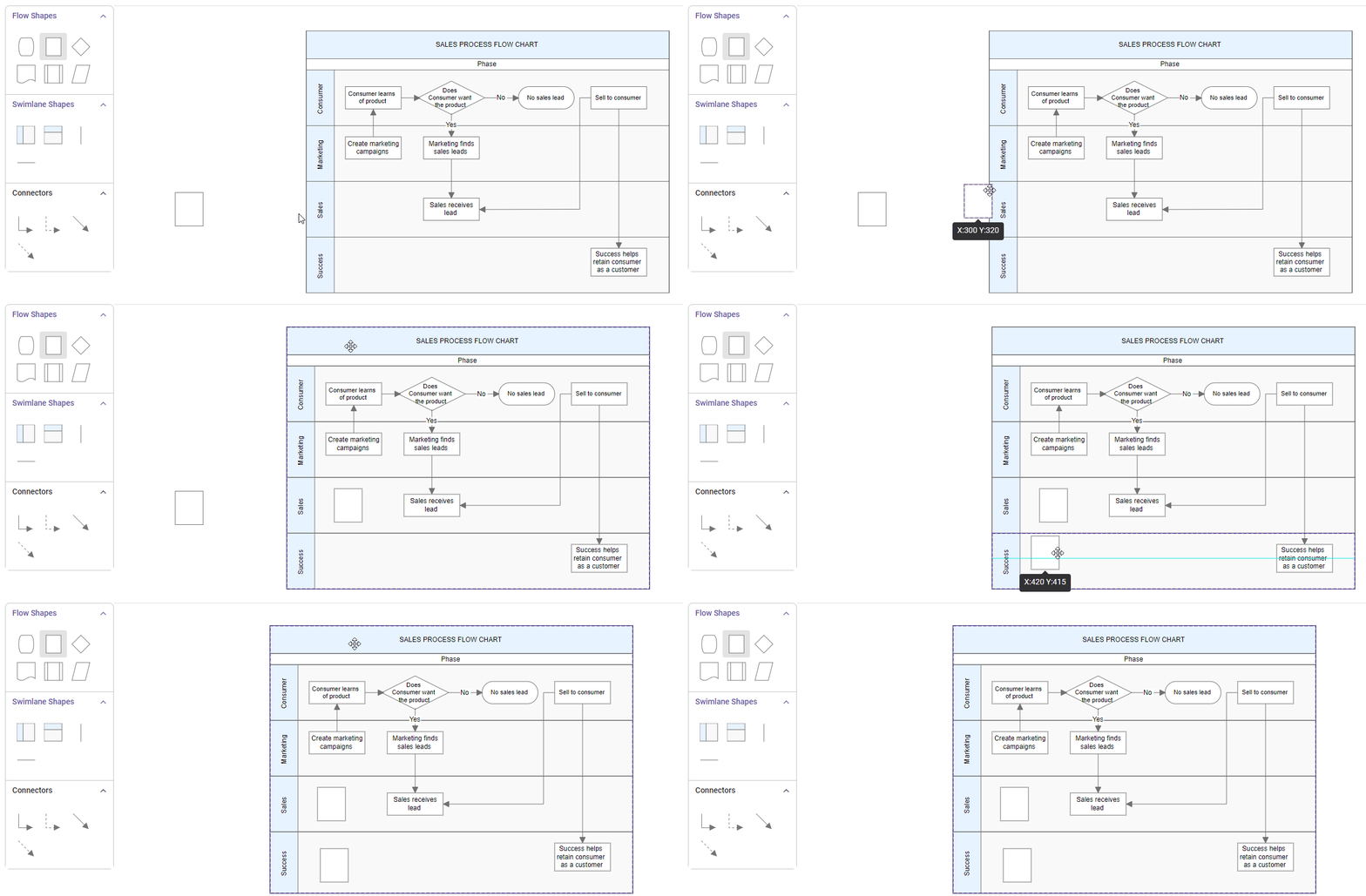
Prevent Child Movement Outside Lane
To prevent child nodes from moving outside their designated lanes, specific constraints can be used. By default, nodes are allowed to move freely. To restrict their movement, the constraints need to be set accordingly.
Here is an example of how to apply these constraints:
import * as React from "react";
import * as ReactDOM from "react-dom";
import { DiagramComponent, NodeConstraints } from "@syncfusion/ej2-react-diagrams";
// A node is created and stored in nodes array.
let node = [{
    id: 'swimlane',
    shape: {
        type: 'SwimLane',
        orientation: 'Horizontal',
        //Intialize header to swimlane
        header: {
          annotation: { content: 'ONLINE PURCHASE STATUS' },
          height: 50,
          style: { fontSize: 11 },
        },
        lanes: [
          {
            id: 'stackCanvas1',
            height: 100,
            header: {
              annotation: { content: 'CUSTOMER' },
              width: 50,
              style: { fontSize: 11 },
            },
            // Set the children of lane
            children: [
              {
                id: 'node1',
                //Preventing node movement outside the lanes
                constraints:
                  NodeConstraints.Default | NodeConstraints.AllowMovingOutsideLane,
                annotations: [
                  {
                    content: 'Node dragding disabled outside lane',
                    style: { fontSize: 11 },
                  },
                ],
                margin: { left: 200, top: 20 },
                height: 60,
                width: 120,
              },
            ],
          },
        ],
        phases: [
          {
            id: 'phase1',
            offset: 170,
            header: { annotation: { content: 'Phase' } },
          },
        ],
        phaseSize: 20,
      },
      offsetX: 300,
      offsetY: 200,
      height: 200,
      width: 350,
}];
// initialize Diagram component
function App() {
    return (
      <DiagramComponent id="container" width={'100%'} height={'600px'} nodes={node}/>
    );
}
const root = ReactDOM.createRoot(document.getElementById('diagram'));
root.render(<App />);
import * as React from "react";
import * as ReactDOM from "react-dom";
import { DiagramComponent, NodeModel, NodeConstraints } from "@syncfusion/ej2-react-diagrams";
// A node is created and stored in nodes array.
let node: NodeModel[] = [{
id: 'swimlane',
shape: {
type: 'SwimLane',
orientation: 'Horizontal',
//Intialize header to swimlane
header: {
annotation: { content: 'ONLINE PURCHASE STATUS' },
height: 50,
style: { fontSize: 11 },
},
lanes: [
{
id: 'stackCanvas1',
height: 100,
header: {
annotation: { content: 'CUSTOMER' },
width: 50,
style: { fontSize: 11 },
},
// Set the children of lane
children: [
{
id: 'node1',
//Preventing node movement outside the lanes
constraints:
NodeConstraints.Default | NodeConstraints.AllowMovingOutsideLane,
annotations: [
{
content: 'Node dragding disabled outside lane',
style: { fontSize: 11 },
},
],
margin: { left: 200, top: 20 },
height: 60,
width: 120,
},
],
},
],
phases: [
{
id: 'phase1',
offset: 170,
header: { annotation: { content: 'Phase' } },
},
],
phaseSize: 20,
},
offsetX: 300,
offsetY: 200,
height: 200,
width: 350,
}];
// initialize Diagram component
function App() {
return (
<DiagramComponent
id="container"
width={'100%'}
height={'600px'}
nodes={node}
/>
);
}
const root = ReactDOM.createRoot(document.getElementById('diagram'));
root.render(<App />);Additional Information Storage
Additional information storage for lanes is similar to nodes. Additional information about a specific lane can be stored by using the addInfo property.
import * as React from "react";
import * as ReactDOM from "react-dom";
import { DiagramComponent } from "@syncfusion/ej2-react-diagrams";
// A node is created and stored in nodes array.
let node = [{
    id: 'swimlane',
    shape: {
        type: 'SwimLane',
        orientation: 'Horizontal',
        //Intialize header to swimlane
        header: {
            annotation: { content: 'ONLINE PURCHASE STATUS' },
            height: 50, style: { fontSize: 11 },
        },
        // initialize the lane of swimlane
        lanes: [
            {
                id: 'stackCanvas1',
                // set the lane height
                height: 100,
                // set the lane info
                addInfo:{name:'lane1'}
            },
        ],
        phases: [
            {
                id: 'phase1', offset: 170,
                header: { annotation: { content: 'Phase' } }
            },
            ],
        phaseSize: 20,
    },
    offsetX: 300, offsetY: 200,
    height: 200,
    width: 350
}];
// initialize Diagram component
function App() {
    return (
      <DiagramComponent id="container" width={'100%'} height={'600px'} nodes={node}/>
    );
}
const root = ReactDOM.createRoot(document.getElementById('diagram'));
root.render(<App />);
import * as React from "react";
import * as ReactDOM from "react-dom";
import { DiagramComponent, NodeModel } from "@syncfusion/ej2-react-diagrams";
// A node is created and stored in nodes array.
let node: NodeModel[] = [{
id: 'swimlane',
shape: {
type: 'SwimLane',
orientation: 'Horizontal',
//Intialize header to swimlane
header: {
annotation: { content: 'ONLINE PURCHASE STATUS' },
height: 50, style: { fontSize: 11 },
},
// initialize the lane of swimlane
lanes: [
{
id: 'stackCanvas1',
// set the lane height
height: 100,
// set the lane info
addInfo:{name:'lane1'}
},
],
phases: [
{
id: 'phase1', offset: 170,
header: { annotation: { content: 'Phase' } }
},
],
phaseSize: 20,
},
offsetX: 300, offsetY: 200,
height: 200,
width: 350
}];
// initialize Diagram component
function App() {
return (
<DiagramComponent
id="container"
width={'100%'}
height={'600px'}
nodes={node}
/>
);
}
const root = ReactDOM.createRoot(document.getElementById('diagram'));
root.render(<App />);Lane Interaction
Resizing Lane
- Lanes can be resized in the bottom and left directions.
- Lanes can be resized by using the resize selector of the lane.
- Once a lane is resized, the swimlane will be resized automatically.
- The lane can be resized either by using the resize selector or the tight bounds of the child object. If the child node moves to the edge of the lane,it can be automatically resized. The following image illustrates how to resize the lane.
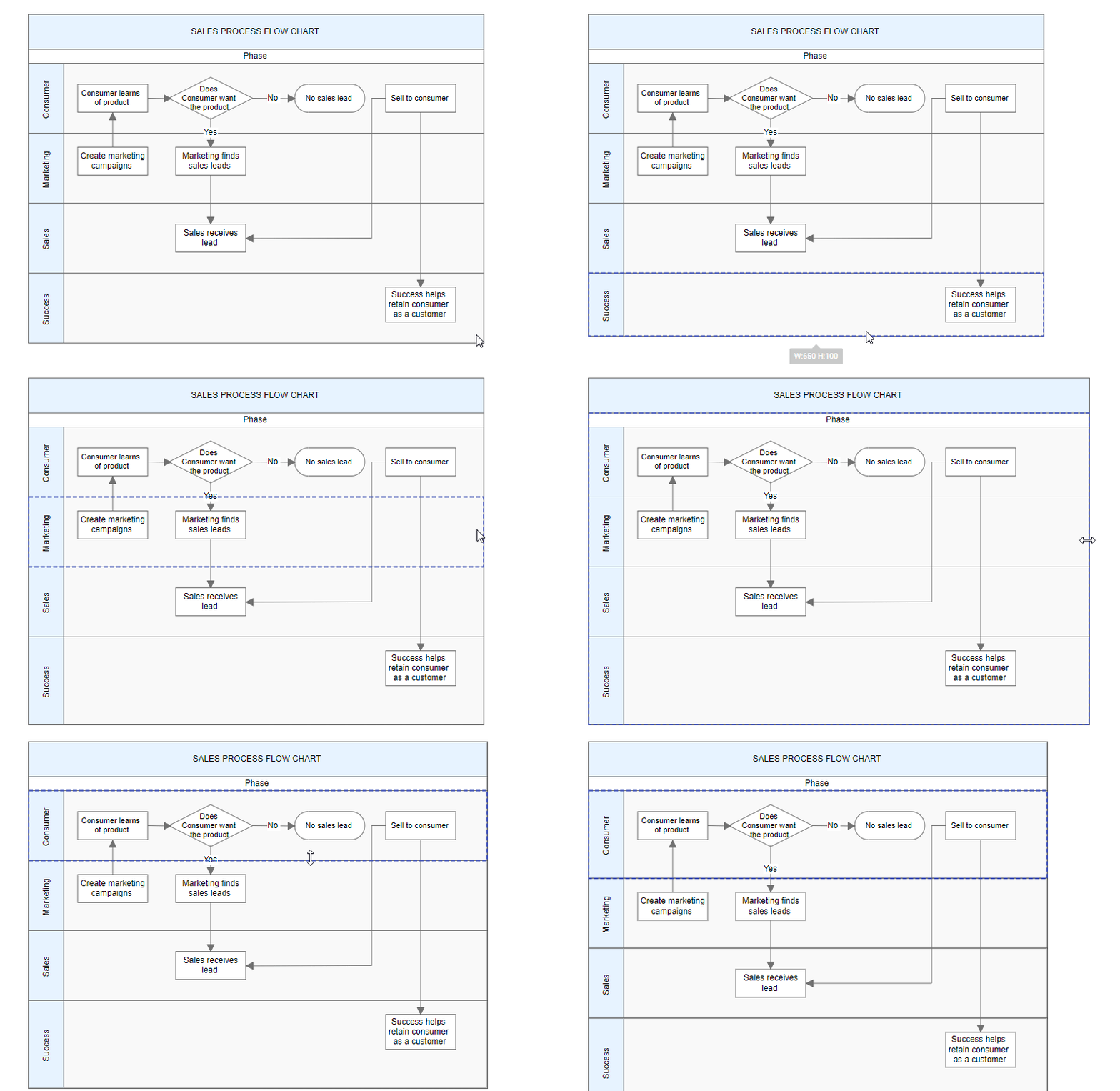
Lane Swapping
- Lanes can be swapped by dragging the lanes over another lane.
- A helper should indicate the insertion point while lane swapping. The following image illustrates how to swap lanes.
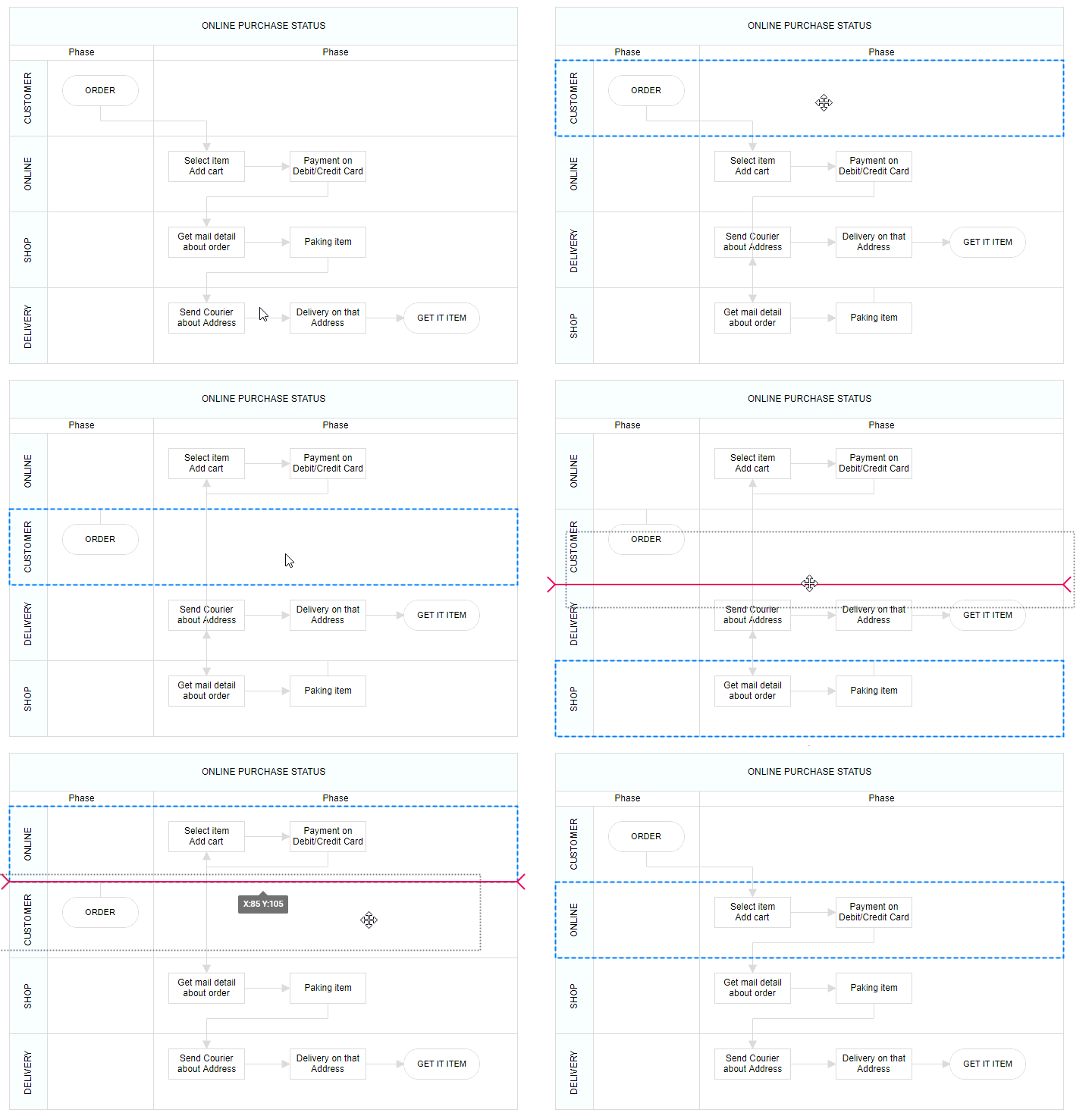
Disable Swimlane Lane Swapping
Swimlane lane swapping can be disabled by using the property called canMove.
The following code illustrates how to disable swimlane lane swapping.
import * as React from "react";
import * as ReactDOM from "react-dom";
import { DiagramComponent } from "@syncfusion/ej2-react-diagrams";
// A node is created and stored in nodes array.
let node = [{
    shape: {
        type: 'SwimLane',
        orientation: 'Horizontal',
        //Intialize header to swimlane
        header: {
          annotation: {
            content: 'ONLINE PURCHASE STATUS',
           },
          height: 50,
          style: { fontSize: 11 },
        },
        lanes: [
          {
            id: 'stackCanvas1',
            height: 100,
            header: {
              annotation: { content: 'CUSTOMER' },
              width: 50,
              style: { fontSize: 11 },
            },
            canMove: false,
            // Set the children of lane
            children: [
              {
                id: 'node1',
                annotations: [
                  {
                    content: 'Consumer learns \n of product',
                    style: { fontSize: 11 },
                  },
                ],
                margin: { left: 60, top: 30 },
                height: 40,
                width: 100,
              },
              {
                id: 'node2',
                shape: { type: 'Flow', shape: 'Decision' },
                annotations: [
                  {
                    content: 'Does \n Consumer want \nthe product',
                    style: { fontSize: 11 },
                  },
                ],
                margin: { left: 200, top: 20 },
                height: 60,
                width: 120,
              },
            ],
          },
        ],
        phases: [
          {
            id: 'phase1',
            offset: 170,
            header: { annotation: { content: 'Phase' } },
          },
        ],
        phaseSize: 20,
      },
      offsetX: 300,
      offsetY: 200,
      height: 200,
      width: 350,
}];
// initialize Diagram component
let diagramInstance;
function App() {
    return (<DiagramComponent id="container" ref={(diagram) => (diagramInstance = diagram)} width={'100%'} height={'600px'} nodes={node} created={() => {
            let lane = [{ id: "lane1", height: 100, canMove: false }];
            diagramInstance.addLanes(diagramInstance.nodes[0], lane, 1);
        }}/>);
}
const root = ReactDOM.createRoot(document.getElementById('diagram'));
root.render(<App />);
import * as React from "react";
import * as ReactDOM from "react-dom";
import { DiagramComponent, NodeModel } from "@syncfusion/ej2-react-diagrams";
// A node is created and stored in nodes array.
let node: NodeModel[] = [{
shape: {
type: 'SwimLane',
orientation: 'Horizontal',
//Intialize header to swimlane
header: {
annotation: {
content: 'ONLINE PURCHASE STATUS',
},
height: 50,
style: { fontSize: 11 },
},
lanes: [
{
id: 'stackCanvas1',
height: 100,
header: {
annotation: { content: 'CUSTOMER' },
width: 50,
style: { fontSize: 11 },
},
canMove: false,
// Set the children of lane
children: [
{
id: 'node1',
annotations: [
{
content: 'Consumer learns \n of product',
style: { fontSize: 11 },
},
],
margin: { left: 60, top: 30 },
height: 40,
width: 100,
},
{
id: 'node2',
shape: { type: 'Flow', shape: 'Decision' },
annotations: [
{
content: 'Does \n Consumer want \nthe product',
style: { fontSize: 11 },
},
],
margin: { left: 200, top: 20 },
height: 60,
width: 120,
},
],
},
],
phases: [
{
id: 'phase1',
offset: 170,
header: { annotation: { content: 'Phase' } },
},
],
phaseSize: 20,
},
offsetX: 300,
offsetY: 200,
height: 200,
width: 350,
}];
// initialize Diagram component
let diagramInstance: DiagramComponent;
function App() {
return (
<DiagramComponent
id="container"
ref={(diagram) => (diagramInstance = diagram)}
width={'100%'}
height={'600px'}
nodes={node}
created = { () => {
let lane = [{id:"lane1",height:100,canMove: false}];
diagramInstance.addLanes(diagramInstance.nodes[0],lane,1);
}}
/>
);
}
const root = ReactDOM.createRoot(document.getElementById('diagram'));
root.render(<App />);Resize Helper
- A special resize helper will be used to resize the lanes.
- The resize cursor will be available on the left and bottom directions only.
- Once the lane is resized, the swimlane will be resized automatically.
Children Interaction in Lanes
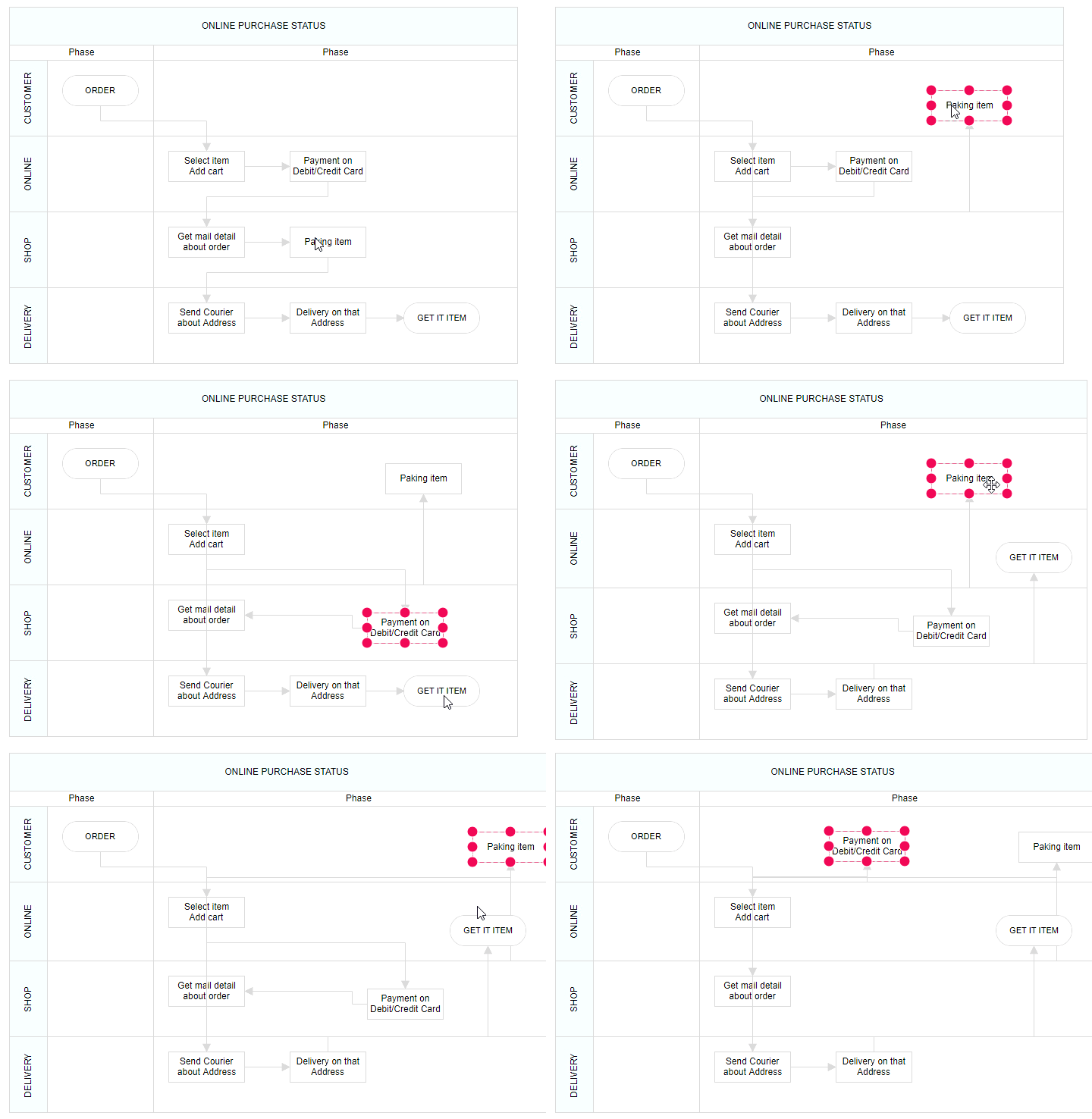
- Child nodes can be resized within swimlanes.
- Child nodes can be dragged within lanes.
- Child nodes can be interchanged from one lane to another lane.
- Child nodes can be dragged and dropped from lanes to the diagram.
- Child nodes can be dragged and dropped from the diagram to lanes.
- Based on the child node interactions, the lane size should be updated.
The following image illustrates children interaction in lanes.
Lane Header Editing
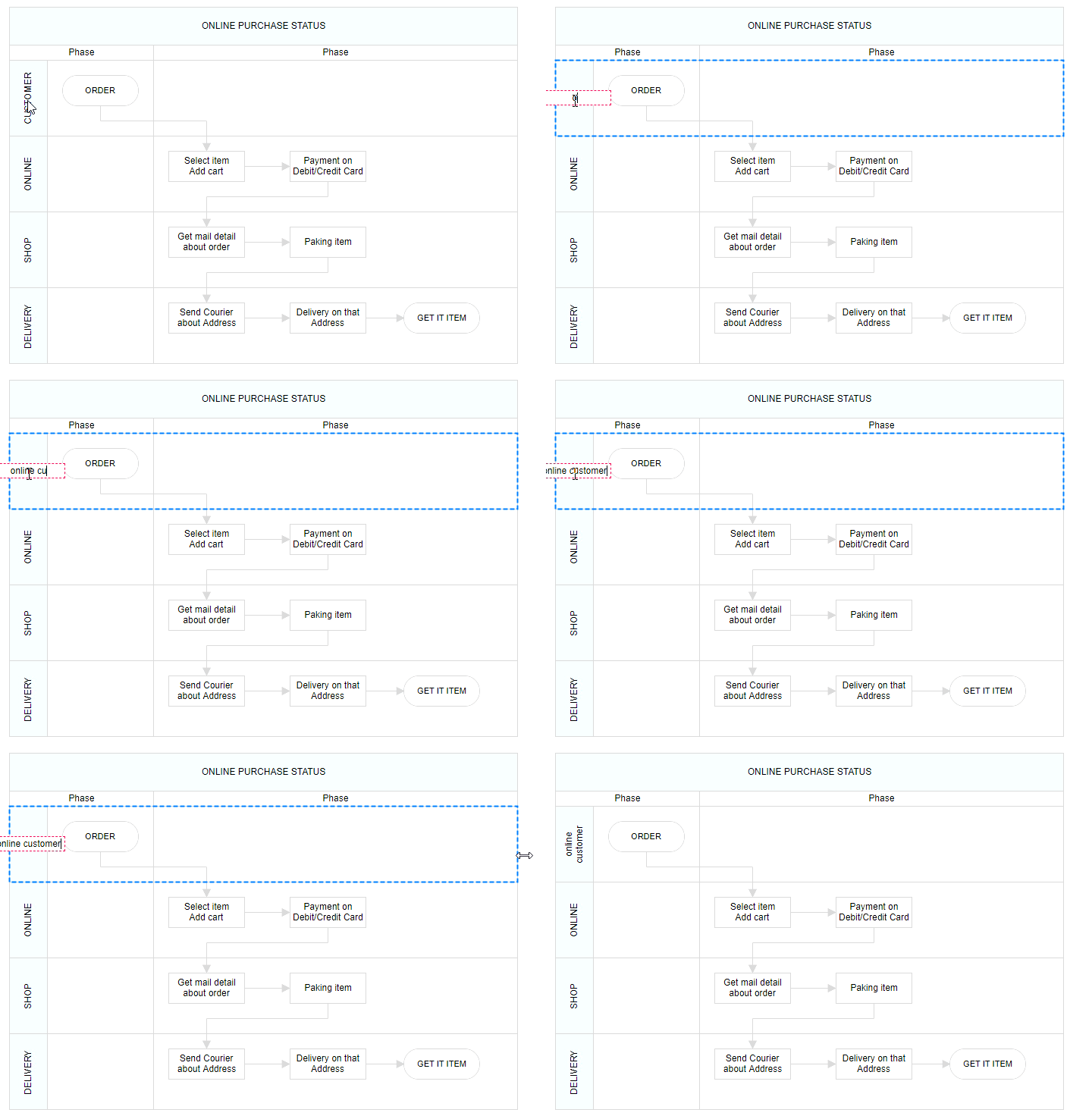
The diagram provides support to edit lane headers at runtime. Header editing is achieved by double-click events. Double-clicking the header label will enable the editing of that header.
The following image illustrates how to edit the lane header.