BPMN Data Object in React Diagram Component
Overview
A BPMN data object represents information that flows through a business process. Data objects can represent data placed into the process, data resulting from the process, data that needs to be collected, or data that must be stored. In business process modeling, data objects help visualize how information moves through different process activities.
Creating Data Objects
To create a BPMN data object in the React Diagram component, set the shape type as data object. The type property determines whether the data object represents input data, output data, or a collection of data items.
Basic Data Object Configuration
The following example demonstrates how to create a basic BPMN data object:.
import * as React from "react";
import * as ReactDOM from "react-dom";
import { DiagramComponent, Inject, BpmnDiagrams } from "@syncfusion/ej2-react-diagrams";
// A node is created and stored in nodes array.
let node = [{
        // Position of the node
        offsetX: 250,
        offsetY: 250,
        // Size of the node
        width: 100,
        height: 100,
        //Sets type as Bpmn and shape as DataObject
        shape: {
            type: 'Bpmn',
            shape: 'DataObject',
            //Sets collection as true and type as Input
            dataObject: {
                collection: true,
                type: 'Input'
            }
        }
    },
    {
        // Position of the node
        offsetX: 450,
        offsetY: 250,
        // Size of the node
        width: 100,
        height: 100,
        //Sets type as Bpmn and shape as DataObject
        shape: {
            type: 'Bpmn',
            shape: 'DataObject',
            //Sets collection as true and type as Input
            dataObject: {
                collection: false,
                type: 'Output'
            }
        }
    },
    {
        // Position of the node
        offsetX: 650,
        offsetY: 250,
        // Size of the node
        width: 100,
        height: 100,
        //Sets type as Bpmn and shape as DataObject
        shape: {
            type: 'Bpmn',
            shape: 'DataObject',
            //Sets collection as true and type as Input
            dataObject: {
                collection: false,
                type: 'None'
            }
        }
    },];
// initialize diagram component
function App() {
    return (<DiagramComponent id="container" width={'100%'} height={'600px'}
    // Add node
    nodes={node}>
      <Inject services={[BpmnDiagrams]}/>
    </DiagramComponent>);
}
const root = ReactDOM.createRoot(document.getElementById('diagram'));
root.render(<App />);
import * as React from "react";
import * as ReactDOM from "react-dom";
import {DiagramComponent,Inject,NodeModel,BpmnDiagrams,} from "@syncfusion/ej2-react-diagrams";
// A node is created and stored in nodes array.
let node:NodeModel[] = [{
// Position of the node
offsetX: 250,
offsetY: 250,
// Size of the node
width: 100,
height: 100,
//Sets type as Bpmn and shape as DataObject
shape: {
type: 'Bpmn',
shape: 'DataObject',
//Sets collection as true and type as Input
dataObject: {
collection: true,
type: 'Input'
}
}
},
{
// Position of the node
offsetX: 450,
offsetY: 250,
// Size of the node
width: 100,
height: 100,
//Sets type as Bpmn and shape as DataObject
shape: {
type: 'Bpmn',
shape: 'DataObject',
//Sets collection as true and type as Input
dataObject: {
collection: false,
type: 'Output'
}
}
},
{
// Position of the node
offsetX: 650,
offsetY: 250,
// Size of the node
width: 100,
height: 100,
//Sets type as Bpmn and shape as DataObject
shape: {
type: 'Bpmn',
shape: 'DataObject',
//Sets collection as true and type as Input
dataObject: {
collection: false,
type: 'None'
}
}
},];
// initialize diagram component
function App() {
return (
<DiagramComponent
id="container"
width={'100%'}
height={'600px'}
// Add node
nodes={node}
>
<Inject services={[BpmnDiagrams]} />
</DiagramComponent>
);
}
const root = ReactDOM.createRoot(document.getElementById('diagram'));
root.render(<App />);Data Object Types
BPMN data objects support three distinct types, each serving different purposes in process modeling:
Collection Data Object
Represents multiple instances of data items. Use this type when the process handles collections of information such as lists, arrays, or multiple documents.
Data Input
Represents data that enters the process from external sources. This type indicates information required by the process to execute successfully.
Data Output
Represents data generated or modified by the process. This type shows information produced as a result of process execution.
The following table shows the visual representation of each data object type:
| Boundary | Image |
|---|---|
| Collection Data Object | 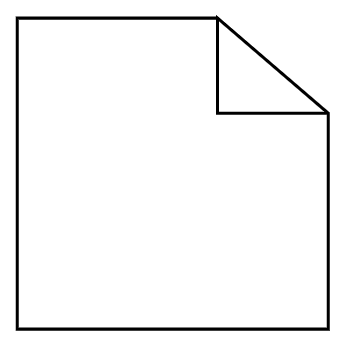 |
| Data Input | 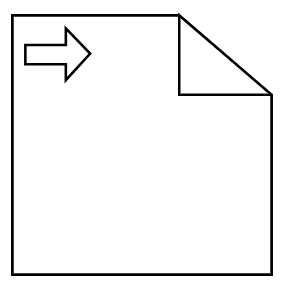 |
| Data Output | 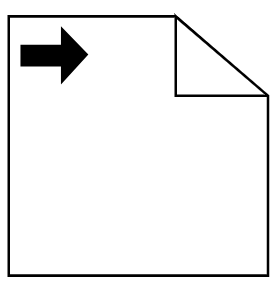 |