Bezier Connector Settings
How to edit bezier segments based on bezier connector settings
The intermediate point of two adjacent bezier segments can be edited interactively based on the segmentEditOrientation property of bezierSettings.
| SegmentEditOrientation value | Description | Output |
|---|---|---|
| Bidirectional | It allows the intermediate points to be dragged in either vertical or horizontal directions. | 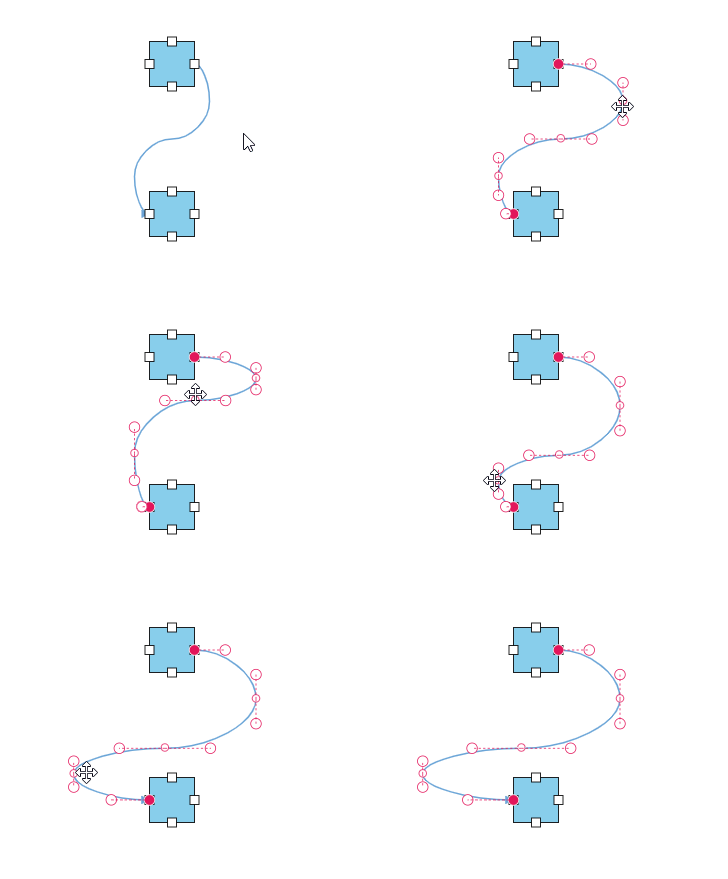 |
| Freeform | It allows the intermediate points to be dragged in any direction. | 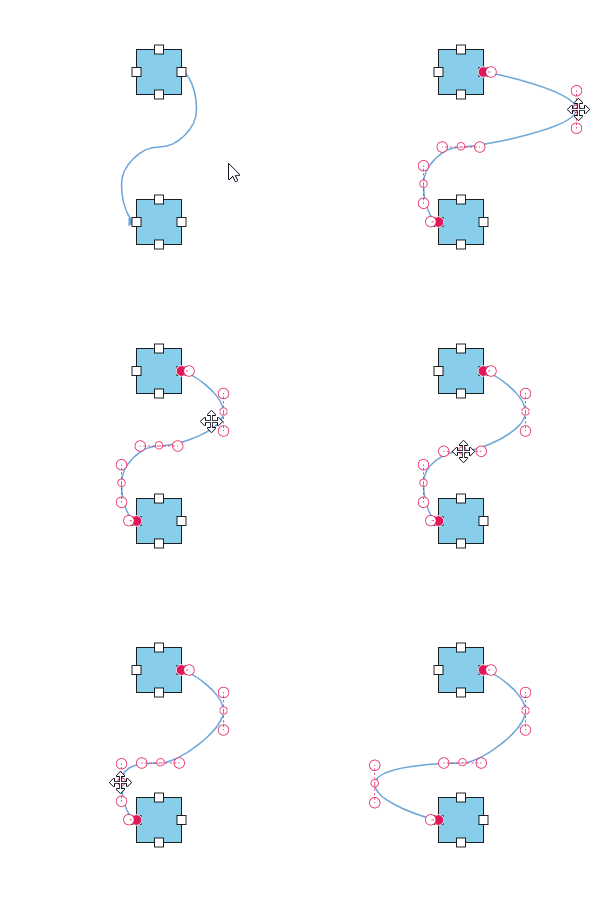 |
The following code illustrates how to interact with Bezier efficiently by using the smoothness and segmentEditOrientation properties of the bezierSettings.
ej.diagrams.Diagram.Inject(ej.diagrams.ConnectorEditing);
var nodes = [
  {
    id: 'Start',
    offsetX: 250,
    offsetY: 150,
    annotations: [{ content: 'Start' }],
    ports: [
      {
        id: 'StartPort',
        visibility: ej.diagrams.PortVisibility.Visible,
        shape: 'Circle',
        offset: { x: 1, y: 0.5 },
        style: { strokeColor: '#366F8C', fill: '#366F8C' },
      },
    ],
  },
  {
    id: 'End',
    offsetX: 250,
    offsetY: 350,
    annotations: [{ content: 'End' }],
    ports: [
      {
        id: 'EndPort',
        visibility: ej.diagrams.PortVisibility.Visible,
        shape: 'Circle',
        offset: { x: 0, y: 0.5 },
        style: { strokeColor: '#366F8C', fill: '#366F8C' },
      },
    ],
  },
];

let connectors = [
  {
    id: 'connector1',
    style: {
      strokeColor: '#6BA5D7',
      fill: '#6BA5D7',
      strokeWidth: 2,
    },
    targetDecorator: { shape: 'None' },
    // ID of the source and target nodes
    sourceID: 'Start',
    sourcePortID: 'StartPort',
    targetID: 'End',
    targetPortID: 'EndPort',
    type: 'Bezier',

    // Configuring settings for bezier interactions
    bezierSettings: {
      smoothness: ej.diagrams.BezierSmoothness.SymmetricAngle,
      segmentEditOrientation: 'FreeForm',
    },
  },
];

var diagram = new ej.diagrams.Diagram({
  width: '100%',
  height: '600px',
  nodes: nodes,
  connectors: connectors,
  // Defines the default properties for the node
  getNodeDefaults: (node) => {
    node.height = 100;
    node.width = 100;
    node.shape = { type: 'Basic', shape: 'Rectangle' };
    node.style.fill = '#6BA5D7';
    node.style.strokeColor = 'white';
    return node;
  },
  getConnectorDefaults: (connector) => {
    connector.constraints =
      ej.diagrams.ConnectorConstraints.Default |
      ej.diagrams.ConnectorConstraints.DragSegmentThumb;
    return connector;
  },
});
diagram.appendTo('#element');
<!DOCTYPE html><html lang="en"><head>
<title>EJ2 Diagram</title>
<meta charset="utf-8">
<meta name="viewport" content="width=device-width, initial-scale=1.0">
<meta name="description" content="Typescript UI Controls">
<meta name="author" content="Syncfusion">
<link href="index.css" rel="stylesheet">
<link href="https://cdn.syncfusion.com/ej2/33.2.3/ej2-base/styles/tailwind3.css" rel="stylesheet">
<link href="https://cdn.syncfusion.com/ej2/33.2.3/ej2-buttons/styles/tailwind3.css" rel="stylesheet">
<link href="https://cdn.syncfusion.com/ej2/33.2.3/ej2-popups/styles/tailwind3.css" rel="stylesheet">
<link href="https://cdn.syncfusion.com/ej2/33.2.3/ej2-splitbuttons/styles/tailwind3.css" rel="stylesheet">
<link href="https://cdn.syncfusion.com/ej2/33.2.3/ej2-diagrams/styles/tailwind3.css" rel="stylesheet">
<link href="https://cdn.syncfusion.com/ej2/33.2.3/ej2-navigations/styles/tailwind3.css" rel="stylesheet">
<script src="https://cdn.syncfusion.com/ej2/33.2.3/dist/ej2.min.js" type="text/javascript"></script>
</head>
<body>
<div id="container">
<div id="element"></div>
</div>
<script>
var ele = document.getElementById('container');
if(ele) {
ele.style.visibility = "visible";
}
</script>
<script src="index.js" type="text/javascript"></script>
</body></html>