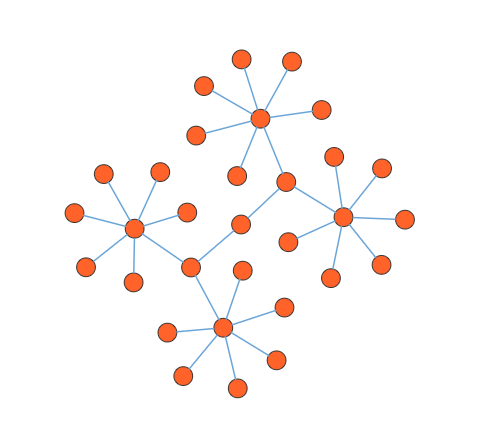
Symmetric layout in JavaScript Diagram control
The symmetric layout has been formed using nodes position by closer together or pushing them further apart. This is repeated iteratively until the system comes to an equilibrium state.
Symmetric layout
The layout’s springLength defined as how long edges should be, ideally. This will be the resting length for the springs. Edge attraction and vertex repulsion forces to be defined by using layout’s springFactor, the more sibling nodes repel each other. The relative positions do not change any more from one iteration to the next. The number of iterations can be specified by using layout’s maxIteration.
The following code illustrates how to arrange the nodes in a radial tree structure.
ej.diagrams.Diagram.Inject(
    ej.diagrams.DataBinding,
    ej.diagrams.HierarchicalTree
  );
  var nodes = [];
  var connectors = [];

  function ConnectNodes(parentNode, childNode) {
    var connector = {
      id: parentNode.id + childNode.id,
      sourceID: parentNode.id,
      targetID: childNode.id,
      targetDecorator: { shape: 'None' },
    };
    return connector;
  }

  function GetRectangle(name) {
    var shape = { type: 'Basic', shape: 'Ellipse' };
    var node = {
      id: name,
      height: 25,
      width: 25,
      style: { fill: '#ff6329' },
      shape: shape,
    };
    return node;
  }

  function populateNodes() {
    var parentRect = GetRectangle('p');
    nodes.push(parentRect);
    for (var i = 0; i < 2; i++) {
      var childRect_i = GetRectangle('c' + i);
      nodes.push(childRect_i);
      for (var j = 0; j < 2; j++) {
        var childRect_j = GetRectangle('c' + i + j);
        nodes.push(childRect_j);
        for (var k = 0; k < 6; k++) {
          var childRect_k = GetRectangle('c' + i + j + k);
          nodes.push(childRect_k);
          connectors.push(ConnectNodes(childRect_j, childRect_k));
        }
        connectors.push(ConnectNodes(childRect_i, childRect_j));
      }
      connectors.push(ConnectNodes(parentRect, childRect_i));
    }
    return nodes;
  }

  populateNodes();
  var diagram = new ej.diagrams.Diagram({
    width: '100%',
    height: '550px',
    layout: {
      type: 'SymmetricalLayout',
      springLength: 80,
      springFactor: 0.8,
      maxIteration: 500,
      margin: { left: 20, top: 20 },
    },
    nodes: nodes,
    connectors: connectors,
  });
  diagram.appendTo('#element');
<!DOCTYPE html><html lang="en"><head>
<title>EJ2 Diagram</title>
<meta charset="utf-8">
<meta name="viewport" content="width=device-width, initial-scale=1.0">
<meta name="description" content="Typescript UI Controls">
<meta name="author" content="Syncfusion">
<link href="index.css" rel="stylesheet">
<link href="https://cdn.syncfusion.com/ej2/33.2.3/ej2-base/styles/tailwind3.css" rel="stylesheet">
<link href="https://cdn.syncfusion.com/ej2/33.2.3/ej2-buttons/styles/tailwind3.css" rel="stylesheet">
<link href="https://cdn.syncfusion.com/ej2/33.2.3/ej2-popups/styles/tailwind3.css" rel="stylesheet">
<link href="https://cdn.syncfusion.com/ej2/33.2.3/ej2-splitbuttons/styles/tailwind3.css" rel="stylesheet">
<link href="https://cdn.syncfusion.com/ej2/33.2.3/ej2-diagrams/styles/tailwind3.css" rel="stylesheet">
<link href="https://cdn.syncfusion.com/ej2/33.2.3/ej2-navigations/styles/tailwind3.css" rel="stylesheet">
<script src="https://cdn.syncfusion.com/ej2/33.2.3/dist/ej2.min.js" type="text/javascript"></script>
</head>
<body>
<div id="container">
<div id="element"></div>
</div>
<script>
var ele = document.getElementById('container');
if(ele) {
ele.style.visibility = "visible";
}
</script>
<script src="index.js" type="text/javascript"></script>
</body></html>NOTE
If you want to use symmetric layout in diagram, you need to inject SymmetricLayout in the diagram.