Data Label in WPF Sunburst Chart (SfSunburstChart)
Sunburst data labels are used to display the data related to the segment. They help to provide information about the data points to the users.
You can enable or disable the data labels by using the ShowLabel property as shown in the below code:
<sunburst:SfSunburstChart.DataLabelInfo>
    <sunburst:SunburstDataLabelInfo ShowLabel="True"/>
</sunburst:SfSunburstChart.DataLabelInfo>
SunburstDataLabelInfo dataLabelInfo = new SunburstDataLabelInfo()
{
ShowLabel = true
};
chart.DataLabelInfo = dataLabelInfo;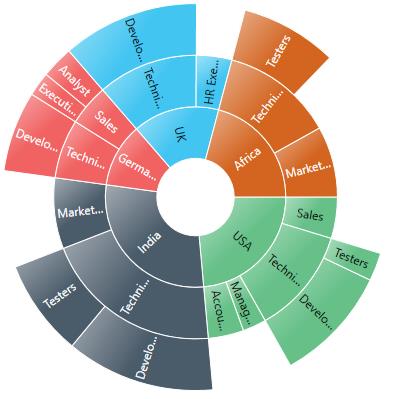
NOTE
By default, the ShowLabel property value is True.
LabelOverflowMode
When you represent huge data with data labels, they may intersect each other. You can avoid this using the LabelOverflowMode property.
The following modes are used to avoid the overlapping:
- Trim – To trim the large data labels.
- Hide – To hide the overlapped data labels.
The following code shows how to set Hide and Trim modes:
Hide
<sunburst:SfSunburstChart.DataLabelInfo>
    <sunburst:SunburstDataLabelInfo ShowLabel="True" LabelOverflowMode="Hide"/>
</sunburst:SfSunburstChart.DataLabelInfo>
SunburstDataLabelInfo dataLabelInfo = new SunburstDataLabelInfo()
{
ShowLabel = true,
LabelOverflowMode = LabelOverflowMode.Hide
};
chart.DataLabelInfo = dataLabelInfo;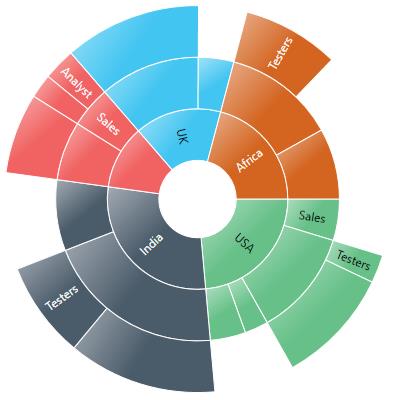
Trim
<sunburst:SfSunburstChart.DataLabelInfo>
    <sunburst:SunburstDataLabelInfo ShowLabel="True" LabelOverflowMode="Trim"/>
</sunburst:SfSunburstChart.DataLabelInfo>
SunburstDataLabelInfo dataLabelInfo = new SunburstDataLabelInfo()
{
ShowLabel = true,
LabelOverflowMode = LabelOverflowMode.Trim
};
chart.DataLabelInfo = dataLabelInfo;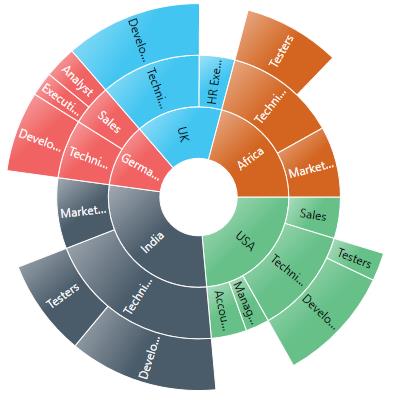
LabelRotationMode
You can rotate the data label by using the LabelRotationMode property.
The following code shows how to set LabelRotationMode as Normal and Angle:
<sunburst:SfSunburstChart.DataLabelInfo>
    <sunburst:SunburstDataLabelInfo ShowLabel="True" LabelRotationMode="Normal"/>
</sunburst:SfSunburstChart.DataLabelInfo>
SunburstDataLabelInfo dataLabelInfo = new SunburstDataLabelInfo()
{
ShowLabel = true,
LabelRotationMode = LabelRotationMode.Normal
};
chart.DataLabelInfo = dataLabelInfo;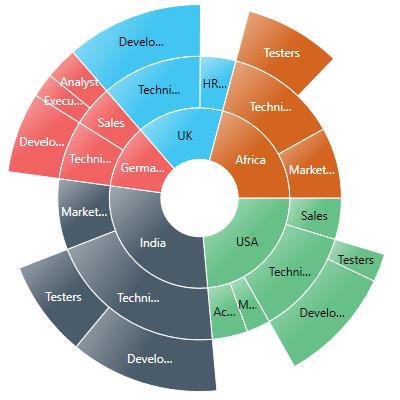
NOTE
By default, LabelRotationMode value is Angle.
Font Customization
Data label fonts can be customized using the FontFamily, FontSize, FontStyle, and FontWeight properties.
The font color of the label can be customized using the Foreground property.
<sunburst:SfSunburstChart ItemsSource="{Binding Data}" ValueMemberPath="EmployeesCount">
    <sunburst:SfSunburstChart.Levels>
        <sunburst:SunburstHierarchicalLevel GroupMemberPath="Country"/>
        <sunburst:SunburstHierarchicalLevel GroupMemberPath="JobDescription"/>
        <sunburst:SunburstHierarchicalLevel GroupMemberPath="JobGroup"/>
        <sunburst:SunburstHierarchicalLevel GroupMemberPath="JobRole"/>
    </sunburst:SfSunburstChart.Levels>

    <sunburst:SfSunburstChart.DataLabelInfo>
        <sunburst:SunburstDataLabelInfo
            ShowLabel="True"
            FontSize="12"
            FontFamily="Comic Sans MS"
            FontStyle="Italic"
            FontWeight="SemiBold"
            Foreground="White"/>
    </sunburst:SfSunburstChart.DataLabelInfo>
</sunburst:SfSunburstChart>
SfSunburstChart sunburst = new SfSunburstChart();
sunburst.SetBinding(SfSunburstChart.ItemsSourceProperty, "Data");
sunburst.ValueMemberPath = "EmployeesCount";
sunburst.Levels.Add(new SunburstHierarchicalLevel()
{
GroupMemberPath = "Country"
});
sunburst.Levels.Add(new SunburstHierarchicalLevel()
{
GroupMemberPath = "JobDescription"
});
sunburst.Levels.Add(new SunburstHierarchicalLevel()
{
GroupMemberPath = "JobGroup"
});
sunburst.Levels.Add(new SunburstHierarchicalLevel()
{
GroupMemberPath = "JobRole"
});
SunburstDataLabelInfo info = new SunburstDataLabelInfo();
info.FontSize = 12;
info.FontStyle = FontStyles.Italic;
info.FontWeight = FontWeights.SemiBold;
info.Foreground = new SolidColorBrush(Colors.White);
info.FontFamily = new FontFamily("Comic Sans MS");
sunburst.DataLabelInfo = info;
grid.Children.Add(sunburst);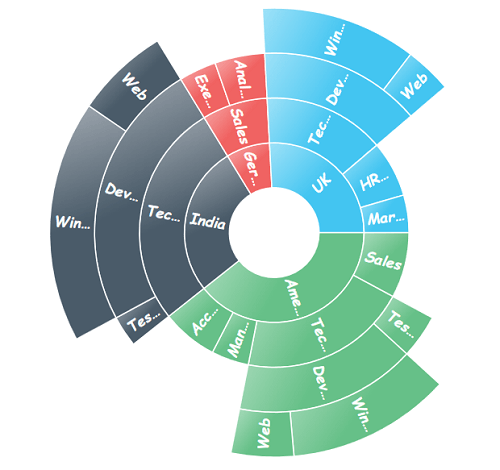
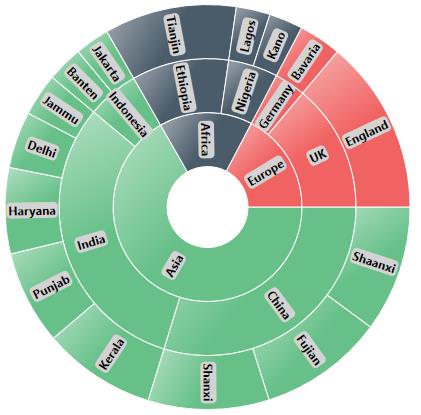
Customizing the Data Labels
You can customize the default appearance or display information about the data point using the LabelTemplate property:
<sunburst:SunburstDataLabelInfo.LabelTemplate>
    <DataTemplate>
        <Border Background="LightGray" CornerRadius="4">
            <TextBlock
                Text="{Binding Category}"
                Margin="2,0,2,0"
                FontWeight="Bold"/>
        </Border>
    </DataTemplate>
</sunburst:SunburstDataLabelInfo.LabelTemplate>