Ticks in WPF Bullet Graph (SfBulletGraph)
The quantitative scale is displayed with two types of ticks:
- Major ticks: the primary scale indicators.
- Minor ticks: the secondary scale indicators that fall in between the major ticks.
Customizing Ticks
The Interval property is used to calculate the major tick count of a SfBulletGraph. Like ticks, small ticks are calculated using the MinorTicksPerInterval property.
The stroke of the major and minor ticks is customized by setting the MajorTickStroke and MinorTickStroke properties. The size can be modified by using the MajorTickSize and MinorTickSize properties. By setting the MajorTickStrokeThickness and MinorTickStrokeThickness properties, the stroke’s thickness can be customized.
<syncfusion:SfBulletGraph  Interval="2" Minimum="0" Maximum="10"
                                MinorTicksPerInterval="3"
                                MajorTickSize="15"
                                MinorTickSize="10"
                                MajorTickStroke="Red"
                                MinorTickStroke="Green">
    </syncfusion:SfBulletGraph>
SfBulletGraph bulletgraph = new SfBulletGraph();
bulletgraph.Interval = 2;
bulletgraph.Minimum = 0;
bulletgraph.Maximum = 10;
bulletgraph.MinorTicksPerInterval = 3;
bulletgraph.MajorTickSize = 15;
bulletgraph.MinorTickSize = 10;
bulletgraph.MajorTickStroke = new SolidColorBrush(Colors.Red);
bulletgraph.MinorTickStroke = new SolidColorBrush(Colors.Green);
grid.Children.Add(bulletgraph);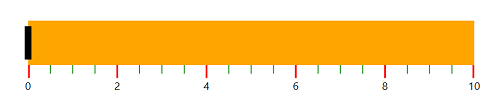
TickPosition, below, or across the ranges of the quantitative scale using the TickPosition property, which supports the following options:
- Below (Default)
- Above
-
Cross
<syncfusion:SfBulletGraph TickPosition="Cross">
    </syncfusion:SfBulletGraph>
SfBulletGraph bulletgraph = new SfBulletGraph(); bulletgraph.TickPosition = BulletGraphTicksPosition.Cross; grid.Children.Add(bulletgraph);
