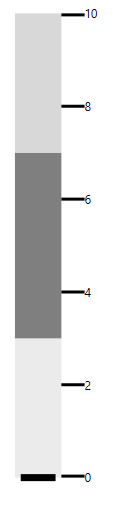
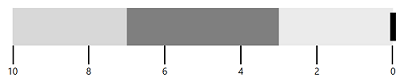
Flow Direction in WPF Bullet Graph (SfBulletGraph)
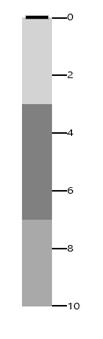
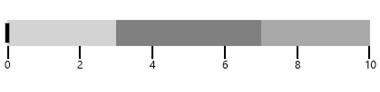
By default, the flow direction of SfBulletGraph is Left to Right. It can be customized by using the FlowDirection property.
Note: When the orientation of
SfBulletGraphis Horizontal, the default flow direction is left to right, and when the orientation is Vertical, the default flow direction is top to bottom.
<syncfusion:SfBulletGraph Orientation="Horizontal" Minimum="0" Maximum="10" Interval="2" FlowDirection="LeftToRight">
        <syncfusion:SfBulletGraph.QualitativeRanges>
            <syncfusion:QualitativeRange RangeEnd="3" RangeStroke="#EBEBEB"></syncfusion:QualitativeRange>
            <syncfusion:QualitativeRange RangeEnd="7" RangeStroke="#7F7F7F"></syncfusion:QualitativeRange>
            <syncfusion:QualitativeRange RangeEnd="10" RangeStroke="#D8D8D8"></syncfusion:QualitativeRange>
        </syncfusion:SfBulletGraph.QualitativeRanges>
    </syncfusion:SfBulletGraph>
SfBulletGraph bulletgraph = new SfBulletGraph();
bulletgraph.Minimum = 0;
bulletgraph.Maximum = 10;
bulletgraph.Interval = 2;
bulletgraph.FlowDirection = FlowDirection.LeftToRight;
bulletgraph.Orientation = Orientation.Horizontal;
QualitativeRange range1 = new QualitativeRange();
range1.RangeEnd = 3;
range1.RangeStroke = (Brush)new BrushConverter().ConvertFrom("#EBEBEB");
QualitativeRange range2 = new QualitativeRange();
range2.RangeEnd = 7;
range2.RangeStroke = (Brush)new BrushConverter().ConvertFrom("#7F7F7F");
QualitativeRange range3 = new QualitativeRange();
range3.RangeEnd = 10;
range3.RangeStroke = (Brush)new BrushConverter().ConvertFrom("#D8D8D8");
bulletgraph.QualitativeRanges.Add(range1);
bulletgraph.QualitativeRanges.Add(range2);
bulletgraph.QualitativeRanges.Add(range3);
grid.Children.Add(bulletgraph);Refer to the following screenshot for flow direction LeftToRight.
<syncfusion:SfBulletGraph Orientation="Horizontal" Minimum="0" Maximum="10" Interval="2" FlowDirection="RightToLeft">
        <syncfusion:SfBulletGraph.QualitativeRanges>
            <syncfusion:QualitativeRange RangeEnd="3" RangeStroke="#EBEBEB"></syncfusion:QualitativeRange>
            <syncfusion:QualitativeRange RangeEnd="7" RangeStroke="#7F7F7F"></syncfusion:QualitativeRange>
            <syncfusion:QualitativeRange RangeEnd="10" RangeStroke="#D8D8D8"></syncfusion:QualitativeRange>
        </syncfusion:SfBulletGraph.QualitativeRanges>
    </syncfusion:SfBulletGraph>
SfBulletGraph bulletgraph = new SfBulletGraph();
bulletgraph.Minimum = 0;
bulletgraph.Maximum = 10;
bulletgraph.Interval = 2;
bulletgraph.FlowDirection = FlowDirection.RightToLeft;
bulletgraph.Orientation = Orientation.Horizontal;
QualitativeRange range1 = new QualitativeRange();
range1.RangeEnd = 3;
range1.RangeStroke = (Brush)new BrushConverter().ConvertFrom("#EBEBEB");
QualitativeRange range2 = new QualitativeRange();
range2.RangeEnd = 7;
range2.RangeStroke = (Brush)new BrushConverter().ConvertFrom("#7F7F7F");
QualitativeRange range3 = new QualitativeRange();
range3.RangeEnd = 10;
range3.RangeStroke = (Brush)new BrushConverter().ConvertFrom("#D8D8D8");
bulletgraph.QualitativeRanges.Add(range1);
bulletgraph.QualitativeRanges.Add(range2);
bulletgraph.QualitativeRanges.Add(range3);
grid.Children.Add(bulletgraph);Refer to the following screenshot for flow direction RightToLeft.