Caption in WPF Bullet Graph (SfBulletGraph)
The Caption property of the bullet graph is used to specify a unique label describing the value represented in the bullet graph.
<syncfusion:SfBulletGraph>
            <syncfusion:SfBulletGraph.Caption>
                <StackPanel Margin="0,0,10,0">
                    <TextBlock Text="Revenue YTD" Foreground="Black"
                               FontSize="13" HorizontalAlignment="Center"/>
                    <TextBlock Text="$ in Thousands" Foreground="Black"
                               FontSize="13" HorizontalAlignment="Center"/>
                </StackPanel>
            </syncfusion:SfBulletGraph.Caption>
        </syncfusion:SfBulletGraph>
SfBulletGraph bulletgraph = new SfBulletGraph();
TextBlock textBlock = new TextBlock() { Text = "Revenue YTD" };
TextBlock textBlock1 = new TextBlock() { Text = "$ in Thousands" };
StackPanel stackPanel = new StackPanel();
stackPanel.Children.Add(textBlock);
stackPanel.Children.Add(textBlock1);
bulletgraph.Caption = stackPanel;
grid.Children.Add(bulletgraph);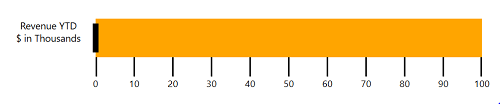
Caption Position
The caption in the bullet graph can be placed at the start or end of the quantitative scale using the CaptionPosition property, which supports the following options:
- Near (Default)
-
Far
<syncfusion:SfBulletGraph CaptionPosition="Far">
            <syncfusion:SfBulletGraph.Caption>
                <StackPanel Margin="0,0,10,0">
                    <TextBlock Text="Revenue YTD" Foreground="Black"
                               FontSize="13" HorizontalAlignment="Center"/>
                    <TextBlock Text="$ in Thousands" Foreground="Black"
                               FontSize="13" HorizontalAlignment="Center"/>
                </StackPanel>
            </syncfusion:SfBulletGraph.Caption>
        </syncfusion:SfBulletGraph>
SfBulletGraph bulletgraph = new SfBulletGraph(); bulletgraph.CaptionPosition = BulletGraphCaptionPosition.Far; TextBlock textBlock = new TextBlock() { Text = "Revenue YTD" }; TextBlock textBlock1 = new TextBlock() { Text = "$ in Thousands" }; StackPanel stackPanel = new StackPanel(); stackPanel.Children.Add(textBlock); stackPanel.Children.Add(textBlock1); bulletgraph.Caption = stackPanel; grid.Children.Add(bulletgraph);
