TreeMap Layout in Windows Forms TreeMap
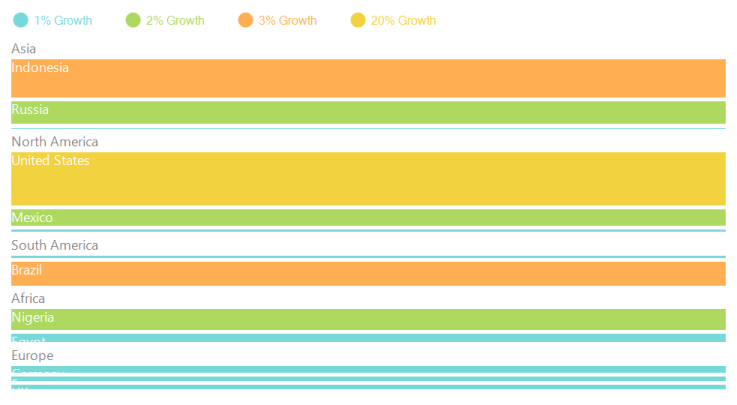
The ItemsLayoutMode of the tree map control specifies the mode in which the items should be laid out. This layout will be applied for all the tree map levels. It includes four different types of layout.
Squarified layout
Code sample
TreeMap TreeMap1 = new TreeMap();

PopulationViewModel data = new PopulationViewModel();

TreeMap1.ItemsSource = data.PopulationDetails;
TreeMap1.WeightValuePath = "Population";
TreeMap1.ColorValuePath = "Growth";
TreeMap1.ItemsLayoutMode = Syncfusion.Windows.Forms.TreeMap.ItemsLayoutModes.Squarified;

TreeMapFlatLevel treeMapFlatLevel1 = new TreeMapFlatLevel();
treeMapFlatLevel1.GroupPath = "Continent";
treeMapFlatLevel1.ShowLabels = true;
TreeMap1.Levels.Add(treeMapFlatLevel1);

TreeMapFlatLevel treeMapFlatLevel2 = new TreeMapFlatLevel();
treeMapFlatLevel2.GroupPath = "Country";
treeMapFlatLevel2.ShowLabels = true;
treeMapFlatLevel2.HeaderHeight = 25;
TreeMap1.Levels.Add(treeMapFlatLevel2);
Dim TreeMap1 As New TreeMap()
Dim data As New PopulationViewModel()
TreeMap1.ItemsSource = data.PopulationDetails
TreeMap1.WeightValuePath = "Population"
TreeMap1.ColorValuePath = "Growth"
TreeMap1.ItemsLayoutMode = Syncfusion.Windows.Forms.TreeMap.ItemsLayoutModes.Squarified
Dim treeMapFlatLevel1 As New TreeMapFlatLevel()
treeMapFlatLevel1.GroupPath = "Continent"
treeMapFlatLevel1.ShowLabels = True
TreeMap1.Levels.Add(treeMapFlatLevel1)
Dim treeMapFlatLevel2 As New TreeMapFlatLevel()
treeMapFlatLevel2.GroupPath = "Country"
treeMapFlatLevel2.ShowLabels = True
treeMapFlatLevel2.HeaderHeight = 25
TreeMap1.Levels.Add(treeMapFlatLevel2)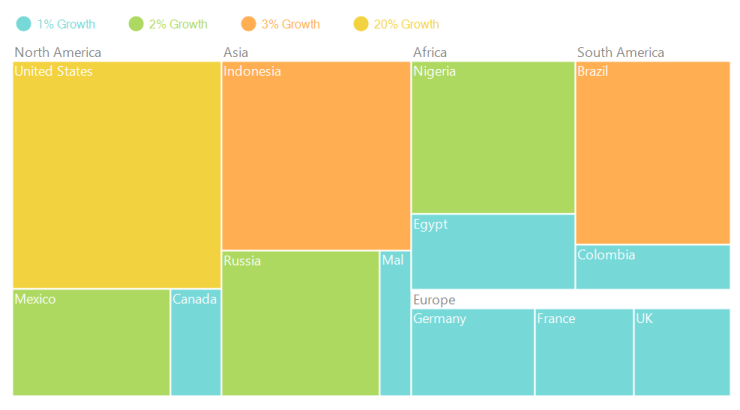
SliceAndDiceAuto layout
Code sample
TreeMap TreeMap1 = new TreeMap();

PopulationViewModel data = new PopulationViewModel();

TreeMap1.ItemsSource = data.PopulationDetails;
TreeMap1.WeightValuePath = "Population";
TreeMap1.ColorValuePath = "Growth";
TreeMap1.ItemsLayoutMode = Syncfusion.Windows.Forms.TreeMap.ItemsLayoutModes.SliceAndDiceAuto;

TreeMapFlatLevel treeMapFlatLevel1 = new TreeMapFlatLevel();
treeMapFlatLevel1.GroupPath = "Continent";
treeMapFlatLevel1.ShowLabels = true;
TreeMap1.Levels.Add(treeMapFlatLevel1);

TreeMapFlatLevel treeMapFlatLevel2 = new TreeMapFlatLevel();
treeMapFlatLevel2.GroupPath = "Country";
treeMapFlatLevel2.ShowLabels = true;
treeMapFlatLevel2.HeaderHeight = 25;
TreeMap1.Levels.Add(treeMapFlatLevel2);
Dim TreeMap1 As New TreeMap()
Dim data As New PopulationViewModel()
TreeMap1.ItemsSource = data.PopulationDetails
TreeMap1.WeightValuePath = "Population"
TreeMap1.ColorValuePath = "Growth"
TreeMap1.ItemsLayoutMode = Syncfusion.Windows.Forms.TreeMap.ItemsLayoutModes.SliceAndDiceAuto
Dim treeMapFlatLevel1 As New TreeMapFlatLevel()
treeMapFlatLevel1.GroupPath = "Continent"
treeMapFlatLevel1.ShowLabels = True
TreeMap1.Levels.Add(treeMapFlatLevel1)
Dim treeMapFlatLevel2 As New TreeMapFlatLevel()
treeMapFlatLevel2.GroupPath = "Country"
treeMapFlatLevel2.ShowLabels = True
treeMapFlatLevel2.HeaderHeight = 25
TreeMap1.Levels.Add(treeMapFlatLevel2)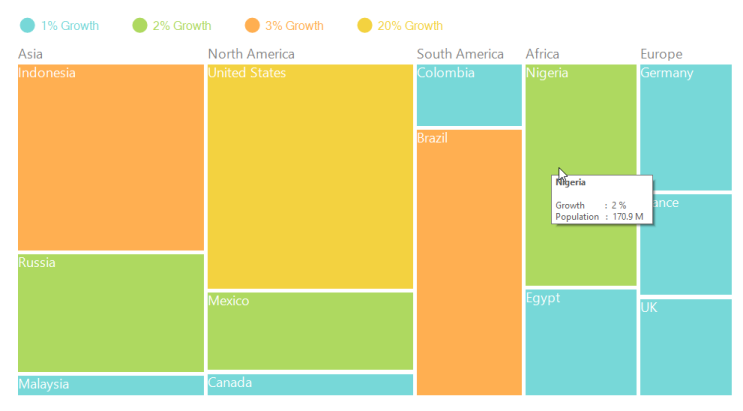
SliceAndDiceHorizontal layout
Code sample
TreeMap TreeMap1 = new TreeMap();

PopulationViewModel data = new PopulationViewModel();

TreeMap1.ItemsSource = data.PopulationDetails;
TreeMap1.WeightValuePath = "Population";
TreeMap1.ColorValuePath = "Growth";
TreeMap1.ItemsLayoutMode = Syncfusion.Windows.Forms.TreeMap.ItemsLayoutModes.SliceAndDiceHorizontal;

TreeMapFlatLevel treeMapFlatLevel1 = new TreeMapFlatLevel();
treeMapFlatLevel1.GroupPath = "Continent";
treeMapFlatLevel1.ShowLabels = true;
TreeMap1.Levels.Add(treeMapFlatLevel1);

TreeMapFlatLevel treeMapFlatLevel2 = new TreeMapFlatLevel();
treeMapFlatLevel2.GroupPath = "Country";
treeMapFlatLevel2.ShowLabels = true;
treeMapFlatLevel2.HeaderHeight = 25;
TreeMap1.Levels.Add(treeMapFlatLevel2);
Dim TreeMap1 As New TreeMap()
Dim data As New PopulationViewModel()
TreeMap1.ItemsSource = data.PopulationDetails
TreeMap1.WeightValuePath = "Population"
TreeMap1.ColorValuePath = "Growth"
TreeMap1.ItemsLayoutMode = Syncfusion.Windows.Forms.TreeMap.ItemsLayoutModes.SliceAndDiceHorizontal
Dim treeMapFlatLevel1 As New TreeMapFlatLevel()
treeMapFlatLevel1.GroupPath = "Continent"
treeMapFlatLevel1.ShowLabels = True
TreeMap1.Levels.Add(treeMapFlatLevel1)
Dim treeMapFlatLevel2 As New TreeMapFlatLevel()
treeMapFlatLevel2.GroupPath = "Country"
treeMapFlatLevel2.ShowLabels = True
treeMapFlatLevel2.HeaderHeight = 25
TreeMap1.Levels.Add(treeMapFlatLevel2)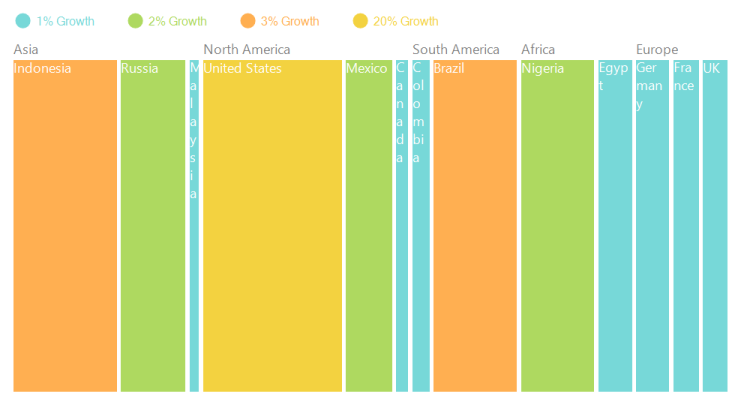
SliceAndDiceVertical layout
Code sample
TreeMap TreeMap1 = new TreeMap();

PopulationViewModel data = new PopulationViewModel();

TreeMap1.ItemsSource = data.PopulationDetails;
TreeMap1.WeightValuePath = "Population";
TreeMap1.ColorValuePath = "Growth";
TreeMap1.ItemsLayoutMode = Syncfusion.Windows.Forms.TreeMap.ItemsLayoutModes.SliceAndDiceVertical;

TreeMapFlatLevel treeMapFlatLevel1 = new TreeMapFlatLevel();
treeMapFlatLevel1.GroupPath = "Continent";
treeMapFlatLevel1.ShowLabels = true;
TreeMap1.Levels.Add(treeMapFlatLevel1);

TreeMapFlatLevel treeMapFlatLevel2 = new TreeMapFlatLevel();
treeMapFlatLevel2.GroupPath = "Country";
treeMapFlatLevel2.ShowLabels = true;
treeMapFlatLevel2.HeaderHeight = 25;
TreeMap1.Levels.Add(treeMapFlatLevel2);
Dim TreeMap1 As New TreeMap()
Dim data As New PopulationViewModel()
TreeMap1.ItemsSource = data.PopulationDetails
TreeMap1.WeightValuePath = "Population"
TreeMap1.ColorValuePath = "Growth"
TreeMap1.ItemsLayoutMode = Syncfusion.Windows.Forms.TreeMap.ItemsLayoutModes.SliceAndDiceVertical
Dim treeMapFlatLevel1 As New TreeMapFlatLevel()
treeMapFlatLevel1.GroupPath = "Continent"
treeMapFlatLevel1.ShowLabels = True
TreeMap1.Levels.Add(treeMapFlatLevel1)
Dim treeMapFlatLevel2 As New TreeMapFlatLevel()
treeMapFlatLevel2.GroupPath = "Country"
treeMapFlatLevel2.ShowLabels = True
treeMapFlatLevel2.HeaderHeight = 25
TreeMap1.Levels.Add(treeMapFlatLevel2)