Getting Started with the Vue HeatMap Component in Vue 3
This article provides a step-by-step guide to creating a Vite JavaScript project and integrating the Syncfusion® Vue HeatMap component using either the Composition API or the Options API.
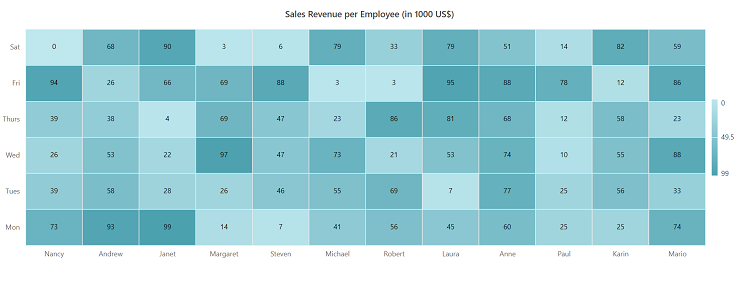
The HeatMap represents two-dimensional data through color variations. Each matrix value is rendered as a cell whose color indicates its magnitude.
You can explore some useful features in the HeatMap component using the video below.
Prerequisites
Ensure that the development environment meets the system requirements for Syncfusion® Vue UI components.
Set Up the Vite Project
Create a Vite project using either npm or yarn.
npm
npm create vite@latest my-app -- --template vueyarn
yarn create vite my-app --template vueNavigate to the project directory:
cd my-appInstall the project dependencies.
npm
npm installyarn
yarn installNote: To create a TypeScript project, use the
vue-tstemplate instead ofvue.
Add the Syncfusion® Vue HeatMap Package
Syncfusion® Vue packages are published on npm.
Install the @syncfusion/ej2-vue-heatmap package using either npm or yarn.
npm
npm install @syncfusion/ej2-vue-heatmapyarn
yarn add @syncfusion/ej2-vue-heatmapConfirm that @syncfusion/ej2-vue-heatmap appears in package.json and the package-manager lock file.
Add the Syncfusion® Vue HeatMap Component
The following steps build the component progressively. Use the complete examples later in this article as the copy-ready versions.
Step 1: Import and Register the Component
Import the HeatMap component in src/App.vue.
In the Composition API example, use the <script setup> syntax. Components imported in this block are available to the template without a components option.
<script setup>
import { HeatMapComponent as EjsHeatmap } from '@syncfusion/ej2-vue-heatmap';
</script><script>
import { HeatMapComponent } from '@syncfusion/ej2-vue-heatmap';
export default {
name: 'App',
components: {
'ejs-heatmap': HeatMapComponent
}
};
</script>Step 2: Declare the HeatMap Data
Add the following values to the existing <script setup> block for the Composition API or to data() inside the existing export default object for the Options API.
Each inner array represents one x-axis category and must contain one numeric value for every y-axis category. All rows must have the same length.
<script setup>
const dataSource = [
  [73, 39, 26, 39, 94, 0],
  [93, 58, 53, 38, 26, 68],
  [99, 28, 22, 4, 66, 90],
  [14, 26, 97, 69, 69, 3],
  [7, 46, 47, 47, 88, 6],
  [41, 55, 73, 23, 3, 79],
  [56, 69, 21, 86, 3, 33],
  [45, 7, 53, 81, 95, 79],
  [60, 77, 74, 68, 88, 51],
  [25, 25, 10, 12, 78, 14],
  [25, 56, 55, 58, 12, 82],
  [74, 33, 88, 23, 86, 59]
];

</script><script>
export default {
data() {
return {
dataSource: [
[73, 39, 26, 39, 94, 0],
[93, 58, 53, 38, 26, 68],
[99, 28, 22, 4, 66, 90],
[14, 26, 97, 69, 69, 3],
[7, 46, 47, 47, 88, 6],
[41, 55, 73, 23, 3, 79],
[56, 69, 21, 86, 3, 33],
[45, 7, 53, 81, 95, 79],
[60, 77, 74, 68, 88, 51],
[25, 25, 10, 12, 78, 14],
[25, 56, 55, 58, 12, 82],
[74, 33, 88, 23, 86, 59]
],
};
}
};
</script>Step 3: Define the HeatMap in the Template
Add the HeatMap to the template section of src/App.vue.
-
dataSourcesupplies the two-dimensional numeric data.
<template>
  <div id="app">
    <ejs-heatmap id="heatmap" :dataSource="dataSource"></ejs-heatmap>
  </div>
</template>
Here is the summarized code for the above steps. Replace the contents of src/App.vue with either complete example.
<template>
  <div id="app">
    <ejs-heatmap id="heatmap" :dataSource="dataSource"
    ></ejs-heatmap>
  </div>
</template>

<script setup>
import { HeatMapComponent as EjsHeatmap } from '@syncfusion/ej2-vue-heatmap';

const dataSource = [
  [73, 39, 26, 39, 94, 0],
  [93, 58, 53, 38, 26, 68],
  [99, 28, 22, 4, 66, 90],
  [14, 26, 97, 69, 69, 3],
  [7, 46, 47, 47, 88, 6],
  [41, 55, 73, 23, 3, 79],
  [56, 69, 21, 86, 3, 33],
  [45, 7, 53, 81, 95, 79],
  [60, 77, 74, 68, 88, 51],
  [25, 25, 10, 12, 78, 14],
  [25, 56, 55, 58, 12, 82],
  [74, 33, 88, 23, 86, 59]
];
</script><template>
<div id="app">
<ejs-heatmap id="heatmap" :dataSource="dataSource"
></ejs-heatmap>
</div>
</template>
<script>
import { HeatMapComponent } from '@syncfusion/ej2-vue-heatmap';
export default {
name: 'App',
components: {
'ejs-heatmap': HeatMapComponent
},
data() {
return {
dataSource: [
[73, 39, 26, 39, 94, 0],
[93, 58, 53, 38, 26, 68],
[99, 28, 22, 4, 66, 90],
[14, 26, 97, 69, 69, 3],
[7, 46, 47, 47, 88, 6],
[41, 55, 73, 23, 3, 79],
[56, 69, 21, 86, 3, 33],
[45, 7, 53, 81, 95, 79],
[60, 77, 74, 68, 88, 51],
[25, 25, 10, 12, 78, 14],
[25, 56, 55, 58, 12, 82],
[74, 33, 88, 23, 86, 59]
],
};
}
};
</script>Run the Application
Save src/App.vue, and then start the development server.
npm
npm run devyarn
yarn run devOpen the URL displayed in the terminal, commonly http://localhost:5173, and verify that the HeatMap displays. Press Ctrl+C to stop the server.
Troubleshooting
-
The HeatMap is not rendered. Verify that
HeatMapComponentis imported or registered correctly and check the browser console for package, runtime, or licensing errors. -
The HeatMap is blank. Verify that
dataSourceis a nonempty rectangular array containing numeric values. -
A module-not-found error occurs. Verify that
@syncfusion/ej2-vue-heatmapappears inpackage.json, reinstall dependencies, and restart the development server. - A package or Vue version error occurs. Confirm that the installed package release supports Vue 3 and the project’s Node.js version.
For additional assistance, refer to the Vue HeatMap API documentation.