Sorting in UWP Charts
Chart provides support for sorting the data point rendering in either ascending or descending order based on the X or Y axis.
Enable sorting
The IsSortData property is used to enable sorting in the series.
Changing sorting direction
The SortDirection property defines the direction of sorting in either Ascending or Descending order based on the X or Y value.
Changing sorting axis
The SortBy property decides whether sorting should be done based on the X or Y values.
The following example illustrates a simple chart (without apply sorting):
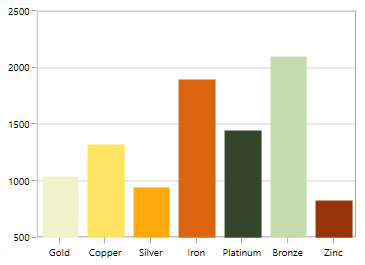
Sorting for category(non-linear) axis
Sorting x axis in ascending order
<syncfusion:ColumnSeries IsSortData="True" SortBy="X"
	                     SortDirection="Ascending"
                         ItemsSource="{Binding Demands}" Interior="#4A4A4A"
                         XBindingPath="Demand"  YBindingPath="Year2011"/>
ColumnSeries columnSeries = new ColumnSeries()
{
IsSortData = true,
SortBy = SortingAxis.X,
SortDirection = Direction.Ascending,
ItemsSource = new ViewModel().Demands,
XBindingPath = "Demand",
YBindingPath = "Year2011",
Interior = new SolidColorBrush(Color.FromRgb(0x4A, 0x4A, 0x4A))
};
chart.Series.Add(columnSeries);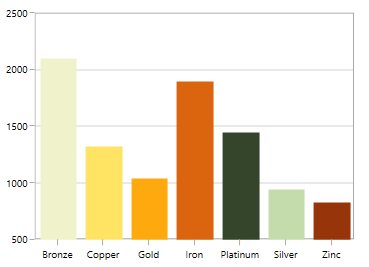
Sorting x-axis in descending order
<syncfusion:ColumnSeries IsSortData="True" SortBy="X"
	                     SortDirection="Descending"
                         ItemsSource="{Binding Demands}" Interior="#4A4A4A"
                         XBindingPath="Demand"  YBindingPath="Year2011"/>
ColumnSeries columnSeries = new ColumnSeries()
{
IsSortData = true,
SortBy = SortingAxis.X,
SortDirection = Direction.Descending,
ItemsSource = new ViewModel().Demands,
XBindingPath = "Demand",
YBindingPath = "Year2011",
Interior = new SolidColorBrush(Color.FromRgb(0x4A, 0x4A, 0x4A))
};
chart.Series.Add(columnSeries);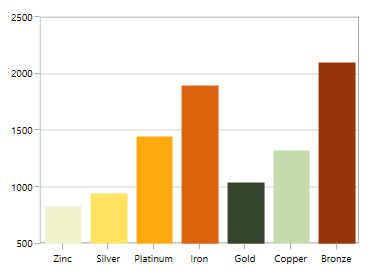
Sorting y axis in ascending order
<syncfusion:ColumnSeries IsSortData="True" SortBy="Y"
					     SortDirection="Ascending"
                         ItemsSource="{Binding Demands}" Interior="#4A4A4A"
                         XBindingPath="Demand"  YBindingPath="Year2011"/>
ColumnSeries columnSeries = new ColumnSeries()
{
IsSortData = true,
SortBy = SortingAxis.Y,
SortDirection = Direction.Ascending,
ItemsSource = new ViewModel().Demands,
XBindingPath = "Demand",
YBindingPath = "Year2011",
Interior = new SolidColorBrush(Color.FromRgb(0x4A, 0x4A, 0x4A))
};
chart.Series.Add(columnSeries);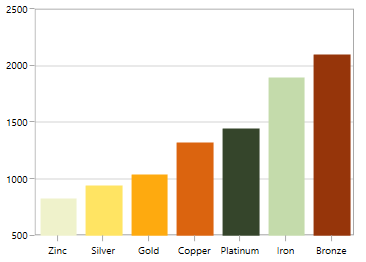
Sorting y axis in descending order
<syncfusion:ColumnSeries IsSortData="True" SortBy="Y"
	                     SortDirection="Descending"
                         ItemsSource="{Binding Demands}" Interior="#4A4A4A"
                         XBindingPath="Demand"  YBindingPath="Year2011"/>
ColumnSeries columnSeries = new ColumnSeries()
{
IsSortData = true,
SortBy = SortingAxis.Y,
SortDirection = Direction.Descending,
ItemsSource = new ViewModel().Demands,
XBindingPath = "Demand",
YBindingPath = "Year2011",
Interior = new SolidColorBrush(Color.FromRgb(0x4A, 0x4A, 0x4A))
};
chart.Series.Add(columnSeries);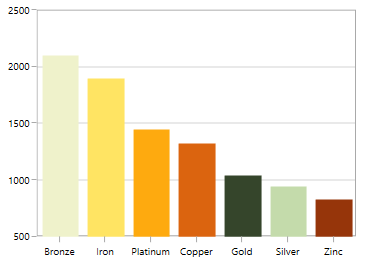
This feature is primarily applicable for indexed (non-linear) axis like
CategoryAxis. For linear axis likeNumericalAxis, only the order of rendering will be sorted. i.e., the order in which the data point is being rendered.
Sorting for linear axis
As mentioned above, the sorting for the linear axis is different from CategoryAxis. Here the rendering order of the data point (x or y) will be sorted.
This will be useful especially when we have one or more values added in same data point. Also this rendering order sorting will be captured by applying Palette to each point.
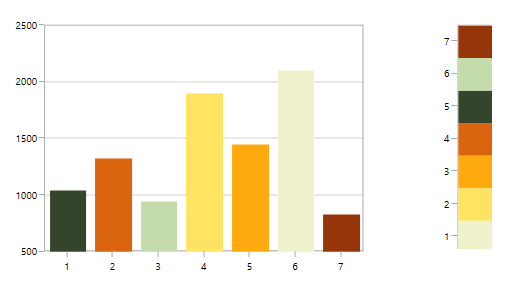
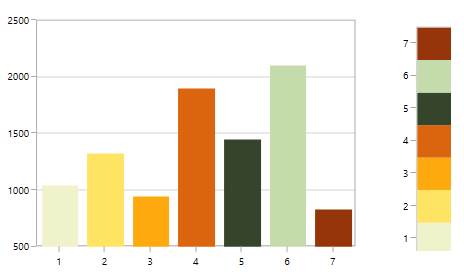
The following example illustrates a simple chart having AutumnBrights palette (without apply sorting):
Sorting x axis in ascending order
<syncfusion:ColumnSeries IsSortData="True" SortBy="X" Palette="AutumnBrights"
                         SortDirection="Ascending"
                         ItemsSource="{Binding Demands}"
                         XBindingPath="Position"  YBindingPath="Year2011"/>
ColumnSeries columnSeries = new ColumnSeries()
{
IsSortData = true,
SortBy = SortingAxis.X,
SortDirection = Direction.Ascending,
Palette = ChartColorPalette.AutumnBrights,
ItemsSource = new ViewModel().Demands,
XBindingPath = "Position",
YBindingPath = "Year2011",
Interior = new SolidColorBrush(Color.FromRgb(0x4A, 0x4A, 0x4A))
};
chart.Series.Add(columnSeries);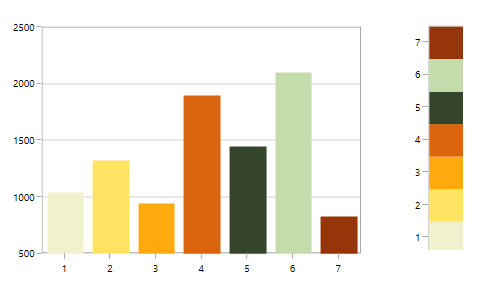
Sorting x axis in descending order
<syncfusion:ColumnSeries IsSortData="True" SortBy="X"
	                     Palette="AutumnBrights"
                         SortDirection="Descending"
                         ItemsSource="{Binding Demands}"
                         XBindingPath="Position"  YBindingPath="Year2011"/>
ColumnSeries columnSeries = new ColumnSeries()
{
IsSortData = true,
SortBy = SortingAxis.X,
SortDirection = Direction.Descending,
Palette = ChartColorPalette.AutumnBrights,
ItemsSource = new ViewModel().Demands,
XBindingPath = "Position",
YBindingPath = "Year2011",
Interior = new SolidColorBrush(Color.FromRgb(0x4A, 0x4A, 0x4A))
};
chart.Series.Add(columnSeries);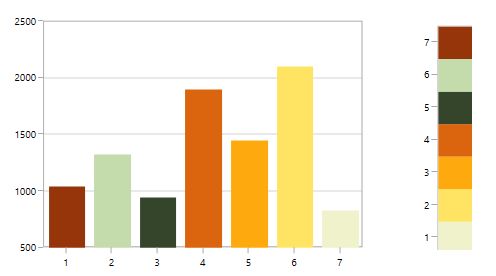
Sorting y axis in ascending order
<syncfusion:ColumnSeries IsSortData="True" SortBy="Y"
	                     Palette="AutumnBrights"
                         SortDirection="Ascending"
                         ItemsSource="{Binding Demands}"
                         XBindingPath="Position"  YBindingPath="Year2011"/>
ColumnSeries columnSeries = new ColumnSeries()
{
IsSortData = true,
SortBy = SortingAxis.Y,
SortDirection = Direction.Ascending,
Palette = ChartColorPalette.AutumnBrights,
ItemsSource = new ViewModel().Demands,
XBindingPath = "Position",
YBindingPath = "Year2011",
Interior = new SolidColorBrush(Color.FromRgb(0x4A, 0x4A, 0x4A))
};
chart.Series.Add(columnSeries);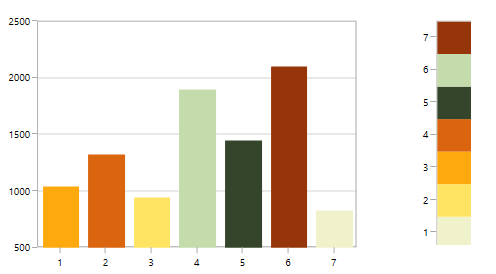
Sorting y axis in descending order
<syncfusion:ColumnSeries IsSortData="True" SortBy="Y"
	                     Palette="AutumnBrights"
                         SortDirection="Descending"
                         ItemsSource="{Binding Demands}"
                         XBindingPath="Position"  YBindingPath="Year2011"/>
ColumnSeries columnSeries = new ColumnSeries()
{
IsSortData = true,
SortBy = SortingAxis.Y,
SortDirection = Direction.Descending,
Palette = ChartColorPalette.AutumnBrights,
ItemsSource = new ViewModel().Demands,
XBindingPath = "Position",
YBindingPath = "Year2011",
Interior = new SolidColorBrush(Color.FromRgb(0x4A, 0x4A, 0x4A))
};
chart.Series.Add(columnSeries);