Liquid Glass Effect in .NET MAUI Sunburst Chart
18 Nov 20183 minutes to read
The Liquid Glass Effect is a modern design style that provides a sleek, minimalist appearance with clean lines, subtle visual effects, and elegant styling. It features smooth rounded corners and sophisticated visual treatments that create a polished, professional look for your charts.
NOTE
The liquid glass effect is supported only on
.NET 10and oniOSandmacOSversions 26 or later
How it Enhances Chart UI on macOS and iOS
The Liquid Glass Effect enhances MAUI SfSunburstChart with a sleek, glassy look and improved interactivity.
- Tooltip: Applies a glassy appearance to tooltips for clearer data highlights.
- Chart Background: Wrap the chart in an SfGlassEffectView to give the chart surface a blurred or clear glass background.
Apply Liquid Glass Effect to SfSunburstChart
Wrap the SfSunburstChart inside an SfGlassEffectView to give the chart surface a glass (blurred or clear) appearance. SfGlassEffectView is available in the Syncfusion.Maui.Core package.
<core:SfGlassEffectView CornerRadius="20"
                        Padding="12"
                        EffectType="Regular"
                        EnableShadowEffect="True">

    <chart:SfSunburstChart>
    . . .

    </chart:SfSunburstChart>
</core:SfGlassEffectView>
SfSunburstChart chart = new SfSunburstChart();
var glass = new SfGlassEffectView
{
CornerRadius = 20,
Padding = 12,
EffectType = GlassEffectType.Regular, // Regular (blurrier) or Clear (glassy)
EnableShadowEffect = true,
Content = chart
};For detailed guidance on SfGlassEffectView, refer to the Getting Started documentation.
Enable Liquid Glass Effect to SfSunburstChart Tooltip
To Enable Liquid Glass Effect to the tooltip, set True to EnableLiquidGlassEffect property and EnableTooltip property of SfSunburstChart.
<chart:SfSunburstChart EnableLiquidGlassEffect="True"
                       EnableTooltip="True">
    . . .
</chart:SfSunburstChart>
SfSunburstChart chart = new SfSunburstChart();
chart.EnableLiquidGlassEffect = true;
chart.EnableTooltip = true;
. . .
this.Content = chart;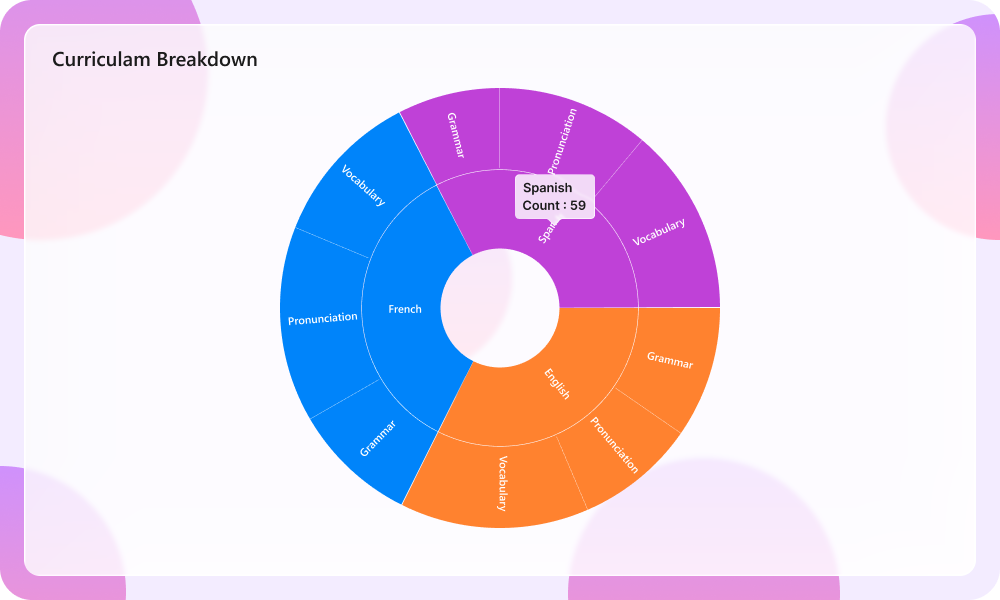
Best Practices and Tips
- Host the chart inside an SfGlassEffectView to give the chart body a glass appearance.
- Liquid glass effects are most visible over images or colorful backgrounds.
- Set EffectType property of SfGlassEffectView as
Regularfor a blurrier look andClearfor a crisper, glassy look. - Tune CornerRadius and Padding to balance content density and visual polish.
- When using a custom template for tooltip using TooltipTemplate, set the background to
Transparentto display the liquid glass effect.