How can I help you?
Selection in .NET MAUI Sunburst Chart
The Sunburst Chart supports segment selection and visual highlighting. Selection is triggered by tapping a segment, enabling users to interact with hierarchical data.
Type
The Type property allows you to select a segment based on the following categories:
- Child: Highlights the selected segment along with its children in all levels.
- Group: Highlights the entire group of the selected segment in a hierarchy.
- Parent: Highlights the parent of the selected segment in the hierarchy.
- Single: Highlights the selected segment alone.
The default value of the Type property is Single.
The following code shows the Child selection type.
<chart:SfSunburstChart>
    . . .
    <chart:SfSunburstChart.SelectionSettings>
        <chart:SunburstSelectionSettings Type="Child"/>
    </chart:SfSunburstChart.SelectionSettings>
</chart:SfSunburstChart>
SfSunburstChart sunburstChart = new SfSunburstChart();
. . .
SunburstSelectionSettings selectionSettings = new SunburstSelectionSettings
{
Type = SunburstSelectionType.Child
};
sunburstChart.SelectionSettings = selectionSettings;
this.Content = sunburst;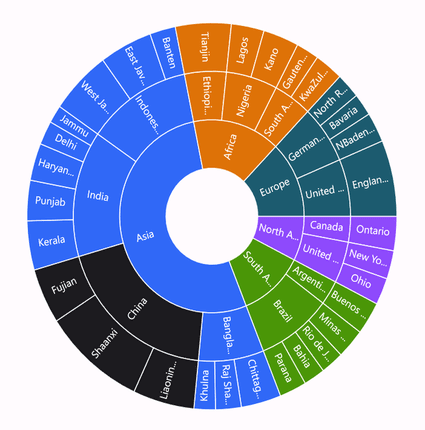
The following code shows the Group selection type.
<chart:SfSunburstChart>
    . . .
    <chart:SfSunburstChart.SelectionSettings>
        <chart:SunburstSelectionSettings Type="Group"/>
    </chart:SfSunburstChart.SelectionSettings>
</chart:SfSunburstChart>
SfSunburstChart sunburstChart = new SfSunburstChart();
. . .
SunburstSelectionSettings selectionSettings = new SunburstSelectionSettings
{
Type = SunburstSelectionType.Group
};
sunburstChart.SelectionSettings = selectionSettings;
this.Content = sunburst;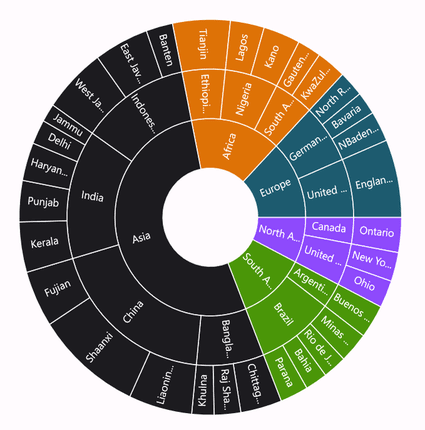
The following code shows the Parent selection type.
<chart:SfSunburstChart>
    . . .
    <chart:SfSunburstChart.SelectionSettings>
        <chart:SunburstSelectionSettings Type="Parent"/>
    </chart:SfSunburstChart.SelectionSettings>
</chart:SfSunburstChart>
SfSunburstChart sunburstChart = new SfSunburstChart();
. . .
SunburstSelectionSettings selectionSettings = new SunburstSelectionSettings
{
Type = SunburstSelectionType.Parent
};
sunburstChart.SelectionSettings = selectionSettings;
this.Content = sunburst;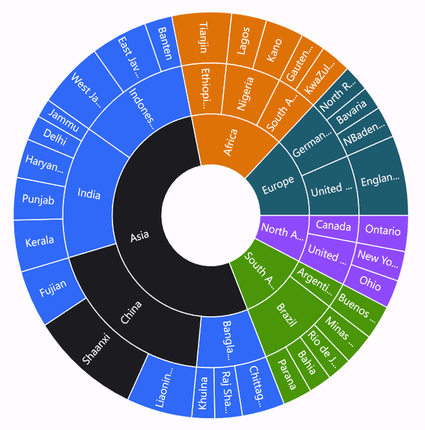
The following code shows the Single selection type.
<chart:SfSunburstChart>
    . . .
    <chart:SfSunburstChart.SelectionSettings>
        <chart:SunburstSelectionSettings Type="Single"/>
    </chart:SfSunburstChart.SelectionSettings>
</chart:SfSunburstChart>
SfSunburstChart sunburstChart = new SfSunburstChart();
. . .
SunburstSelectionSettings selectionSettings = new SunburstSelectionSettings
{
Type = SunburstSelectionType.Single
};
sunburstChart.SelectionSettings = selectionSettings;
this.Content = sunburst;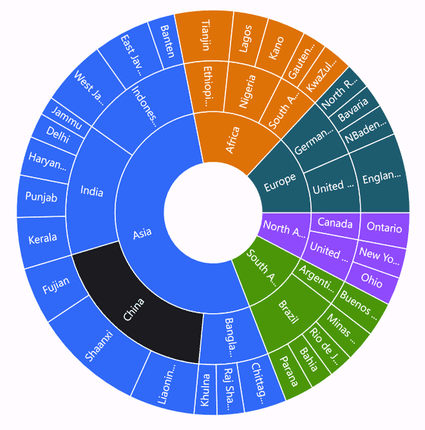
DisplayMode
The DisplayMode property allows segments to be highlighted using brush, opacity, and stroke. The default value of DisplayMode is HighlightByBrush.
Brush
This mode highlights the selected segment using the brush defined in the Fill property of the SunburstSelectionSettings.
<chart:SfSunburstChart>
    . . .
    <chart:SfSunburstChart.SelectionSettings>
        <chart:SunburstSelectionSettings Fill="DarkRed" DisplayMode="HighlightByBrush" Type="Child"/>
    </chart:SfSunburstChart.SelectionSettings>
</chart:SfSunburstChart>
SfSunburstChart sunburstChart = new SfSunburstChart();
. . .
SunburstSelectionSettings selectionSettings = new SunburstSelectionSettings
{
Fill = Colors.DarkRed,
DisplayMode = SunburstSelectionDisplayMode.HighlightByBrush,
Type = SunburstSelectionType.Child,
};
sunburstChart.SelectionSettings = selectionSettings;
this.Content = sunburst;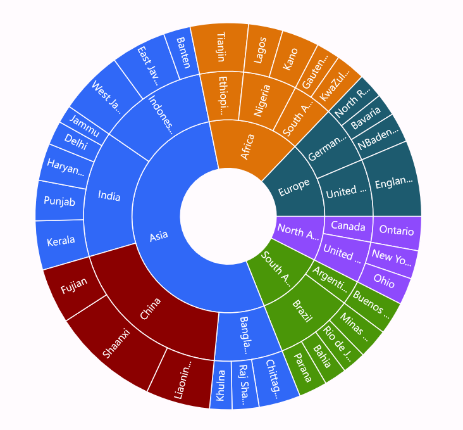
Opacity
This mode highlights the selected segment with full opacity as 1, while unselected segments use the opacity value defined in the Opacity property.
<chart:SfSunburstChart>
    . . .
    <chart:SfSunburstChart.SelectionSettings>
        <chart:SunburstSelectionSettings Opacity="0.6" DisplayMode="HighlightByOpacity" Type="Child"/>
    </chart:SfSunburstChart.SelectionSettings>
</chart:SfSunburstChart>
SfSunburstChart sunburstChart = new SfSunburstChart();
. . .
SunburstSelectionSettings selectionSettings = new SunburstSelectionSettings
{
Opacity = 0.6,
DisplayMode = SunburstSelectionDisplayMode.HighlightByOpacity,
Type = SunburstSelectionType.Child,
};
sunburstChart.SelectionSettings = selectionSettings;
this.Content = sunburst;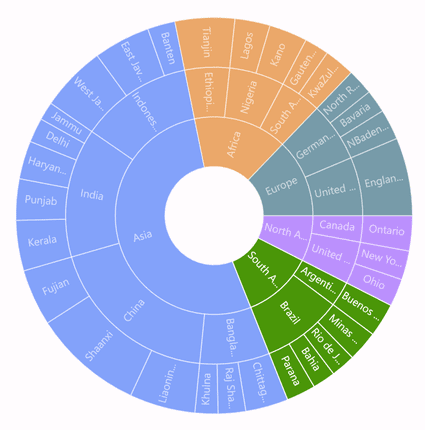
Stroke
This mode highlights the selected segment by applying stroke to it. The color and thickness of the stroke can be customized using the Stroke and StrokeWidth properties.
<chart:SfSunburstChart>
    . . .
    <chart:SfSunburstChart.SelectionSettings>
        <chart:SunburstSelectionSettings Stroke="Black" StrokeWidth="3" DisplayMode="HighlightByStroke" Type="Child"/>
    </chart:SfSunburstChart.SelectionSettings>
</chart:SfSunburstChart>
SfSunburstChart sunburstChart = new SfSunburstChart();
. . .
SunburstSelectionSettings selectionSettings = new SunburstSelectionSettings
{
Stroke = Colors.Black,
StrokeWidth = 3,
DisplayMode = SunburstSelectionDisplayMode.HighlightByStroke,
Type = SunburstSelectionType.Child,
};
sunburstChart.SelectionSettings = selectionSettings;
this.Content = sunburst;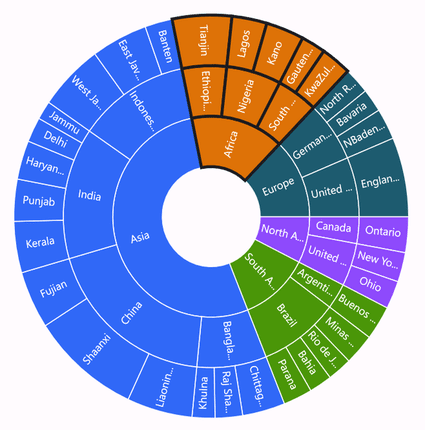
Events
SelectionChanging
The SelectionChanging event is triggered when a segment is about to be selected.
This is a cancelable event. The following properties are contained in the event arguments:
- NewSegment: Gets the new segment that was selected.
- OldSegment: Gets the old segment that was selected or deselected.
- Cancel - Gets or sets a value indicating whether to proceed with the selection.
Selection Changed
The SelectionChanged event occurs after a segment is selected or deselected. The following properties are contained in the event arguments:
- IsSelected: Indicates whether a segment is selected.
- NewSegment: Gets the new segment that was selected.
- OldSegment: Gets the old segment that was selected or deselected.