Blazor Chart Wizard Working with Data
The primary configuration for the chart wizard is provided via the ChartSettings. Key properties:
-
DataSource(IEnumerable<Object>) — Supplies the collection of data objects for the chart. Each object should have fields referenced byCategoryFieldsandSeriesFields. -
CategoryFields(IEnumerable<string>) — Specifies one or more field names from your data objects to use as category (x-axis) values. Example:new List<string>{ "Country" }ornew[] { "Month" }. -
SeriesFields(IEnumerable<string>) — Lists one or more numeric field names to render as chart series. Use multiple names for multi-series charts (e.g.,new[]{ "Gold", "Silver", "Bronze" }). -
SeriesType(ChartWizardSeriesType) — Selects the chart type for rendering series. Common values includeBar,Column,Line,Area,Pie, and more.
Configuring Fields
- Single-category, single-series chart
<ChartSettings DataSource="@SalesData"
               CategoryFields="@(new[]{ "Month" })"
               SeriesFields="@(new[]{ "Sales" })"
               SeriesType="ChartWizardSeriesType.Column" />
- Multi-series chart
<ChartSettings DataSource="@OlympicsData"
               CategoryFields="@(new[]{ "Country" })"
               SeriesFields="@(new[]{ "Gold", "Silver", "Bronze" })"
               SeriesType="ChartWizardSeriesType.Bar" />
NOTE
- The order of
SeriesFieldsdetermines the default series ordering.CategoryFieldscan include multiple fields for nested or grouped categories; the wizard will combine them as specified.
List Binding
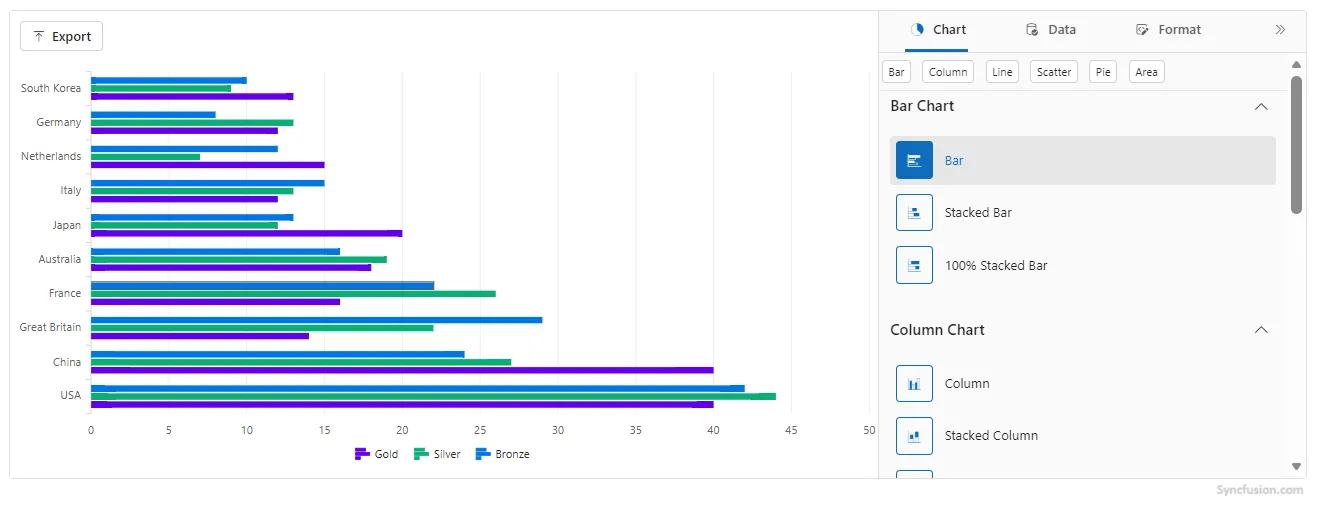
Any IEnumerable object can be assigned to the DataSource property of the ChartSettings.
@using Syncfusion.Blazor.ChartWizard

<div class="control-section">
    <SfChartWizard Width="90%" Theme="Theme.Fluent2" PropertyPanelExpanded="true">
        <ChartSettings DataSource="@OlympicsDataSource"
                        CategoryFields="@(new[] { "Country" })"
                        SeriesFields="@(new[] { "Gold", "Silver", "Bronze" })"
                        SeriesType="ChartWizardSeriesType.Bar"
                        EnablePropertyPanel="true"
                        AllowExport="true">
        </ChartSettings>
    </SfChartWizard>
</div>

@code {
    private readonly List<string> chartSeries = new() { "Gold", "Silver", "Bronze" };
    private readonly List<string> categories = new() { "Country" };

    private readonly List<OlympicsData> OlympicsDataSource = new()
    {
        new OlympicsData { Country = "USA", CountryCode = "USA", Gold = 40, Silver = 44, Bronze = 42 },
        new OlympicsData { Country = "China", CountryCode = "CHN", Gold = 40, Silver = 27, Bronze = 24 },
        new OlympicsData { Country = "Great Britain", CountryCode = "GBR", Gold = 14, Silver = 22, Bronze = 29 },
        new OlympicsData { Country = "France", CountryCode = "FRA", Gold = 16, Silver = 26, Bronze = 22 },
        new OlympicsData { Country = "Australia", CountryCode = "AUS", Gold = 18, Silver = 19, Bronze = 16 },
        new OlympicsData { Country = "Japan", CountryCode = "JPN", Gold = 20, Silver = 12, Bronze = 13 },
        new OlympicsData { Country = "Italy", CountryCode = "ITA", Gold = 12, Silver = 13, Bronze = 15 },
        new OlympicsData { Country = "Netherlands", CountryCode = "NLD", Gold = 15, Silver = 7,  Bronze = 12 },
        new OlympicsData { Country = "Germany", CountryCode = "DEU", Gold = 12, Silver = 13, Bronze = 8  },
        new OlympicsData { Country = "South Korea", CountryCode = "KOR", Gold = 13, Silver = 9,  Bronze = 10 }
    };

    public class OlympicsData
    {
        public string? Country { get; set; }
        public int Gold { get; set; }
        public int Silver { get; set; }
        public int Bronze { get; set; }
    }
}
ObservableCollection
The ObservableCollection (dynamic data collection) provides notifications when items are added, removed, and moved. The implemented INotifyCollectionChanged provides notification when the dynamic changes of adding, removing, moving, and clearing the collection occur.
@using Syncfusion.Blazor.ChartWizard
@using System.Collections.ObjectModel

<div class="control-section">
    <SfChartWizard>
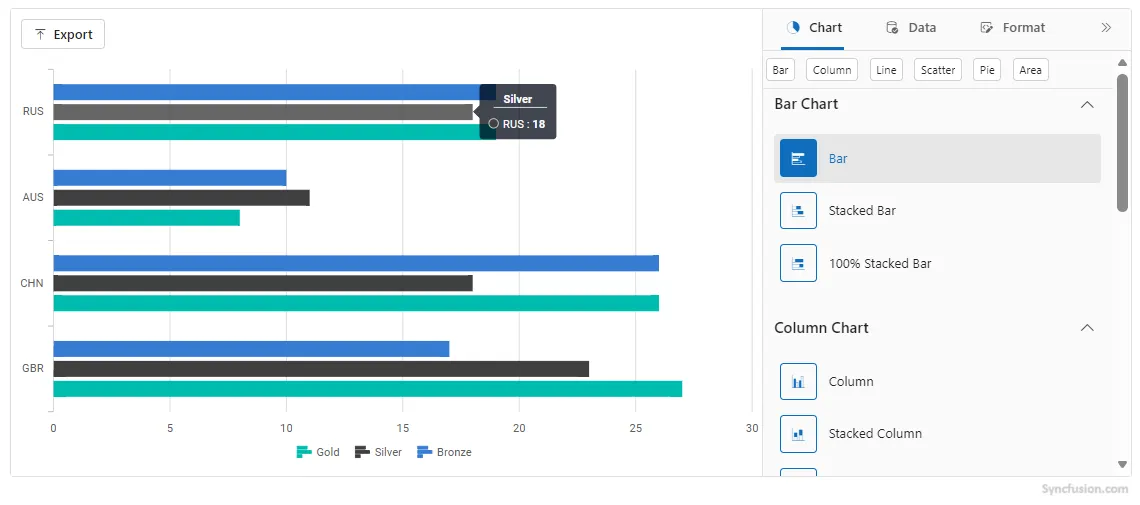
        <ChartSettings DataSource="@OlympicsDataSource"
                    CategoryFields="@categories"
                    SeriesFields="@chartSeries"
                    SeriesType="ChartWizardSeriesType.Bar" />
    </SfChartWizard>
</div>

@code {
    private readonly List<string> chartSeries = new() { "Gold", "Silver", "Bronze" };
    private readonly List<string> categories = new() { "CountryCode" };
    private ObservableCollection<OlympicsData>? OlympicsDataSource;

    public class OlympicsData
    {
        public string? CountryCode { get; set; }
        public double Gold { get; set; }
        public double Silver { get; set; }
        public double Bronze { get; set; }
        public static ObservableCollection<OlympicsData> GetData()
        {
            return new ObservableCollection<OlympicsData>
            {
                new OlympicsData { CountryCode = "GBR", Gold = 27, Silver = 23, Bronze = 17 },
                new OlympicsData { CountryCode = "CHN", Gold = 26, Silver = 18, Bronze = 26 },
                new OlympicsData { CountryCode = "AUS", Gold = 8, Silver = 11, Bronze = 10 },
                new OlympicsData { CountryCode = "RUS", Gold = 19, Silver = 18, Bronze = 19 }
            };
        }
    }

    protected override void OnInitialized()
    {
        OlympicsDataSource = OlympicsData.GetData();
    }
}
See Also
- Explore the Chart Wizard Demo for interactive samples.