How can I help you?
Convert complex JSON to flat JSON and assign it to pivot table
Overview
The ASP.NET Core Pivot Table component requires data in flat JSON format for proper binding. This guide explains how to convert complex, nested JSON structures to flat JSON format and bind it to the pivot table.
Understanding complex vs flat JSON
Complex JSON contains nested objects and arrays, making it difficult to directly bind to the pivot table. For example:
{
  "CustomerID": "VINET",
  "Freight": 32.38,
  "OrderDetails": [
    {
      "OrderID": 10248,
      "OrderDate": "1996-07-04T10:10:00.000Z"
    }
  ],
  "ShipDetails": [
    {
      "ShipName": "Vins et alcools Chevalier",
      "ShipAddress": "59 rue de l'Abbaye",
      "ShipCity": "Reims",
      "ShipRegion": null,
      "ShipCountry": "France",
      "ShippedDate": "1996-07-16T12:20:00.000Z"
    }
  ]
}
Flat JSON has a simple key-value structure without nesting, which is suitable for pivot table binding:
{
  "CustomerID": "VINET",
  "Freight": 32.38,
  "OrderID": 10248,
  "OrderDate": "1996-07-04T10:10:00.000Z",
  "ShipName": "Vins et alcools Chevalier",
  "ShipAddress": "59 rue de l'Abbaye",
  "ShipCity": "Reims",
  "ShipRegion": null,
  "ShipCountry": "France",
  "ShippedDate": "1996-07-16T12:20:00.000Z"
}
Implementation
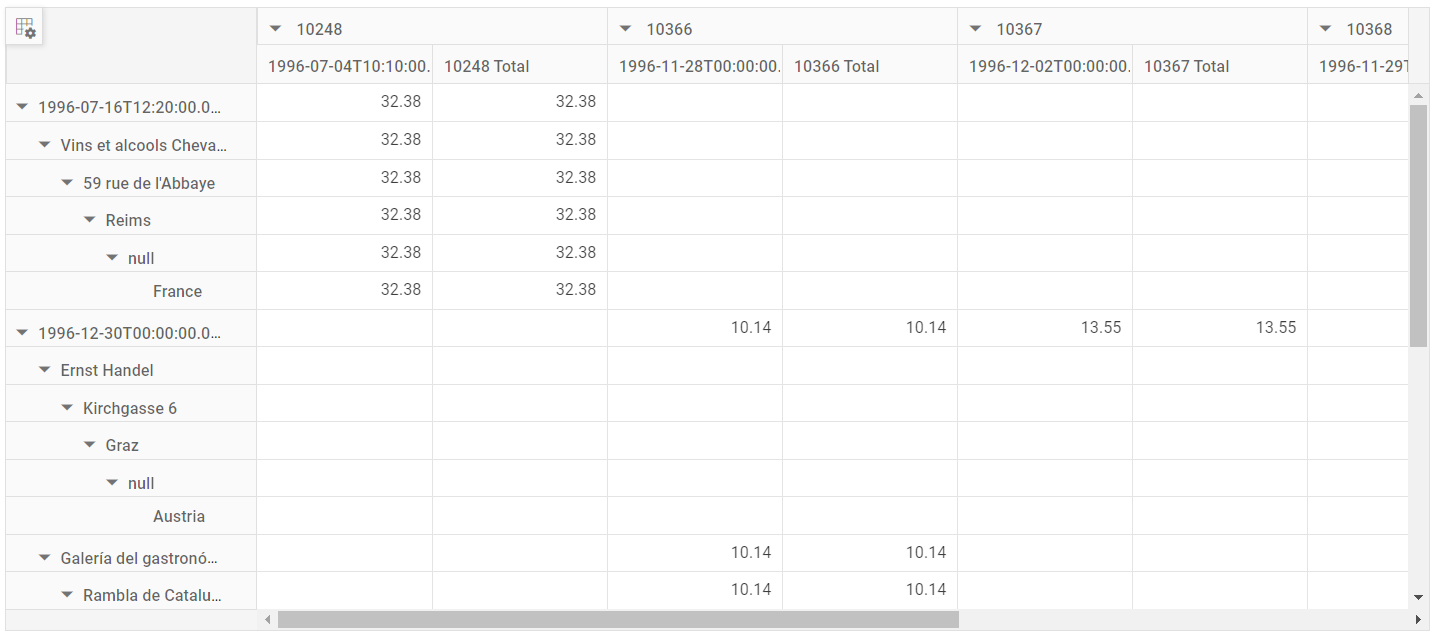
You can convert complex JSON to flat JSON programmatically and bind it to the pivot table using the dataSource property in the load event.
In the following example, the complexToFlatJson() method is used to convert complex JSON to flat JSON and bind it to the pivot table using the dataSource property, then modifying the field names in the rows and columns based on the converted flat JSON under e-datasourcesettings in the load event.