Title and subtitle in Bullet Chart Control
Title
The title of the Bullet Chart displays the information about the data plotted by specifying it in the title property.
@{
    List<DefaultBulletData> bulletData = new List<DefaultBulletData>
    {
        new DefaultBulletData { value = 55, target = 75}
    };
}

<ejs-bulletchart id="bulletgraph" title="Sales Rate" minimum="0" maximum="100" interval="20" targetField="target" valueField="value" dataSource="bulletData">
    <e-bullet-range-collection>
        <e-bullet-range end="35"></e-bullet-range>
        <e-bullet-range end="50"></e-bullet-range>
        <e-bullet-range end="100"></e-bullet-range>
    </e-bullet-range-collection>
</ejs-bulletchart>
...
public class DefaultBulletData
{
public double value;
public double target;
}
Subtitle
To show additional information about the data plotted, the Bullet Chart can also be given a subtitle using the Subtitle property.
@{
    List<SubTitleData> bulletData = new List<SubTitleData>
    {
        new SubTitleData { value = 55, target = 75}
    };
}

<ejs-bulletchart id="bulletgraph" title="Sales Rate in dollars" subtitle="(in dollars $)" labelFormat="${value}" minimum="0" maximum="100" interval="20" targetField="target" valueField="value" dataSource="bulletData">
    <e-bullet-range-collection>
        <e-bullet-range end="35"></e-bullet-range>
        <e-bullet-range end="50"></e-bullet-range>
        <e-bullet-range end="100"></e-bullet-range>
    </e-bullet-range-collection>
</ejs-bulletchart>
...
public class SubTitleData
{
public double value;
public double target;
}
Title and subTitle position
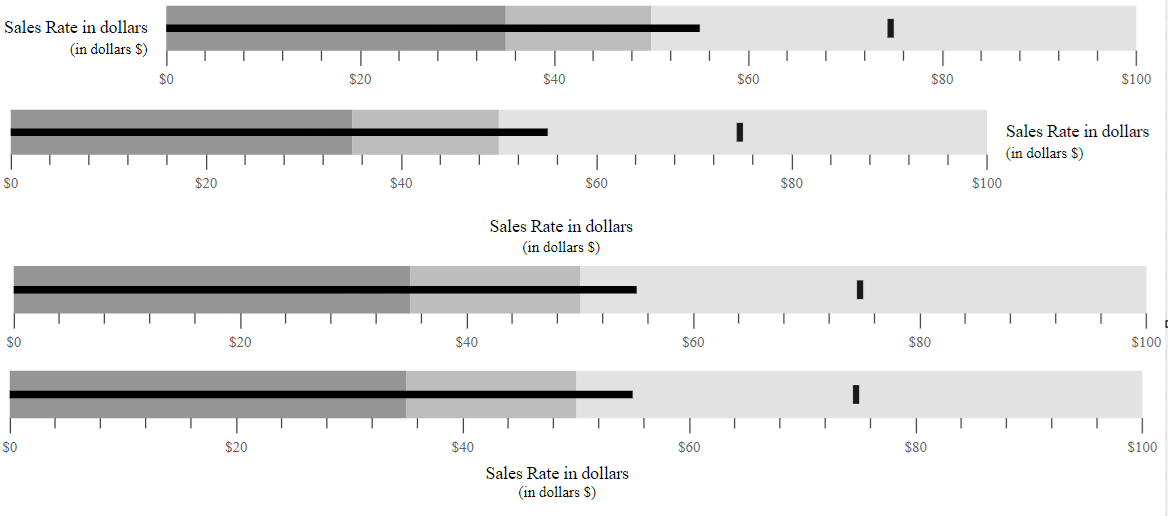
The title and the subtitle positions can be customized using the TitlePosition property. Possible positions are Left, Right, Top, and Bottom.
Position as left
By setting the titlePosition to Left, you can display the title and subtitle at the left side of the Bullet Chart.
@{
    List<Position> bulletData = new List<Position>
    {
        new Position { value = 55, target = 75}
    };
}

<ejs-bulletchart id="bulletgraph" titlePosition="@Syncfusion.EJ2.Charts.TextPosition.Left" title="Sales Rate in dollars" subtitle="(in dollars $)" labelFormat="${value}" minimum="0" maximum="100" interval="20" targetField="target" valueField="value" dataSource="bulletData">
<e-bullet-range-collection>
    <e-bullet-range end="35"></e-bullet-range>
    <e-bullet-range end="50"></e-bullet-range>
    <e-bullet-range end="100"></e-bullet-range>
</e-bullet-range-collection>
</ejs-bulletchart>
...
public class Position
{
public double value;
public double target;
}Position as right
By setting the TitlePosition to Right, you can display the title and subtitle at the right side of the Bullet Chart.
@{
    List<RightPositionData> bulletData = new List<RightPositionData>
    {
        new RightPositionData { value = 55, target = 75}
    };
}

<ejs-bulletchart id="bulletgraph" titlePosition="@Syncfusion.EJ2.Charts.TextPosition.Right" title="Sales Rate in dollars" subtitle="(in dollars $)" labelFormat="${value}" minimum="0" maximum="100" interval="20" targetField="target" valueField="value" dataSource="bulletData">
    <e-bullet-range-collection>
        <e-bullet-range end="35"></e-bullet-range>
        <e-bullet-range end="50"></e-bullet-range>
        <e-bullet-range end="100"></e-bullet-range>
    </e-bullet-range-collection>
</ejs-bulletchart>
...
public class RightPositionData
{
public double value;
public double target;
}Position as top
By setting the TitlePosition to Top, you can display the title and subtitle at the top of the Bullet Chart. The default title and subtitle positions of the Bullet Chart is Top.
@{
    List<DefaultBulletData> bulletData = new List<DefaultBulletData>
    {
        new DefaultBulletData { value = 55, target = 75}
    };
}

<ejs-bulletchart id="bulletgraph" titlePosition="@Syncfusion.EJ2.Charts.TextPosition.Top" title="Sales Rate in dollars" subtitle="(in dollars $)" labelFormat="${value}" minimum="0" maximum="100" interval="20" targetField="target" valueField="value" dataSource="bulletData">
    <e-bullet-range-collection>
        <e-bullet-range end="35"></e-bullet-range>
        <e-bullet-range end="50"></e-bullet-range>
        <e-bullet-range end="100"></e-bullet-range>
    </e-bullet-range-collection>
</ejs-bulletchart>
...
public class TopPositionData
{
public double value;
public double target;
}Position as bottom
By setting the TitlePosition to Bottom, you can display the title and subtitle at the bottom of the Bullet Chart.
@{
    List<BottomPositionData> bulletData = new List<BottomPositionData>
    {
        new BottomPositionData { value = 55, target = 75}
    };
}

<ejs-bulletchart id="bulletgraph" titlePosition="@Syncfusion.EJ2.Charts.TextPosition.Bottom" title="Sales Rate in dollars" subtitle="(in dollars $)" labelFormat="${value}" minimum="0" maximum="100" interval="20" targetField="target" valueField="value" dataSource="bulletData">
	<e-bullet-range-collection>
		<e-bullet-range end="35"></e-bullet-range>
		<e-bullet-range end="50"></e-bullet-range>
		<e-bullet-range end="100"></e-bullet-range>
	</e-bullet-range-collection>
</ejs-bulletchart>
...
public class BottomPositionData
{
public double value;
public double target;
}
Title customization
The title color, opacity, font size, font family, font weight, and font style can be customized using the TitleStyle property.
@{
    List<Customization> bulletData = new List<Customization>
    {
        new Customization { value = 55, target = 75}
    };
}

<ejs-bulletchart id="bulletgraph" title="Sales Rate" labelFormat="${value}" minimum="0" maximum="100" interval="20" targetField="target" valueField="value" dataSource="bulletData">
    <e-bullet-range-collection>
        <e-bullet-range end="35"></e-bullet-range>
        <e-bullet-range end="50"></e-bullet-range>
        <e-bullet-range end="100"></e-bullet-range>
    </e-bullet-range-collection>
    <e-bulletchart-titlestyle size="22px" color="red" fontFamily="cursive" fontWeight="Bold"></e-bulletchart-titlestyle>
</ejs-bulletchart>
...
public class Customization
{
public double value;
public double target;
}SubTitle customization
The sub-title color, opacity, font size, font family, font weight, and font style can be customized using the SubtitleStyle property.
@{
    List<Custom> bulletData = new List<Custom>
    {
        new Custom { value = 55, target = 75}
    };
}

<ejs-bulletchart id="bulletgraph" title="Sales Rate in dollars" subtitle="(in dollars $)" labelFormat="${value}" minimum="0" maximum="100" interval="20" targetField="target" valueField="value" dataSource="bulletData">
    <e-bullet-range-collection>
        <e-bullet-range end="35"></e-bullet-range>
        <e-bullet-range end="50"></e-bullet-range>
        <e-bullet-range end="100"></e-bullet-range>
    </e-bullet-range-collection>
    <e-bulletchart-subtitlestyle size="22px" color="red" fontFamily="cursive" fontWeight="Bold"></e-bulletchart-subtitlestyle>
</ejs-bulletchart>
...
public class Custom
{
public double value;
public double target;
}