Customization in Bullet Chart Control
Orientation
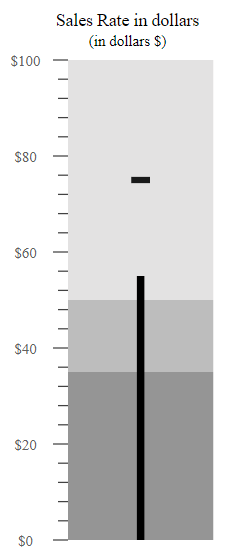
The Bullet Chart can be rendered in different orientations such as Horizontal or Vertical via the Orientation property. By default, the Bullet Chart is rendered in the Horizontal orientation.
@{
    List<OrientationData> bulletData = new List<OrientationData>
    {
        new OrientationData { value = 55, target = 75}
    };
}

<ejs-bulletchart id="bulletgraph" width="20%" orientation="@Syncfusion.EJ2.Charts.OrientationType.Vertical" title="Sales Rate in dollars" subtitle="(in dollars $)" labelFormat="${value}" minimum="0" maximum="100" interval="20" targetField="target" valueField="value" dataSource="bulletData">
    <e-bullet-range-collection>
        <e-bullet-range end="35"></e-bullet-range>
        <e-bullet-range end="50"></e-bullet-range>
        <e-bullet-range end="100"></e-bullet-range>
    </e-bullet-range-collection>
</ejs-bulletchart>
...
public class OrientationData
{
public double value;
public double target;
}
Right-to-left (RTL)
The Bullet Chart supports the right-to-left rendering that can be enabled by setting the EnableRtl property to true.
@{
    List<RightToLeftData> bulletData = new List<RightToLeftData>
    {
        new RightToLeftData { value = 55, target = 75}
    };
}

<ejs-bulletchart id="bulletgraph" enableRtl="true" title="Sales Rate in dollars" subtitle="(in dollars $)" labelFormat="${value}" minimum="0" maximum="100" interval="20" targetField="target" valueField="value" dataSource="bulletData">
<e-bullet-range-collection>
    <e-bullet-range end="35"></e-bullet-range>
    <e-bullet-range end="50"></e-bullet-range>
    <e-bullet-range end="100"></e-bullet-range>
</e-bullet-range-collection>
</ejs-bulletchart>
...
public class RightToLeftData
{
public double value;
public double target;
}
Animation
The actual and the target bar supports the linear animation via the Animation setting. The speed and the delay are controlled using the Duration and Delay properties respectively.
@{
    List<AnimationData> bulletData = new List<AnimationData>
    {
        new AnimationData { value = 55, target = 75}
    };
}

<ejs-bulletchart id="bulletgraph" title="Sales Rate in dollars" subtitle="(in dollars $)" labelFormat="${value}" minimum="0" maximum="100" interval="20" targetField="target" valueField="value" dataSource="bulletData">
<e-bullet-range-collection>
    <e-bullet-range end="35"></e-bullet-range>
    <e-bullet-range end="50"></e-bullet-range>
    <e-bullet-range end="100"></e-bullet-range>
</e-bullet-range-collection>
<e-bulletchart-animation enable="true"></e-bulletchart-animation>
</ejs-bulletchart>
...
public class AnimationData
{
public double value;
public double target;
}Theme
The Bullet Chart supports different type of themes via the Theme property.
@{
    List<Themes> bulletData = new List<Themes>
    {
        new Themes { value = 55, target = 75}
    };
}

<ejs-bulletchart id="bulletgraph" theme="HighContrast" title="Sales Rate in dollars" subtitle="(in dollars $)" labelFormat="${value}" minimum="0" maximum="100" interval="20" targetField="target" valueField="value" dataSource="bulletData">
<e-bullet-range-collection>
    <e-bullet-range end="35"></e-bullet-range>
    <e-bullet-range end="50"></e-bullet-range>
    <e-bullet-range end="100"></e-bullet-range>
</e-bullet-range-collection>
</ejs-bulletchart>
...
public class Themes
{
public double value;
public double target;
}